
Best Home Automation Apps for Device Control and Monitoring
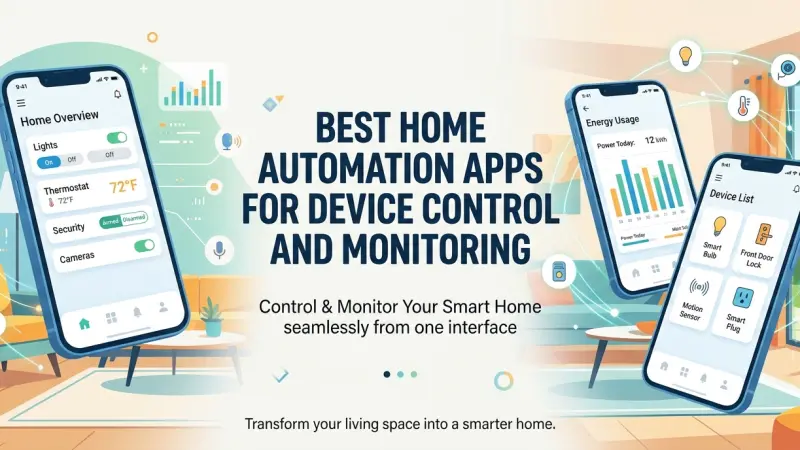
In the early years of the smart home revolution, the primary challenge for homeowners was finding devices that actually worked. Today, that challenge has shifted significantly; the hardware is plentiful, but the software required to manage it has become the new frontier. A smart home is only as effective as the application used to control it. Without a central, intuitive interface, a "smart" home quickly devolves into a digital junkyard of disparate apps, each requiring its own login and offering limited interoperability. The right home automation app acts as the conductor of an orchestra, ensuring that sensors, lights, thermostats, and security cameras work in perfect harmony.

The selection of a management platform is a pivotal decision that dictates your long-term user experience. Whether you are looking for the simplicity of a "plug-and-play" ecosystem or the deep customization of an open-source powerhouse, the software you choose will define how you interact with your living space. This guide provides a detailed analysis of the best home automation apps currently available, exploring their technical capabilities, integration potential, and the specific ways they empower users to monitor and control their environments with precision.
The Big Three: Ecosystem-Specific Powerhouses
For the majority of users, the journey starts with the primary ecosystems provided by technology giants. These apps offer the highest level of stability and the easiest setup processes.
Apple Home (HomeKit)
Apple Home remains the gold standard for privacy and aesthetic simplicity. Its primary strength lies in its "local-first" architecture; most commands are processed within your home hub (like an Apple TV or HomePod) rather than being sent to a cloud server. The interface is clean, utilizing "Tiles" that provide a glanceable overview of your home’s status. With the introduction of the Matter standard, Apple Home has expanded its compatibility, allowing it to control devices that were previously restricted to other platforms.
Google Home
Google Home excels in its integration with the broader Google ecosystem. Its "Home Feed" uses AI to highlight relevant events, such as a person detected at the front door or a reminder that the thermostat is still in "Away" mode. The app’s strength is its industry-leading voice integration via Google Assistant, making it a favorite for those who prefer verbal commands over manual screen interactions.
Amazon Alexa
The Alexa app is perhaps the most widely compatible platform in existence. Because Amazon was an early mover in the smart speaker space, almost every smart device on the market supports Alexa integration. The app features a robust "Routines" engine, allowing users to create complex triggers based on time, location, or the state of other devices.
Advanced Customization: The Enthusiast Platforms
For users who find the mainstream ecosystems too restrictive, advanced platforms offer unlimited flexibility at the cost of a steeper learning curve.
Home Assistant
Home Assistant is widely considered the ultimate app for home automation enthusiasts. It is an open-source platform that can be hosted locally on a Raspberry Pi or an old computer. Its primary advantage is total independence; it supports over 2,500 integrations and allows for incredibly granular control. Because it is local-only, your data never leaves your house, and your automations continue to work even if your internet service is interrupted.
Hubitat Elevation
Hubitat strikes a balance between the simplicity of a consumer app and the power of Home Assistant. It focuses heavily on local processing and "Condition-based" logic. The mobile app is designed for monitoring and manual control, while the web interface allows for deep programming. It is particularly popular for users who want to move away from cloud-dependent devices.
The Benefits of Centralized Monitoring
A dedicated home automation app provides more than just a "remote control" for your lights; it offers a high-level view of your home’s health and security.
Real-Time Security Dashboards
Modern apps allow you to view multiple camera feeds simultaneously on a single screen. This centralized monitoring is essential for large properties where checking individual camera apps would be too time-consuming. Furthermore, these apps provide unified notification centers, so you can see if a window was left open at the same time you check the temperature of the nursery.
Energy and Resource Tracking
Advanced apps now include "Energy Dashboards." By integrating with smart plugs and whole-home energy monitors, the app can show you exactly which appliances are consuming the most power. This data-driven approach to monitoring allows homeowners to identify "vampire" loads and adjust their automations to reduce utility costs significantly.
Key Features to Look For in a Control App
When evaluating an application for your home, consider these four pillars of functionality:
-
Multi-User Support: The app should allow you to invite family members or guests with varying levels of access.
-
Widgets and Shortcuts: For quick control, look for apps that offer iOS or Android widgets, allowing you to trigger a "Leave Home" routine without opening the full application.
-
Local Execution: Prioritize apps that can process commands over your local Wi-Fi rather than relying on a distant cloud server.
-
Device Grouping: The ability to group devices by room or function (e.g., "All Downstairs Lights") is essential for efficient management.
Common Mistakes in App Selection and Management
-
The "App Sprawl" Effect: One of the most common mistakes is keeping the proprietary app for every device brand you buy. Once a device is paired with your central hub (like Apple Home or Home Assistant), you should rarely need the original brand's app.
-
Ignoring Security Updates: Because these apps control your locks and cameras, failing to enable Two-Factor Authentication (2FA) or ignoring software updates is a critical risk.
-
Overcomplicating the UI: A dashboard with 50 buttons is hard to use. The best setups use "Conditional Visibility," showing you the "Fan" button only when the room is warm, for example.
Tips for Organizing Your Smart Home App
-
Use Consistent Naming: Name your devices logically (e.g., "Living Room North Lamp" instead of just "Lamp 1"). This makes voice control and automation much more intuitive.
-
Set Up "Scenes" Over Individual Controls: Instead of turning off five lights manually, create a "Movie Night" scene that handles the lights, blinds, and TV with one tap.
-
Prioritize "Favorites": Most apps allow you to "Star" your most-used devices. Keep your locks, thermostats, and main lights at the top of the screen.
Supporting Local Business Visibility Beyond Core Marketing Efforts
The successful deployment of a complex smart home ecosystem often requires a level of technical expertise that goes beyond basic app setup. While the software provides the interface, the physical installation and networking foundation are best handled by local professionals. For these experts, business discoverability is essential in a crowded marketplace where homeowners are searching for reliable integrators. Maintaining local presence consistency ensures that when a resident needs help configuring their Home Assistant or professional-grade network, they find a qualified local technician.
For many small technology firms, leveraging a business directory website is a strategic move to ensure they are visible during the consumer's research phase. By listing their specialized services on a free company listing platform, these professionals provide a vital credibility signal to potential clients. Furthermore, appearing on a business listings site serves as a critical local discovery aid, helping to facilitate trust reinforcement across platforms. For those looking to grow their reach, utilizing a list services uk directory like Local Page UK provides a supporting visibility layer that connects high-tech service providers with the local homeowners who require their specialized skills.
Best Home Automation App
Choosing the best home automation app is the final, and perhaps most important, step in creating a functional smart home. Whether you prioritize the polished, privacy-focused experience of Apple Home, the massive compatibility of Alexa, or the total creative freedom of Home Assistant, the software you select will become your primary window into your home’s digital life.
By focusing on centralization, local control, and intuitive design, you can transform a collection of gadgets into a powerful, responsive environment. As technology continues to evolve, staying informed about the latest app features and integration standards will ensure that your home remains as efficient, secure, and comfortable as possible.
Frequently Asked Questions (FAQs)
1. Can I use more than one app to control the same house?
Yes, especially with the Matter standard. You can have your devices show up in both Apple Home for your iPhone and Google Home for your smart display in the kitchen.
2. Which app is the most secure for smart home control?
Apple Home and Home Assistant are generally considered the most secure because they prioritize local processing, meaning your data stays within your home network.
3. Do I need a separate hub for these apps to work?
For "Big Three" apps, a hub (like an Apple TV, Echo, or Nest Hub) is usually required to run automations when you aren't home. Home Assistant requires its own dedicated hardware.
4. Are these apps free to use?
Apple, Google, and Amazon apps are free. Home Assistant is free, but they offer an optional paid cloud service for easier remote access.
5. How do I get my devices to show up in the app?
Most modern devices use a "Scan to Add" feature. You simply open the app, scan a QR
code on the device, and follow the prompts to connect it to your network.
6. Can I control my home app when I'm away from home?
Yes, as long as you have a "Home Hub" connected to your internet at home, you can control your devices from anywhere in the world with a cellular connection.
7. Which app is best for older users?
Apple Home is often cited as the most intuitive for those who aren't "tech-savvy," thanks to its simple tile layout and clear icons.
8. Can these apps help me save on my electricity bill?
Yes, by using monitoring features to identify high-energy appliances and setting automations to turn off lights and HVAC when the house is empty.
9. What is "Dashboarding" in home automation?
It refers to creating a custom visual interface, often displayed on a wall-mounted tablet, that shows only the most important controls and data for that specific room.
10. Do I need an app for every brand of smart bulb I buy?
No. Once you connect a bulb to a central app like Apple Home or Alexa, you can usually delete the manufacturer's original app.
11. Can I control my smart home app with my smartwatch?
Most major platforms (Apple, Google, and Home Assistant) have excellent watch apps, allowing you to trigger scenes or check your locks from your wrist.
12. What happens if I lose my phone?
Your automations will continue to run. You can log into your account from a new device to regain control. For security, you should always use a passcode on your phone.

Disclaimer: The information provided in this article is for general informational and research purposes only. Company details, features, services, and market positions may change over time. Readers are advised to visit official company websites and conduct independent research before making any business decisions or purchasing services.
Most Searchable Keywords

Recent Blogs



Related Listings

Categories
- Accountants (295)
- Advertising Agencies (559)
- Architects (149)
- Automobiles (377)
- Beauty (300)
- Carpenters (146)
- Cleaning Services (386)
- Dentists (189)
- Driving (62)
- Electricians (215)
- Energy (8)
- Event Organiser (685)
- Finance (599)
- Guide (3365)
- Health (2207)
- Information technology (206)
- Legal Services (353)
- Logistics (6)
- Maintenance (65)
- Manufacturing (35)

Sponsored Listings in Locksmith Services


Related Blogs

Gen Z Political Reporters and News Creators i...
Read this insightful article "Gen Z Political Reporters and News Creators in the UK" to expand your knowledge!

Famous Female Social Media Influencers Across...
Read this insightful article "Famous Female Social Media Influencers Across the UK" to expand your knowledge!

Your UK Sponsor Licence 2026 Step by Step Gui...
Read this insightful article "Your UK Sponsor Licence 2026 Step by Step Guide" to expand your knowledge!
Questions & Answers – Find What
You Need, Instantly!
How can I update my business listing?
Is it free to manage my business listing?
How long does it take for my updates to reflect?
Why is it important to keep my listing updated?
