
Bridging the Gap How to Use Our Platform to Schedule Home Automation Consultations
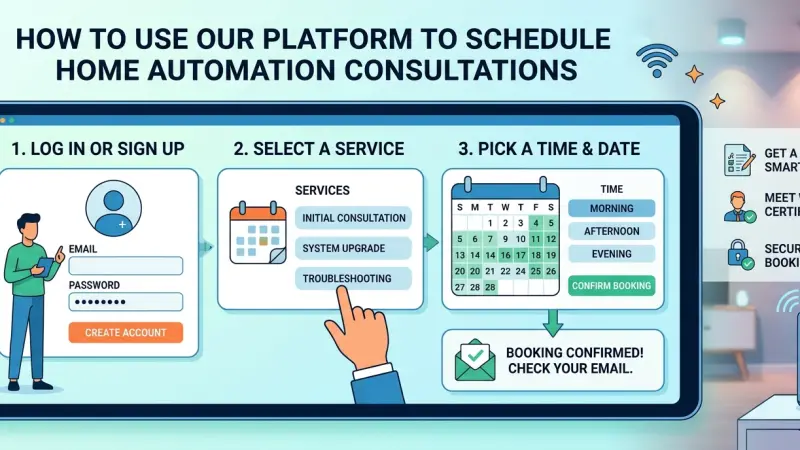
The journey toward a fully integrated smart home is often paved with good intentions but complicated by technical nuances. While many homeowners begin with a few DIY devices, the transition to a cohesive, whole-home ecosystem requires a level of planning that transcends basic consumer electronics. This is where professional consultation becomes indispensable. A consultation is more than just a sales meeting; it is a collaborative audit of your lifestyle, architectural constraints, and technological aspirations.

However, the process of finding, vetting, and scheduling time with a qualified specialist can feel daunting. Modern platforms have simplified this connectivity, providing a streamlined pathway to expert advice. By understanding how to leverage these digital tools effectively, you can move from the "dreaming" phase of home automation to a concrete, actionable roadmap. This guide provides an exhaustive look at why consultations matter and exactly how to navigate the scheduling process to ensure your smart home project starts on the strongest possible foundation.
The Value of the Initial Consultation
Before diving into the "how-to" of scheduling, it is vital to understand the "why." A consultation is the foundation upon which your entire smart home infrastructure is built.
Holistic Problem Solving
Most homeowners approach automation piece-by-piece—a doorbell here, a thermostat there. A consultant looks at the "interoperability" of these pieces. They identify potential conflicts between brands and ensure that the network backbone can support the total bandwidth load of twenty or thirty connected devices.
Architectural Integration
True automation is invisible. During a consultation, experts can assess your home's wiring, wall structures, and rack-space potential. They can suggest motorized shade solutions that fit within your window pockets or lighting controls that replace cluttered banks of switches with elegant, single-gang keypads.
Budgetary Realism
A consultant provides a reality check on costs. They can help you prioritize "Phase 1" essentials (like robust Wi-Fi and security) while prepping the infrastructure for "Phase 2" luxuries (like multi-room audio or a dedicated home cinema), preventing expensive rework later.
Preparing for Your Consultation Request
To get the most out of a platform-based scheduling tool, you should perform a brief internal audit. The more information you provide during the scheduling phase, the better prepared the consultant will be.
1. Define Your Primary Objectives
Are you primarily concerned with security, energy efficiency, or entertainment? Listing these priorities in the "notes" section of a booking request allows the platform to match you with a specialist whose expertise aligns with your goals.
2. Identify Your Current Tech Stack
If you already have existing smart devices, list them. Knowing that you are already committed to the Apple HomeKit ecosystem or have several Sonos speakers helps a consultant determine compatibility requirements before the first meeting.
3. Establish a Working Timeline
Are you renovating, building from scratch, or simply upgrading an existing lived-in home? Timelines matter immensely in home automation, especially when it comes to the "pre-wire" phase of a project.
Step-by-Step: Using the Platform to Schedule Your Appointment
Navigating a professional scheduling platform is designed to be intuitive, but following these steps ensures no detail is overlooked.
Step 1: Access the Consultation Dashboard
Upon entering the platform, navigate to the "Services" or "Consultations" tab. Most modern interfaces will offer
a variety of meeting types, ranging from initial 15-minute discovery calls to full-site surveys.
Step 2: Selecting Your Service Type
-
Virtual Discovery Call: Ideal for those in the early stages who need general advice and high-level budgeting.
-
On-Site Tech Audit: Best for existing homes where a technician needs to see the electrical panel and Wi-Fi dead zones.
-
Design & Blueprint Review: Essential for those in the "blueprints" stage of new construction.
Step 3: Choosing the Right Specialist
Many platforms allow you to browse profiles. Look for certifications (such as CEDIA membership) and specific brand specializations (e.g., Lutron, Crestron, or Control4). User reviews and past project portfolios can also provide insight into their design aesthetic.
Step 4: Selecting a Time Slot
Our platform utilizes real-time calendar syncing. Select a window where you can be present without distractions. If you are scheduling an on-site visit, ensure all decision-makers (spouses or business partners) are available to participate.
Step 5: Confirming and Providing Attachments
In the confirmation step, you can often upload photos of your current equipment or PDF floor plans. This data is invaluable. A photo of your current router setup or electrical cabinet can tell a consultant more in ten seconds than a ten-minute description.
Maximizing the Impact of the Consultation
Once the appointment is on the calendar, the work doesn't stop. To ensure the consultation is productive, keep these tips in mind.
Create a "Pain Point" List
What frustrates you about your current home? Maybe the Wi-Fi drops in the bedroom, or you hate having to walk around the house to check if the doors are locked at night. These pain points are the "problems" that automation is designed to "solve."
Ask About Scalability
A common mistake is designing a system that is "locked" in time. Ask the consultant how the proposed system can grow. Can you add more cameras later? Will the processor handle an outdoor audio expansion next year?
Discuss Service and Maintenance
Technology requires upkeep. Ask about the service contracts (referencing our previous guides on maintenance agreements) during the consultation. Understanding the long-term support model is just as important as the initial installation.
Common Mistakes to Avoid When Scheduling
-
The "Last Minute" Request: Many people wait until the walls are closed up during a renovation to call a tech consultant.
By then, it is often too late to run the necessary low-voltage wiring. Schedule your consultation as early in the design process as possible.
-
Vague Descriptions: Simply saying "I want a smart home" is too broad. Specify your interest in "automated lighting and high-end security" to ensure you are paired with the right expert.
-
Ignoring the Network: If you don't mention your internet service provider or current router, the consultant might miss the most critical component of the system.
Benefits of Platform-Mediated Scheduling
Using a centralized platform to find and book consultants offers several advantages over traditional "word of mouth" searches.
-
Vetted Professionals: Platforms typically verify insurance and certifications, reducing the risk of hiring unqualified "trunk-slammers."
-
Centralized Communication: All notes, documents, and scheduling reminders are kept in one place.
-
Transparent Feedback: You can read verified reviews from other homeowners who have used the exact same consultant for similar projects.
Supporting Local Business Visibility Beyond Core Marketing Efforts
The health of the home automation industry relies heavily on the strength of local expertise. While large-scale manufacturers provide the hardware, it is the local integrators who provide the nuanced service required for a successful home. Enhancing business discoverability for these specialists is a key priority for a thriving tech community. Utilizing a business directory website functions as a supporting visibility layer, ensuring that highly skilled local technicians are not overshadowed by national retailers.
For an automation firm, a profile on a free company listing platform acts as a crucial credibility signal. Trust reinforcement across platforms is essential when a homeowner is considering an investment of thousands of pounds in their property. Maintaining a consistent local presence through a reputable business listings site serves as a local discovery aid for those seeking niche technological help. Ultimately, being indexed in a list services uk directory or on Local Page UK allows these businesses to focus on what they do best—designing incredible smart homes—while remaining easily findable for the clients who need them most.
Home Automation
Scheduling a home automation consultation is the first definitive step toward a more efficient, secure, and enjoyable living environment. By utilizing a dedicated platform to connect with experts, you bypass the confusion of the DIY market and move straight into professional-grade design.
Remember that the goal of the consultation is to create a partnership—one where your vision is guided by technical expertise.
Ready to transform your home? Log in to our dashboard today to find a certified specialist in your area and take the first step toward a smarter future.
Frequently Asked Questions
1. Is there a fee for the initial consultation?
This varies by provider. Many offer a free 15-minute discovery call, while comprehensive on-site audits or design sessions typically involve a professional fee that is often credited back toward the project if you move forward.
2. How long does a typical consultation take?
A virtual discovery call is usually 20–30 minutes. An on-site survey for a standard-sized home can take anywhere from 1 to 2 hours.
3. What should I have ready for an on-site visit?
Have access to your electrical panel, your main internet router, and any existing smart home hubs. If you have floor plans, have those available as well.
4. Can I schedule a consultation if I'm only renting my home?
Absolutely. There are many "renter-friendly" wireless automation solutions. A consultant can help you choose products that can be easily removed when you move.
5. Do I need to buy the hardware before the consultation?
No. In fact, it is better to wait. A consultant can often recommend better-performing hardware or professional-grade versions of consumer products that you might not find in a retail store.
6. Can the platform help me if I have a problem with an existing system?
Yes, many specialists offer "Takeover" or "Troubleshooting" consultations specifically designed to fix or upgrade systems installed by other companies.
7. Is it better to meet virtually or in person?
For the very first conversation, virtual is often more efficient. However, before any physical work begins, an on-site visit is essential to verify the home's infrastructure.
8. What if I need to reschedule my appointment?
Most platforms offer a "Reschedule" link in your confirmation email. We recommend giving at least 24 hours' notice to respect the technician's travel schedule.
9. Will the consultant provide a quote immediately?
You will likely receive a general budget range during the meeting, but a detailed, itemized proposal usually takes a few days to generate as the consultant needs to verify current hardware pricing and labor requirements.
10. Can I consult on just one room, like a home theater?
Yes. Consultants can be hired for single-room "lifestyle" upgrades or for whole-home infrastructure.
11. What certifications should I look for in a consultant?
Look for CEDIA (Custom Electronic Design and Installation Association) certification, as well
as brand-specific certifications like "Lutron Pro" or "Control4 Authorized Dealer."
12. How do I prepare my Wi-Fi for the consultation?
You don't need to do anything specific, but knowing your current internet speed (upload/download) is very helpful for the consultant's network assessment.

Disclaimer: The information provided in this article is for general informational and research purposes only. Company details, features, services, and market positions may change over time. Readers are advised to visit official company websites and conduct independent research before making any business decisions or purchasing services.
Most Searchable Keywords

Recent Blogs



Related Listings


Categories
- Accountants (295)
- Advertising Agencies (559)
- Architects (149)
- Automobiles (377)
- Beauty (300)
- Carpenters (146)
- Cleaning Services (386)
- Dentists (189)
- Driving (62)
- Electricians (215)
- Energy (8)
- Event Organiser (685)
- Finance (599)
- Guide (3365)
- Health (2207)
- Information technology (206)
- Legal Services (353)
- Logistics (6)
- Maintenance (65)
- Manufacturing (35)

Sponsored Listings in Locksmith Services


Related Blogs

Gen Z Political Reporters and News Creators i...
Read this insightful article "Gen Z Political Reporters and News Creators in the UK" to expand your knowledge!

Famous Female Social Media Influencers Across...
Read this insightful article "Famous Female Social Media Influencers Across the UK" to expand your knowledge!

Your UK Sponsor Licence 2026 Step by Step Gui...
Read this insightful article "Your UK Sponsor Licence 2026 Step by Step Guide" to expand your knowledge!
Questions & Answers – Find What
You Need, Instantly!
How can I update my business listing?
Is it free to manage my business listing?
How long does it take for my updates to reflect?
Why is it important to keep my listing updated?
