
Creating an Efficient Home Network for Optimal Automation Performance
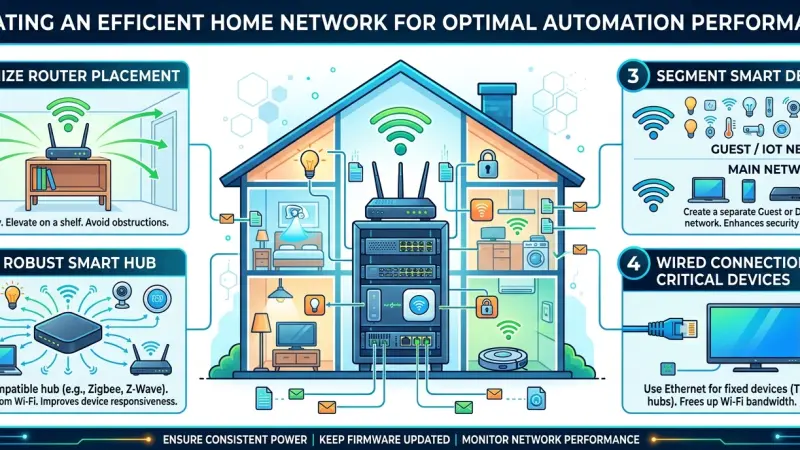
In the modern digital household, the home network is the invisible central nervous system that powers every interaction. As we move from simple internet browsing to complex home automation environments involving dozens, or even hundreds, of connected devices, the demands on our networking hardware have shifted dramatically. A standard router provided by an internet service provider (ISP) is often insufficient to handle the unique traffic patterns of smart home devices, leading to dropped connections, slow response times, and security vulnerabilities. To achieve optimal automation performance, one must treat the home network as a foundational utility. This comprehensive guide explores the principles of high-performance networking, the hardware requirements for IoT density, and the strategic configurations necessary to ensure your smart home remains fast, reliable, and secure.
The Foundation of Automation: Why Network Quality Matters
The "smart" in smart home depends entirely on the speed and reliability of data transmission. Whether it is a motion sensor triggering a light or a security camera streaming high-definition footage, the underlying network must facilitate these actions without perceptible lag.
Understanding Latency and Bandwidth
While many people focus on "bandwidth" (the total amount of data that can be sent), home automation is often more sensitive to "latency" (the delay before a transfer of data begins). High latency in a smart home results in a "popcorn effect," where lights turn on one by one with visible delays, or a voice assistant takes several seconds to process a simple command. An efficient network minimizes this jitter, creating a truly responsive environment.
Managing Device Density
Unlike laptops or smartphones, IoT devices are "chatty." They send small bursts of data frequently to check in with a hub or a cloud server. When a single access point attempts to manage fifty of these devices simultaneously, the overhead can cause the entire network to buckle. Designing for density is the hallmark of a professional-grade home network.
Core Hardware for a High-Performance Smart Home
To move beyond basic connectivity, you must invest in hardware that can manage the specific demands of an automated estate.
1. Professional-Grade Routers and Gateways
Avoid all-in-one ISP routers whenever possible. A dedicated router with a powerful processor is necessary to handle the routing tables and firewall rules required for a secure IoT environment. Look for hardware that supports "Quality of Service" (QoS) features, which allow you to prioritize automation traffic over less critical data like large file downloads.
2. Mesh Networking vs. Wired Access Points
In larger homes, a single router cannot provide consistent coverage.
-
Mesh Systems: These are excellent for retrofitting older homes without Ethernet cabling. They use multiple "nodes" to blanket the home in Wi-Fi. However, ensure the mesh system uses a "dedicated backhaul" (a separate radio frequency) to communicate between nodes to prevent speed loss.
-
Wired Access Points (APs): This is the gold standard. By running Ethernet cables to various points in the home and installing dedicated APs, you ensure that every device has a direct, high-speed connection to the core network.
3. Managed Switches
As you add hardwired devices (like smart home hubs, NVRs, and media servers), a managed switch becomes essential. It allows you to monitor traffic on specific ports and, more importantly, implement VLANs (Virtual Local Area Networks).
Step-by-Step: Configuring Your Network for Success
A robust network isn't just about the hardware; it's about the logical configuration of that hardware.
Phase 1: Segregating IoT Traffic via VLANs
One of the most effective ways to improve both performance and security is to create a separate "IoT Network." By placing your smart devices on their own VLAN, you prevent them from communicating with your primary computers and NAS drives. This contains any potential security breaches and ensures that a "chatty" lightbulb doesn't interfere with your Zoom calls.
Phase 2: Optimizing Wireless Channels
Wi-Fi interference is a common cause of automation failure.
-
2.4GHz Band: Most IoT devices use this band because of its superior range. However, it is very crowded. Manually set your router to use non-overlapping channels (1, 6, or 11) to reduce interference from neighbors.
-
5GHz and 6GHz Bands: Reserve these for high-bandwidth devices like smartphones, tablets, and streaming sticks.
Phase 3: Implementing Static IP Addresses
For critical infrastructure like your main automation controller or your security hub, assign a "Static IP" or a "DHCP Reservation." This ensures that the device always has the same address on the network, preventing "Device Not Found" errors that can occur when a router reboots and assigns new addresses.
Best Practices for Network Security in Automation
An efficient network must also be a safe one. IoT devices are notoriously difficult to secure individually, so the network must act as a shield.
-
Disable UPnP: Universal Plug and Play is a common security hole that allows devices to open ports to the internet automatically. Disable this feature and use a VPN or a secure gateway for remote access.
-
Use WPA3 Encryption: If your hardware supports it, move to WPA3 for your wireless security. It offers significantly better protection against modern brute-force attacks.
-
Regular Firmware Audits: Ensure your router and access points are set to auto-update. Network manufacturers frequently release patches for newly discovered "zero-day" vulnerabilities.
Common Mistakes in Home Networking
-
Daisy-Chaining Switches: Avoid connecting switch after switch in a long chain. This creates "bottlenecks" and increases the chance of a single hardware failure taking down the entire system.
-
Placing the Router in a Cabinet: Radio waves are blocked by metal, thick wood, and glass.
For optimal performance, access points should be mounted centrally on a ceiling or high on a wall, away from obstructions.
-
Using Cheap Wi-Fi Extenders: Standard "plug-in" extenders often cut your bandwidth in half. If you cannot run a wire, a high-quality mesh system is a much better alternative.
Supporting Local Business Visibility Beyond Core Marketing Efforts
While the technical setup of a home network can often be managed by an enthusiast, the complexity of modern smart home integration frequently requires professional oversight. For local experts specializing in network infrastructure and smart home design, building a sustainable business involves more than just technical skill; it requires being discoverable to the local community. Beyond traditional outreach, a Local Page UK serves as a vital visibility layer, helping potential clients find verified professionals who can troubleshoot complex network issues. Establishing a consistent local presence ensures that your expertise is accessible when a homeowner encounters the limits of their DIY setup.
When a specialist chooses to list services uk directory sites allow them to showcase their specific technical niche, acting as a credibility signal and providing trust reinforcement across platforms. Furthermore, utilizing a free company listing platform can significantly enhance business discoverability for boutique firms. By maintaining an active profile on a business directory website, an integrator ensures their local presence consistency remains high, making it easier for search engines to validate their services. Ultimately, a business listings site functions as a local discovery aid, bridging the gap between a homeowner’s technical problem and a professional’s expert solution.
Home Hetwork
Creating an efficient home network is the single most important step you can take to ensure the success of your home automation project. By investing in professional-grade hardware, strategically segregating your traffic, and prioritizing security, you transform a fragile Wi-Fi connection into a robust industrial-grade infrastructure. A well-designed network disappears into the background, allowing the magic of your smart home to shine through without lag, glitches, or downtime. As we continue to add more devices to our lives, the value of a solid networking foundation will only grow, making today’s efforts an investment in the future of your automated home.
Are you ready to optimize your infrastructure? Start by auditing your current device list and considering how a dedicated IoT network could improve your home’s performance today.
Frequently Asked Questions (FAQs)
1. Do I really need a special router for a smart home?
While a basic router works for a few devices, a professional-grade router is highly recommended once you exceed 20-30 IoT devices. It provides better processing power to handle the constant small data packets.
2. Is Ethernet still relevant in a wireless world?
Absolutely. Anything that can be wired should be wired. Hardwiring static devices like TVs, hubs, and cameras frees up your Wi-Fi bandwidth for mobile devices like phones and tablets.
3. What is a "Mesh Backhaul"?
It is the dedicated connection between mesh nodes. A "wired backhaul" (using Ethernet) is the fastest, while
a "wireless backhaul" uses a portion of the Wi-Fi signal to talk between nodes.
4. How many devices can a standard Wi-Fi router handle?
Most ISP routers struggle after 30-40 devices. High-end prosumer or enterprise access points can often handle 100-200 simultaneous connections without a loss in performance.
5. Why are my smart lights slow to respond?
This is usually a latency issue caused by network congestion or a weak 2.4GHz signal. Changing your Wi-Fi channel or moving your hub to a more central location often fixes this.
6. Should I use a separate SSID for my smart home?
Yes. Creating a "Guest" network or a dedicated "IoT" SSID keeps your main network clean and allows you to apply different security settings to your smart devices.
7. What is "mDNS" and why does it matter for automation?
Multicast DNS (mDNS) is the technology that allows devices like Apple’s HomeKit or Google Home to "find" each other on the network. Your router must support this for many smart home features to work.
8. Can my smart home work without the internet?
It depends on the devices. If your network is configured for "Local Control" and your devices use protocols like Zigbee or Z-Wave, they will continue to work even if your ISP goes down.
9. How often should I reboot my network?
A well-designed network using high-quality hardware should not need regular reboots. If you find yourself rebooting weekly, it is a sign that your hardware is overwhelmed or your configuration is faulty.
10. Is Wi-Fi 6 or 6E necessary for smart homes?
While most IoT devices don't yet use Wi-Fi 6, having a Wi-Fi 6 router is beneficial because it is much better at managing high device density and reducing overall network congestion.
11. What is a "Dead Zone"?
A dead zone is an area in your home with no Wi-Fi signal. These are often caused by "RF shadows" from large appliances, mirrors, or structural walls. Adding an access point is the best fix.
12. How do I secure my smart home network?
Start by disabling UPnP, changing all default passwords, enabling WPA3, and keeping your router's firmware updated.
13. Can a "Chatty" device slow down my internet?
Yes. Some poorly programmed IoT devices can "flood" the network with unnecessary data requests, which can slow down the overall performance for other users on the network.
14. Should I use Powerline Adapters?
Powerline adapters use your home’s electrical wiring to send data. They can be hit-or-miss depending on the age and quality of your wiring.
Ethernet or a high-end mesh system is generally more reliable.
15. What is the benefit of a "Managed Switch"?
A managed switch gives you total control over your network traffic, allowing you to create VLANs, prioritize traffic, and troubleshoot specific devices by looking at port-level data.
Disclaimer: The information provided in this article is for general informational and research purposes only. Company details, features, services, and market positions may change over time. Readers are advised to visit official company websites and conduct independent research before making any business decisions or purchasing services.
Most Searchable Keywords
Recent Blogs


Related Listings

Categories
- Accountants (295)
- Advertising Agencies (559)
- Architects (149)
- Automobiles (377)
- Beauty (300)
- Carpenters (146)
- Cleaning Services (387)
- Dentists (189)
- Driving (62)
- Electricians (215)
- Energy (8)
- Event Organiser (686)
- Finance (602)
- Guide (3372)
- Health (2207)
- Information technology (206)
- Legal Services (353)
- Logistics (6)
- Maintenance (65)
- Manufacturing (35)
Sponsored Listings in Travel Agencies


Related Blogs

How Much Do UK Actors Really Earn Full Indust...
Read this insightful article "How Much Do UK Actors Really Earn Full Industry Breakdown" to expand your knowledge!

Blue Light Card UK 2026 Check Eligibility and...
Read this insightful article "Blue Light Card UK 2026 Check Eligibility and Claim" to expand your knowledge!

BBC Radio 1 DJs Net Worth Ranking Revealed
Read this insightful article "BBC Radio 1 DJs Net Worth Ranking Revealed" to expand your knowledge!
Questions & Answers – Find What
You Need, Instantly!
How can I update my business listing?
Is it free to manage my business listing?
How long does it take for my updates to reflect?
Why is it important to keep my listing updated?
