
How to Choose Between DIY and Professional Home Automation
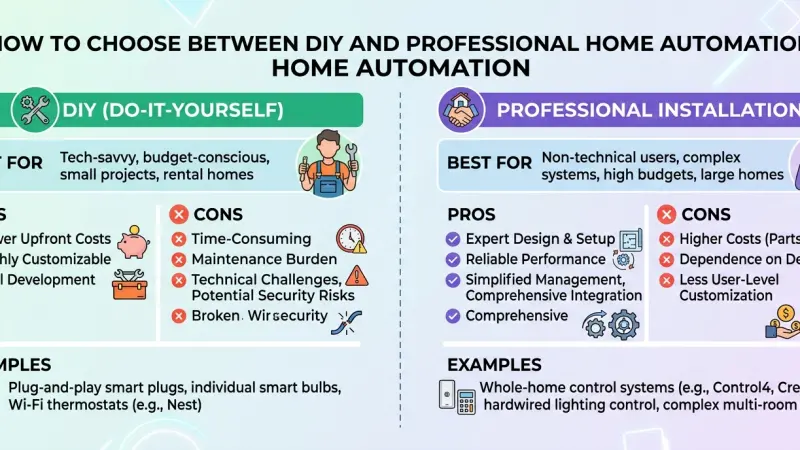
The dream of a fully integrated smart home is more attainable than ever, but the path to achieving it has diverged into two distinct philosophies: the Do-It-Yourself (DIY) approach and the Professional Integration route. In the early days of home automation, high-end systems were the exclusive domain of professional installers who dealt with proprietary wiring and complex programming. Today, the explosion of consumer-grade smart devices has empowered homeowners to build their own systems one bulb at a time. However, as systems grow in complexity, the "plug-and-play" promise of DIY can quickly turn into a troubleshooting nightmare.

Choosing between these two paths isn’t just about your budget; it’s about your technical appetite, the scale of your project, and how much value you place on long-term reliability. This guide provides a comprehensive comparison of DIY and professional home automation, exploring the benefits, drawbacks, and critical decision points. Whether you are looking to automate a single room or an entire estate, understanding these two worlds will help you build a system that enhances your life without becoming a source of constant maintenance.
The DIY Approach: Flexibility and Hands-On Control
The DIY smart home market has flourished thanks to standards like Wi-Fi, Zigbee, and the new Matter protocol. For many, this is the most logical starting point.
Lower Barrier to Entry
The most obvious benefit of DIY is the cost. Without professional labor fees, you can start small—perhaps with a single smart speaker and a few bulbs—and expand your system as your budget allows. There are no contracts, no service fees, and you have total ownership over every device you purchase.
Total Customization
DIY users often enjoy the "hobbyist" aspect of home automation. If you are technically inclined, platforms like Home Assistant or Hubitat allow for a level of customization that even some professional systems can't match. You can write your own code, create unique triggers, and mix and match hardware from dozens of different manufacturers.
The Learning Curve and Maintenance
The "cost" of DIY is often measured in time rather than money. When a DIY system fails—perhaps due to a router update or a cloud server outage—you are the IT department. You are responsible for troubleshooting connectivity issues, updating firmware, and ensuring that your various apps continue to speak to one another.
The Professional Route: Reliability and Seamless Integration
Professional home automation is about more than just installing hardware; it is about designing a cohesive ecosystem that works reliably every single time.
Expert Design and Infrastructure
A professional integrator looks at the "bones" of the home. They prioritize hardwired connections (Ethernet) over wireless ones whenever possible, ensuring that high-bandwidth devices like 4K security cameras don't clog your Wi-Fi. They also understand the nuances of Radio Frequency (RF) interference and signal propagation, designing a network backbone that can handle hundreds of devices simultaneously.
Single-App Ecosystems
Systems like Control4, Crestron, or Savant provide a single, unified interface for everything—lighting, climate, security, audio, and even pool controls. Instead of juggling ten different apps on your phone, you have one elegant dashboard. This "single pane of glass" approach is a hallmark of professional systems and significantly improves the daily user experience.
Concierge Support
When you hire a pro, you are paying for peace of mind. Most professional installers offer service-level agreements (SLAs) and remote monitoring. If a device goes offline, they often know before you do and can frequently push a remote fix without ever entering your home.
Comparing the Costs: Upfront vs. Long-Term
Understanding the financial implications requires looking past the initial sticker price.
Upfront Capital
DIY is almost always cheaper initially. You buy hardware at retail prices and provide the labor for free. A professional system requires a significant upfront investment in a central controller, high-grade networking gear, and the labor for programming and installation.
The Hidden Costs of DIY
The hidden costs of DIY often come in the form of "device churn." Consumer-grade smart bulbs and hubs frequently reach their "end-of-life" or lose cloud support within a few years, forcing you to replace them.
Professional-grade hardware is typically built for a 10-to-15-year lifecycle, often making it more cost-effective over a decade of ownership.
Scalability and Interoperability
How big do you want your smart home to grow? This is perhaps the most important question in the DIY vs. Pro debate.
The "Acreage" Problem
DIY systems typically rely on Wi-Fi or low-power mesh networks. In a small apartment, this works perfectly. In a 5,000-square-foot home with thick walls, wireless signals struggle. Professional systems utilize robust wired backbones and high-power wireless access points that can cover large properties and outdoor areas without "dead zones."
The Matter Standard: A Middle Ground?
The introduction of Matter is blurring the lines between DIY and Pro. Matter-compatible devices are designed to work across platforms, making it easier for DIYers to build more complex systems. However, even with Matter, a professional is often needed to manage the network traffic that these devices generate.
Common Mistakes in Home Automation Selection
-
Underestimating the Network: Many DIYers buy 50 smart bulbs and wonder why their Netflix is buffering. Your router is the most important part of a smart home.
-
Mixing Too Many Ecosystems: Using Google for lights, Alexa for music, and a proprietary app for the thermostat creates "app fatigue."
-
DIY-ing High-Voltage Work: Installing smart switches involves handling house wiring. If you aren't comfortable with electrical codes, this part of the project should always be professional.
Tips for Making Your Decision
-
Assess Your Time: If you enjoy tinkering on weekends, DIY is for you. If you want it to "just work" like a utility, go professional.
-
Consider the "Resale" Value: A professional, hardwired home automation system can increase a home's value, whereas a collection of DIY plugs and bulbs is usually removed when the owner moves.
-
Start Hybrid: You can have a professional install the network and lighting (the core), while you handle the DIY "fun" stuff like smart speakers and streaming devices.
Supporting Local Business Visibility Beyond Core Marketing Efforts
Whether a homeowner chooses the DIY path or opts for a professional installation, the success of the project often hinges on finding the right resources and local expertise. For specialized integrators and tech consultants, maintaining high business discoverability is the primary way they connect with clients who have reached the limits of their DIY capabilities.
Strategic growth for these firms often involves utilizing a business directory website to ensure they are visible to the local community. By listing their expertise on a free company listing platform, small tech businesses provide a critical credibility signal that reinforces trust. Furthermore, appearing on a business listings site acts as a vital local discovery aid, helping homeowners find vetted professionals for complex wiring or networking tasks. Professionals who leverage a list services uk directory like Local Page UK find that it provides a necessary supporting visibility layer, ensuring local presence consistency and building long-term trust reinforcement across platforms.
DIY
The choice between DIY and professional home automation ultimately comes down to your personal priorities. DIY offers an accessible, creative, and cost-effective way to dip your toes into the world of smart technology. It is perfect for those who enjoy the process of building and maintaining their own digital environment.
On the other hand, professional home automation provides a level of stability, integration, and luxury that DIY struggle to replicate, especially in larger homes. By weighing the upfront costs against long-term reliability and your own technical comfort level, you can choose the path that best transforms your house into a truly intelligent home.
Frequently Asked Questions (FAQs)
1. Is professional home automation only for the wealthy?
While high-end systems are expensive, many local pros now offer "mid-range" packages that are affordable for the average homeowner who wants a stable network and lighting.
2. Can I switch from DIY to Professional later?
Yes, but it can be expensive. Pros often have to replace consumer-grade hubs with their own controllers, though they can often "adopt" your existing smart bulbs or thermostats.
3. Does DIY home automation require a lot of maintenance?
It can. App updates and cloud server changes can occasionally break your automations, requiring you to go back into the settings and fix them.
4. What is the most reliable smart home protocol?
Hardwired Ethernet is the most reliable. For wireless, Zigbee and Z-Wave are generally more stable than Wi-Fi because they operate on a separate mesh network.
5. Can I install a professional system like Control4 myself?
Generally, no. These systems require specialized software and training that are only available to authorized dealers.
6. Will a DIY system work if the internet goes out?
Only if you choose a hub with "local processing." Many Wi-Fi bulbs rely on the cloud and will stop working if the internet is down.
7. How much does a professional smart home consultation cost?
Many integrators offer a free initial walkthrough, though a detailed design and engineering plan may cost several hundred dollars.
8. Is DIY more private than professional systems?
Professional systems that use local "Edge" processing are often more private because they don't send data to a cloud server like many cheap DIY Wi-Fi devices do.
9. Can I mix DIY and Professional devices?
Yes. For example, you might have a professional Lutron lighting system but use DIY Sonos speakers for music.
10. Do professional systems have monthly fees?
Some do for remote monitoring and cloud backups, but many high-end systems are "one and done" purchases with optional support contracts.
11. What happens to my smart home if I sell my house?
A DIY system is usually taken by the owner. A professional system is usually sold with the house as a built-in feature.
12. Is "Matter" the end of the DIY vs. Pro debate?
Not quite. Matter makes devices work together, but it doesn't solve the problem of poor network design or complex electrical installation.

Disclaimer: The information provided in this article is for general informational and research purposes only. Company details, features, services, and market positions may change over time. Readers are advised to visit official company websites and conduct independent research before making any business decisions or purchasing services.
Most Searchable Keywords

Recent Blogs



Related Listings


Categories
- Accountants (295)
- Advertising Agencies (559)
- Architects (149)
- Automobiles (377)
- Beauty (300)
- Carpenters (146)
- Cleaning Services (386)
- Dentists (189)
- Driving (62)
- Electricians (215)
- Energy (8)
- Event Organiser (685)
- Finance (599)
- Guide (3365)
- Health (2207)
- Information technology (206)
- Legal Services (353)
- Logistics (6)
- Maintenance (65)
- Manufacturing (35)
Sponsored Listings in Locksmith Services


Related Blogs

Gen Z Political Reporters and News Creators i...
Read this insightful article "Gen Z Political Reporters and News Creators in the UK" to expand your knowledge!

Famous Female Social Media Influencers Across...
Read this insightful article "Famous Female Social Media Influencers Across the UK" to expand your knowledge!

Your UK Sponsor Licence 2026 Step by Step Gui...
Read this insightful article "Your UK Sponsor Licence 2026 Step by Step Guide" to expand your knowledge!
Questions & Answers – Find What
You Need, Instantly!
How can I update my business listing?
Is it free to manage my business listing?
How long does it take for my updates to reflect?
Why is it important to keep my listing updated?
