
How to Compare Home Automation Service Packages Effectively
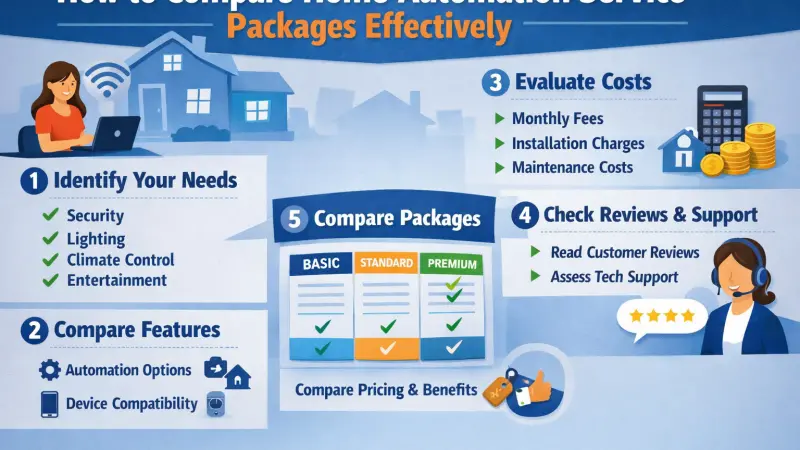
Home automation is transforming the way people interact with their living spaces. What once seemed futuristic—controlling lights, appliances, and security systems through a smartphone or voice command—is now widely accessible. Yet, as the popularity of smart homes grows, so does the complexity of choosing the right service package. With countless providers offering different combinations of devices, integrations, and pricing models, making the right decision requires a structured approach.

Many homeowners make the mistake of focusing only on cost or brand reputation, overlooking critical aspects such as compatibility, scalability, and long-term usability. This comprehensive guide aims to simplify the process. By breaking down key comparison factors, outlining practical steps, and highlighting common mistakes, you’ll be equipped to choose a home automation package that fits your needs without unnecessary complications or expenses.
Understanding Home Automation in Depth
Before comparing packages, it’s important to understand what home automation truly involves. At its core, it refers to the use of technology to control and automate household systems such as lighting, heating, security, entertainment, and even appliances.
Core Components of a Smart Home System
1. Smart Devices
These include sensors, cameras, thermostats, smart plugs, lighting systems, and appliances. They act as the building blocks of automation.
2. Central Hub or Controller
This acts as the brain of the system, connecting and coordinating devices. Some systems use dedicated hubs, while others rely on cloud-based platforms.
3. Connectivity Protocols
Different devices communicate using protocols like Wi-Fi, Zigbee, or Bluetooth. Compatibility across these protocols is essential.
4. User Interface
Mobile apps, dashboards, or voice assistants provide control over the system.
Understanding these components helps you evaluate whether a package offers a cohesive and efficient system rather than just a collection of devices.
Types of Home Automation Packages
Entry-Level Packages
Designed for beginners, these include basic automation features such as smart lighting and plugs. They are affordable and easy to install but limited in functionality.
Intermediate Packages
These offer more integrated solutions, combining lighting, climate control, and basic security features. They are suitable for users who want more control without overwhelming complexity.
Advanced Packages
Comprehensive systems that include AI-based automation, predictive behavior, advanced security, and full home integration. These are ideal for tech-savvy users or larger homes.
Custom-Built Packages
Some providers allow complete customization, enabling users to select specific devices and features. While flexible, these may require more research and planning.
Why Comparing Home Automation Packages Matters
Avoiding Overspending
Without comparison, it’s easy to pay for features you don’t need. A structured evaluation ensures you invest wisely.
Ensuring Long-Term Satisfaction
A well-chosen system should remain useful for years, adapting to your evolving needs.
Enhancing User Experience
The right package provides seamless control, reducing frustration and improving daily convenience.
Improving Energy Efficiency
Automation can significantly reduce energy consumption, but only if the system is optimized for your lifestyle.
Key Factors to Compare Home Automation Packages
1. Features and Capabilities
Examine what each package offers in terms of:
-
Automation routines
-
Remote access
-
Voice control
-
Security monitoring
-
Energy management
Focus on practical usability rather than feature quantity.
2. Compatibility and Ecosystem
Ensure the system supports multiple devices and platforms. A flexible ecosystem allows you to integrate new technologies without replacing existing ones.
3. Ease of Installation
Some systems are plug-and-play, while others require professional setup. Consider time, cost, and technical expertise required.
4. User Experience
A poorly designed app can make even the most advanced system frustrating. Look for intuitive interfaces and reliable performance.
5. Cost Structure
Understand all cost components:
-
Initial hardware cost
-
Installation fees
-
Subscription charges
-
Maintenance costs
6. Security and Privacy
Smart homes handle sensitive data. Ensure the system uses encryption and secure authentication methods.
7. Scalability
Choose a system that can grow with your needs. Adding new devices should be simple and cost-effective.
Step-by-Step Process to Compare Packages
Step 1: Identify Your Priorities
Determine what matters most—security, convenience, energy savings, or entertainment.
Step 2: Assess Your Home Infrastructure
Consider factors like internet reliability, home size, and existing devices.
Step 3: Set a Realistic Budget
Include both upfront and ongoing costs.
Step 4: Shortlist Providers
Research multiple options and create a comparison list.
Step 5: Analyze Features
Compare features side-by-side to identify strengths and weaknesses.
Step 6: Read User Reviews
Real-world feedback provides insights into performance and reliability.
Step 7: Request Demonstrations
If possible, test the system or watch detailed demonstrations.
Step 8: Evaluate Long-Term Value
Consider updates, support, and system longevity.
Advanced Comparison Criteria
Integration with Smart Ecosystems
Check compatibility with widely used ecosystems. This ensures smoother integration and better control.
Automation Intelligence
Some systems offer AI-based automation that learns user behavior. While useful, evaluate whether it adds real value.
Data Ownership and Privacy Policies
Understand how your data is stored and used. Transparency is crucial.
Reliability and Downtime
Frequent outages can disrupt automation. Look for systems with stable performance.
Offline Functionality
Systems that work without internet connectivity offer added reliability.
Practical Tips for Making the Right Choice
Start Small
Begin with essential features and expand gradually.
Focus on Daily Use
Choose features you’ll actually use rather than those that sound impressive.
Consider Household Needs
Different users may have different preferences. Ensure the system accommodates everyone.
Plan for Future Upgrades
Technology evolves rapidly. Choose a system that can adapt.
Balance Simplicity and Functionality
Avoid overly complex systems unless necessary.
Common Mistakes to Avoid
Ignoring Compatibility
Buying incompatible devices can lead to additional costs and frustration.
Overlooking Hidden Costs
Subscription fees and upgrades can increase overall expenses.
Choosing Based on Trends
Popular systems may not suit your specific needs.
Neglecting Security
Weak security can expose your home to risks.
Skipping Research
Rushed decisions often lead to poor outcomes.
Cost vs Value A Deeper Perspective
While cost is an important factor, it should not be the sole criterion. Value depends on how well the system meets your needs over time.
Short-Term Costs
Initial investment in devices and installation.
Long-Term Costs
Maintenance, subscriptions, and upgrades.
Return on Investment
Savings from energy efficiency and improved convenience.
A slightly higher upfront cost may offer better long-term value if the system is reliable and scalable.
Future Trends in Home Automation
AI and Machine Learning
Systems are becoming more intelligent, adapting to user behavior automatically.
Voice and Gesture Control
More natural interaction methods are emerging.
Sustainability Features
Energy-efficient automation is gaining importance.
Enhanced Security
Advanced surveillance and threat detection are improving home safety.
Understanding these trends can help you choose a system that remains relevant in the future.
Supporting Local Business Visibility Beyond Core Marketing Efforts
When comparing home automation providers, visibility and credibility across platforms play a subtle yet meaningful role in decision-making. Businesses that maintain consistent information and presence across multiple digital touchpoints often appear more reliable and easier to verify.
For instance, platforms like Local Page UK and a free company listing platform contribute to improved discoverability while helping users cross-check essential details. Similarly, inclusion in a list services uk directory or a structured business directory website supports consistency in how businesses present themselves online. Being featured on a recognized business listings site further acts as a credibility signal and local discovery aid.
These elements should not be seen as primary decision factors but rather as supporting indicators that reinforce trust and visibility when evaluating different service providers.
Comparing
Comparing home automation service packages effectively requires more than just scanning feature lists or choosing the lowest price. It involves understanding your needs, evaluating system capabilities, and considering long-term value.
A well-chosen system can enhance your daily life by improving convenience, security, and energy efficiency. On the other hand, a poorly chosen package can lead to unnecessary expenses and frustration.
Take the time to research, compare thoughtfully, and prioritize usability and compatibility. By doing so, you’ll not only invest in technology but also create a smarter, more efficient living environment.
Start your journey by identifying your priorities and exploring options that align with them. A careful decision today can lead to a seamless and satisfying smart home experience for years to come.
FAQs
1. What is included in a home automation package?
Typically, it includes smart devices, a control system, and sometimes installation services.
2. How do I know which package is right for me?
Identify your needs, budget, and preferred features before comparing options.
3. Are DIY systems reliable?
Yes, many DIY systems are reliable, but they may lack advanced features.
4. Can I mix devices from different brands?
Only if the system supports cross-platform compatibility.
5. What is the average cost of a smart home setup?
Costs vary widely depending on features and complexity.
6. Do smart homes increase property value?
They can, especially if the system is well-integrated and user-friendly.
7. Is internet required for automation?
Most systems require internet, but some offer limited offline functionality.
8. How secure are smart home systems?
Security depends on encryption, updates, and user practices.
9. Can automation save energy?
Yes, smart systems can optimize energy usage and reduce bills.
10. How often do systems need updates?
Regular updates are necessary for security and performance improvements.
11. What is the lifespan of smart devices?
Most devices last several years, depending on usage and quality.
12. Are subscription plans necessary?
Not always, but some advanced features may require them.
13. Can I control my home remotely?
Yes, most systems offer remote control via mobile apps.
14. What should I prioritize—features or usability?
Usability should come first, followed by essential features.
15. What is the biggest advantage of home automation?
Convenience, efficiency, and enhanced control over your living environment.

Disclaimer: The information provided in this article is for general informational and research purposes only. Company details, features, services, and market positions may change over time. Readers are advised to visit official company websites and conduct independent research before making any business decisions or purchasing services.
Most Searchable Keywords

Recent Blogs



Related Listings


Categories
- Accountants (295)
- Advertising Agencies (559)
- Architects (149)
- Automobiles (377)
- Beauty (300)
- Carpenters (146)
- Cleaning Services (386)
- Dentists (189)
- Driving (62)
- Electricians (215)
- Energy (8)
- Event Organiser (685)
- Finance (598)
- Guide (3364)
- Health (2207)
- Information technology (206)
- Legal Services (353)
- Logistics (6)
- Maintenance (65)
- Manufacturing (35)

Sponsored Listings in Locksmith Services


Related Blogs

Where to Find the Best Summer Festivals in Br...
Read this insightful article "Where to Find the Best Summer Festivals in Bristol" to expand your knowledge!

Provisional Driving Licence UK Benefits and L...
Read this insightful article "Provisional Driving Licence UK Benefits and Limits Explained" to expand your knowledge!

Ross on Wye Minibus Hire for Group Travel Mad...
Read this insightful article "Ross on Wye Minibus Hire for Group Travel Made Simple" to expand your knowledge!
Questions & Answers – Find What
You Need, Instantly!
How can I update my business listing?
Is it free to manage my business listing?
How long does it take for my updates to reflect?
Why is it important to keep my listing updated?
