
How to File Taxes in the UK Step by Step Guide for Beginners 2026
Filing your UK tax return can feel daunting if you’re new to the process. In the UK, most people pay tax automatically through PAYE (Pay As You Earn), but anyone with extra income – from self-employment, rental property, investments, or overseas earnings – must report this on a Self Assessment tax return. This guide breaks down the steps to file your taxes for the 2025/26 tax year (6 April 2025 – 5 April 2026), explains why it’s important to file correctly and on time, and offers practical tips to avoid common pitfalls. By following a clear process and understanding key deadlines, even beginners can file confidently and keep more of their money.

Overview: UK Tax System and Self Assessment
In the UK, the tax year runs from 6 April to the following 5 April. Most employees and pensioners have Income Tax deducted at source via PAYE, so they usually don’t need to file a return if that’s their only income. However, Self Assessment is the system HMRC uses to collect tax on income that isn’t taxed through PAYE. If you have untaxed income – for example, you’re self-employed, have rental income, earned significant interest or dividends, or received certain benefits – HMRC will expect you to report it in a tax return. In fact, if you were sent a notice by HMRC to file, you must do so by the deadline. Filing a return ensures you pay the right amount of tax on all your income.
Filing online is strongly recommended. According to HMRC, around 97% of taxpayers now submit their Self Assessment online. The online system not only gives you longer to file (three extra months) but is also easier and more secure. In fact, if you file online you have until 31 January 2027 to submit your 2025/26 tax return – instead of 31 October 2026 for a paper return. HMRC provides free online guidance to help fill each section of the return and even offers tools like webinars and videos.
Filing on time and accurately brings several benefits. You avoid automatic penalties and interest (HMRC fines £100 immediately for late filing, with more charges as delays lengthen) and you ensure you claim any tax reliefs or refunds due. For example, your Self Assessment can be used to claim back overpaid tax and eligible reliefs (such as certain work expenses or charitable donations). Submitting early also gives you peace of mind, more time to correct mistakes, and keeps you in good standing with HMRC. Remember: it’s your responsibility to get it right – even if you pay an accountant, you remain legally liable for the information in your return.
Who Needs to File a UK Tax Return (Self Assessment)
Most people on PAYE do not need to file a return. You do need to submit a Self Assessment if any of the following applied in 2025/26 (tax year 6 April 2025–5 April 2026):
- Self-employment: You earned more than £1,000 from being self-employed or in a partnership. (There is a £1,000 trading allowance – income below this generally doesn’t require reporting, though you might still file to pay voluntary National Insurance contributions).
- Property Income: You received over £1,000 from renting out property or land. (There are special allowances, e.g. if you rent a room in your home you may earn up to £7,500 tax-free, but beyond that threshold you must declare it).
- High Investment Income: You had £10,000 or more in taxable savings interest, or £10,000 or more in untaxed investment/dividend income in the year (ISAs and some exempt savings don’t count).
- Additional Income: You had £2,500 or more from tips, commissions, or any other untaxed additional income.
- Foreign Income: You earned income from overseas (including pensions) or capital gains that need UK tax.
- Trust or Estate Income: You received income from a trust or estate.
- Capital Gains: You owe Capital Gains Tax (for instance, if you sold shares, a second home, or other assets during the year).
- Employees or Contractors with Loans: You worked under a service company or loan (IR35) and have a student loan to repay (often called ‘off-payroll working’).
- Pension Early Withdrawal: You took early pensions withdrawals (before age 55, mostly).
- High-Income Child Benefit Charge: You or your partner’s income exceeded £50,000 (or £60,000 in the past) and you claimed Child Benefit; you may need to report it through Self Assessment (though HMRC now allows some to pay this via payroll instead).
- Job with Expenses: You had unusual employment income (like being a religious minister, or certain parliamentary positions) which cannot be taxed through PAYE, so you must return it.
Finally, if you already filed a Self Assessment for 2024/25, you should generally file one for 2025/26 unless HMRC has told you it’s no longer needed. The rules can change (for instance, the high-earners requirement and Child Benefit reporting have recently been updated), so when in doubt use HMRC’s online tool to “check if you need to file for Self Assessment” or ask HMRC directly.
Benefits of Filing on Time and Accurately
Filing your tax return carefully and on schedule has clear benefits for any taxpayer. One immediate benefit is avoiding penalties and interest. HMRC imposes a £100 fine as soon as the deadline passes, plus daily penalties and interest charges if it remains late. By contrast, submitting on time means you pay no fines – just your correct tax bill. Also, if you file early, you will have longer to pay or budget your tax bill (the deadline to pay what you owe is 31 January following the tax year). Early filing or payment avoids last-minute stress and any surprise charges.
A second benefit is making sure you claim all reliefs and refunds due. The Self Assessment return is how you report income and claim entitlements. For instance, if you overpaid tax or are due a tax refund (perhaps from over-deducted PAYE or allowable pension contributions), you need to complete a return to get that money back. It’s also your chance to deduct all eligible business expenses and allowances for your situation, which can significantly reduce how much tax you owe. In fact, many self-employed taxpayers save money by claiming every valid expense on their SA103 pages.
Another often-overlooked benefit is maintaining your National Insurance record. Even if you earned under the £1,000 threshold, you can still voluntarily make Class 2 National Insurance contributions via your tax return. This ensures you do not lose state pension or benefit entitlements. Thus, filing a return can protect your future benefits.
Finally, on-time filing gives peace of mind. With modern online filing, you can work on your tax return gradually and double-check everything. Taking care with your return “can save you money, time and stress”. It also signals to HMRC that you are compliant and responsible – keeping your tax affairs up-to-date avoids HMRC inquiries. In contrast, rushing at the last minute often leads to errors (and those errors, as we’ll see, can cost you more later).
Overall, the simple act of filing accurately and promptly ensures you pay only what you should (no less, no more) and avoids the unwelcome cost of penalties.
Step-by-Step Guide to Filing Your UK Tax Return (2026)
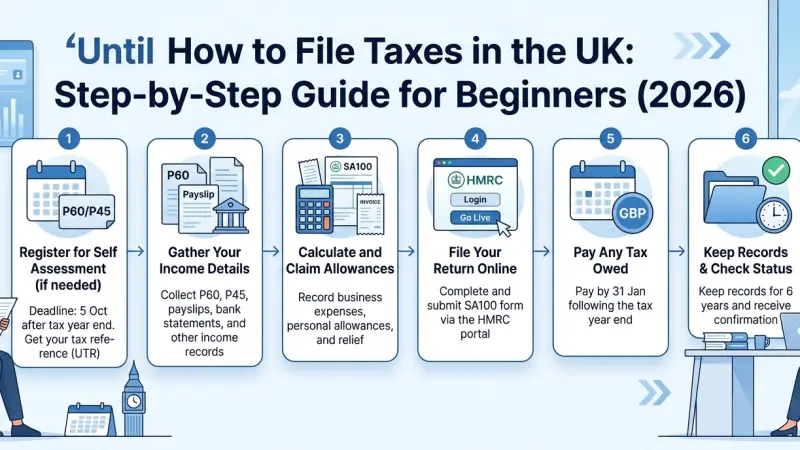
Follow these key steps to file your UK Self Assessment for the 2025/26 tax year. Each step is designed for beginners, with pointers to the official forms and resources you’ll need.
1. Check If You Need to File
First, confirm whether HMRC expects a tax return from you. Review the list of criteria above (self-employment, investments, etc.). If any apply for 2025/26, you should file. If you’re unsure, use HMRC’s online eligibility checker.
It’s important to register for Self Assessment by 5 October 2026 for the 2025/26 year if you haven’t filed before. Missing that 5 October registration deadline can mean extra penalties later, so don’t delay registering if you discover you must file.
If you’re a newly self-employed freelancer, partner in a business, or have taxable income, register immediately for Self Assessment. HMRC will then send you a Unique Taxpayer Reference (UTR) within a few weeks, which you’ll need to file online. You can register online (via GOV.UK “Register for Self Assessment”) or by paper form.
2. Register for Self Assessment (Get a UTR)
If you do need to file and have never done so, you must register with HMRC for Self Assessment. Go to GOV.UK and search “register for Self Assessment” (or use HMRC’s page to register). After registering, HMRC will send a Unique Taxpayer Reference (UTR) to your address. This is a 10-digit number you’ll need to log in and submit your return. Keep it safe.
The deadline to register in good time for filing is 5 October 2026 (for the 2025/26 tax year). If you register after that, HMRC will give you a different deadline (usually three months from your registration date) but you’ll still have to pay by 31 January 2027 or face penalties. Once you have your UTR, set up your online HMRC account (or Government Gateway) to access the Self Assessment service. If you don’t receive your UTR in the post after a few weeks, check your HMRC online account or app.
3. Gather Your Records and Paperwork
Good records are the foundation of an accurate tax return. Before you start filling in forms, collect all relevant documents from the tax year (6 April 2025–5 April 2026). What you need will depend on your income types:
- Employment income: Gather your P60 (year-end summary from your employer), any P45s (if you switched jobs), P11D (benefits in kind), or final payslips. Also note any taxable benefits (like company car, medical insurance, etc.).
- Self-employment income: Compile all invoices, receipts, bank statements, and accounting records of your business income and expenses. You should keep a record of the type and amount of each expense (travel, office costs, equipment, etc.).
- Property income: If you rented property, gather rent statements, mortgage interest details, letting agent statements, and any receipts for maintenance or repairs.
- Savings and investments: Get statements showing interest from banks/building societies, dividends from investments, and details of any ISA income (though ISAs are tax-free).
- Other income: Pension statements (UK or overseas), state benefits, tips, commission, and any other miscellaneous income.
- Foreign income or gains: Records of foreign bank interest, foreign pension or employment income, and details of any foreign tax paid. Also note any capital gains events, like selling shares or property.
- Charitable donations: If you gave Gift Aid, note the amounts (you might claim higher-rate relief).
You do not send HMRC these documents with your return, but you must keep them in case HMRC asks to see proof. HMRC typically requires you keep records for at least 5 years after the January filing deadline for self-employed people (longer in cases of open enquiries).
4. Complete Your Tax Return
Now you can start filling in the Self Assessment tax return form SA100 (and any supplementary pages needed). The easiest way is online via your HMRC account. Log in and choose “Complete Self Assessment Return”. The system walks you through sections step by step. You do not have to do it all in one sitting – you can save and return. HMRC’s online tool gives you more time to file (deadline 31 January 2027) and does many calculations automatically.
If you prefer paper (or must, in rare cases like living abroad or certain income types), you can download and print the SA100 form and related supplementary pages from GOV.UK. But remember, paper returns must be received by HMRC by 31 October 2026, and if possible online filing is simpler and safer.
Filling sections:
- The main SA100 form covers personal details and a summary of all income, tax allowances, and reliefs.
- You’ll add supplementary pages for specific income. For example: SA102 for employment income (if you had a job), SA103S/F for self-employment, SA105 for UK property, SA106 for foreign income, SA108 for capital gains, SA100 UK property pages, etc. Use the relevant pages so you don’t leave out anything.
- Enter the figures exactly from your records: employment pay on P60, bank interest from statements, self-employment turnover minus expenses (see expenses below), etc. If you have multiple sources of similar income (e.g. two jobs), add them together.
- Claim allowances and reliefs: Enter details of pension contributions, charitable donations, marriage allowance, etc. The software and HMRC guidance can remind you what’s available.
Things to watch for: Enter your correct UTR and National Insurance number at the top of the form – they tie your return to your records. Check the tax year is 2025/26 (it will be default). Be careful with tick boxes (e.g. residency status, marriage allowance) – getting those wrong can affect your tax and trigger questions. Take your time: read HMRC’s guidance notes for each section if unsure.
Claiming Expenses (if self-employed or landlord)
If you’re self-employed, you can deduct allowable business expenses from your turnover before calculating profit. Common allowable costs include office supplies, travel costs for work (excluding commuting), professional fees, business insurance, and a proportion of home-office costs. HMRC has a detailed list of allowable expenses. Make sure you claim everything you’re entitled to; failing to claim legitimate expenses is a common mistake that means paying more tax than necessary. Only include actual expenses incurred in 2025/26, and keep receipts. The final profit figure after expenses goes on the SA103 page. For landlords, similarly record and enter allowable property expenses (repairs, agent fees, mortgage interest relief, etc.).
5. Submit Your Return by the Deadline
For the 2025/26 tax year, the submission deadlines are: 31 October 2026 if filing by paper, or 31 January 2027 if filing online. Online filing is nearly universal and gives you extra time. Make sure to finalise and submit your return before midnight on 31 January 2027. You can file any time after 6 April 2025 (and the online system is available even if you register later, with a prorated deadline).
When completing the online form, verify every section and press “submit”. If you’re paper-filing, print the forms and post them to HMRC (address on instructions). Keep proof of postage. Note: if HMRC asked for other specific pages (e.g. SA102 for employment), be sure to include those.
6. Pay Your Tax Bill
By filing your return, you report what you owe. HMRC will show you the tax calculation when you complete your submission (or you can “view your tax calculation” afterward). The Payment on Account system may apply if your previous tax bill was over £1,000 – which means you
pay half of the previous year’s tax on 31 January (following the tax year) and the other half on 31 July. For most people, the balance is due by 31 January 2027 (24 months after the start of 2025/26).
In short, pay any tax due by 31 January 2027 to avoid further penalties. You can pay online via bank transfer, debit/credit card, or other methods listed on GOV.UK. If you cannot pay in full, contact HMRC early to arrange a payment plan; otherwise interest and penalties will apply on late payments. HMRC’s “Pay your Self Assessment bill” page has details on payment options.
7. Keep Proof and Plan Ahead
After filing, download or print a copy of your submitted tax return and the tax calculation. Save these, along with your records, for at least 22 months (preferably longer) in case HMRC asks questions. Mark your diary with next year’s deadlines (remember the cycle: if you file online by 31 Jan 2027, you won’t have to file again until after April 2026, etc.).
If your business is growing, keep a close eye on Making Tax Digital (MTD) requirements. As of 6 April 2026, many self-employed or landlord businesses with £50k+ turnover must use MTD-compatible software to keep digital records. Even if you’re below that threshold, MTD is the direction HMRC is heading for personal taxes. Staying organized now by using basic bookkeeping software or spreadsheets will make future filings easier.
Tips for Easier Tax Filing
- Start Early and Work Incrementally: Don’t wait until January. Begin gathering documents and filling rough figures well before the deadlines. HMRC online allows you to save progress. Working early gives you time to catch any missing information or seek help.
- Use HMRC Resources: HMRC provides comprehensive help. Their website has guidance for each section of the return, along with videos and webinars. You can also use HMRC’s Digital Assistant or helpline (0300 200 3310) if you get stuck.
- Consider Software: HMRC-approved tax software (some are free) can auto-calculate and check your entries, reducing errors. It can flag missing fields and ensure correct totals. (Check HMRC’s list of compatible software on GOV.UK.)
- Maintain Good Records Year-Round: Keep income and expense records organized throughout the year. Store invoices and receipts digitally if possible. Good record-keeping makes tax time much smoother and ensures you don’t overlook deductible costs.
- Double-Check Your Details: Before submitting, verify your UTR, National Insurance number, bank details, and personal info. Mistyping your NI or UTR is a surprisingly common error that can cause delays.
- Declare All Income: Carefully include every source of taxable income. Forgetting to report, say, casual freelance gigs, rental income, or overseas earnings can lead to costly penalties down the line.
- Be Honest and Accurate: Avoid guesswork. Use actual figures from your documents. If you make a mistake, it’s often better to find it yourself and amend quickly (see below) than to have HMRC find it later.
- Get Help if Needed: If your situation is complex, consider professional advice. But even then, check their work. (If you hire an accountant, confirm they are qualified with a professional body and know exactly what service you’re getting.) For low-income earners who struggle, charities like TaxAid offer free, independent advice.
Common Mistakes to Avoid
- Missing the Deadline: This is the simplest way to incur penalties. Put 31 January (online) and 31 October (paper) in your calendar and aim to finish at least a week early. If you miss 31 January, HMRC’s £100 fine is automatic.
- Failing to Declare All Income: As noted, omitting income is a serious error. Include everything: employment, freelance, rental, tips, interest, dividends, benefits, overseas income, and even casual work. Even small forgotten amounts can trigger HMRC inquiries. “Not reporting all taxable income… can lead to underpaid tax and potential penalties”.
- Incorrect or Missing Supplementary Pages: If you had self-employment or property income, forgetting to attach the SA103 or SA105 pages means those incomes won’t be taxed. Always add the correct supplementary forms for your income types.
- Misclaiming or Omitting Expenses: On the flip side, don’t leave out legitimate expenses. Many people overpay tax because they forget small expenses or aren’t aware of an allowable cost. For example, mileage or home-office costs are often missed. Not claiming allowable business expenses “means paying more tax… than necessary”. Keep a clear record of all work-related expenses through the year.
- Ticking the Wrong Boxes: The SA form has many tick-box questions (e.g. residency status, claim of Marriage Allowance, eligibility for reliefs). A wrong tick can alter your tax. For instance, an incorrect residency tick-box may tax you incorrectly on foreign income. Always read those questions carefully. As one tax guide warns, selecting reliefs or statuses that don’t apply can trigger issues.
- Inaccurate UTR or NI: A simple typo in your UTR or NI number can cause big headaches. HMRC may not match your return to your tax record, delaying processing. Double-check those numbers.
- Underestimating Payments on Account: If you’ve had a big tax bill before, HMRC might expect you to make two payments on account. If you forget these (due 31 January and 31 July), surprise “tax underpayment” interest charges will occur. Plan ahead for these payments if they apply.
- Ignoring HMRC Notices: If HMRC sends a notice to file (or other correspondence), don’t ignore it. It’s a sign you need to act. Sometimes HMRC may also send guidance updates; reading HMRC emails or letters can keep you informed of rule changes.
If you realize you’ve made a mistake after filing, you can amend your return online within 12 months of the deadline (for 2025/26, that’s by 31 January 2028). It’s best to correct errors promptly to minimize penalties.
Supporting Local Business Visibility Beyond Core Marketing Efforts
In addition to traditional tax preparation, small businesses can benefit from good online visibility. Business directories play a supporting role in local marketing: they make your company more discoverable to local customers and reinforce trust in your brand. For example, a listing on Local Page UK or any free company listing platform helps your business appear in local searches and directory databases. By setting up a profile that includes your company name, address, phone and website (NAPW), you create a layer of visibility that goes beyond your own website or ads.
Ensuring your business information is consistent across many directories (including well-known ones and niche [list services uk directory] categories) boosts credibility. Customers often cross-check basic details online; seeing the same address and phone on a [business directory website] and your own site builds trust. These local listings also act as a discovery aid: when people search for services in your town or area, accurate directory entries help potential customers find you easily.
For example, updating your profile on a reputable [business listings site] with correct service categories and hours means locals searching those keywords will see you. This consistency across platforms (name, address, service categories) also signals to search engines that your business is legitimate, which can improve your local ranking in search results. In short, using strategic listings – like Local Page UK – as a supplementary visibility layer helps nearby customers discover your services and reinforces trust by showing you have a solid presence beyond just social media or paid ads.
Taxes
Filing taxes in the UK may seem complicated at first, but breaking it down into clear steps makes the process manageable. Remember to determine whether you need to file, register in time, gather all your income records, and complete the return accurately. Use the official online system for more time and fewer errors, and never leave filing to the last minute. By filing properly and on time, you avoid costly penalties, claim the reliefs you deserve, and keep your tax affairs in good standing.
Stay organized, use HMRC’s free guidance, and seek help early if needed (either from HMRC’s support lines or professional advisers). Now that you have this guide, you can approach your 2026 tax return with confidence. Get started today – gather your documents and make a plan to file well before the deadline. Doing so will leave you with peace of mind and perhaps even a welcome refund.
Ready to file? Visit GOV.UK’s Self Assessment pages or log in to your online tax account and begin your tax return today.
If you have questions along the way, HMRC’s helpline and taxpayer advice services (like TaxAid) are there to help.
FAQs
1. Who needs to file a Self Assessment tax return in the UK? You need to file a return if you have untaxed income such as self-employment earnings over £1,000, rental or property income over £1,000, high savings interest or dividends, foreign income, or certain benefits (see above). Employees on PAYE only usually do not need to file, unless HMRC specifically asks you to.
2. When is the deadline for filing my 2025/26 tax return? For online returns covering 6 April 2025–5 April 2026, the deadline is 31 January 2027. If you file a paper return, the deadline was 31 October 2026. Always aim to file well before these dates to avoid late penalties.
3. How do I register for Self Assessment? Go to GOV.UK and search “register for Self Assessment”. You can register online to get your Unique Taxpayer Reference (UTR), which HMRC will send by post. Register by 5 October 2026 to avoid late-registration issues.
4. What records do I need to keep for my tax return? Keep records of all income and expenses related to the tax year. This includes pay slips (P60/P45), invoices, receipts for business or rental expenses, bank statements, dividend vouchers, and pension or investment statements. In general, keep self-employment records for 5 years after January deadline and other records for about 2 years.
5. Can I file my tax return online? Yes. Filing online is recommended. It gives you an extra 3 months (until 31 January 2027) and includes tools to help you complete it. You can log in to your HMRC online account to file. Paper filing is possible but more limited and has an earlier deadline.
6. How do I pay the tax I owe? After you submit your return, you’ll see what tax is due. You must pay any balance by 31 January 2027. If applicable, you’ll also pay “payments on account” by 31 January 2027 and 31 July 2027. Use HMRC’s online or bank payment methods. See GOV.UK’s “Pay your Self Assessment tax bill” for details.
7. What happens if I miss the deadline? Missing the deadline triggers automatic penalties. A £100 fine is charged straight away for a late submission, plus daily penalties and interest on any late payment. The sooner you file after the deadline, the lower your additional fines, but it’s best to avoid lateness entirely.
8. Can I file a return if I only earned a little self-employed income? If you earned £1,000 or less in self-employment, you don’t have to file. However, you can still file voluntarily if you want to pay Class 2 National Insurance (to protect your state pension). Otherwise, income under £1,000 can often be ignored under the trading allowance.
9. Do I need to report capital gains? Yes, if you had capital gains (for example, selling stocks or a second home) beyond the exempt threshold, you should report them. Capital gains are reported on the SA108 supplementary form. There is a separate deadline (30 days) for paying Capital Gains Tax on property sales, so check GOV.UK guidance if this applies.
10. How long should I keep my tax records? For self-employed income, keep records for at least 5 years after the tax deadline (e.g., keep 2025/26 records until Jan 2032). For other records (like employment income), keep them around 2 years after the end of the tax year. In practice, keeping everything a bit longer is safer in case of HMRC queries.
11. What if I make a mistake on my submitted tax return? You can amend your return online within 12 months after the filing deadline (so until 31 January 2028 for the 2025/26 return). Log in to your HMRC account, choose to amend return, and correct the figures. Doing it sooner avoids penalties. HMRC charges interest on any unpaid tax during the delay, so correct errors quickly.
12. What is Making Tax Digital (MTD) and do I need to use it? Making Tax Digital for Income Tax is a new system where eligible self-employed and landlords (over £50,000 turnover) must keep digital accounts and send quarterly updates. It starts 6 April 2026 for those businesses. If your turnover is below £50k, you can file as usual with a tax return. But it’s a good idea to use digital tools anyway for record-keeping, as MTD is expected to expand in the future.
13. Can I file without an accountant to save money? Many simple cases can be handled on your own using HMRC’s free online service. If you find it straightforward, you don’t need to pay someone. However, if you’re not confident or have complex issues (e.g. multiple income types, significant allowances, or unfamiliar deductions), professional help can prevent costly errors. Always vet any accountant’s qualifications.
14. Are there any free services to help me file? Yes. HMRC’s website has help guides, and its telephone helpline can answer queries.
Charities like TaxAid offer free advice for those on lower incomes. Also, MoneySavingExpert (MSE) and other consumer sites have step-by-step guides (like this one!). For software, some firms offer basic free versions for straightforward returns.
15. How can I double-check I'm doing it right? As you fill in the online form, the software calculates your tax automatically. Use HMRC’s “check your tax calculation” summary to review each entry. Look at line-by-line breakdown of income and allowances. If something looks off, go back and correct it. You can also use HMRC’s Estimate Your Tax (GOV.UK) tool beforehand to get an idea of what to expect. Finally, ensure your details (like UTR, NI number, and contact info) match HMRC’s records to avoid issues.

Disclaimer: The information provided in this article is for general informational and research purposes only. Company details, features, services, and market positions may change over time. Readers are advised to visit official company websites and conduct independent research before making any business decisions or purchasing services.
Most Searchable Keywords

Recent Blogs



Related Listings


Categories
- Accountants (295)
- Advertising Agencies (559)
- Architects (149)
- Automobiles (376)
- Beauty (300)
- Carpenters (146)
- Cleaning Services (386)
- Dentists (189)
- Driving (61)
- Electricians (215)
- Energy (8)
- Event Organiser (684)
- Finance (598)
- Guide (3363)
- Health (2205)
- Information technology (206)
- Legal Services (352)
- Logistics (6)
- Maintenance (65)
- Manufacturing (35)

Sponsored Listings in Health and Wellbeing

Related Blogs

Bristol Firework Displays Every Local Should...
Read this insightful article "Bristol Firework Displays Every Local Should Experience" to expand your knowledge!

Self Assessment Registration 2026 Common Erro...
Read this insightful article "Self Assessment Registration 2026 Common Errors and Rules" to expand your knowledge!
Calculate Your 2026 Employer National Insuran...
Read this insightful article "Calculate Your 2026 Employer National Insurance Bill Easily" to expand your knowledge!
Questions & Answers – Find What
You Need, Instantly!
How can I update my business listing?
Is it free to manage my business listing?
How long does it take for my updates to reflect?
Why is it important to keep my listing updated?
