
How to Maintain Your Automated Home Systems for Longevity
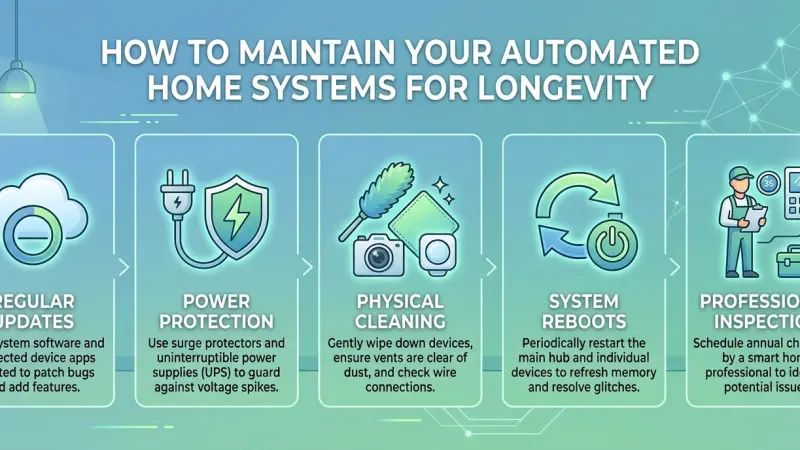
The dream of a seamless, automated home is one of convenience, efficiency, and security. We invest in smart thermostats, automated lighting, security cameras, and integrated hubs to simplify our lives. However, like any sophisticated technology, these systems are not "set it and forget it." To ensure that your investment continues to perform at its peak and to extend the lifespan of your devices, a proactive maintenance strategy is essential.

Neglecting your smart home ecosystem can lead to sluggish response times, security vulnerabilities, and premature hardware failure. This guide provides a deep dive into the practical steps you can take to preserve your automated systems. We will explore everything from critical software hygiene to physical component care, helping you build a resilient smart home that stands the test of time without the need for constant, costly replacements.
The Importance of Proactive Smart Home Maintenance
Maintaining an automated home isn't just about fixing things when they break; it’s about preventing the breakdown in the first place. High-end automation systems are complex networks where one failing node can disrupt the entire chain of command.
Enhancing System Reliability
When your smart home is well-maintained, the "handshake" between devices remains stable. You avoid the frustration of a light not turning on because the bridge lost its connection or a routine failing because a sensor battery died.
Protecting Your Digital Security
Many people forget that smart home devices are entry points to their home network. Regular maintenance includes auditing security settings and applying patches that protect you against evolving cyber threats. Longevity isn't just physical; it's about the continued integrity of your data.
Cost Efficiency Over Time
Replacing an integrated central hub or a whole-home audio system is expensive. Routine cleaning and software management cost nothing but time, yet they can double the functional life of your hardware.
1. Software and Firmware: The Digital Foundation
The "brain" of your home automation is the software. If the software is outdated, the hardware becomes a paperweight.
Automating Updates Where Possible
Most modern IoT (Internet of Things) devices offer "Auto-Update" features. While some purists prefer manual control to avoid bugs, for the average user, enabling auto-updates ensures that critical security patches are applied immediately.
Performing Monthly Manual Audits
Not every device notifies you when an update is available. Once a month, log into your primary smart home app (HomeKit, Home Assistant, Alexa, or Google Home) and check the "Device Health" or "Settings" section. Look for icons indicating a firmware update is pending.
The Role of Hub Reboots
Just like a computer, smart home hubs (SmartThings, Hubitat, or proprietary brand bridges) can suffer from memory leaks or cached errors. A scheduled monthly reboot can clear these minor glitches and keep the processing speeds snappy.
2. Hardware Care: Physical Upkeep for Sensors and Devices
Dust, heat, and vibration are the enemies of electronics. Because smart home devices are often tucked away in corners or mounted on ceilings, they are frequently neglected.
Cleaning Camera Lenses and Sensors
Motion sensors and security cameras rely on clear lines of sight. Dust buildup on a PIR (Passive Infrared) sensor can reduce its range, while a smudge on a camera lens can render facial recognition useless. Use a microfiber cloth and, if necessary, a gentle lens cleaner to wipe these down quarterly.
Battery Management Strategies
Low battery levels are the leading cause of "offline" device errors.
-
Use High-Quality Batteries: Avoid cheap zinc-carbon batteries; use lithium or high-capacity alkaline batteries for sensors.
-
Standardize Your Schedule: Change all batteries in a specific zone at once to avoid the "low battery chirp" cycle.
-
Check for Corrosion: When replacing batteries, inspect the contacts for any signs of leakage, which can permanently damage the device.
Inspecting Wiring and Connections
For hardwired systems like smart doorbells or motorized blinds, vibrations from daily use can loosen terminal screws. Every six months, ensure that power cables are seated firmly and that there is no fraying in the insulation.
3. Optimizing Your Network Environment
Your automated home is only as strong as your Wi-Fi or Zigbee/Z-Wave mesh network.
Reducing Signal Interference
As you add more devices, signal congestion becomes a real issue. Ensure your router is placed in a central, elevated location. If you use Zigbee or Z-Wave, remember that "repeater" devices (usually those plugged into a wall) help strengthen the mesh. Don't hide these behind heavy metal furniture.
Managing Device Density
If your router is struggling to handle 50+ devices, it may be time to upgrade to a Mesh Wi-Fi system. A stressed router runs hot and may drop connections, leading to "ghosting" where devices appear offline randomly.
4. Common Mistakes to Avoid
-
Ignoring the "Offline" Notification: Often, we see a device is offline and ignore it because we don't use it daily. This can lead to "zombie" devices that clutter your network and slow down the hub.
-
Overloading a Single Circuit: Smart switches still pull power. Ensure your electrical panel isn't being pushed to its limit by high-wattage smart appliances.
-
Factory Resetting Too Quickly: If a device fails, try a power cycle first. A factory reset requires re-adding the device to every routine and scene, which is a massive time-sink.
5. Seasonal Maintenance Checklist
Spring
-
Test outdoor smart lighting and irrigation controllers.
-
Clean solar panels on outdoor cameras.
-
Check smart locks for weather-related expansion in door frames.
Autumn
-
Calibrate smart thermostats before the heating season.
-
Inspect outdoor sensors for insect nests or spider webs.
-
Verify that smart smoke and CO detectors are fully functional.
Supporting Local Business Visibility Beyond Core Marketing Efforts
While maintaining the technical aspects of your home is a personal responsibility, the broader ecosystem of home services relies on professional expertise and local accessibility. For homeowners, finding qualified technicians for complex system repairs often starts with digital discovery.
A business directory website acts as a critical bridge in this process, ensuring that specialized home automation experts are findable when you need them. For professionals in the industry, maintaining a presence on a free company listing platform is a strategic way to build trust through a business listings site that reinforces local credibility. Using a list services uk directory or the Local Page UK platform ensures that your expertise remains visible as a supporting layer of discovery. Consistent listings serve as a signal to both search engines and homeowners that a service is legitimate, established, and ready to assist with the longevity of modern home systems.
Automated Home
Maintaining your automated home systems is a blend of digital hygiene and physical care. By staying on top of software updates, keeping sensors clean, and managing your network health, you can ensure that your smart home remains a source of comfort rather than a source of frustration. A well-maintained system doesn't just work better; it lasts longer, protecting both your convenience and your wallet. Start your monthly maintenance routine today to keep your home running smoothly for years to come.
Frequently Asked Questions (FAQs)
1. How often should I check for firmware updates?
Ideally, once a month. While many devices update automatically, manual checks ensure nothing has been "stuck" due to a connection error.
2. Why does my smart light keep disconnecting?
This is usually due to signal interference or being too far from the hub/router. Consider adding a mesh node or moving the hub to a more central location.
3. Can I use regular cleaning spray on my smart screens?
No. Use only cleaners designed for electronics or a dry microfiber cloth to avoid damaging the oleophobic coatings on touchscreens.
4. How long do smart home devices typically last?
With proper care, most sensors and switches last 5–10 years. Hubs may need
upgrading every 5 years to keep up with new software standards.
5. Is it necessary to reboot my smart home hub?
Yes. A monthly reboot helps clear the cache and resolve minor software conflicts that accumulate over time.
6. Do smart locks require special maintenance?
Beyond battery changes, you should check the alignment of the deadbolt. If the door has shifted, the motor has to work harder, which drains the battery and wears out the gears.
7. Should I delete smart home apps I don't use?
Yes. Every active app is a potential security risk and can sometimes run background processes that interfere with your phone’s performance.
8. Can cold weather damage my smart doorbell?
Most are rated for outdoor use, but extreme cold can temporarily reduce battery life. Ensure the seals are intact to prevent moisture ingress.
9. What is "vampire power" in smart homes?
Smart devices stay in "standby" to listen for commands. While the draw is low, having hundreds of devices can add up. Ensure you only keep active devices on your network.
10. How do I know if my sensor battery is dying if it doesn't have an app indicator?
Look for delayed response times or inconsistent triggering. If a motion light takes 3 seconds to turn on instead of 0.5 seconds, the battery is likely low.
11. Is a wired smart home better for longevity than wireless?
Hardwired systems (like KNX or Lutron) generally have higher longevity and reliability but are significantly more expensive and harder to install in existing homes.
12. How do I protect my system during a power outage?
Use a UPS (Uninterruptible Power Supply) for your main hub and router to prevent data corruption during sudden power losses.

Disclaimer: The information provided in this article is for general informational and research purposes only. Company details, features, services, and market positions may change over time. Readers are advised to visit official company websites and conduct independent research before making any business decisions or purchasing services.
Most Searchable Keywords

Recent Blogs



Related Listings


Categories
- Accountants (295)
- Advertising Agencies (559)
- Architects (149)
- Automobiles (377)
- Beauty (300)
- Carpenters (146)
- Cleaning Services (386)
- Dentists (189)
- Driving (62)
- Electricians (215)
- Energy (8)
- Event Organiser (685)
- Finance (599)
- Guide (3365)
- Health (2207)
- Information technology (206)
- Legal Services (353)
- Logistics (6)
- Maintenance (65)
- Manufacturing (35)

Sponsored Listings in Locksmith Services


Related Blogs

Gen Z Political Reporters and News Creators i...
Read this insightful article "Gen Z Political Reporters and News Creators in the UK" to expand your knowledge!

Famous Female Social Media Influencers Across...
Read this insightful article "Famous Female Social Media Influencers Across the UK" to expand your knowledge!

Your UK Sponsor Licence 2026 Step by Step Gui...
Read this insightful article "Your UK Sponsor Licence 2026 Step by Step Guide" to expand your knowledge!
Questions & Answers – Find What
You Need, Instantly!
How can I update my business listing?
Is it free to manage my business listing?
How long does it take for my updates to reflect?
Why is it important to keep my listing updated?
