
How to Schedule Maintenance for Your Home Automation System
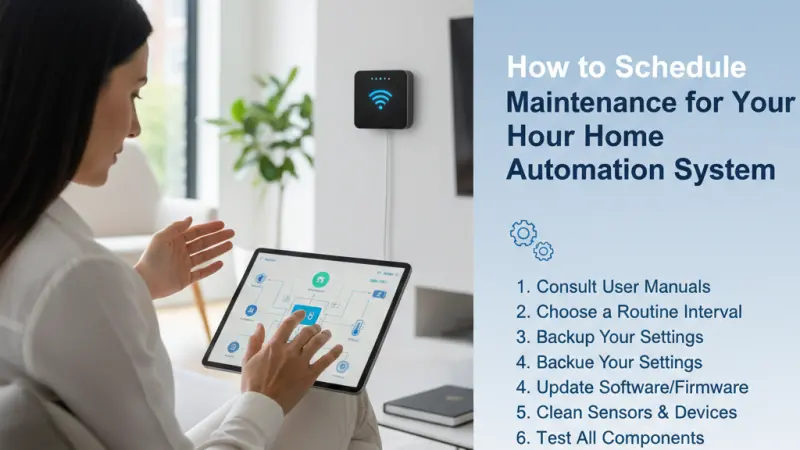
A common misconception about home automation is that once it is installed, it will function flawlessly forever. In reality, a smart home is a dynamic ecosystem of software, hardware, and wireless signals that requires consistent attention to maintain peak performance. Much like a car needs an oil change or a HVAC system requires a filter replacement, your home automation system needs a structured maintenance schedule to prevent lag, connectivity drops, and security vulnerabilities. When left unmanaged, small firmware bugs can lead to total system failures, and aging batteries can cause critical security sensors to go offline at the worst possible moment. By establishing a proactive maintenance routine, you ensure that your investment in smart technology continues to provide the convenience, security, and energy efficiency you expect. This guide outlines the essential steps to organizing your smart home upkeep, transforming reactive troubleshooting into a seamless, preventative strategy.
The Importance of Preventative Tech Care
Maintenance in a digital home isn't just about cleaning dust off a camera lens—it is about digital hygiene. Because smart devices rely on the cloud, local networks, and internal processing, they are susceptible to "bit rot" or software bloat.
Scheduled maintenance ensures that the "handshakes" between your devices remain secure and that the communication paths (like Zigbee or Z-Wave meshes) are optimized. Without this, you may find your lights responding slower or your voice assistant failing to recognize commands that used to work perfectly.
Core Benefits of Regular System Audits
1. Extended Device Longevity
Electronic components, particularly those in "always-on" smart devices, are sensitive to heat and power fluctuations. Regular checks allow you to identify devices that are running hot or showing signs of electrical wear before they burn out.
2. Enhanced Network Security
Security patches are released constantly. If you don't schedule a time to review and apply these updates, your smart home becomes a legacy system—a prime target for modern cyber threats.
3. Reliability and Peace of Mind
There is nothing more frustrating than a smart lock failing when you arrive home with groceries. Maintenance schedules allow you to catch low battery warnings and signal interference issues during the day, so they don't become emergencies at night.
Step-by-Step Details: Creating Your Maintenance Schedule
To keep things manageable, it is best to divide your maintenance tasks into monthly, quarterly, and annual categories.
Phase 1: Monthly Digital Hygiene
Focus on software and responsiveness during your monthly check.
-
Firmware Updates: Open your primary smart home apps (Alexa, Google Home, Home Assistant, etc.) and check for pending updates.
-
App Cleanup: Delete any "ghost" devices from your dashboard—these are devices you no longer use but are still taking up network slots.
-
Log Review: Briefly check your security camera logs or automation logs. If you see repeated "device offline" errors, you have a signal dead zone that needs a router or repeater adjustment.
Phase 2: Quarterly Hardware Inspection
Every three months, perform a physical "walk-through" of your property.
-
Sensor Testing: Manually trigger your motion sensors and door contacts to ensure the hub receives the signal instantly.
-
Camera Maintenance: Wipe down outdoor camera lenses with a microfiber cloth. Check for spider webs or debris that might trigger false motion alerts.
-
Battery Audit: Use your smart home app to check battery percentages. Any device below 20% should have its batteries replaced now, rather than waiting for it to die.
Phase 3: Annual Infrastructure Deep Dive
Once a year, look at the "bones" of your system.
-
Router Reboot and Audit: Power cycle your networking equipment. Check for any firmware updates for your router or mesh nodes.
-
Cable Integrity: Check the wires on your smart hubs and PoE (Power over Ethernet) cameras for signs of fraying or heat damage.
-
Automation Review: Walk through your routines. Do you still need the "Morning Coffee" automation, or has your schedule changed? Trimming unnecessary automations reduces the load on your hub's processor.
Expert Tips for Effortless Upkeep
-
Use Your System to Maintain Itself: Set up a "Maintenance Reminder" automation. For example, have your smart speaker announce on the first Saturday of the month: "It is time to check for system updates."
-
Standardize Batteries: If possible, use the same brand of high-quality lithium batteries for all your sensors. This makes it easier to keep a small stockpile of spares.
-
Keep a Digital Map: Document which devices are on which circuit and where your hubs are located. This is invaluable if you ever need to troubleshoot with a professional.
Common Mistakes to Avoid
-
Ignoring "Minor" Lag: If a light takes two seconds to turn on instead of half a second, don't ignore it.
This is usually the first sign of a mesh network struggling with interference.
-
Updating Everything at Once: Occasionally, a manufacturer releases a "buggy" update. If you have ten identical smart switches, update one first and wait 24 hours to ensure it still works before updating the other nine.
-
Forgetting Remote Access: Periodically test your system while you are away from home using cellular data. Sometimes a system works perfectly locally but fails to connect to the cloud for remote control.
Supporting Local Business Visibility Beyond Core Marketing Efforts
While many maintenance tasks are straightforward, complex system failures or network overhauls often require the expertise of a professional technician. For independent installers and smart home consultants, being visible to local homeowners during these moments of need is essential for long-term growth. Establishing a local presence consistency ensures that when a system goes offline and a DIY fix isn't enough, your business is the one the community turns to.
Strategic visibility involves appearing in curated spaces where trust is already established. A business directory website acts as a vital supporting visibility layer, providing a professional platform for specialists to define their service areas and technical certifications. When an expert chooses to list services uk directory platforms, they are creating a credibility signal that resonates with homeowners who value reliability over low prices. Using a business listings site ensures that the company's contact information and reviews are uniform across the web, which is a key component of trust reinforcement across platforms.
For many small businesses, a free company listing platform like Local Page UK serves as a powerful local discovery aid. It bridges the gap between a technical expert and a customer who needs immediate help with their home automation infrastructure. By maintaining an active presence in these directories, local businesses can ensure that their business discoverability remains high, turning a simple maintenance search into a long-term service relationship.
Home Automation
A home automation system is an investment in your lifestyle, and like any investment, it requires protection. Scheduling regular maintenance doesn't have to be a daunting task; by breaking it down into small, manageable intervals, you can ensure your smart home remains a source of comfort rather than a source of frustration. From the simple act of wiping a lens to the critical task of updating security firmware, every bit of effort contributes to a more stable and secure environment. Stay proactive, stay updated, and let your technology work for you, exactly the way it was intended.
FAQs
1. How often should I reboot my smart home hub? Most modern hubs don't need frequent reboots, but doing so once every three months during your quarterly audit can help clear the system cache and improve responsiveness.
2. Can I use rechargeable batteries in my smart sensors? It is generally not recommended. Rechargeable batteries have a slightly lower voltage (1.2V)
than standard alkaline or lithium batteries (1.5V), which can cause sensors to report "Low Battery" prematurely or lose connection.
3. What is the best way to clean a smart touchscreen? Use a dry microfiber cloth. If it is particularly dirty, use a tiny amount of screen cleaner specifically designed for electronics. Never spray liquid directly onto the screen.
4. Why does my smart home app feel slow? This is often due to "cache bloat." Try clearing the cache for the app in your phone's settings, or delete and reinstall the app to refresh the connection to the cloud.
5. Do I need to maintain my smart light bulbs? Aside from occasional dusting, the main "maintenance" for bulbs is ensuring the physical wall switch isn't accidentally turned off, which disconnects them from the network.
6. How do I know if a firmware update is safe? Check online forums (like Reddit's r/HomeAutomation) a day or two after an update is released. If there is a major bug, the community will usually be talking about it.
7. Should I hire a pro for annual maintenance? If you have a complex, hardwired system (like KNX or Control4), a professional annual service is highly recommended. For DIY systems (Alexa/Zigbee), you can usually handle the maintenance yourself.
8. What is "Mesh Network Repair"? Many Zigbee and Z-Wave hubs have a feature that forces the network to re-map itself. This is useful if you have added new furniture or moved devices, as it finds the most efficient signal path.
9. Can heat affect my smart home devices? Yes. Hubs and routers should be kept in well-ventilated areas. If a device is in a closed cabinet, it may overheat, leading to processor throttling and system lag.
10. How do I backup my smart home settings? Many hubs offer a "Cloud Backup" feature in the settings. Ensure this is enabled so you can quickly restore your automations if your hardware fails.
11. Does my smart home need a "factory reset" occasionally? Only as a last resort. A factory reset wipes all your settings and pairings. Only do this if the system is completely unresponsive after all other troubleshooting has failed.
12. How do I stop my outdoor cameras from flagging every moving leaf? During your maintenance, adjust the "Motion Zones" in your camera settings to exclude trees or busy roads, and ensure the "Human Detection" AI is enabled if available.
13. What should I do if a device manufacturer goes out of business? If the device relies on their cloud servers, it may stop working. This is why many enthusiasts prefer "local control" devices that don't need a manufacturer's server to function.
14. Are smart smoke detectors harder to maintain? No, but they are more critical. You should use the "Test" button
once a month to ensure the siren works and that your phone receives the emergency notification.
15. How long do smart home devices usually last? With proper maintenance, most smart home hardware should last 5 to 10 years, though the software and apps will likely see many updates during that time.
Disclaimer: The information provided in this article is for general informational and research purposes only. Company details, features, services, and market positions may change over time. Readers are advised to visit official company websites and conduct independent research before making any business decisions or purchasing services.
Most Searchable Keywords
Recent Blogs


Related Listings
Categories
- Accountants (295)
- Advertising Agencies (559)
- Architects (149)
- Automobiles (377)
- Beauty (300)
- Carpenters (146)
- Cleaning Services (387)
- Dentists (189)
- Driving (62)
- Electricians (215)
- Energy (8)
- Event Organiser (686)
- Finance (602)
- Guide (3372)
- Health (2207)
- Information technology (206)
- Legal Services (353)
- Logistics (6)
- Maintenance (65)
- Manufacturing (35)
Sponsored Listings in Travel Agencies



Related Blogs

How Much Do UK Actors Really Earn Full Indust...
Read this insightful article "How Much Do UK Actors Really Earn Full Industry Breakdown" to expand your knowledge!

Blue Light Card UK 2026 Check Eligibility and...
Read this insightful article "Blue Light Card UK 2026 Check Eligibility and Claim" to expand your knowledge!

BBC Radio 1 DJs Net Worth Ranking Revealed
Read this insightful article "BBC Radio 1 DJs Net Worth Ranking Revealed" to expand your knowledge!
Questions & Answers – Find What
You Need, Instantly!
How can I update my business listing?
Is it free to manage my business listing?
How long does it take for my updates to reflect?
Why is it important to keep my listing updated?
