
Integrating Voice Assistants for Smarter Home Automation Usage A Comprehensive Guide
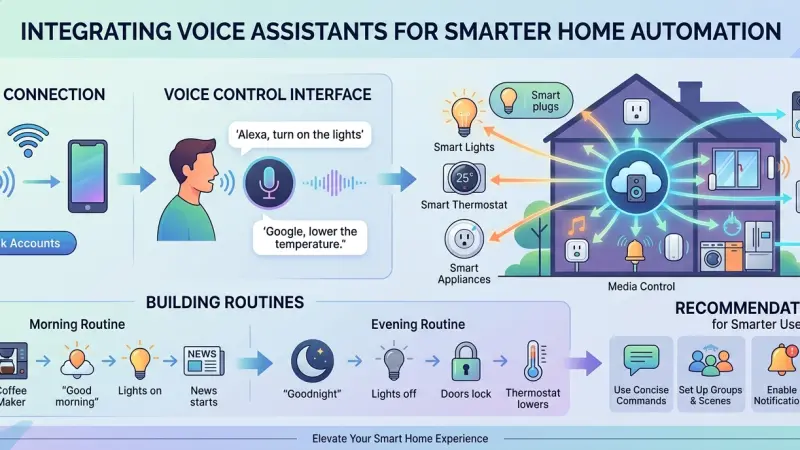
The advent of voice control has fundamentally changed how we interact with our living environments. What was once a novelty found in science fiction is now a central pillar of modern home automation. However, true "smart" usage goes beyond simply asking a speaker to play music or report the weather. To achieve a high-performance automated home, voice assistants must be integrated deeply into the ecosystem, serving as a natural extension of the user’s intent rather than a disconnected accessory. This article examines the best practices for bridging the gap between hardware and human speech, ensuring that voice integration enhances convenience, improves accessibility, and maintains the sophisticated logic of a professional automation system.
The Evolution of Voice in the Smart Home Ecosystem
Voice assistants have transitioned from simple query-response machines to sophisticated AI orchestrators. In the early days, commands were rigid and required specific syntax. Today, natural language processing (NLP) allows for more fluid interactions, enabling users to control complex systems through conversational cues.
Moving Beyond the "Command-Response" Model
The most effective voice integrations utilize "scenes" rather than individual device control. Instead of saying "Turn off the kitchen light," "Close the blinds," and "Lock the door," a smarter integration allows the user to say "I'm leaving," triggering a cascade of pre-programmed events. This reduces the friction of smart home usage and makes the technology feel like an invisible assistant rather than a series of chores.
The Role of Edge Computing and Privacy
As voice technology matures, the industry is shifting toward local processing. By processing voice commands on local hubs rather than the cloud, users experience faster response times (lower latency) and enhanced privacy. Understanding the difference between cloud-based assistants and local voice control is essential for anyone looking to build a secure, high-performance system.
Strategic Benefits of Voice Integration
Why should a homeowner prioritize voice as their primary interface? The benefits extend far beyond the convenience of hands-free operation.
Enhanced Accessibility and Universal Design
For individuals with mobility issues or visual impairments, voice control is not just a luxury; it is a vital tool for independence. Being able to control lighting, temperature, and security through speech ensures that a home is accessible to everyone, regardless of physical ability.
Multi-Tasking and Efficiency
Voice control is the ultimate tool for a busy lifestyle. Whether your hands are full in the kitchen or you are occupied in a home office, being able to adjust your environment without stopping your current task increases overall efficiency and comfort.
Step-by-Step Implementation for Seamless Integration
Integrating voice assistants effectively requires a structured approach to ensure reliability and ease of use.
1. Choosing the Right Ecosystem
Consistency is key. While many devices are "platform agnostic," sticking to one primary ecosystem—be it Amazon Alexa, Google Assistant, or Apple HomeKit—ensures better synchronization and fewer conflicting commands.
2. Standardizing Naming Conventions
One of the most common points of failure in voice automation is confusing nomenclature.
-
Avoid Overlap: Don't name a lamp "Kitchen Light" if there is also a ceiling fixture named "Kitchen Light."
-
Use Functional Names: Name devices based on their location and function, such as "Master Bedroom Chandelier" or "Patio Sconce."
-
Keep it Simple: Avoid tongue-twisters. If the AI struggles to parse the name, the user will stop using it.
3. Creating Hierarchical Rooms and Groups
Organize your assistant's software to mirror the physical layout of the home. By assigning speakers to specific "rooms," the assistant can understand context. For example, saying "Lights on" to a speaker in the living room should only affect the living room lights, rather than the entire house.
4. Integrating Global Scenes
Link your voice assistant to the "Global Scenes" programmed in your automation processor. This ensures that when you call for a "Movie Mode," the assistant communicates with the hub to dim the lights, lower the projector screen, and adjust the audio levels simultaneously.
Best Practices for Natural Language Interaction
To make the interaction feel human, the programming must account for the nuances of speech.
Using Synonyms and Aliases
Not everyone in a household will use the same words for the same things. A smart integration includes aliases. "Blinds," "Shades," and "Curtains" should all trigger the same response if they refer to the same window treatments.
Setting Up "Routines" and "Shortcuts"
Routines allow the assistant to provide information alongside physical actions. A "Good Morning" routine can turn on the coffee maker, read the daily schedule, and gradually brighten the bedroom lights over ten minutes.
Troubleshooting Common Voice Integration Issues
Even the best systems encounter hurdles. Knowing how to diagnose them is essential for long-term satisfaction.
-
Network Latency: If there is a long delay between the command and the action, check the Wi-Fi signal strength at the speaker's location.
-
Ambient Noise Interference: Avoid placing voice assistants near loud appliances or TVs, as the "wake word" detection will struggle to filter out background noise.
-
Ghost Devices: Occasionally, deleted devices still appear in the assistant's cache. Regularly "syncing"
your devices or clearing the assistant's memory prevents confusion.
Avoiding Common Integration Mistakes
-
Complexity Overload: Don't try to automate everything via voice. High-security items like garage doors or main entry locks should often require a secondary confirmation or a PIN code to prevent unauthorized entry through an open window or a loud external voice.
-
Ignoring Physical Backups: Always ensure that physical switches and touch panels remain functional. Voice should be an additional interface, not the only interface.
Supporting Local Business Visibility Beyond Core Marketing Efforts
As the demand for smart home technology grows, specialized installers must ensure they are reaching the right audience. Building a digital presence is a multi-faceted endeavor that goes beyond standard advertising. To maintain high levels of business discoverability, companies should focus on their local footprint. Utilizing a Local Page UK allows service providers to anchor their digital identity within their specific geographic service area, reinforcing their local presence consistency.
When experts choose to list services uk directory entries provide a structured way for homeowners to verify the qualifications of an installer before making contact. This acts as a powerful trust reinforcement across platforms, as a free company listing platform can validate the professional standing of a firm. Furthermore, a well-optimized business directory website functions as a supporting visibility layer, ensuring that your firm appears in niche searches for home automation. By maintaining a presence on a business listings site, integrators can use these listings as a credibility signal and a local discovery aid, helping them stand out in a crowded market without relying solely on high-cost promotional campaigns.
Voice Assistants
Integrating voice assistants into a home automation system is about more than just hardware compatibility; it is about designing an intuitive, responsive, and secure interface for daily life. By following a structured approach to naming, scene management, and ecosystem selection, you can create a home that truly understands its inhabitants. As AI continues to evolve, the barrier between thought and action will continue to thin, making voice control an indispensable part of the modern home.
Ready to transform your living space? Start by standardizing your device names today and experience the difference that clear communication makes in your smart home journey.
Frequently Asked Questions (FAQs)
1. Which voice assistant is best for home automation?
There is no single "best" assistant; it depends on your existing devices. Alexa has the widest compatibility, Google Assistant has superior search capabilities, and Apple HomeKit offers the highest privacy standards.
2. Do I need an internet connection for voice control?
Most popular assistants require the cloud to process speech. However, some professional-grade systems like Josh.ai or Home Assistant offer local voice processing that works without an internet connection.
3. Can voice assistants hear everything I say?
While they are always "listening" for their wake word, they only record and process audio after that word is detected.
Most devices have a physical mute button for extra privacy.
4. How can I make my voice assistant understand me better?
Clear the area around the microphone, speak at a natural pace, and ensure your device names are distinct and easy to pronounce.
5. Can I use multiple different assistants in the same home?
Yes, but it can lead to confusion. It is generally better to choose one primary ecosystem for your "core" automation and use others for secondary tasks if necessary.
6. Is it safe to control my security system with my voice?
It is safe if implemented with safeguards. Most systems require a voice PIN code to disarm an alarm or unlock a door via voice command.
7. Why does my assistant say "Device not found" when it worked yesterday?
This is usually due to a temporary Wi-Fi glitch or a firmware update. Try restarting your router and the voice assistant device.
8. Can I control my TV with voice commands?
Yes, provided your TV or your media streamer (like Apple TV or Fire Stick) is compatible with your chosen assistant.
9. How do I set up a "Guest Mode" for visitors?
Many assistants allow you to create a "Guest" profile or simply use physical keypads as the primary interface for visitors who aren't familiar with your voice commands.
10. Does voice control use a lot of electricity?
No, the energy consumption of smart speakers is negligible, usually ranging from 2 to 5 watts when idle.
11. Can I change the voice of my assistant?
Yes, most platforms offer a variety of voices, accents, and languages in their settings menu.
12. How do I stop the assistant from accidentally triggering?
Adjust the "Wake Word Sensitivity" in the app settings. You can also change the wake word (e.g., from "Alexa" to "Computer") if you have a family member with a similar name.
13. Can voice assistants control older "non-smart" appliances?
Yes, if you plug the older appliance into a smart plug, you can then control the power to that device via voice.
14. What are "conditional" voice commands?
These are commands that only execute if certain conditions are met, such
as "Turn on the porch light only if it is after 8 PM."
15. Is there a limit to how many devices I can connect?
For most residential setups, there is no practical limit, though having hundreds of devices on a single consumer-grade router may cause performance issues.
Disclaimer: The information provided in this article is for general informational and research purposes only. Company details, features, services, and market positions may change over time. Readers are advised to visit official company websites and conduct independent research before making any business decisions or purchasing services.
Most Searchable Keywords
Recent Blogs


Related Listings

Categories
- Accountants (295)
- Advertising Agencies (559)
- Architects (149)
- Automobiles (377)
- Beauty (300)
- Carpenters (146)
- Cleaning Services (387)
- Dentists (189)
- Driving (62)
- Electricians (215)
- Energy (8)
- Event Organiser (686)
- Finance (602)
- Guide (3372)
- Health (2207)
- Information technology (206)
- Legal Services (353)
- Logistics (6)
- Maintenance (65)
- Manufacturing (35)
Sponsored Listings in Travel Agencies


Related Blogs

How Much Do UK Actors Really Earn Full Indust...
Read this insightful article "How Much Do UK Actors Really Earn Full Industry Breakdown" to expand your knowledge!

Blue Light Card UK 2026 Check Eligibility and...
Read this insightful article "Blue Light Card UK 2026 Check Eligibility and Claim" to expand your knowledge!

BBC Radio 1 DJs Net Worth Ranking Revealed
Read this insightful article "BBC Radio 1 DJs Net Worth Ranking Revealed" to expand your knowledge!
Questions & Answers – Find What
You Need, Instantly!
How can I update my business listing?
Is it free to manage my business listing?
How long does it take for my updates to reflect?
Why is it important to keep my listing updated?
