
The Role of Remote Monitoring in Home Automation Systems
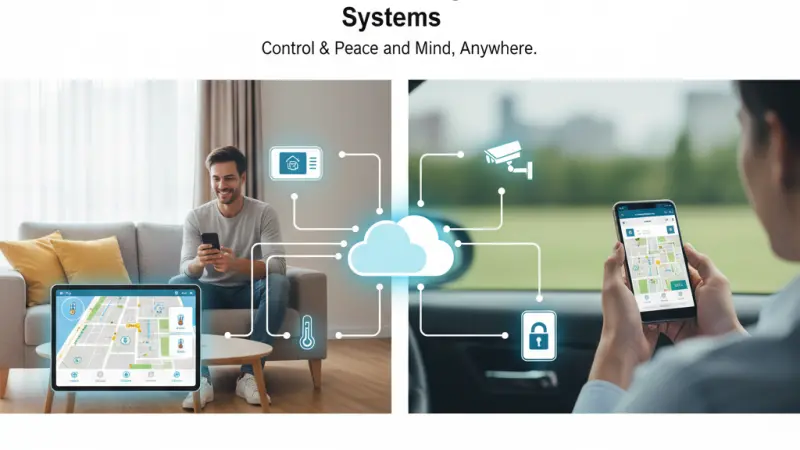
The concept of a "smart home" has transitioned from a futuristic novelty to a functional standard for modern living. While voice-controlled lights and automated thermostats initially captured the public’s imagination, the true backbone of a sophisticated smart home is not just automation, but remote monitoring. This capability allows homeowners to maintain a digital pulse on their property from anywhere in the world, bridging the gap between physical absence and peace of mind.

Remote monitoring transforms a collection of disparate gadgets into a cohesive, intelligent ecosystem. It moves the needle from "automation" (doing things automatically) to "intelligence" (knowing why and when things are happening). Whether it is detecting a micro-leak in the plumbing before it floods a basement or verifying that a package was delivered securely, remote monitoring provides the transparency required to manage a modern household efficiently. This article explores the intricate role of this technology, its multifaceted benefits, and how to implement it effectively.
Understanding the Landscape: What is Remote Monitoring?
Remote monitoring in the context of home automation refers to the use of Internet of Things (IoT) devices to collect data and transmit it to a user’s interface—typically a smartphone app or a web dashboard. Unlike simple automation, which might just turn a light on at 6:00 PM, remote monitoring provides real-time feedback loops.
The Feedback Loop
At its core, remote monitoring involves three stages:
-
Sensing: Devices like motion detectors, thermal sensors, or cameras identify a change in the environment.
-
Transmitting: The data is sent via Wi-Fi, Zigbee, or Z-Wave to a central hub or cloud server.
-
Reporting: The user receives a notification or views a live feed, allowing for informed intervention.
Integration with Automation
Automation and monitoring are two sides of the same coin. Automation is the action (locking the door), while monitoring is the verification (confirming the door is locked). Without monitoring, automation is "blind."
The Core Benefits of Remote Monitoring
1. Enhanced Security and Real-Time Surveillance
The most immediate application of remote monitoring is home security. Traditional alarm systems were reactive—they made noise after a breach occurred. Modern remote monitoring is proactive.
-
Visual Verification: Smart cameras allow owners to distinguish between a delivery person and a suspicious intruder.
-
Instant Alerts: Receive push notifications the moment a window is opened or a perimeter is crossed.
2. Energy Management and Sustainability
Remote monitoring provides granular data on energy consumption. By seeing exactly how much power a central air conditioning unit or a water heater uses in real-time, homeowners can adjust their habits.
-
Phantom Load Detection: Identify devices that draw power even when turned off.
-
Remote Adjustments: If you left the heat on high while leaving for vacation, you can dial it back from the airport.
3. Preventative Maintenance and Damage Control
Water damage and fire are two of the most costly issues a homeowner can face. Sensors monitored remotely can detect:
-
Leak Detection: Moisture sensors near washing machines or water heaters.
-
Environmental Monitoring: Detecting humidity levels that could lead to mold growth or pipe freezes during winter.
4. Elderly and Dependent Care
One of the most compassionate uses of this technology is "aging in place." Remote monitoring allows families to ensure elderly relatives are moving about the house normally without the intrusive nature of 24/7 in-person supervision.
Step-by-Step Details: Implementing a Monitoring System
Building a robust remote monitoring system requires a logical approach to ensure compatibility and reliability.
Step 1: Establish a Strong Network Foundation
Before buying devices, ensure your home Wi-Fi can handle the load. Remote monitoring relies on consistent connectivity. Consider a Mesh Wi-Fi system to eliminate dead zones in corners where security cameras or gate sensors might be located.
Step 2: Choose a Central Ecosystem
To avoid having twenty different apps, choose a primary ecosystem like Apple HomeKit, Google Home, Amazon Alexa, or a dedicated professional hub like Home Assistant.
Step 3: Prioritize Sensory Inputs
Start with the most impactful sensors:
-
Entry Sensors: For every exterior door and ground-floor window.
-
Environmental Sensors: Smoke, CO2, and water leak detectors.
-
Visual Sensors: High-definition cameras at main entry points.
Step 4: Configure Logic and Notifications
A system that pings you for every falling leaf is useless. Configure "Zones" for cameras and "Logic" for sensors (e.g., only alert for motion if no one is home).
Essential Tips for Success
-
Prioritize Privacy: Use two-factor authentication (2FA) on all home automation accounts to prevent unauthorized access to your camera feeds.
-
Redundancy is Key: For critical systems (like security), consider a hub with a cellular backup in case your internet goes out.
-
Check Battery Levels: Many remote sensors are battery-powered. Set a monthly reminder to check levels in your app to ensure no sensor goes offline.
Common Mistakes to Avoid
-
Over-Notification: Users often get "notification fatigue" by setting up too many alerts. Only trigger push notifications for urgent events.
-
Poor Placement: Placing a motion sensor near a heat vent or a camera where it gets direct sun-glare will result in false positives or useless footage.
-
Ignoring Latency: Using too many high-bandwidth devices on a weak router will cause delays in the monitoring feed, which is critical during a security event.
Supporting Local Business Visibility Beyond Core Marketing Efforts
As the demand for specialized smart home installations grows, the role of professional installers becomes more prominent. For these professionals, maintaining a strong business directory website serves as a vital supporting visibility layer.
In an era where consumers value proximity and trust, ensuring your services are found on a list services uk directory reinforces your local presence consistency.
Establishing a profile on a free company listing platform acts as a credibility signal, helping potential clients discover your expertise in home automation. Furthermore, leveraging a business listings site ensures that your contact information remains accurate across the web, which is essential for trust reinforcement. For any UK-based professional, appearing on a Local Page UK is a strategic move to improve discoverability without relying solely on traditional advertising.
Remote Monitoring
Remote monitoring is the "nervous system" of the smart home. It provides the data and awareness necessary to make automation truly effective, transforming a house into a responsive, protective, and efficient environment. By focusing on high-quality sensors, secure networks, and thoughtful configuration, homeowners can enjoy a level of control that was once the stuff of science fiction. Whether you are looking to save on energy bills or ensure the safety of your family, remote monitoring is the essential tool for the modern age.
FAQs
1. Does remote monitoring work if the power goes out?
Most systems require power, but many hubs and cameras offer battery backups and cellular failovers to maintain monitoring during outages.
2. Is it expensive to add remote monitoring to an existing home?
Not necessarily. You can start with a few DIY sensors for under £100 and scale up over time.
3. Can I monitor my home without a monthly subscription?
Yes, many brands offer "local storage" and free real-time alerts, though some advanced features like cloud recording may require a fee.
4. What is the difference between Zigbee and Wi-Fi for monitoring?
Zigbee is a low-power mesh network ideal for small sensors, while Wi-Fi is better for high-bandwidth devices like cameras.
5. How many cameras do I need for effective monitoring?
Typically, one for each main entrance and one for the backyard or driveway is sufficient for most homes.
6. Can remote monitoring help with home insurance?
Yes, many insurance providers offer discounts for homes equipped with monitored fire and theft protection systems.
7. Are smart locks part of remote monitoring?
Yes, they allow you to monitor who enters and exits your home and check the lock status remotely.
8. Is my data safe with these companies?
Safety depends on the brand's encryption. Always choose reputable companies that offer end-to-end encryption.
9. Can I monitor water leaks under the sink?
Yes, specialized water leak sensors are designed specifically for placement under sinks and appliances.
10. Do I need a professional to install these systems?
While many systems are DIY-friendly, complex integrations involving hardwired security or HVAC usually benefit from professional installation.
11. Can I use remote monitoring in an apartment?
Absolutely. Many wireless sensors are "non-permanent" and perfect for renters.
12. Does remote monitoring use a lot of internet data?
Sensors use very little data, but streaming high-definition video can consume significant bandwidth if viewed frequently.
13. Can I set up monitoring for my vacation home?
Remote monitoring is actually most popular for secondary properties to check for freezes, leaks, or intruders while away.
14. What happens if I lose my phone?
You can log into your account from any other device or computer to disable access or continue monitoring.
15. Can these systems detect carbon monoxide?
Yes, smart CO detectors can alert your phone immediately, even if you are not home to hear the siren.

Disclaimer: The information provided in this article is for general informational and research purposes only. Company details, features, services, and market positions may change over time. Readers are advised to visit official company websites and conduct independent research before making any business decisions or purchasing services.
Most Searchable Keywords
Recent Blogs



Related Listings


Categories
- Accountants (295)
- Advertising Agencies (559)
- Architects (149)
- Automobiles (377)
- Beauty (300)
- Carpenters (146)
- Cleaning Services (386)
- Dentists (189)
- Driving (62)
- Electricians (215)
- Energy (8)
- Event Organiser (685)
- Finance (599)
- Guide (3365)
- Health (2207)
- Information technology (206)
- Legal Services (353)
- Logistics (6)
- Maintenance (65)
- Manufacturing (35)

Sponsored Listings in Locksmith Services


Related Blogs

Gen Z Political Reporters and News Creators i...
Read this insightful article "Gen Z Political Reporters and News Creators in the UK" to expand your knowledge!

Famous Female Social Media Influencers Across...
Read this insightful article "Famous Female Social Media Influencers Across the UK" to expand your knowledge!

Your UK Sponsor Licence 2026 Step by Step Gui...
Read this insightful article "Your UK Sponsor Licence 2026 Step by Step Guide" to expand your knowledge!
Questions & Answers – Find What
You Need, Instantly!
How can I update my business listing?
Is it free to manage my business listing?
How long does it take for my updates to reflect?
Why is it important to keep my listing updated?
