
The Ultimate Guide to Alt Text in 2026: SEO, Accessibility & Best Practices
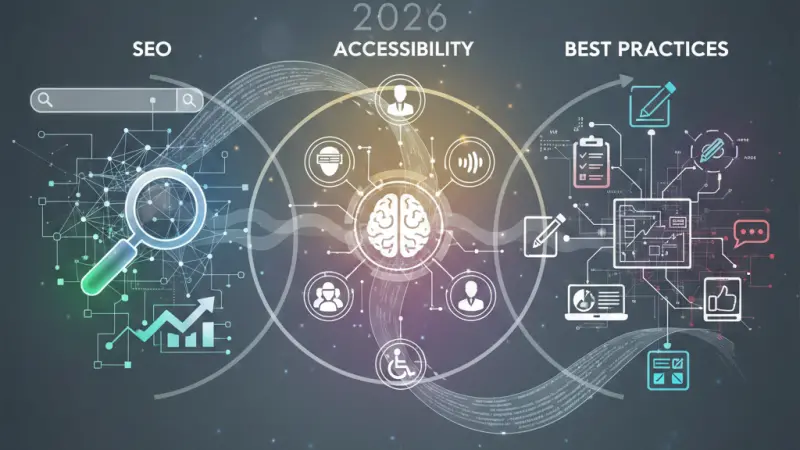
In the modern digital landscape, a picture isn't just worth a thousand words—it’s worth a thousand data points. As we navigate the web in 2026, visual content has become the primary language of the internet. From high-definition product photography to complex data visualizations and memes, images dominate our screens. However, there is a hidden layer of the internet that often goes unnoticed by the average user:Alt Text.

Alternative text, or alt text, is the written description of an image embedded within a website's HTML code. While it may seem like a minor technical detail, it is a cornerstone of a high-performing, inclusive website. In this exhaustive guide, we will explore the depths of what alt text is, why it remains a non-negotiable part of SEO and accessibility, and how you can master the art of writing it to future-proof your digital presence.
Deciphering Alt Text – What Is It Exactly?
At its core,alt text (also known as "alt attributes" or "alt tags") is a textual substitute for non-text content. If an image fails to load due to a server error or a slow connection, the alt text appears in its place.
The Technical Anatomy
In the world of HTML, an image is typically embedded using the tag. The alt text lives within this tag as an attribute. For example:

Beyond the "Tag"
Many people confuse alt text with captions or title attributes.
Alt Text: Hidden from the UI; read by screen readers and search engines.
Caption: Visible to all users; provides additional context or credits.
Title Attribute: Appears as a "tooltip" when a user hovers their mouse over an image.
Understanding these distinctions is the first step toward a sophisticated content strategy.
Why Alt Text Is Non-Negotiable in 2026
The importance of alt text can be categorized into three main pillars: Accessibility, SEO, and User Experience (UX).
1. The Ethical and Legal Mandate: Web Accessibility
The internet was designed to be universal. For the millions of users globally who are blind or have low vision, the web is experienced through screen readers—software that converts on-screen text into synthesized speech or Braille.
When a screen reader encounters an image without alt text, it might simply say "image" or, worse, read out a cryptic file name like "IMG_54321.png." This creates a massive barrier to information. By providing descriptive alt text, you ensure that visually impaired users receive the same value from your site as sighted users. In 2026, following the Web Content Accessibility Guidelines (WCAG) isn't just an ethical choice; in many jurisdictions, it is a legal requirement to avoid discrimination lawsuits.
2. The Search Engine Advantage: SEO Benefits
Search engines like Google are incredibly advanced, but they still cannot "see" an image in the same way humans do. They rely on alt text to understand the subject matter and context of visual content.
Image Ranking: Descriptive alt text is the primary factor that helps your images appear in Google Image Search.
Topical Relevance: By including relevant keywords in your alt text, you provide search engines with more signals about the overall topic of your page, boosting your primary SERP (Search Engine Results Page) rankings.
Visual Search: With the rise of AI-driven tools like Google Lens, search is becoming increasingly visual. Optimized alt text helps these AI models categorize your content accurately.
3. Enhancing the User Experience (UX)
Alt text serves as a safety net.
Slow Connections: In areas with poor bandwidth, images often fail to load. Alt text ensures the user still understands the content.
Voice Assistants: As more people use Siri, Alexa, or Google Assistant to "read" web pages, alt text provides the verbal description of visual elements.
Different Categories of Alt Text
Not all images are created equal, and neither should their alt text be.
Functional Images
These are images that perform a task, such as a "Search" icon or a "Submit" button.
Goal: Describe the function, not the look.
Example: For a magnifying glass icon, the alt text should be "Search," not "Magnifying glass."
Informational Images
These include photos that convey specific information relevant to the article.
Goal: Provide a concise summary of the scene.
Example: "A professional chef garnishing a plate of pasta with fresh basil."
Complex Graphics (Infographics & Charts)
Complex data requires more than a simple sentence.
Goal: Summarize the key takeaway or trend.
Example: "Bar chart showing a 25% increase in organic traffic from 2024 to 2025."
Decorative Images
Some images are purely for aesthetics, like a background swirl or a divider line.
Goal: Let screen readers know they can skip it.
Implementation: Use a null alt attribute (alt="").
Tips for Crafting High-Quality Alt Text
To write alt text like a pro, follow these 2026 best practices:
Be Descriptive and Specific: Avoid vague terms like "dog." Instead, use "Golden
Retriever puppy playing in a field of daisies."
Keep it Concise: Most screen readers cut off at around 125 characters. Get to the point quickly.
Avoid Redundancy: Never start with "Image of" or "Graphic of." The screen reader already announces that it is an image.
Keyword Usage: Integrate your primary keywords naturally, but avoid keyword stuffing, which can lead to search engine penalties.
Use Punctuation: End your alt text with a period. This causes the screen reader to pause slightly, making the experience more natural for the user.
Don't Forget Buttons: If an image is a link, the alt text must describe where the link leads.
Common Mistakes to Avoid
Even seasoned marketers make mistakes. Watch out for these pitfalls:
Leaving Alt Text Blank for Important Images: This leaves visually impaired users in the dark.
Using the Same Alt Text for Every Image: Every image has a unique context; your descriptions should reflect that.
Including Copyright Info: Alt text is for description, not legal disclaimers. Use the caption for that.
How to Implement Alt Text Across Platforms
You don't need to be a coder to add alt text. Most modern Content Management Systems (CMS) make it easy.
WordPress: When you upload an image to the Media Library, there is a dedicated "Alt Text" field in the attachment details.
Shopify: Click on a product image, select "Edit alt text," and save.
Social Media: Platforms like X (Twitter), LinkedIn, and Instagram now have "Add
Alt Text" options in their advanced settings before you post.
Elevate Your Online Visibility with Local Page UK
In the competitive world of digital marketing, every detail counts—from the alt text on your images to where your business is listed online. If you want to boost your local SEO and ensure your business is seen by the right audience, you need a presence in the most trusted directories.
Local Page UK is the premier destination for businesses looking to expand their reach. Whether you are looking for a uk online business directory or a comprehensive uk business directory, we provide the platform you need to shine. Our uk local business directory helps customers find local businesses uk with ease, making us an essential part of any local businesses list uk.
Small businesses can take advantage of our uk small business directory, while larger enterprises can benefit from our uk b2b business directory and uk b2c business directory sections. As a leading business directory uk online, we host a vast uk service providers directory and ensure your uk business listings online are accurate. Join the local page uk business directory today and become part of a top-tier uk business directory website.
Looking for a cost-effective way to start? We offer a business listing uk to help you get started. Our business listing uk is designed to support the economy, providing a business listing uk for those just starting out. As a prominent business listing uk, we offer a seamless business listing uk process. Secure your business listing uk or explore our business listing uk options. There is no better business listing uk for visibility, including targeted opportunities like a business listing uk or a business listing uk.
For those ready to dominate their niche, our local business listings uk and uk service listings provide unmatched authority. We pride ourselves on featuring uk verified business listings and highlighting uk top rated local businesses. From our uk home services directory to uk professional services listings and uk trade services listings, we cover every industry. Trust the uk local trades directory and the power of local page uk listings to simplify any uk local business search.
Service-Related Questions & Answers
1. Does every single image need alt text? No. Decorative images that don't add meaning should have an empty alt attribute (alt="") so screen readers skip them.
2. How long should alt text be? The sweet spot is under 125 characters. If you need more space, use the surrounding text or a caption.
3. Is alt text the same as a caption? No. A caption is visible to everyone; alt text is usually only "visible" to screen readers and search engines.
4. Can I just use my focus keyword for all alt text? No, that’s keyword stuffing. Alt text should describe the image first. Only use keywords if they naturally fit the description.
5. Do images of text need alt text? Yes. You should transcribe the text within the image exactly into the alt attribute.
6. Does alt text improve my Google ranking? Yes, it helps your images rank in Google Images and provides context that supports your page's overall SEO.
7. How do I add alt text in HTML? Use the alt attribute within the tag:
 .
.
8. What happens if I forget to add alt text? Screen readers may read the file name, which is often unhelpful (e.g., "DSC001.jpg"), harming your site's accessibility.
9. Can AI generate my alt text? AI tools can help, but they often lack the specific context of your page. Manual review is always recommended.
10. Should I include "Photo of..." in the text? No. Screen readers already identify the element as an image.
11. Is alt text important for social media? Yes. It makes your social content accessible to visually impaired followers and can help with platform-internal search.
12. What are "functional images"? These are images that act as buttons or links. Their alt text should describe the action (e.g., "View Shopping Cart").
13. Do I need alt text for logos? Yes. Usually, the alt text for a logo should be the name of the company (e.g., "Local Page UK Logo").
14. How does alt text help with voice search? Voice assistants use alt
text to describe visual content when answering a user's query verbally.
15. Can alt text be too long? Yes. Very long descriptions can be tedious for screen reader users and may be truncated by the software.

Disclaimer: The information provided in this article is for general informational and research purposes only. Company details, features, services, and market positions may change over time. Readers are advised to visit official company websites and conduct independent research before making any business decisions or purchasing services.
Most Searchable Keywords

Recent Blogs


Categories
- Accountants (295)
- Advertising Agencies (559)
- Architects (149)
- Automobiles (375)
- Beauty (300)
- Carpenters (146)
- Cleaning Services (386)
- Dentists (189)
- Driving (61)
- Electricians (215)
- Energy (6)
- Event Organiser (683)
- Finance (594)
- Guide (3356)
- Health (2205)
- Information technology (206)
- Legal Services (352)
- Logistics (6)
- Maintenance (65)
- Manufacturing (35)
Sponsored Listings in Real Estate


Related Blogs

Things to Do with Kids in Reading for Memorab...
Read this insightful article "Things to Do with Kids in Reading for Memorable Family Days" to expand your knowledge!
Step by Step Guide to Claiming Free School Me...
Read this insightful article "Step by Step Guide to Claiming Free School Meals in the UK" to expand your knowledge!

Free Things to Do in Newport Explore Local At...
Read this insightful article "Free Things to Do in Newport Explore Local Attractions Today" to expand your knowledge!
Questions & Answers – Find What
You Need, Instantly!
How can I update my business listing?
Is it free to manage my business listing?
How long does it take for my updates to reflect?
Why is it important to keep my listing updated?
