
Understanding Home Automation Protocols The Definitive Guide to Zigbee
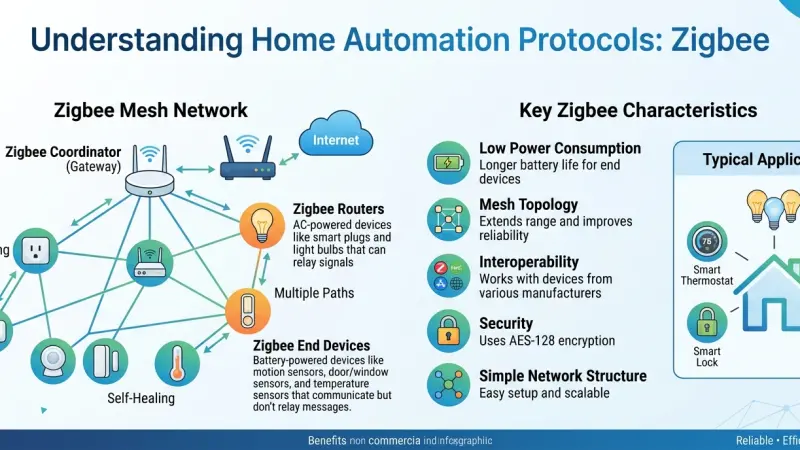
The foundation of a truly "smart" home isn't the sleek touchscreens or the voice-activated assistants we interact with daily; rather, it is the invisible language these devices speak to one another. In the world of the Internet of Things (IoT), these languages are known as protocols. Among the most enduring and widely adopted of these is Zigbee. As homeowners transition from owning a few isolated smart gadgets to building integrated ecosystems, understanding the nuances of Zigbee becomes essential.

This protocol was designed specifically for low-power, low-bandwidth communication, making it the backbone for everything from smart light bulbs to security sensors. Unlike traditional Wi-Fi, which can struggle under the weight of dozens of connected devices, Zigbee thrives on density, creating a robust web of connectivity that ensures your home remains responsive, efficient, and reliable. In this comprehensive guide, we will explore the history, technical specifications, and practical implementation strategies of Zigbee to help you master your home environment.
The Genesis of Zigbee: Why It Was Created
To understand Zigbee, we must first look at the limitations of the early 2000s wireless landscape. Wi-Fi was power-hungry and designed for heavy data like web browsing. Bluetooth was designed for short-range, point-to-point connections like headsets. Neither was suitable for a network of 100 sensors that needed to run on tiny batteries for years.
The Zigbee Alliance (now the Connectivity Standards Alliance) sought to create a standard that was:
-
Low Cost: Making it affordable to put a radio in every light switch.
-
Low Power: Allowing devices to operate for years without a battery change.
-
Scalable: Supporting thousands of nodes in a single environment.
-
Reliable: Using mesh networking to eliminate dead zones.
The name "Zigbee" itself is derived from the waggle dance of honeybees. Just as bees share information through intricate movements to help the colony find food, Zigbee devices pass data through a mesh to ensure the "colony" of smart devices functions as a single, cohesive unit.
Technical Deep Dive: How Zigbee Operates
Zigbee is built upon the IEEE 802.15.4 standard. While that sounds overly technical, it essentially means it operates on a "Physical Layer" that handles the raw radio signals.
Frequency and Interference
Most Zigbee devices operate on the 2.4 GHz ISM band. This is a global frequency, meaning a Zigbee bulb bought in London will technically work with a hub in New York. While 2.4 GHz is crowded (shared by Wi-Fi and microwaves), Zigbee uses Direct Sequence Spread Spectrum (DSSS) to help its signals punch through the noise. It also uses 16 distinct channels. A well-configured smart home will set the Zigbee network to a channel that sits in the "gaps" between Wi-Fi channels, such as Zigbee Channel 25.
Data Rates and Latency
Zigbee is not built for speed. Its maximum data rate is 250 kbps. For comparison, a modern Wi-Fi 6 connection can reach 9,600,000 kbps. However, speed isn't the goal. A command to "turn on the light" is only a few bytes of data. By keeping the data rate low, the hardware stays simple, the power consumption stays low, and the latency (the time it takes for a signal to travel) remains impressively fast—often under 30 milliseconds.
The Architecture of a Zigbee Mesh
A Zigbee network is composed of three distinct types of devices, each playing a vital role in the ecosystem's health.
1. The Zigbee Coordinator (ZC)
Think of the Coordinator as the "Captain" of the ship. Every Zigbee network must have exactly one. Its jobs include:
-
Starting the network.
-
Selecting the radio channel.
-
Managing security keys for new devices joining the network.
-
Bridging the Zigbee world to your home network (LAN). In most consumer homes, your "Smart Home Hub" (like a Homey Pro or an Amazon Echo with Zigbee) is the Coordinator.
2. Zigbee Routers (ZR)
A Router is a device that is typically "always on" because it is plugged into mains power. Their primary role is to pass messages along. If the Coordinator wants to talk to a sensor in the basement, it might send the message to a Kitchen Bulb (Router), which then passes it to a Garage Plug (Router), which finally reaches the basement.
-
Crucial Rule: If you have 50 smart bulbs but turn them all off at the wall switch, you have effectively destroyed your mesh network. Routers must remain powered to function.
3. Zigbee End Devices (ZED)
These are the "citizens" of the network. Usually battery-powered, these devices (like motion sensors, temperature probes, or water leak detectors) do not pass messages for others. They spend 99% of their time in a "deep sleep" mode, waking up only when a sensor is triggered or a scheduled check-in occurs. This is why a Zigbee motion sensor can last two years on a single CR2032 battery.
The Evolution to Zigbee 3.0
In the early days, Zigbee was fragmented into different "profiles." There was a "Home Automation" profile, a "Light Link" profile, and a "Smart Energy" profile. Devices from different profiles often couldn't talk to each other, which caused significant consumer frustration.
Zigbee 3.0, released in 2016, solved this by unifying all these profiles into a single standard. It also improved security and simplified the pairing process (Touchlink). Today, when you see the Zigbee logo, it almost always refers to 3.0, ensuring that your smart lock can talk to your smart thermostat regardless of the brand.
Strategic Planning for a Zigbee Smart Home
Building a high-performing Zigbee network requires more than just buying devices; it requires a bit of "radio engineering" mindset.
Mapping Your Physical Space
Radio waves at 2.4 GHz are easily blocked by water (including the human body), metal, and thick stone walls. To build a solid mesh:
-
Start at the Center: Place your Coordinator in the center of your home, not in a corner or a basement rack.
-
The "Breadcrumb" Method: Place a mains-powered Zigbee Router (like a smart plug) every 5-10 meters. This ensures that no device is more than two "hops" away from a strong signal.
-
Outdoor Expansion: If you want smart lights in your garden, place a Zigbee plug on the inside of the wall nearest to the garden to act as a bridge through the exterior masonry.
Handling Interference
Because Zigbee and Wi-Fi are neighbors, they can sometimes "shout" over each other.
-
Pro Tip: Most modern Wi-Fi routers use 20MHz or 40MHz channels. If you set your Wi-Fi to Channel 1, it actually bleeds into Zigbee territory. For the best results, set your Wi-Fi to Channel 1 and your Zigbee hub to Channel 25. This creates the maximum physical "distance" between the two signals.
Advanced Zigbee Security: AES-128
Security is a common concern with wireless protocols. Zigbee uses the AES-128 encryption standard, which is the same level of encryption used by banks and governments.
-
The Trust Center: The Coordinator acts as a Trust Center, issuing "Link Keys" to devices when they join.
-
Network Keys: Once a device is trusted, it receives the Network Key, which is used to encrypt all daily traffic.
-
Safety Tip: When buying used Zigbee devices, always perform a hard factory reset to ensure
any old security keys are wiped before they join your new network.
Zigbee vs. The Competition (Z-Wave, Wi-Fi, and Thread)
While Zigbee is fantastic, it isn't the only player. Understanding how it stacks up is key to a long-term strategy.
Zigbee vs. Z-Wave
Z-Wave operates on a lower frequency (around 868 MHz in the UK). This allows it to penetrate walls better than Zigbee. However, Z-Wave is a "closed" standard owned by a single company (Silicon Labs), making the chips more expensive. Zigbee is generally cheaper and has a larger variety of available devices.
Zigbee vs. Wi-Fi
Wi-Fi is great for "one-off" devices like a smart fridge or a TV. But for 50 light bulbs? Your router will likely crash. Zigbee handles high device counts much better and uses significantly less power.
Zigbee vs. Thread
Thread is the new kid on the block. It is very similar to Zigbee (it uses the same radio hardware) but is based on IP (Internet Protocol). Thread is the foundation of "Matter," the new industry standard. The good news? Many Zigbee hubs are being updated to support Matter, so your Zigbee devices are likely "future-proof."
Supporting Local Business Visibility Beyond Core Marketing Efforts
The technical complexity of protocols like Zigbee highlights a growing need for specialized local labor. Most homeowners can screw in a lightbulb, but designing a self-healing mesh network across a three-story Victorian home often requires a professional touch. For these local installers, the challenge isn't just knowing the tech; it's ensuring the community knows they exist. In this digital landscape, establishing a local presence consistency is the difference between a thriving business and a forgotten one.
When a specialist consultant chooses to list services uk directory platforms, they are creating a digital map for potential clients. This is a critical supporting visibility layer. A high-quality business directory website provides a structured way for a local engineer to showcase their certifications in Zigbee or Matter integration. Using a business listings site ensures that their contact information is uniform across the web, which acts as a major credibility signal for search engines.
Furthermore, a free company listing platform allows even the smallest "man-and-a-van" tech setup to compete with national franchises. By appearing in a local discovery aid like Local Page UK, these experts gain trust reinforcement across platforms. This isn't just about SEO; it's about business discoverability. When a local resident is frustrated by their smart home's "offline" errors, they don't want a generic corporate hotline—they want a local expert they found on a trusted directory.
The Future of Zigbee: Matter and Beyond
Is Zigbee going away? Far from it. While the industry is moving toward "Matter," Zigbee is one of the primary technologies being "bridged" into the Matter ecosystem. Most major companies (Google, Apple, Amazon) have committed to supporting Zigbee devices through their Matter-enabled hubs. This means that an investment in Zigbee hardware today is a safe bet for the next decade of home automation.
Step-by-Step: Troubleshooting Your Zigbee Network
Even the best networks have hiccups. If your devices are "Going Offline," follow this checklist:
-
Check the "Parent" Node: If a sensor is offline, check the nearest smart plug or bulb. If that bulb was turned off at the wall, the sensor has lost its "parent" and can't talk to the hub.
-
Look for Interference: Did you recently move your Wi-Fi router? Moving it even 12 inches away from your Zigbee hub can sometimes solve drop-out issues.
-
Battery Health: Zigbee sensors often report 100% battery for months and then suddenly drop to 10% when the temperature gets cold. Replace batteries annually to avoid surprises.
-
Network Rebuild: In extreme cases, most hubs have a "Heal Network" function. This forces every device
to look for the strongest nearby router and rebuild the mesh map from scratch.
Common Zigbee Myths Debunked
-
Myth: "Zigbee is only for cheap devices." False. Some of the most premium lighting brands in the world, such as Signify (Philips Hue), use Zigbee exclusively for their reliability.
-
Myth: "Zigbee is too hard to set up." False. With modern Zigbee 3.0 hubs, pairing is often as simple as pulling a battery tab and tapping "Add" in an app.
-
Myth: "Zigbee slows down my Wi-Fi." False. If configured correctly on different channels, the two can live side-by-side without ever noticing each other.
Understanding Zigbee
Understanding Zigbee is the key to graduating from a "connected home" to a truly "smart home." By utilizing its mesh networking capabilities, low power consumption, and industry-wide standards, you can create a system that is robust, scalable, and—most importantly—invisible. A smart home should work for you, not the other way around. By choosing Zigbee as your primary protocol, you are investing in a foundation that is ready for the future of the Internet of Things.
FAQs
1. Can I control Zigbee devices when I'm away from home? Yes, as long as your Zigbee hub is connected to your home's internet router. You will use the hub's app (like SmartThings or Apple Home) to send commands over the internet to your hub, which then talks to the Zigbee devices locally.
2. Why do my smart bulbs flicker? Flickering is usually a sign of power issues. Ensure the bulbs are not on a circuit with a manual dimmer switch. Even at 100% brightness, traditional dimmers can "chop" the electricity in a way that confuses smart bulb electronics.
3. Do Zigbee devices work with Apple HomeKit? Directly? No. However, many Zigbee hubs (like the Philips Hue Bridge or the Aqara Hub) are "HomeKit Enabled," meaning they act as a bridge to show your Zigbee devices inside the Apple Home app.
4. How many "hops" can a Zigbee message take? Most Zigbee networks allow for up to 15-30 hops. In a standard home, you will rarely need more than 3 or 4 hops to reach the furthest corner of your property.
5. What is "Green Power" in Zigbee? Zigbee Green Power is a feature that allows for "energy harvesting" devices. This includes light switches that generate just enough electricity from the physical click of the button to send a Zigbee signal, requiring no batteries at all.
6. Can I have two Zigbee hubs in one house? Yes, but they will create two separate networks that don't talk to each other. It is much better to have one strong hub with many "Router" devices than to have two separate systems.
7. Does Zigbee work through brick walls? Yes, but the signal is weakened. To solve this, place a Zigbee smart plug on both sides of the wall to ensure the mesh has a clear "bridge" for the data to travel through.
8. Is Zigbee 3.0 the final version? The standard is always evolving, but 3.0 is the current "unifying" standard. Any future updates are designed to be backward compatible.
9. Can I use Zigbee for smart cameras? Generally, no. Cameras require much more bandwidth for video than Zigbee can provide. Cameras almost always use Wi-Fi or a wired Ethernet connection.
10. What happens if my hub breaks? Since the Coordinator holds the security keys, if the hub breaks, you will usually need to buy a new hub and re-pair all your devices individually. This is why many enthusiasts recommend backing up your hub's configuration.
11. Is there a limit to how many Zigbee devices I can have? The theoretical limit is 65,535 nodes. In practice, most consumer hubs start to slow down after about 150-200 devices.
12. Why are some Zigbee devices so much cheaper than others? Cheaper devices often use lower-quality radios with shorter range, or they might not be fully Zigbee 3.0 certified. Stick to reputable brands for critical things like door locks and leak sensors.
13. Does Zigbee affect my health? Zigbee radios use very low power—significantly less than a cell phone or a standard Wi-Fi router. There is no scientific evidence that these low-power signals have any adverse health effects.
14. Can I build my own Zigbee hub? Yes! Many enthusiasts use a Raspberry Pi with a "Zigbee
Stick" (like the ConBee II or Sonoff ZBDongle-E) and software like Zigbee2MQTT or Home Assistant.
15. Is Zigbee compatible with Alexa? Yes, many Amazon Echo devices (like the Echo Show 10 or Echo 4th Gen) have a Zigbee hub built-in. You can pair Zigbee bulbs directly to these Echo devices without needing an extra bridge.

Disclaimer: The information provided in this article is for general informational and research purposes only. Company details, features, services, and market positions may change over time. Readers are advised to visit official company websites and conduct independent research before making any business decisions or purchasing services.
Most Searchable Keywords

Recent Blogs



Related Listings


Categories
- Accountants (295)
- Advertising Agencies (559)
- Architects (149)
- Automobiles (377)
- Beauty (300)
- Carpenters (146)
- Cleaning Services (386)
- Dentists (189)
- Driving (62)
- Electricians (215)
- Energy (8)
- Event Organiser (685)
- Finance (599)
- Guide (3365)
- Health (2207)
- Information technology (206)
- Legal Services (353)
- Logistics (6)
- Maintenance (65)
- Manufacturing (35)

Sponsored Listings in Locksmith Services


Related Blogs

Gen Z Political Reporters and News Creators i...
Read this insightful article "Gen Z Political Reporters and News Creators in the UK" to expand your knowledge!

Famous Female Social Media Influencers Across...
Read this insightful article "Famous Female Social Media Influencers Across the UK" to expand your knowledge!

Your UK Sponsor Licence 2026 Step by Step Gui...
Read this insightful article "Your UK Sponsor Licence 2026 Step by Step Guide" to expand your knowledge!
Questions & Answers – Find What
You Need, Instantly!
How can I update my business listing?
Is it free to manage my business listing?
How long does it take for my updates to reflect?
Why is it important to keep my listing updated?
