
Understanding Remote Access Capabilities in Home Automation Systems
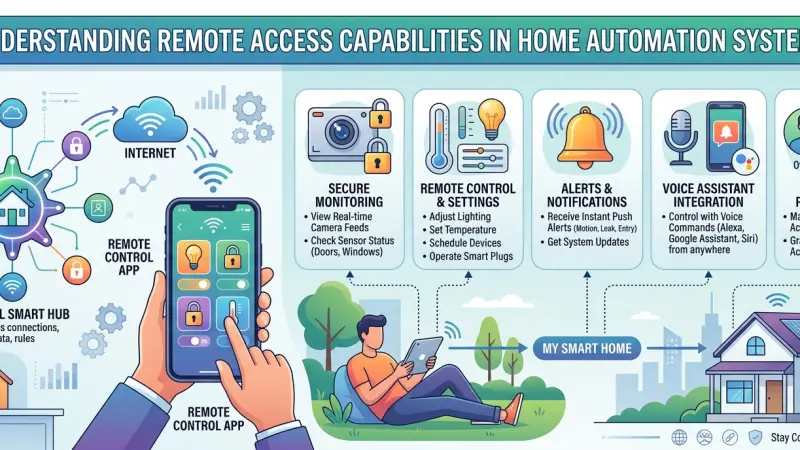
The concept of a "connected home" has evolved from a futuristic vision into a standard convenience of modern living. At the heart of this transformation lies remote access—the ability to interact with, monitor, and control household systems from virtually anywhere in the world. Whether it is adjusting the thermostat while sitting at an airport or checking security camera feeds during a lunch break, remote access bridges the physical gap between a homeowner and their property. This capability does more than just offer convenience; it provides a profound sense of security and a tool for unprecedented efficiency.

As we become more mobile, our reliance on these digital tethers grows. Understanding the underlying technology, the protocols that ensure security, and the practical ways to implement remote control is essential for anyone looking to optimize their living environment. This guide delves into the mechanics of remote access, exploring how it functions within the broader Internet of Things (IoT) landscape and how you can leverage it to create a more responsive, secure home.
An Overview of Remote Access in the IoT Landscape
Remote access is the operational "nervous system" of a smart home. Without it, a smart device is merely a programmable tool that requires physical proximity. With it, that same device becomes a globally accessible endpoint.
How Remote Access Functions
Most remote access systems rely on a cloud-based architecture. When you send a command through a smartphone app, that signal travels to a secure server (the cloud), which then communicates with your home’s central hub or the specific device. Alternatively, some advanced systems use Peer-to-Peer (P2P) connections or Virtual Private Networks (VPNs) to establish a direct, encrypted link between your device and your home network, bypassing third-party servers for enhanced privacy.
The Role of the Central Hub
While many devices now offer "cloud-to-cloud" connectivity, a central hub remains a cornerstone for robust remote access. Hubs consolidate various communication protocols—such as Zigbee, Z-Wave, and Thread—into a single interface. This allows a homeowner to manage a diverse array of hardware through one application, rather than juggling dozens of individual manufacturer apps.
The Core Capabilities of Remote Control
1. Real-Time Security Monitoring
The most sought-after feature of remote access is security. Homeowners can receive instant push notifications if a motion sensor is triggered or a door is opened.
-
Live Video Streaming: High-definition feeds allow for visual verification of events.
-
Remote Locking: If you forget to lock the front door, you can secure it from your phone.
-
Two-Way Audio: Communicate with delivery personnel or visitors at the front door through smart doorbells.
2. Environmental and Climate Management
Remote access allows for dynamic adjustments to the home environment based on changing schedules or weather conditions.
-
HVAC Control: Pre-cool or pre-heat your home before arrival to ensure comfort while saving energy during your absence.
-
Lighting Control: Mimic occupancy by turning lights on and off at irregular intervals, a strategy known as "vacation mode" to deter intruders.
3. Appliance and Utility Oversight
Modern smart appliances provide status updates and control options that prevent domestic accidents and energy waste.
-
Leak Detection: Smart water valves can notify you of a leak and allow you to shut off the main water supply remotely.
-
Oven and Stove Monitoring: Verify if appliances were left on and disable them remotely if necessary.
The Benefits of Remote Connectivity
Peace of Mind
The psychological benefit of knowing exactly what is happening at home cannot be overstated. Remote access eliminates the "did I leave the iron on?" anxiety that plagues many travelers.
Enhanced Energy Efficiency
By monitoring energy consumption in real-time and adjusting systems remotely, homeowners can significantly reduce their carbon footprint and utility costs. If a heatwave strikes while you are away, you can adjust your cooling schedule to prevent unnecessary usage.
Accessibility for All
For individuals with limited mobility or the elderly, remote access provides a way to manage their environment without physical exertion. Caregivers can also use these systems to check in on loved ones without intruding on their privacy.
Step-by-Step Details for Setting Up Remote Access
Step 1: Ensure Robust Network Infrastructure
Your remote access is only as reliable as your home internet. Use a high-quality mesh Wi-Fi system to ensure there are no "dead zones" where devices might lose connectivity.
Step 2: Choose a Unified Ecosystem
Select a platform (such as Apple HomeKit, Google Home, or Home Assistant) that supports the majority of your devices. This ensures that your remote commands are executed through a consistent and stable interface.
Step 3: Configure Secure Authentication
Security is paramount when opening your home to the internet. Enable Two-Factor Authentication (2FA) on every account associated with your smart home. Avoid using default passwords provided by manufacturers.
Step 4: Test Local and Remote Toggles
Before relying on the system, test it while away from your home network (using cellular data). Ensure that notifications are arriving promptly and that commands are executed without significant latency.
Step 5: Set Up Emergency "Fail-Safes"
Program your system to take autonomous action if remote communication fails. For example, if a leak is detected and you don't respond to a notification within five minutes, the system should automatically shut off the water.
Common Mistakes and How to Avoid Them
-
Neglecting Firmware Updates: Manufacturers frequently release patches to fix security vulnerabilities. Set your devices to auto-update whenever possible.
-
Using Unsecured Public Wi-Fi: Never access your home's security system over an unencrypted public Wi-Fi network (like at a coffee shop) without a VPN.
-
Over-Reliance on the Cloud: If your internet goes out, cloud-dependent devices may become
"dumb." Look for devices that support local control as a backup.
-
Poor Password Hygiene: Using the same password for your email and your smart home hub is a significant security risk. Use a password manager to generate unique, complex keys.
Strategic Tips for Remote Management
-
Customize Your Notifications: Don't let "notification fatigue" set in. Set alerts only for critical events, such as security breaches or water leaks.
-
Use Geofencing Smartly: Automate the "Away" mode so that your home secures itself automatically as your smartphone leaves a defined radius.
-
Audit Access Permissions: Periodically check who has "guest access" to your smart home app and remove anyone who no longer needs it.
-
Invest in Battery Backups: Ensure your router and home hub are connected to an Uninterruptible Power Supply (UPS) so that remote access remains active during power outages.
Supporting Local Business Visibility Beyond Core Marketing Efforts
The integration of remote access technology into a home often requires the expertise of specialized technicians, security consultants, and system integrators. For these professionals, establishing a strong digital footprint is essential for business discoverability. Maintaining a presence on a business listings site serves as a supporting visibility layer that helps potential clients find verified experts in their immediate area. It is a strategic move that reinforces trust across platforms by ensuring that contact information and service descriptions are uniform and easily accessible.
For a specialized installer, being featured on a business directory website provides a credibility signal that distinguishes them from unverified contractors. Small businesses can utilize a free company listing platform to build local presence consistency, which is vital for long-term growth. Furthermore, a well-optimized Local Page UK acts as a local discovery aid for homeowners who are searching for niche services like "remote access security setup." The ability to list services uk directory style allows these professionals to showcase their specific technical capabilities to a highly relevant local audience.
Remote access
Remote access is the feature that truly makes a home "smart." It transforms a collection of gadgets into a cohesive, responsive system that looks out for its inhabitants. By understanding the capabilities of these systems—from security monitoring to environmental control—and implementing them with a focus on security and reliability, you can enjoy a level of convenience and safety that was previously unimaginable.
As technology continues to advance, remote access will become even more seamless and intuitive. The key is to start with a solid foundation, prioritize security, and choose systems that grow with your needs. Take the first step today by reviewing your current home network and exploring how a few remote-capable devices can change the way you interact with your living space.
Frequently Asked Questions (FAQs)
1. Does remote access work if my power goes out?
Only if your internet router and home hub have a battery backup
(UPS) and your internet service provider's local infrastructure is still functional.
2. Can someone "hack" into my home via remote access?
While any internet-connected device has risks, using strong passwords, Two-Factor Authentication, and keeping firmware updated makes the risk extremely low.
3. Do I need a static IP address for remote access?
Most modern consumer smart home systems use "cloud polling," which does not require a static IP. Only certain advanced DIY setups (like some VPNs) might require one.
4. Is there a monthly fee for remote access?
Some companies (like Ring or Nest) may charge a subscription for advanced features like cloud video storage, but basic remote control is usually free.
5. How much data does remote monitoring use?
Simple commands use negligible data. However, streaming live HD video from security cameras can consume significant data, which is something to monitor if you have a capped mobile plan.
6. Can I give temporary remote access to a guest?
Yes, most smart home apps allow you to invite "guests" with limited permissions or for a specific duration.
7. What is "latency" in remote access?
Latency is the delay between sending a command and the device responding. In a well-configured system, this is usually less than a second.
8. Can I control my home from a web browser?
Many systems offer a web-based dashboard, though smartphone apps are generally the primary and most feature-rich interface.
9. Will remote access work on a slow internet connection?
Basic controls (turning off a light) will work fine, but video streaming and high-bandwidth tasks will likely fail or buffer significantly.
10. Do all smart devices have remote access?
Not necessarily. Some "Bluetooth-only" devices only work when you are within a 10-meter range unless they are connected to a Wi-Fi bridge or hub.
11. Can I use voice commands remotely?
Yes, if you have a voice assistant app (like Siri or Google Assistant) on your phone, you can issue voice commands to your home from anywhere.
12. What happens if I lose my phone?
You should immediately log into your smart home account from a computer or another device and de-authorize the lost phone's access.
13. Does remote access drain my phone's battery?
Using the app for a few minutes a day has a negligible impact. However, leaving a live video feed open will drain the battery quickly.
14. Is remote access compatible with older home systems?
Generally no, unless you add "smart" retrofits, such as a smart relay to an old garage door opener.
15. Can I set up "conditional" remote alerts?
Yes, for example, you can set the system to only alert you if a door is opened between 10 PM and 6 AM.

Disclaimer: The information provided in this article is for general informational and research purposes only. Company details, features, services, and market positions may change over time. Readers are advised to visit official company websites and conduct independent research before making any business decisions or purchasing services.
Most Searchable Keywords

Recent Blogs


Related Listings


Categories
- Accountants (295)
- Advertising Agencies (559)
- Architects (149)
- Automobiles (377)
- Beauty (300)
- Carpenters (146)
- Cleaning Services (386)
- Dentists (189)
- Driving (62)
- Electricians (215)
- Energy (8)
- Event Organiser (685)
- Finance (599)
- Guide (3365)
- Health (2207)
- Information technology (206)
- Legal Services (353)
- Logistics (6)
- Maintenance (65)
- Manufacturing (35)
Sponsored Listings in Locksmith Services


Related Blogs

Gen Z Political Reporters and News Creators i...
Read this insightful article "Gen Z Political Reporters and News Creators in the UK" to expand your knowledge!

Famous Female Social Media Influencers Across...
Read this insightful article "Famous Female Social Media Influencers Across the UK" to expand your knowledge!

Your UK Sponsor Licence 2026 Step by Step Gui...
Read this insightful article "Your UK Sponsor Licence 2026 Step by Step Guide" to expand your knowledge!
Questions & Answers – Find What
You Need, Instantly!
How can I update my business listing?
Is it free to manage my business listing?
How long does it take for my updates to reflect?
Why is it important to keep my listing updated?
