
Understanding the Benefits of Smart Home Automation for Elderly Care
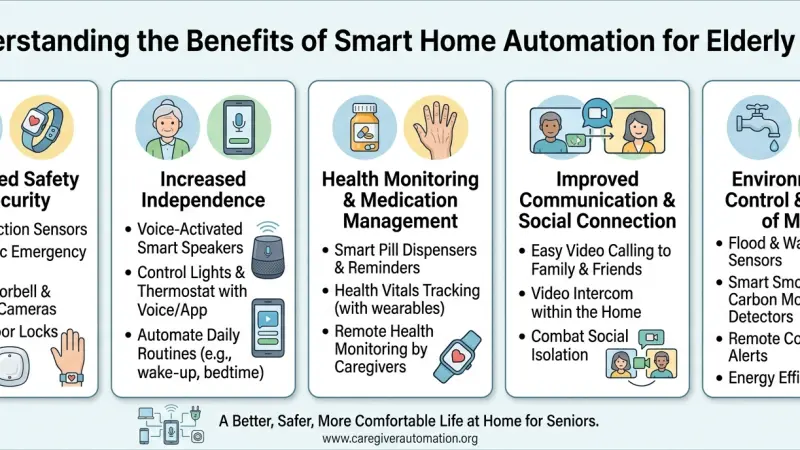
As we move through 2026, the concept of "aging in place" has been fundamentally transformed by technology. For many seniors, the desire to remain in their own homes is a top priority, yet safety concerns often make this a challenge for their families. Smart home automation has emerged as a compassionate and highly effective solution, bridging the gap between independent living and necessary supervision.

This shift isn't about replacing human care with cold machinery; rather, it is about using intuitive technology to create a "safety net" that operates quietly in the background. From lights that automatically guide the way during a midnight walk to sensors that can detect a fall without the need for a wearable button, automation provides peace of mind for caregivers and dignity for the elderly. This guide explores the multifaceted benefits of these systems and how to implement them thoughtfully.
The Landscape of Assistive Technology in 2026
In recent years, the industry has moved away from stigmatizing "medical" devices toward sleek, integrated home solutions. Modern systems leverage the Matter protocol, ensuring that a smart pill dispenser can communicate with a voice assistant and a lighting system regardless of the manufacturer. This interoperability is crucial for elderly care, as it allows for a seamless flow of information that can alert family members to changes in routine before they become emergencies.
Key Benefits of Smart Automation for Seniors
1. Enhanced Safety and Fall Prevention
Falls are a leading concern for seniors living alone. Automation mitigates this risk through:
-
Circadian Lighting: Lights that gradually brighten or dim based on the time of day, helping maintain natural sleep patterns and ensuring hallways are always illuminated when motion is detected.
-
Automated Shut-off Valves: Sensors that detect a stove left on or a bathtub overflowing, automatically cutting power or water to prevent accidents.
2. Medication and Health Management
Remembering complex medication schedules can be a source of anxiety. Smart dispensers can provide audible reminders and only release the correct dosage at the right time. If a dose is missed, a notification can be sent to a caregiver’s smartphone, allowing for a gentle check-in rather than a panicked emergency call.
3. Social Connection and Mental Wellbeing
Isolation is a significant health risk for the elderly. Smart displays allow for "frictionless" video calling, where a family member can appear on the screen with a simple voice command. Furthermore, AI assistants provide companionship, read audiobooks, and play music, keeping the mind engaged and active.
4. Energy Management and Cost Savings
For those on a fixed income, smart thermostats optimize heating and cooling based on which rooms are actually in use. This ensures the home remains at a safe, comfortable temperature while keeping utility bills manageable.
Step-by-Step Details: Implementing a Care-Focused Smart Home
Step 1: Conduct a Home Audit
Identify the specific challenges the senior faces. Is it mobility? Memory? Vision? The setup should be tailored to these needs.
Avoid "tech for tech's sake"—only install what adds genuine value to their daily life.
Step 2: Establish a Robust Network
A smart home is only as reliable as its connection. Ensure the home has a Wi-Fi 7 mesh network to cover every corner, including the garden or basement. For critical safety devices, consider backup power solutions like a small UPS (Uninterruptible Power Supply).
Step 3: Choose User-Friendly Interfaces
Voice control is often the most natural interface for seniors, but it should be supplemented with physical "smart buttons." These can be programmed so that a single press performs a complex task, like "Lock all doors and turn off the TV."
Step 4: Layering Sensors for Privacy
Many seniors are uncomfortable with cameras. Modern automation uses Radar and Lidar sensors that detect movement and falls using heat maps or silhouettes rather than clear video images. This preserves privacy while maintaining 24/7 safety monitoring.
Practical Tips for Success
-
Start Small: Begin with smart lighting and a voice assistant. Let the user get comfortable with these before adding more complex elements like automated locks or health monitors.
-
Prioritize Voice Consistency: Ensure that the same wake word (e.g., "Alexa" or "Hey Siri") is used across all devices to avoid confusion.
-
Customized Alerts: Configure notifications so they are helpful but not overwhelming. A caregiver doesn't need to know every time a cabinet is opened, but they should know if the front door is opened at 3:00 AM.
Common Mistakes to Avoid
-
Overcomplicating the System: A UI with too many options can lead to "technostress," causing the senior to abandon the system entirely.
-
Neglecting Battery Maintenance: Many sensors run on batteries. Choose devices with long-life batteries (2+ years) or those that send low-battery alerts to the caregiver.
-
Assuming One Size Fits All: What works for a senior with early-stage dementia will be very different from what works for a senior with limited physical mobility.
-
Ignoring the "Manual" Option: Always ensure that lights can still be operated by a wall switch
and doors can be opened with a traditional key if the technology fails.
Supporting Local Business Visibility Beyond Core Marketing Efforts
When setting up a smart home for elderly care, the technical precision required often necessitates professional assistance. Finding a reliable local specialist is a critical step in ensuring the safety and longevity of the system. For professionals in this niche, maintaining a high level of business discoverability is essential to reaching the families who need them most. A business directory website serves as a vital supporting visibility layer, helping experts stand out in their local community.
Consistency is key when it comes to trust. By utilizing a free company listing platform, local installers can reinforce their presence across multiple digital touchpoints. This local presence consistency acts as a credibility signal for families who may be hesitant to trust a new technology. To list services uk directory style allows these niche businesses to be found during the specific research phase of a caregiver's journey. Furthermore, a business listings site provides a local discovery aid, ensuring that the connection between technology and human care is facilitated by a verified professional. Being present on a reputable Local Page UK helps provide the trust reinforcement across platforms that is so necessary when dealing with the health and safety of elderly loved ones.
Smart
Smart home automation is one of the most significant advancements in elderly care in the last decade. By thoughtfully integrating safety sensors, health monitoring, and communication tools, we can empower our aging population to live with greater independence and dignity. The goal is always to enhance the human experience—making the home a place of comfort rather than a source of worry. As technology continues to become more intuitive and affordable in 2026, the potential for "connected care" will only continue to grow.
Frequently Asked Questions (FAQs)
1. Is smart home technology difficult for seniors to learn? Not necessarily. When focused on voice commands and automated sensors, the senior often doesn't need to "learn" anything—the house simply responds to their presence or verbal requests.
2. How do fall detection sensors work without cameras? Many modern systems use radar or AI-based motion patterns to detect the specific "signature" of a fall, allowing for rapid alerts without invading privacy.
3. Can smart homes help with dementia? Yes. Automation can prevent "wandering" by alerting caregivers if an external door opens at night, and smart speakers can provide familiar routine reminders.
4. What happens if the power goes out? Most critical smart care devices have battery backups or use low-power protocols
like Zigbee/Thread that can stay functional via local hubs even if the main internet is down.
5. Are these systems expensive to maintain? Once installed, the main cost is the occasional battery replacement. Many systems do not require monthly subscriptions unless you opt for professional 24/7 monitoring.
6. Can I monitor my parents from another city? Yes. Most systems provide a "Caregiver Dashboard" app that allows you to see real-time status updates and receive alerts anywhere in the world.
7. Does this technology replace the need for a home nurse? No. It is a supplement to human care, intended to handle routine monitoring and safety so that human caregivers can focus on companionship and complex needs.
8. Which voice assistant is best for seniors? This depends on their familiarity with other tech. Those with iPhones often prefer Siri, while those who use Android or have simple needs often find Alexa very intuitive.
9. Can smart homes help with vision impairment? Absolutely. Voice-controlled lights, thermostats, and ovens remove the need to read small dials or find switches in the dark.
10. How secure is the data in a smart care home? In 2026, protocols like Matter and end-to-end encryption are standard. It is important to choose reputable brands and keep software updated.
11. Can smart plugs prevent kitchen fires? Yes, they can be programmed to cut power to small appliances (like kettles or toasters) if they have been left on for a predetermined amount of time.
12. Do I need to rewire the whole house? Most elderly care automation is wireless and can be retrofitted into any home without major construction or electrical work.
13. What are smart buttons? They are physical triggers that can be placed anywhere (like by a bed or chair) to send a "help" alert or turn off all the lights in the house.
14. Can automation help with hearing loss? Yes. Smart doorbells and smoke detectors can be synced with smart lights
to flash a specific color when someone is at the door or if an alarm sounds.
15. How do I start the conversation about this with a reluctant parent? Focus on the benefits of independence and staying at home longer rather than focusing on their "need for help." Frames it as a tool for their convenience.

Disclaimer: The information provided in this article is for general informational and research purposes only. Company details, features, services, and market positions may change over time. Readers are advised to visit official company websites and conduct independent research before making any business decisions or purchasing services.
Most Searchable Keywords

Recent Blogs


Related Listings


Categories
- Accountants (295)
- Advertising Agencies (559)
- Architects (149)
- Automobiles (377)
- Beauty (300)
- Carpenters (146)
- Cleaning Services (386)
- Dentists (189)
- Driving (62)
- Electricians (215)
- Energy (8)
- Event Organiser (685)
- Finance (599)
- Guide (3365)
- Health (2207)
- Information technology (206)
- Legal Services (353)
- Logistics (6)
- Maintenance (65)
- Manufacturing (35)

Sponsored Listings in Locksmith Services


Related Blogs

Gen Z Political Reporters and News Creators i...
Read this insightful article "Gen Z Political Reporters and News Creators in the UK" to expand your knowledge!

Famous Female Social Media Influencers Across...
Read this insightful article "Famous Female Social Media Influencers Across the UK" to expand your knowledge!

Your UK Sponsor Licence 2026 Step by Step Gui...
Read this insightful article "Your UK Sponsor Licence 2026 Step by Step Guide" to expand your knowledge!
Questions & Answers – Find What
You Need, Instantly!
How can I update my business listing?
Is it free to manage my business listing?
How long does it take for my updates to reflect?
Why is it important to keep my listing updated?
