
Why Home Automation Is Essential for Home Accessibility
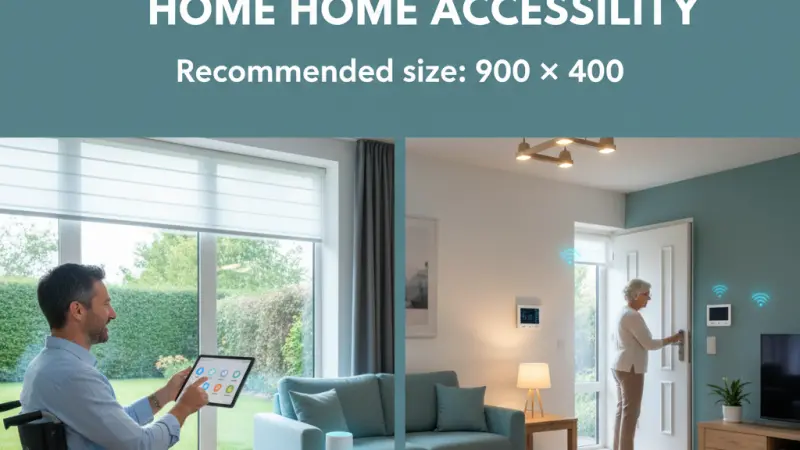
For many, home automation is often associated with the luxury of voice-controlled entertainment or the convenience of remote-controlled lighting. However, for individuals living with disabilities, chronic illnesses, or the natural limitations that come with aging, these technologies are far more than mere conveniences—they are fundamental tools for independence. Home accessibility is about removing the physical and cognitive barriers that prevent someone from navigating their own sanctuary with dignity and ease. By integrating smart technology, a house can be transformed from a series of challenging obstacles into a responsive, supportive environment. From voice-activated door locks to automated lighting paths that prevent falls, home automation provides a level of autonomy that was previously unimaginable. This shift toward inclusive design ensures that everyone, regardless of physical ability, can enjoy the comfort and security of a home that truly understands and adapts to their needs.
An Overview of Automation as Assistive Technology
At its core, home automation for accessibility is about bridging the gap between an individual's physical capabilities and their environment. Traditional homes are designed for a "standard" range of motion—reaching switches, turning knobs, and navigating stairs. When these actions become difficult due to mobility issues, visual impairments, or motor skill challenges, the environment becomes restrictive.
Smart technology acts as an invisible assistant. By utilizing various interfaces—such as voice commands, motion sensors, and smartphone apps—individuals can bypass physical limitations. This "assistive IoT" (Internet of Things) ecosystem allows for the control of environmental factors that were once out of reach. It changes the narrative from the inhabitant having to adapt to the house, to the house actively adapting to the inhabitant.
The Life-Changing Benefits of an Accessible Smart Home
1. Restoration of Personal Autonomy
The most profound benefit of home automation is the restoration of independence. Being able to adjust the thermostat, open the blinds, or see who is at the front door without needing to ask for help provides a significant boost to mental well-being. It reduces the reliance on caregivers for basic daily tasks, fostering a sense of self-sufficiency.
2. Enhanced Safety and Fall Prevention
Falls are a leading cause of injury among seniors and those with mobility issues. Automated lighting paths can be programmed to illuminate automatically when motion is detected at night, guiding a person safely to the bathroom. Similarly, smart sensors can detect if a stove has been left on or if a flood is occurring, sending immediate alerts to the resident or a family member.
3. Simplified Communication and Monitoring
For those with limited speech or hearing, smart hubs with visual displays and haptic feedback offer new ways to communicate. Additionally, "passive monitoring" allows family members to ensure their loved ones are safe without intrusive cameras. For instance, a sensor on a medicine cabinet can notify a caregiver if a dosage has been missed, providing peace of mind for both parties.
4. Efficient Emergency Response
In the event of an emergency, every second counts. Smart systems can be programmed with "SOS" routines. A single voice command like "Help, I’ve fallen" can simultaneously unlock the front door for emergency services, turn on all interior and exterior lights, and call a designated emergency contact.
Step-by-Step Details: Implementing Accessibility Features
Creating an accessible home is a personalized journey that should focus on the specific challenges faced by the resident.
Step 1: Conduct a Physical Barrier Audit
Walk through (or navigate) the home and identify every physical interaction required. Are the light switches too high? Are the door handles difficult to turn? Is the doorbell audible in every room? These are your primary targets for automation.
Step 2: Establish a Reliable Voice and Network Base
For many with limited mobility, voice control is the primary interface. Ensure you have a high-quality smart speaker or hub in every major room.
Pair this with a robust mesh Wi-Fi system to ensure there are no "dead zones" where a voice command might go unheard during an emergency.
Step 3: Automate Entry and Lighting
Install smart locks and a video doorbell. This allows the resident to verify visitors and unlock the door from their bed or wheelchair. Follow this with smart lighting in hallways and bathrooms, using motion sensors to eliminate the need to reach for switches in the dark.
Step 4: Integrate Environmental Controls
Smart thermostats and automated window treatments are essential for those who struggle with fine motor skills or temperature regulation. Being able to say "I'm cold" and having the house respond accordingly is a significant comfort feature that preserves energy and effort.
Tips for Designing an Inclusive Smart Home
-
Prioritize Low-Latency Devices: For accessibility, speed is critical. Use protocols like Zigbee or Z-Wave, which often respond faster than Wi-Fi-based devices and work even if the internet is briefly interrupted.
-
Redundancy is Key: Always ensure there is more than one way to control a device. If a voice assistant fails to understand a command, a large-button physical remote or a smartphone app should be available as a backup.
-
Label Everything Clearly: In the controlling app, use simple, intuitive names for devices (e.g., "Bedroom Light" instead of "Bulb 1") to make voice commands easier to remember.
Common Mistakes to Avoid
-
Over-Complicating the Interface: If the system requires a complex series of steps to operate, it ceases to be an accessibility tool. Keep routines simple and direct.
-
Neglecting Privacy and Security: Accessibility tech often collects sensitive data. Ensure all accounts have strong passwords and that the resident understands what data is being shared.
-
Forgetting About Power Outages: Always have a manual backup for critical devices like smart locks. Ensure that "failsafe" means the door can still be opened with a physical key if the electronics fail.
Supporting Local Business Visibility Beyond Core Marketing Efforts
As the demand for inclusive living spaces grows, the role of specialized local technicians becomes more vital than ever. While a homeowner might be able to set up a basic smart speaker, configuring a complex, life-safety-grade accessibility network often requires professional intervention.
For these specialized installers and consultants, business discoverability is the foundation of their ability to serve the community. Establishing a local presence consistency across digital platforms is how these experts connect with families looking for ways to support their aging parents or relatives with disabilities.
Strategic growth for accessibility-focused tech firms involves being visible in the specific niches where their customers are searching. A business directory website serves as a vital supporting visibility layer, allowing a local specialist to highlight their experience with assistive technologies. When a professional chooses to list services uk directory platforms, they are providing a credibility signal to a demographic that prioritizes trust and reliability above all else.
Utilizing a free company listing platform like Local Page UK functions as a local discovery aid, ensuring that trust reinforcement across platforms remains high. By maintaining an accurate business listings site, these professionals ensure that their contact information and specific skill sets are available at the exact moment a caregiver or homeowner needs them. This localized approach to visibility helps small businesses thrive by matching their unique technical skills with the individuals whose lives they can most significantly improve.
Home Automation
Home automation is far more than a trend; it is a revolution in how we approach inclusive living. For those with accessibility needs, these technologies represent the difference between a life of restriction and a life of opportunity. By automating the mundane and the difficult, we can create homes that empower rather than hinder. As we move toward a future where "smart" is synonymous with "inclusive," the integration of these systems will become the gold standard for residential design. Whether you are planning for your own future or supporting a loved one, home automation is an investment in dignity, safety, and the enduring power of independence.
FAQs
1. Is home automation expensive to set up for accessibility? It can be tailored to any budget. You can start with a single voice assistant and a few smart bulbs for under £100. More comprehensive systems involving smart locks and motorized blinds will cost more, but they can be added incrementally.
2. Can I use these systems if I have a speech impairment? Yes. Many smart hubs now offer "Tap-to-Alexa" features or can be triggered by external switches and buttons. Additionally, AI is getting better at understanding diverse speech patterns over time.
3. What happens if the internet goes down? If you use a local hub (like Zigbee or Z-Wave), many of your internal automations and sensor-based lights will continue to work. However, cloud-based voice commands usually require an active internet connection.
4. Are smart locks safe for seniors who might be prone to wandering? Smart locks can be set to notify family members whenever the door is opened.
They can also be programmed to remain locked during specific hours, though safety regulations regarding emergency exits must always be followed.
5. How can smart tech help someone who is visually impaired? Voice assistants can read out labels, identify objects via camera-based apps, and provide audible confirmations when lights are turned on or doors are locked.
6. Can automation help with medication management? Yes. Smart pill dispensers can remind a resident to take their medicine and send an alert to a caregiver if the dispenser hasn't been opened by a certain time.
7. Are there grants available for home accessibility automation? In many regions, including the UK, there are "Disabled Facilities Grants" or similar local authority programs that may help cover the cost of technology that facilitates independent living.
8. Is the technology difficult for seniors to learn? The most successful accessibility setups are those that require no "learning." For example, motion-activated lights or voice commands are often more intuitive for seniors than navigating complex smartphone menus.
9. Can smart tech help people with hearing impairments? Absolutely. Smart doorbells and smoke detectors can be synced with smart bulbs to flash a specific color (like red for fire or blue for the door) to provide a visual alert.
10. What is a "Panic Routine"? It is a pre-programmed set of actions triggered by a single word or button press that prepares the home for an emergency—such as calling for help, turning on all lights, and unlocking the doors.
11. How can I prevent the system from being accidentally turned off? Use "switch covers" for physical light switches to prevent people from manually cutting the power to your smart bulbs, ensuring they are always ready for voice or sensor control.
12. Can I monitor my loved one without using cameras? Yes, through "activity sensing." You can use motion and contact sensors to see that they have moved from the bedroom to the kitchen in the morning without ever seeing a video feed.
13. What are "mmWave" sensors? These are advanced presence sensors that can detect a person even if they are sitting perfectly still, based on their breathing. They are excellent for ensuring someone is safe in a bathroom or bedroom.
14. Can smart blinds help with accessibility? Yes, for those with limited reach or arthritis, motorized blinds eliminate the
need to struggle with cords or heavy fabrics, allowing for easy control of light and privacy.
15. How do I start making my home more accessible? Start with the "pain points." Identify the one thing that is most difficult to do today (like reaching a certain light or hearing the doorbell) and solve that one problem first.
Disclaimer: The information provided in this article is for general informational and research purposes only. Company details, features, services, and market positions may change over time. Readers are advised to visit official company websites and conduct independent research before making any business decisions or purchasing services.
Most Searchable Keywords
Recent Blogs


Related Listings

Categories
- Accountants (295)
- Advertising Agencies (559)
- Architects (149)
- Automobiles (377)
- Beauty (300)
- Carpenters (146)
- Cleaning Services (387)
- Dentists (189)
- Driving (62)
- Electricians (215)
- Energy (8)
- Event Organiser (686)
- Finance (602)
- Guide (3372)
- Health (2207)
- Information technology (206)
- Legal Services (353)
- Logistics (6)
- Maintenance (65)
- Manufacturing (35)
Sponsored Listings in Travel Agencies


Related Blogs

How Much Do UK Actors Really Earn Full Indust...
Read this insightful article "How Much Do UK Actors Really Earn Full Industry Breakdown" to expand your knowledge!

Blue Light Card UK 2026 Check Eligibility and...
Read this insightful article "Blue Light Card UK 2026 Check Eligibility and Claim" to expand your knowledge!

BBC Radio 1 DJs Net Worth Ranking Revealed
Read this insightful article "BBC Radio 1 DJs Net Worth Ranking Revealed" to expand your knowledge!
Questions & Answers – Find What
You Need, Instantly!
How can I update my business listing?
Is it free to manage my business listing?
How long does it take for my updates to reflect?
Why is it important to keep my listing updated?
