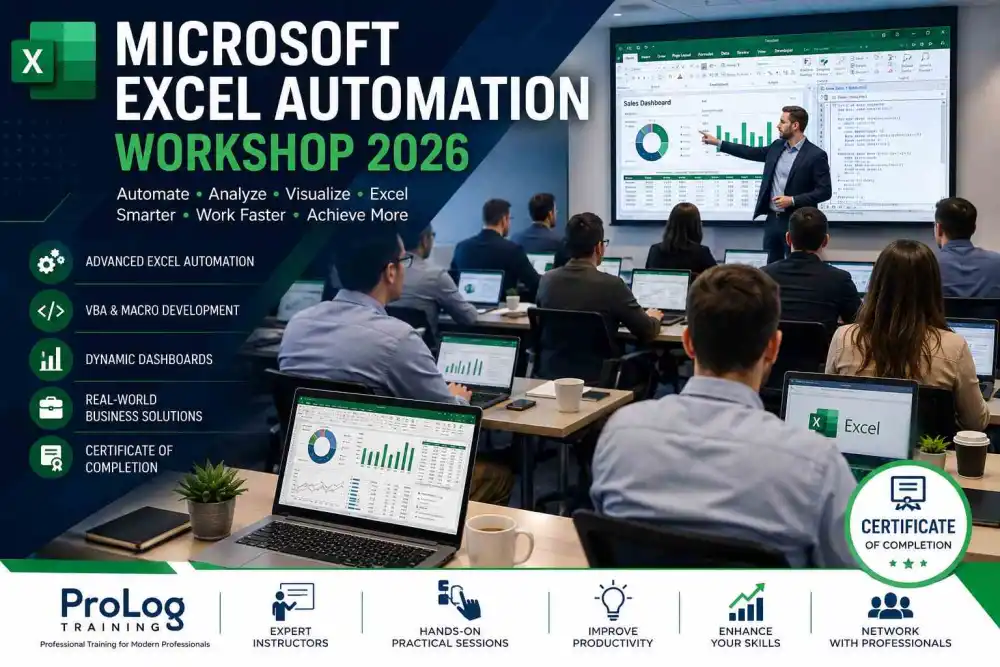
Microsoft Excel remains one of the most widely used business applications across industries, enabling organizations to manage data, perform financial analysis, create reports, and make informed decisions. However, many professionals only use a fraction of Excel's capabilities, leaving significant opportunities for automation and efficiency untapped. The Microsoft Excel Automation Workshop 2026, organized by ProLog Training, is designed to help professionals unlock the full potential of Microsoft Excel through advanced automation techniques, VBA programming, dynamic reporting, and productivity-enhancing tools.
This intensive one-day workshop provides participants with practical knowledge that can immediately be applied in the workplace. Delivered by experienced Microsoft Office trainers, the event focuses on real-world business scenarios, allowing delegates to gain hands-on experience while learning advanced Excel skills. Whether you work in finance, administration, human resources, operations, sales, or project management, this workshop will help you reduce manual tasks, improve reporting accuracy, and streamline everyday business processes.
Why Attend This Workshop?
Businesses rely on accurate data and efficient reporting to remain competitive. Manual spreadsheet processes often consume valuable time and increase the risk of errors. By learning automation techniques, participants can significantly reduce repetitive work while improving the quality and consistency of business reports.
During this workshop, delegates will discover how to automate routine tasks using Microsoft Excel's powerful features, including formulas, macros, VBA programming, PivotTables, Power Query, and dashboard creation. The course combines expert instruction with practical exercises to ensure every participant leaves with confidence in applying newly acquired skills.
Learn from Industry Experts
ProLog Training has established a strong reputation for delivering high-quality Microsoft Office and business productivity training across the United Kingdom. Their experienced trainers understand both the technical capabilities of Excel and the practical challenges faced by modern businesses.
Throughout the workshop, instructors provide live demonstrations, practical exercises, and personalized guidance. Participants are encouraged to ask questions, explore business scenarios, and develop solutions tailored to their professional responsibilities. This interactive approach ensures every attendee gains practical knowledge rather than simply observing presentations.
Workshop Learning Objectives
The Microsoft Excel Automation Workshop has been carefully designed to help participants achieve measurable improvements in workplace productivity. Throughout the day, attendees will learn how to:
- Build automated spreadsheets for repetitive business tasks.
- Record, edit, and manage Excel macros.
- Understand the fundamentals of Visual Basic for Applications (VBA).
- Create interactive business dashboards.
- Develop dynamic reports using PivotTables and PivotCharts.
- Clean and organize data with Power Query.
- Improve workbook security and data validation.
- Automate formatting and report generation.
- Apply best practices for managing large datasets.
- Increase overall efficiency while reducing manual errors.
These practical skills enable professionals to complete complex reporting tasks in minutes rather than hours, freeing valuable time for higher-value business activities.
Hands-on Practical Sessions
Unlike traditional lecture-based training, this workshop emphasizes practical learning through guided exercises and real-world case studies. Participants will work with sample business datasets that reflect everyday workplace challenges.
Exercises include creating automated financial reports, developing sales dashboards, building employee tracking systems, generating management reports, and automating repetitive calculations. Each activity is designed to reinforce newly learned concepts while demonstrating how automation can improve operational efficiency.
By the end of the workshop, participants will have created several practical Excel solutions that can serve as templates for future projects within their own organizations.
Advanced Excel Features Covered
The workshop explores a wide range of advanced Excel capabilities that are commonly used in modern business environments, including:
- Advanced formulas and logical functions
- Dynamic arrays and lookup functions
- Conditional formatting techniques
- Named ranges and structured tables
- PivotTables and PivotCharts
- Interactive dashboards
- Power Query fundamentals
- Data validation and protection
- Workbook collaboration
- Macro recording and editing
- VBA automation basics
- Automated reporting tools
Each topic is explained using practical business examples that demonstrate how these features improve efficiency and support better decision-making.
Benefits for Every Industry
Excel automation is valuable across virtually every business sector. Finance professionals can automate monthly reporting, budgeting, and forecasting. HR teams can streamline employee records and workforce analytics. Sales departments can generate automated performance reports, while operations managers can simplify inventory tracking and operational analysis.
Project managers will benefit from improved scheduling and progress tracking, while administrative professionals can reduce repetitive tasks through intelligent spreadsheet automation. Regardless of industry or department, attendees will gain valuable techniques that increase productivity and improve reporting quality.
Networking with Business Professionals
In addition to technical learning, the workshop provides an excellent opportunity to network with professionals from various industries. During scheduled breaks and interactive discussions, participants can exchange ideas, discuss workplace challenges, and explore innovative ways organizations are using Microsoft Excel to improve efficiency.
These networking opportunities encourage collaboration and allow delegates to gain valuable insights from peers facing similar business challenges.
Professional Course Materials
Every participant receives comprehensive training materials that support continued learning after the workshop. These resources include step-by-step guides, practical exercises, keyboard shortcuts, VBA examples, workbook templates, and reference materials that can be used in everyday business operations.
Having access to professionally developed course documentation ensures delegates can confidently apply their new knowledge long after the event has concluded.
Why Choose ProLog Training?
ProLog Training is committed to delivering practical, business-focused training that produces measurable results. Their instructor-led workshops combine technical expertise with real-world experience, ensuring participants receive relevant, engaging, and immediately applicable knowledge.
The organization focuses on helping businesses improve productivity through professional development, empowering employees with the skills needed to maximize Microsoft Office applications and modern workplace technologies.
Event Highlights
- Instructor-led Microsoft Excel automation training
- Hands-on VBA and macro development
- Interactive dashboard creation
- Practical business case studies
- Live demonstrations and guided exercises
- Expert support throughout the workshop
- Professional networking opportunities
- Comprehensive training materials
- Certificate of completion
- Skills that can be implemented immediately in the workplace
Who Should Attend?
This workshop is ideal for:
- Business Analysts
- Finance Professionals
- Project Managers
- HR Executives
- Administrative Professionals
- Operations Managers
- Office Managers
- Sales Coordinators
- Data Analysts
- Anyone looking to improve Microsoft Excel productivity
Whether you are seeking career advancement, improved workplace efficiency, or stronger technical skills, this workshop offers valuable knowledge that can make a significant impact on your daily work.
Register Today
Take your Microsoft Excel expertise to the next level by joining the Microsoft Excel Automation Workshop 2026. Gain practical automation skills, learn from experienced trainers, and discover how advanced Excel techniques can improve productivity, enhance reporting accuracy, and streamline business operations.
Whether you are looking to automate repetitive tasks, build professional dashboards, develop VBA solutions, or create powerful business reports, this workshop provides the knowledge and confidence needed to succeed in today's data-driven workplace. Don't miss this opportunity to invest in your professional development and become a more efficient, productive, and valuable member of your organization.
Key Event Highlights
- Advanced Microsoft Excel automation techniques
- Practical VBA and macro development sessions
- Real-world business reporting exercises
- Interactive trainer-led workshops
- Certificate of completion for participants
Venue & Location Info
Timings
Entry Fees
Event Type
Estimated Turnout & Audience
Community Reviews
How was your experience?
Share your thoughts with the community. Your reviews help others discover the best local events.