
Discover All Events
Explore 1 premium experiences in all locations
Promoted
List Your Next Big Event
Reach millions of attendees by showcasing your conferences, workshops, or exhibitions on the world's most trusted event platform.
Create Your Event Now
FEATURED
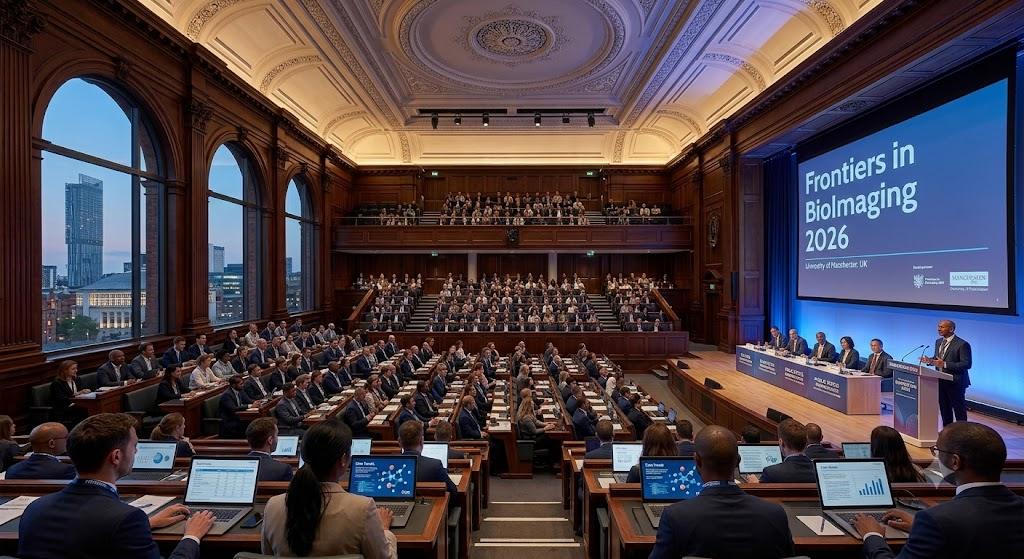
Frontiers in BioImaging 2026
The Frontiers in BioImaging 2026 event, organized by the Royal Microscopical Society, represents a premier gathering for professionals and researchers dedicated to exploring the absolute cutting edge of microscopy in the life sciences. Taking place in Manchester, this high-profile seminar focuses heavily on correlative microscopy—a powerful discipline that leverages the combined strengths of traditionally distinct imaging techniques to answer complex scientific questions that no single approach can solve independently. Attendees will have the unique opportunity to dive deep into multidisciplinary workflows, discovering how integrated imaging frameworks bridge gaps between different scales of biological observation.
Technical Advancements and Core Scientific SessionsThe comprehensive program features a rich variety of technical developments spanning both light and electron microscopy. Sessions are structured to highlight novel hardware enhancements, advanced detector technologies, and innovative specimen preparation methods designed to maximize clarity and resolution. Alongside hardware advancements, the meeting places significant emphasis on sophisticated image analysis and data interpretation tools. Experts will present cutting-edge computational pipelines, machine learning applications for automated feature extraction, and standardized methodologies to enhance reproducibility and robustness across biological datasets.
Empowering Early-Career Researchers and ProfessionalsDesigned with a strong commitment to community growth, this event creates an inclusive, welcoming environment tailored particularly for early-career researchers, PhD students, and core facility technicians to learn, connect, and thrive. Participants can engage directly with prominent leaders in the field, ask technical questions during interactive question-and-answer panels, and present their own findings through specialized poster sessions. The collaborative atmosphere encourages active dialogue, mentorship pairings, and the exchange of best practices regarding facility management, sample optimization, and advanced microscopy execution.
Registration, Sponsorship, and Participation DetailsProfessionals looking to advance their expertise in modern biological imaging can secure their attendance through the official Royal Microscopical Society booking portal. The event also provides exceptional networking platforms and corporate exhibition spaces, allowing leading industry vendors to demonstrate their latest technological breakthroughs directly to an engaged, specialized audience. Whether you are an experienced microscopist managing a core facility or an emerging researcher utilizing advanced bioimaging techniques for the first time, this Manchester meeting delivers essential insights into the future trajectory of biological discovery.
Manchester Conference Centre,
Manchester
4
0
FEATURED

Jun 29, 2026 - Jul 29, 2058
Resolve Display Issues in QuickBooks Desktop Quickly
Introduction
QuickBooks Desktop has become a preferred accounting software solution for thousands of businesses across the United States because of its comprehensive financial management capabilities. From managing invoices and payroll to tracking inventory, recording expenses, and preparing financial reports, the software simplifies daily accounting tasks for businesses of every size. Since accounting professionals spend long hours working within QuickBooks, a responsive and properly functioning interface plays a significant role in maintaining efficiency.
Despite its reliability, users occasionally experience graphical problems that affect the software's usability. One such issue is the QuickBooks Black and White Screen Issue, where the entire application unexpectedly changes from its standard colorful interface to a grayscale display. Menus, toolbar icons, navigation panels, reports, and transaction windows lose their normal colors, making it difficult to distinguish different options. Although this issue rarely affects company data, it can interrupt accounting workflows and reduce overall productivity until the display is restored.
What Is the QuickBooks Black and White Screen Issue?
The QuickBooks Black and White Screen Issue is a display-related problem that causes the QuickBooks Desktop interface to appear entirely in black, white, and gray shades. Instead of displaying colorful menus and highlighted buttons, the software loads without its normal color palette.
Unlike company file corruption or database errors, this issue affects only the visual appearance of QuickBooks Desktop. Users can often continue working with their company file, but navigating through the software becomes slower because visual indicators are no longer easy to recognize.
How QuickBooks Desktop Generates Its Display
QuickBooks Desktop relies on Windows graphics services to render its interface. Several system components work together, including graphics drivers, display adapters, monitor resolution, Windows themes, display scaling, DirectX support, graphics memory, and hardware acceleration.
Whenever one or more of these components become outdated or improperly configured, users may experience various display issues in QuickBooks Desktop. These problems may include blurry fonts, distorted windows, missing icons, screen flickering, color distortion, or a completely black-and-white interface.
Symptoms of the QuickBooks Black and White Screen Issue
The problem may appear differently depending on the system configuration, but common symptoms include:
QuickBooks opens with a black-and-white interface.
Toolbar icons lose their original colors.
Navigation panels appear completely gray.
Reports become difficult to read.
Buttons no longer display highlighted colors.
Transaction windows appear faded.
Screen flickering occurs before colors disappear.
Colors vanish after Windows updates.
Certain QuickBooks windows display correctly while others remain grayscale.
Other display issues in QuickBooks Desktop appear simultaneously.
These symptoms usually indicate a graphical rendering problem rather than an issue with the company file itself.
Common Causes of the QuickBooks Black and White Screen Issue
Several technical issues may trigger this display problem.
Outdated Graphics Drivers
Graphics drivers allow Windows to communicate with the computer's graphics hardware. If the installed driver becomes outdated or incompatible, QuickBooks may display graphical abnormalities, including grayscale screens.
Windows Color Filters
Windows Accessibility includes Color Filters that can convert the display into grayscale. Accidentally enabling this feature is one of the most common reasons for the QuickBooks turned black and white issue.
High Contrast Settings
High Contrast Mode changes the Windows color scheme to improve accessibility. These changes may also affect how QuickBooks Desktop displays its interface.
Corrupted QuickBooks Installation Files
Damaged program files caused by interrupted updates or incomplete installations may prevent QuickBooks from loading graphical components correctly.
Incorrect Display Scaling
Display scaling values that exceed recommended levels may interfere with QuickBooks rendering, particularly on high-resolution monitors.
Graphics Hardware Compatibility
Some graphics cards experience compatibility issues with Windows rendering technologies, causing QuickBooks Desktop to display unusual colors or grayscale interfaces.
Windows Update Conflicts
Major Windows updates occasionally install new graphics drivers or modify display settings, resulting in temporary compatibility problems with QuickBooks Desktop.
Corrupted Windows User Profile
A damaged Windows user profile may contain incorrect graphics settings that affect QuickBooks while leaving other applications unaffected.
Why This Display Issue Can Reduce Productivity
Although the QuickBooks Black and White Screen Issue usually does not damage accounting records, it can significantly impact productivity. Employees may spend additional time locating toolbar icons, identifying highlighted fields, reviewing reports, and navigating transaction windows.
For businesses that rely heavily on QuickBooks Desktop throughout the day, even a display-only problem can delay bookkeeping, payroll processing, invoicing, and financial reporting.
qbookassist,
Frodsham
63
0

Jul 21 - 31, 2026
Your Moment: dBD Communications 2026
The campaign focuses on authentic moments from sectors including rail, aviation, construction and infrastructure. Teams are encouraged to submit a photograph or short video showing their people in action while using dBD wireless systems. The initiative is intended to highlight the practical role that effective communication plays in helping teams coordinate activities, maintain operational awareness and support safer working environments.
The campaign is particularly relevant to organisations where communication must remain clear and dependable despite challenging conditions. In these environments, teams may be working around aircraft, rail infrastructure, construction equipment, machinery or other operational hazards. Clear communication can therefore form an important part of effective coordination and workplace safety.
For participants in and around Basildon, the initiative also provides an opportunity to connect with a communications technology company that has its headquarters at Nobel Square in the Burnt Mills Industrial Estate. dBD Communications specialises in wireless communication solutions serving sectors such as rail, aviation and construction.
What Participants Can Share
Participants can submit visual content that demonstrates how their teams use dBD systems in everyday or specialist operations. The strongest submissions are likely to be those that show the technology naturally integrated into the working environment rather than staged promotional photographs.
The initiative encourages teams to capture genuine moments of collaboration. This could include workers coordinating activities on a railway project, aviation personnel communicating during ground operations, construction teams managing demanding site activities or infrastructure professionals working together in challenging conditions.
The source guidance encourages submissions to clearly show the dBD equipment in use and to capture teams working together. Participants are also encouraged to keep images natural and authentic. Unique locations and creative applications can make submissions particularly interesting, provided that appropriate permissions and safety requirements are followed.
This approach gives the campaign a strong real-world focus. Instead of simply presenting communication technology as a product, the initiative demonstrates how people use it during actual operations. It also provides an opportunity for professionals across different industries to see how communication systems can be applied in different environments.
Industries and Professionals
The Your Moment initiative is particularly relevant to professionals involved in safety-critical and operationally complex industries.
In the rail sector, communication is important for teams working on infrastructure, engineering projects, maintenance and other operational activities. Railway environments can involve multiple teams working simultaneously, making reliable coordination an important consideration.
In aviation, ground-handling and airside teams often operate in noisy and fast-moving environments. Wireless communication can help teams coordinate activities where conventional communication methods may be difficult to use effectively.
The construction industry is another important area, particularly for teams working around heavy machinery, high noise levels and complex project environments. Communication between workers and supervisors can support more organised operations.
The campaign also covers infrastructure projects, where teams may work across large sites or in environments requiring effective coordination between multiple personnel.
dBD Communications describes its wider work as supporting rail, air, construction and other demanding operational environments through wireless communication solutions. Its Your Moment initiative brings the focus back to the people using those systems in real-world situations.
Why Participate?
Taking part in Your Moment offers organisations an opportunity to showcase the people behind their operations. Safety-critical work is often carried out away from public attention, despite the important role these teams play in keeping infrastructure, transport and industrial services running.
The initiative provides a platform for organisations to share these stories and demonstrate how communication technology supports their daily activities. For businesses using dBD wireless systems, it can also be an opportunity to highlight their teams, working environments and operational achievements.
According to dBD Communications, participants in the 2026 campaign can receive a limited-edition 2026 calendar, while entries are also connected with monthly luxury hamper prize draws. Selected submissions may be featured in dBD Communications' printed calendar and across its industry-facing channels.
The initiative can therefore be viewed as both a recognition campaign and an industry showcase. It celebrates the people using communication systems while illustrating the practical environments in which reliable communication technology is needed.
How to Take Part
The participation process is straightforward. Teams should prepare a photograph or short video showing their people using dBD Communications wireless systems in an operational environment.
The equipment should be clearly visible, while the image should also demonstrate genuine teamwork and activity. Participants should ensure that everyone appearing in the content has the appropriate permission and that any photography or filming is carried out safely.
Submissions for the initiative can be sent to marketing@dbdcommunications.co.uk. The official campaign page encourages contributors to show their equipment in use, capture authentic teamwork and consider creative or unusual operational settings.
Because the initiative is centred on real operational environments, participants should avoid compromising safety or disrupting normal work activities simply to create a photograph. The strongest content is likely to come naturally from everyday professional operations.
Basildon Connection
The event listing is associated with Basildon because dBD Communications' listed address is Unit 2 Nobel Square, Burnt Mills Industrial Estate, Basildon, Essex, SS13 1LS, United Kingdom. This location provides a clear local connection for businesses and professionals searching for telecommunications, wireless communication and industry-focused activities in Basildon.
The company's work extends beyond Basildon, with its communication solutions serving customers and industries across different operational environments. The Your Moment initiative similarly has an international and cross-sector perspective, encouraging contributions that demonstrate real-world applications of its technology.
For local professionals, the campaign can therefore provide an opportunity to engage with a Basildon-based specialist while participating in a wider industry showcase.
Communication, Safety and Teamwork
One of the central themes behind Your Moment is the connection between communication and effective teamwork. In safety-critical environments, teams may need to coordinate quickly and efficiently while dealing with noise, distance, machinery and changing operational conditions.
dBD Communications' wider industry focus includes wireless systems designed for demanding applications across rail, aviation and construction. The Your Moment campaign gives users an opportunity to demonstrate these applications through real examples rather than relying solely on technical descriptions.
By sharing authentic examples, participants can help other professionals understand the practical benefits and potential applications of wireless communication technology. This creates an industry knowledge-sharing element alongside the promotional and recognition aspects of the campaign.
Who Should Attend or Participate?
The initiative is most suitable for organisations and professionals who already use dBD wireless communication systems or work within industries where such technology is relevant.
Potential participants include rail contractors, railway engineering teams, aviation ground-handling personnel, airport operations teams, construction companies, infrastructure contractors, site managers, safety professionals and communications specialists.
The initiative may also interest business leaders and technology decision-makers who want to explore how wireless communication supports operational efficiency and team coordination.
Because the campaign is based on real-world submissions, it is especially relevant to teams with interesting projects, unusual operating environments or strong examples of collaborative working.
Event Participation and Contact
The Your Moment initiative is presented as an ongoing campaign rather than a conventional ticketed conference. Participation is free, and the primary action is to submit suitable photographs or short videos showing dBD wireless systems being used by teams in real operational environments.
For further information, prospective participants can contact dBD Communications by telephone on +44 (0) 1268 724 617 or by email. The official Your Moment page lists marketing@dbdcommunications.co.uk for submissions, while the company's general sales contact is listed as sales@dbdcommunications.co.uk.
As the campaign is ongoing through 2026, interested participants should check the official page for the latest participation requirements, deadlines and campaign updates before submitting content.
Your Moment: dBD Communications 2026 provides an opportunity to celebrate the people who use wireless communication technology in demanding operational environments. With a Basildon connection through dBD Communications' headquarters, the initiative is relevant to local businesses while maintaining a broader focus on rail, aviation, construction and infrastructure professionals.
The campaign's emphasis on genuine photographs and short videos makes it different from a traditional business event. It is an invitation for teams to demonstrate their work, highlight their collaboration and show how communication systems are used in real situations.
For eligible participants, the campaign offers recognition, potential industry exposure and opportunities connected with the 2026 calendar initiative. Most importantly, it places the focus on the people behind safety-critical operations and the practical role that clear communication plays in helping teams work effectively.
Anyone interested in participating should review the official campaign information and contact dBD Communications directly for the latest requirements and participation details.
dBD Communications,
Basildon
22
0
- Prev
- 1
- Next
Share This Page
My Page
Scan QR to open
Barcode