
10 Best FAQ Page Examples & How to Build One for SEO Success
In the digital landscape, your website is often the first point of contact between your brand and a potential customer. While homepages and product descriptions get the lion's share of attention, there is a silent powerhouse that often goes neglected: The FAQ Page.
Far from being just a "dumping ground" for miscellaneous information, a well-structured Frequently Asked Questions page is a strategic asset. It serves as a 24/7 customer service representative, an SEO magnet, and a conversion tool that addresses "buyer friction" in real-time.
In this comprehensive guide, we will explore the anatomy of a perfect FAQ section, how to leverage it for search engine rankings, and analyze 10 world-class examples that you can emulate.
What is an FAQ Page? (More Than Just Definitions)
The acronym FAQ stands for Frequently Asked Questions. At its core, an FAQ page is a curated collection of common queries that prospective or current customers have about your products, services, or brand identity.
However, in the modern era of web design, an FAQ page is much more. It is a knowledge base designed to:
Reduce Customer Support Overhead: By answering common questions, you free up your team to handle complex issues.
Establish Authority: Detailed, transparent answers build trust.
Boost SEO: FAQ content is highly "crawlable" and often targets long-tail keywords and "People Also Ask" (PAA) boxes on Google.
What Should You Include on an FAQ Page?
The biggest mistake businesses make is guessing what their customers want to know. Instead, your FAQ content should be data-driven.
Listen to Your Frontline
Talk to your customer support team, sales reps, and social media managers. What are the top 10 questions they hear every single week? If people are asking, you should be answering.
Essential Categories to Cover:
Logistics: Shipping times, return policies, and international availability.
Product Specifics: Materials used, sizing guides, or compatibility.
Account Management: How to reset passwords, cancel subscriptions, or update billing.
Security & Trust: Privacy policies, data handling, and money-back guarantees.
How to Write an FAQ for a Website: The Step-by-Step Process
Writing for the web requires a different approach than traditional copywriting. Here is how to craft answers that satisfy both humans and search engines.
A. Choose the Right Questions
Avoid "fluff." Don't include questions like "Why is our company so amazing?" instead, focus on "How does your product compare to competitors?" or "What is the refund process?" Be honest and helpful.
B. Create Dedicated Pages for Complex Topics
If a question requires a 1,000-word answer, don't cram it into a list. Provide a concise summary on the FAQ page and use a "Read More" link to a dedicated blog post or landing page. This creates a powerful internal linking structure that search engines love.
C. Write in the "Voice of the Customer"
Phrasing your questions from the perspective of the user is vital. Use "How do I..."
instead of "How do users..." This makes the content feel personal and direct.
D. Keep Answers Concise
The goal is speed. A user visits an FAQ because they have a problem they want solved quickly. Use bullet points and short paragraphs to make the content scannable.
E. The Power of Regular Maintenance
A stale FAQ page is worse than no FAQ page. If you change your pricing or shipping provider but forget to update the FAQ, you create a trust gap. Set a quarterly reminder to review your content for accuracy.
FAQ Page Design Ideas & UX Best Practices
Design is just as important as the copy. If a user can’t find the answer, the information might as well not exist.
Accordion Menus: These allow users to see a list of questions and click to expand the answer. It prevents the page from looking cluttered and reduces scrolling.
Search Bars: For large companies, a search bar is non-negotiable. It allows users to skip the navigation and go straight to the solution.
Strategic Internal Linking: Use your FAQ to guide users back into the sales funnel. If you answer a question about a specific service, link to that service page.
SEO Optimization (Schema Markup): Use FAQ Schema (JSON-LD) to help Google understand your content. This increases the chances of your questions appearing directly in the search results as "Rich Snippets."
10 World-Class FAQ Page Examples
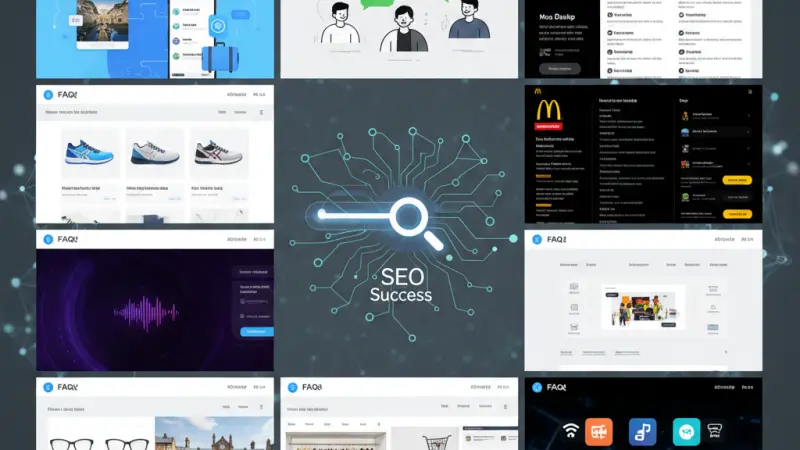
1. Travel Excellence: TUI
TUI organizes their FAQ into "buckets" of information (Pre-holiday, Travel Details, On-Holiday). This chronological categorization mirrors the customer's journey. They also feature a prominent search bar that allows for detailed queries up to 120 characters.
2. Branding Consistency: WhatsApp
WhatsApp keeps it simple. They use their signature brand colors and a clean sidebar for navigation. Their use of simplistic imagery alongside popular topics makes technical troubleshooting feel accessible and less intimidating.
3. Data-Driven Volume: McDonald’s
With nearly 1,000 questions answered, McDonald’s uses their FAQ to address everything from food sourcing to corporate responsibility. Their design is minimalist—black text on white—ensuring the information is the star of the show.
4. Community Integration: Spotify
Spotify utilizes two layers: a company-managed FAQ for official billing/technical issues, and a Community Page. This allows power users to help others, creating a massive repository of user-generated content that ranks highly on Google.
5. Visual Navigation: JD Sports
JD Sports understands their mobile-first audience. They use a carousel of FAQs, allowing users to swipe through high-level topics. This "app-like" feel prevents the desktop version of the site from feeling like a wall of text.
6. Human Touch: University of Manchester
Academic institutions can be bureaucratic. Manchester University combats this by placing a "Contact Us" section prominently at the bottom. If the FAQ doesn't solve it, the path to human help is clear.
7. Retail Precision: Marks & Spencer
M&S uses a "Top 5" (or 6) feature, highlighting the most current concerns (like holiday delivery dates). They also integrate a "Find a Store" map directly into the FAQ, bridging the gap between digital help and physical retail.
8. Service Navigation: Specsavers
Specsavers uses a hybrid approach: a search bar for quick fixes and a sidebar for categorical browsing. This ensures that whether you are looking for contact lens advice or glasses repair, the path is only two clicks away.
9. Technical Transparency: Adobe
Adobe stands out by including a "Last Updated" timestamp on their service-specific FAQs. This is a massive trust signal for software users who need to know if the instructions apply to the latest version of the Creative Cloud.
10. The Rebel Brand: Cards Against Humanity
This brand proves that FAQs don’t have to be boring. They use sarcastic, on-brand humor to answer questions.
While this doesn't work for a bank, it works perfectly for a party game, proving that your FAQ should reflect your brand’s unique personality.
Grow Your Business with Local Page UK
Before you dive into building your FAQ, remember that being found is just as important as being helpful. If you are a business owner in the United Kingdom, visibility is the key to growth.
At Local Page UK, we provide the ultimate platform to boost your digital presence. Whether you are looking for a uk online business directory to list your services or trying to find local businesses uk that you can partner with, our platform is the gold standard. We are a comprehensive uk business directory and uk local business directory designed to connect quality providers with eager customers.
For those just starting out, we offer a business listing uk to get you on the map. Our business listing uk and business listing uk options ensure that every entrepreneur has a voice. From a business listing uk to a specialized business listing uk, we cover all bases.
Explore our local business listings uk to see how others are succeeding. Our uk service listings and uk verified business listings are trusted by thousands. Whether you are looking for a uk home services directory or uk professional services listings, our local page uk listings provide the data you need. Join the local page uk business directory today and ensure your uk business listings online are working as hard as you are.
Questions Clients Commonly Ask
Does an FAQ page really help with SEO?
Yes! By using long-tail keywords and structured data (Schema), you can rank for specific questions and appear in "Featured Snippets."
How long should an FAQ answer be?
Ideally, between 50 to 100 words. If it needs to be longer, link to a detailed blog post.
Should I use an accordion design?
Yes, it saves space and improves the user experience on mobile devices.
How often should I update my FAQ?
At least once every six months, or whenever you launch a new product or change a policy.
Can I use images in my FAQ?
Absolutely. Screenshots and "how-to" videos can often explain things better than text.
Where should I place the FAQ link?
In the footer of every page and often in the main navigation under "Support" or "Resources."
Should I have one giant FAQ or multiple small ones?
If you have many products, category-specific FAQs (like Adobe does) are much more effective.
What is FAQ Schema?
It is a specific type of code you add to your page to help search engines display your Q&As directly on the search results page.
How do I find questions for my FAQ?
Check your sent emails, talk to your support team, and use tools like "AnswerThePublic."
Should I include a search bar on my FAQ page?
If you have more than 15–20 questions, a search bar is highly recommended.
Can I use my FAQ to sell products?
Yes, by naturally linking to products that solve the user's question.
Is it okay to be funny in an FAQ?
Only if it fits your brand voice (like Cards Against Humanity). Otherwise, stay professional.
What if I don’t have any questions yet?
Look at your competitors' FAQ pages to see what their customers are concerned about.
Does an FAQ reduce phone calls?
Yes, a well-designed FAQ can reduce basic support inquiries by up to 30%.
Should I allow users to rate the answers?
Yes, asking "Was this helpful?" provides invaluable data on which answers need improvement.
Disclaimer: The information provided in this article is for general informational and research purposes only. Company details, features, services, and market positions may change over time. Readers are advised to visit official company websites and conduct independent research before making any business decisions or purchasing services.
Most Searchable Keywords
Recent Blogs


Related Listings
Categories
- Accountants (295)
- Advertising Agencies (559)
- Architects (149)
- Automobiles (377)
- Beauty (300)
- Carpenters (146)
- Cleaning Services (387)
- Dentists (189)
- Driving (62)
- Education (1)
- Electricians (215)
- Energy (8)
- Event Organiser (687)
- Finance (602)
- Guide (3383)
- Health (2207)
- Information technology (206)
- Legal Services (361)
- Logistics (6)
- Maintenance (65)
Sponsored Listings in Health and Wellbeing


Related Blogs

UK Event Calendar — Complete Full-Year Guide
Read this insightful article "UK Event Calendar — Complete Full-Year Guide" to expand your knowledge!

SMCR Phase One 2026 New Rules for Checks and...
Read this insightful article "SMCR Phase One 2026 New Rules for Checks and References" to expand your knowledge!

UK Comedians With the Highest Net Worth in 20...
Read this insightful article "UK Comedians With the Highest Net Worth in 2026" to expand your knowledge!
Questions & Answers – Find What
You Need, Instantly!
How can I update my business listing?
Is it free to manage my business listing?
How long does it take for my updates to reflect?
Why is it important to keep my listing updated?
