
Best Practices for Home Automation Customer Onboarding The Ultimate Professional Guide
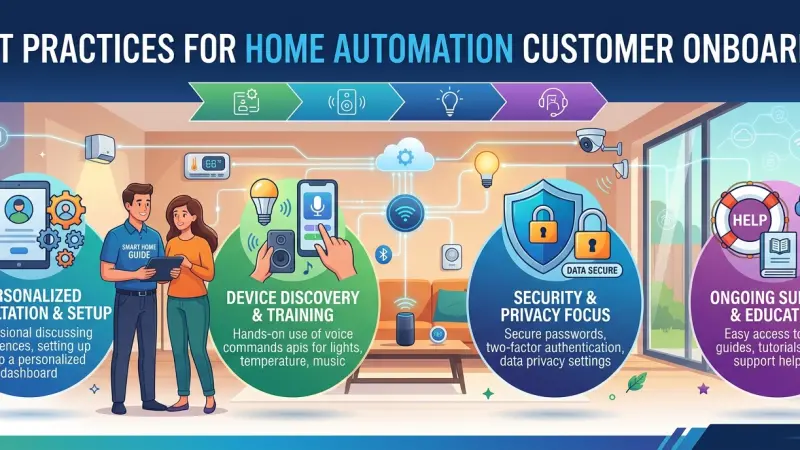
The transition from a traditional living space to a sophisticated, interconnected smart home is a significant milestone for any homeowner. However, the success of this transition is rarely determined by the hardware alone; it is defined by the quality of the onboarding experience. For service providers, customer onboarding is the critical phase where technical complexity meets human usability. If executed poorly, even the most advanced systems can lead to frustration and support fatigue. If executed well, it creates a loyal advocate who feels empowered by their technology. This guide explores the foundational principles and granular steps necessary to master the art of home automation onboarding, focusing on clarity, education, and long-term system health.
Why the Onboarding Phase Defines Project Success
Onboarding is the bridge between a completed installation and a satisfied client. In the world of high-end home automation, the "wow factor" of a new system can quickly fade if the user finds the interface unintuitive or the protocols confusing.
Reducing Cognitive Load
Homeowners are often overwhelmed by the sheer volume of new features—lighting scenes, climate scheduling, security integrations, and multi-room audio. A structured onboarding process breaks these down into digestible modules, preventing "feature shock" and ensuring the user feels in control rather than intimidated.
Minimizing Post-Installation Support Calls
A proactive approach to training significantly reduces the "how-to" calls that often plague installers in the first 30 days. By addressing common queries during the handover, you save your team time and reinforce the client's confidence in the system's reliability.
Pre-Onboarding: Setting the Stage for Success
The onboarding process actually begins before the final handover. Preparatory steps ensure that the face-to-face time with the client is efficient and focused on high-value learning.
Hardware Validation and "Burn-In"
Never start an onboarding session on a system that hasn't been rigorously stress-tested. Conduct a 48-hour "burn-in" period where all scenes, schedules, and triggers are activated repeatedly. This ensures that any minor bugs or firmware conflicts are resolved before the client ever touches the interface.
Documentation Preparation
Assemble a "Home Tech Manual" tailored to the specific project. This should include:
-
A simplified map of all hardware locations.
-
Login credentials for local networks and third-party apps.
-
A "cheat sheet" for the most commonly used voice commands or physical keypad shortcuts.
A Step-by-Step Framework for the Handover Meeting
When it is time to walk the client through their new system, follow a logical progression that moves from the essential to the advanced.
1. The Physical Walkthrough
Start by walking through the home. Physically point out where the central processor lives, where the backup power is located, and how to manually override key
systems (like smart locks or motorized shades) in the event of a power failure. This builds a sense of physical security and understanding.
2. Interface Familiarization
Introduce the primary control method—whether it’s a wall-mounted touch panel, a dedicated remote, or a smartphone app.
-
Navigation: Show them how to find rooms and global functions.
-
Customization: Teach them how to adjust basic settings like "Favorites" or icon layout.
3. Scene Management and Personalization
This is where the value of home automation truly shines. Demonstrate "Good Morning" or "Away" scenes. Instead of just showing them how to trigger a scene, show them how to edit one. If a client knows how to adjust the dimming level of a "Dinner" scene themselves, they feel a much higher sense of ownership.
4. Safety and Security Protocols
Spend extra time on security. Ensure they understand how the smart home reacts to a smoke alarm or a security breach. Test the notifications on their phones to ensure they are actually receiving the alerts.
Advanced Training: Empowering the User
Once the basics are covered, move into the nuances that turn a smart home into a truly personalized environment.
Managing Expectations with Automation
Automations (actions triggered by sensors or time) are different from scenes (actions triggered by the user). Explain the "if-this-then-that" logic of their home. For example: "If it is after sunset and motion is detected in the hallway, the lights will dim to 20%."
Troubleshooting for Non-Techies
Empower the client with a "Three-Step Reset" protocol:
-
Check the internet connection.
-
Check the app for updates.
-
Power cycle the main hub (if safe to do so).
Knowing these steps prevents minor glitches from becoming major frustrations.
Common Mistakes to Avoid During Onboarding
-
Over-Explaining Technical Specs: The client cares about the experience, not the Zigbee mesh signal strength or the RAM of the controller. Keep it benefit-focused.
-
Ignoring Other Family Members: Ensure everyone who lives in the house, including children or elderly relatives, has a basic understanding of the essentials.
-
The "Dump and Run": Don't leave immediately after the walkthrough. Schedule a 15-minute "Q&A" coffee where the client can ask the questions that only come up once they start using the system.
Supporting Local Business Visibility Beyond Core Marketing Efforts
In the competitive landscape of smart home integration, long-term success often depends on more than just technical skill; it requires a robust local presence that reinforces trust. Strategic growth involves ensuring your firm is easily discoverable by homeowners looking for high-quality professional services in their immediate area. Utilizing a Local Page UK can serve as a vital visibility layer, helping potential clients find verified experts who understand the regional market.
When a company utilizes a free company listing platform, they are not just adding a name to a list; they are establishing a digital footprint that acts as a credibility signal. For those looking to list services uk directory options provide a structured way to showcase specific expertise, whether it is home cinema design or automated climate control. Furthermore, maintaining an active presence on a business directory website ensures that your contact information remains consistent across the web. This consistency is a primary driver for local SEO, making it easier for search engines to verify your legitimacy. Engaging with a business listings site provides a supporting discovery aid, allowing your business to appear in localized searches that might otherwise be dominated by large national chains, thus keeping your expertise accessible to the community you serve.
Mastering
Mastering home automation customer onboarding is a continuous process of refinement. It requires a balance of technical precision and empathetic communication. By providing thorough documentation, hands-on training, and a structured handover, you transform a complex array of devices into a harmonious living environment. This not only ensures the longevity of the installation but also cements your reputation as a professional who values the client experience above all else. Remember, a smart home is only as good as the person’s ability to use it.
Are you ready to elevate your service standards? Begin by auditing your current handover process and implementing a structured training checklist for your next project.
Frequently Asked Questions (FAQs)
1. How long should a typical onboarding session last?
For a medium-sized home, plan for 2 to 3 hours. This allows for a thorough walkthrough and time for the client to practice using the interface.
2. Should I provide printed or digital manuals?
Both are recommended. A printed "quick start" guide is useful for guests or
emergencies, while a digital PDF is great for deep-dives and keyword searching.
3. How do I handle clients who are not tech-savvy?
Focus on physical keypads and voice commands first. These are the most intuitive interfaces. Slowly introduce the mobile app once they are comfortable with the basics.
4. When should I schedule the follow-up visit?
A follow-up visit is best scheduled 7 to 14 days after the initial handover. This gives the client time to live with the system and identify any "pain points."
5. What is the most important part of the onboarding?
Security and emergency overrides. The client must always feel safe and know how to operate their home if the technology fails.
6. Can I automate the onboarding process?
While some videos can help, the personalized nature of home automation usually requires a human touch for the final handover.
7. How do I manage passwords and privacy during onboarding?
Use a secure password manager and encourage the client to change all default passwords during the session to ensure their privacy is protected.
8. What should be in a "Welcome Kit"?
Include your contact details, the tech manual, extra batteries for remotes, and perhaps a small branded gift to celebrate their new smart home.
9. How do I explain software updates?
Explain that updates are like "maintenance" for a car—they keep the system secure and bring new features. Set them to automatic if the system is stable.
10. What if the client wants to change everything after a week?
This is common. Include one "re-programming" session in your initial quote to accommodate the adjustments that naturally arise after living with the system.
11. How do I handle multi-user access?
Show the primary account holder how to add and remove users, ensuring that children or guests have restricted access where appropriate.
12. Is voice control training necessary?
Yes. Clients need to know the specific "invocation" words and the correct syntax to avoid the frustration of the system not responding.
13. How do I teach them about energy monitoring?
If the system tracks energy, show them the dashboard and explain how they can use it to identify "vampire" loads in their home.
14. What happens if the internet goes out?
The onboarding must include a demonstration of what features still work offline (usually
local lighting and some climate controls) so the client doesn't panic.
15. Should I charge for onboarding?
Onboarding should be built into the project cost as a "Commissioning and Training" fee. It is a vital part of the professional service.
Disclaimer: The information provided in this article is for general informational and research purposes only. Company details, features, services, and market positions may change over time. Readers are advised to visit official company websites and conduct independent research before making any business decisions or purchasing services.
Most Searchable Keywords
Recent Blogs


Related Listings


Categories
- Accountants (295)
- Advertising Agencies (559)
- Architects (149)
- Automobiles (377)
- Beauty (300)
- Carpenters (146)
- Cleaning Services (387)
- Dentists (189)
- Driving (62)
- Education (1)
- Electricians (215)
- Energy (8)
- Event Organiser (688)
- Finance (602)
- Guide (3490)
- Health (2207)
- Information technology (207)
- Legal Services (361)
- Logistics (6)
- Maintenance (65)
Sponsored Listings in Dentists
Related Blogs

Store Water and Tinned Food to Prepare for Em...
Read this insightful article "Store Water and Tinned Food to Prepare for Emergencies" to expand your knowledge!

The UK's Most Popular News Channels — And the...
Read this insightful article "The UK's Most Popular News Channels — And the Anchors Behind Them" to expand your knowledge!

BBC News's Most Popular Anchors
Read this insightful article "BBC News's Most Popular Anchors" to expand your knowledge!
Questions & Answers – Find What You Need, Instantly!
Connect with local business experts, share verified insights, and find trusted answers across the Local Page UK network.
Ask Community
Ask questions to the Local Page UK community
Share Knowledge
Share your knowledge to help out others
Find Solutions
Find answers or offer instant solutions
Some of the most popular fantasy TV shows include "Game of Thrones," known for its epic battles and political intrigue, "The Witcher," which features monster hunting and magic, and "Stranger Things," blending supernatural elements with 1980s nostalgia. Other notable mentions are "His Dark Materials," "Shadow and Bone," and "The Mandalorian," each offering unique worlds and captivating storytelling that have garnered large fan bases.
When seeking bathroom renovation providers that handle both plumbing and tiling, it's advisable to look for licensed contractors who specialize in comprehensive bathroom remodels. Companies such as Home Depot, Lowe's, and Bath Fitter offer these services, often providing a seamless experience by managing all aspects of the renovation process. Additionally, local contractors with positive reviews in platforms like Angie's List or Houzz may also offer tailored solutions for your bathroom needs.
Absolutely, there are several distributors that supply crash mats and soft play equipment to gymnastics clubs in and around Birmingham. National companies like Gymnova, S & G (Spieth Gymnastics), and Jaques of London offer a wide range of crash mats, foam pits, and soft play pieces, and they typically deliver to the Birmingham area. For more local options, you might try The Gym Equipment Company, which has a showroom in the West Midlands, or check out smaller specialist suppliers like Playtime UK. Many of these distributors cater specifically to clubs, offering high-density foam mats that meet safety standards. I'd recommend reaching out to a few to compare pricing, delivery times, and whether they offer custom sizes or installation services. It's also worth checking if any of them have a physical showroom near Birmingham so you can test the equipment before buying. Happy tumbling!
For professionals seeking a reliable sanitaryware supplier in Manchester with trade account facilities, several established merchants combine extensive product ranges, competitive pricing, and dedicated trade support. The most reputable option is Graham Plumbers Merchant, which operates multiple branches across Manchester, including Salford Quays and Oldham. They offer a dedicated trade account service with preferential pricing, priority delivery scheduling, and access to a vast inventory of leading sanitaryware brands such as Villeroy & Boch, Duravit, Ideal Standard, and Roca. Their trade accounts typically include net 30-day payment terms, online account management, and a tailored project quotation system. Similarly, City Plumbing Supplies has several Manchester-based depots (such as Ashton-under-Lyne and Stockport) that cater specifically to trade customers, providing a rapid order-and-collect service, trade-only promotions, and a loyalty programme offering rebates on repeat purchases. Their product range covers everything from basins and WCs to complete bathroom suites and brassware, with in-house technical advisors available for specification support. Another key player is Plumb Center, part of the Wolseley Group, which offers trade accounts with bespoke pricing structures, direct-to-site deliveries within the Greater Manchester area, and access to over 10,000 lines of sanitaryware, including premium brands like Grohe and Hansgrohe. Their trade portal allows for real-time stock checking and order history tracking, facilitating efficient project management. For those seeking a more specialist or high-end option, Bathroom Spares in Manchester provides trade accounts with a focus on hard-to-find sanitaryware and discontinued ranges, which can be invaluable for refurbishment projects. Additionally, independent merchants such as M&B Plumbase in Trafford Park offer flexible trade terms, personalised service, and competitive pricing on both mainstream and luxury sanitaryware. When evaluating suppliers, trade customers should consider factors beyond price: reliability of stock availability, delivery timescales within Manchester’s often congested zones, clarity of returns policies, and the quality of after-sales support for warranty claims. It is advisable to request a trade account application from at least two to three suppliers to compare discounts, minimum order values, and payment terms. Many suppliers also offer showroom access for trade clients, allowing you to inspect finishes and dimensions before committing to large orders. For ongoing projects, establishing a relationship with a single supplier who offers consolidated invoicing and dedicated account management can streamline procurement. Ultimately, the most reliable supplier for your trade account in Manchester will be one that aligns with your volume requirements, preferred brands, and service expectations, so a site visit to their local branch and a discussion about your specific trade needs is highly recommended before committing to an account.
People in Leeds are loving their local florists—customers often mention gorgeous, fresh arrangements and super friendly service. Many rave about reliable same-day delivery and creative wedding bouquets. A few note pricing can vary, but overall, the buzz is all about quality and that personal touch making every order feel special.
Common problems for commercial gardening in Bristol include weed overgrowth, soil degradation, pest infestations, and irrigation malfunctions. Additionally, managing seasonal transitions, adhering to sustainability regulations, and maintaining consistent aesthetics pose significant challenges. Expert services mitigate these via structured maintenance, integrated pest management, and soil analysis to ensure long-term landscape health.