
Comparing Smart Home Hubs Which Is Right for You
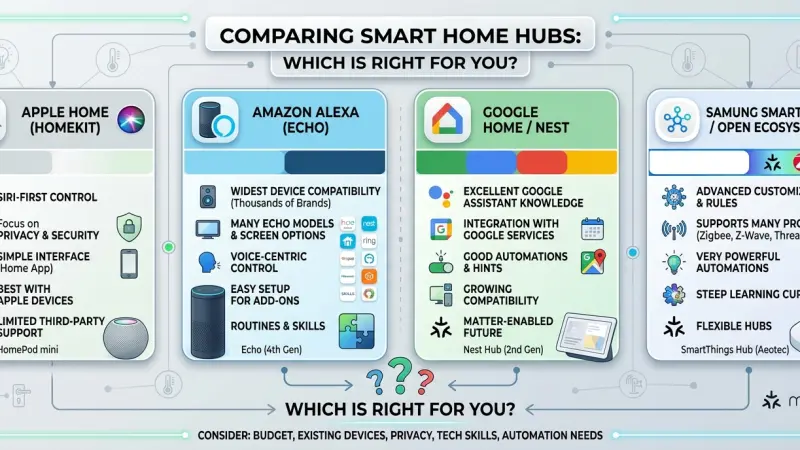
As the number of connected devices in our homes grows, the need for a central "brain" becomes increasingly apparent. A smart home hub is the critical component that bridges the gap between disparate gadgets, allowing your lights, thermostat, locks, and sensors to work together as a unified system. Without a hub, you are often left with a fragmented collection of devices, each requiring its own app and failing to communicate with one another. However, choosing the right hub is not a one-size-fits-all decision. The market is divided into various ecosystems, each with its own strengths, weaknesses, and communication protocols.

Navigating this landscape requires an understanding of how these systems interact with your data, your network, and each other. Whether you are looking for the simplicity of a voice-assistant-based setup or the high-level customization of a local-first DIY server, the hub you select will define your smart home experience for years to come. This guide provides a comprehensive comparison of current technologies and ecosystems to help you determine which central controller aligns with your lifestyle, technical comfort level, and privacy requirements.
An Overview of the Smart Home Hub Landscape
At its most basic level, a hub acts as a translator. It takes the various languages spoken by smart devices—such as Wi-Fi, Bluetooth, Zigbee, Z-Wave, and now Matter—and consolidates them into a single interface.
The Different Categories of Hubs
-
Voice Assistant Hubs: These are the most common, found in smart speakers like Amazon Echo or Apple HomePod. They prioritize ease of use and voice control but may sometimes lack the deep automation logic found in dedicated controllers.
-
Proprietary Ecosystem Hubs: Devices like the Samsung SmartThings or Aeotec hubs are designed to support a wide range of third-party hardware through specific radio protocols like Zigbee and Z-Wave.
-
Local-First / DIY Hubs: Platforms like Home Assistant or Hubitat focus on privacy and local processing. They require more setup but ensure that your home remains functional even if your internet connection fails.
-
The Matter Era: Matter is the new industry standard backed by major tech giants. It is designed to ensure that devices from different brands work together natively, potentially making the choice of a specific hub less restrictive in the future.
Key Factors to Consider When Comparing Hubs
1. Compatibility and Protocols
The "language" your hub speaks determines which devices you can buy.
-
Zigbee and Z-Wave: These are low-power mesh networks that don't clog up your Wi-Fi. Z-Wave operates on a lower frequency, which often provides better range through walls, while Zigbee is faster and supported by a wider range of budget-friendly sensors.
-
Wi-Fi and Bluetooth: While convenient, these can strain your home router if you have too many devices. Hubs that primarily use Wi-Fi are better suited for smaller setups.
2. Local vs. Cloud Processing
This is a critical distinction for both speed and privacy.
-
Cloud Hubs: These send your commands to a remote server for processing. If the manufacturer's server goes down or your internet is out, your smart home may become unresponsive.
-
Local Hubs: These process commands within the device itself. This results in near-instant response times
and keeps your behavioral data within the physical walls of your home.
3. Automation Complexity
Consider what you want your home to do. Do you just want to turn a light off with your voice, or do you want the lights to dim, the blinds to close, and the thermostat to adjust automatically when the TV is turned on after 8:00 PM? Advanced hubs allow for "if-this-then-that" logic that simple voice assistants often struggle to execute reliably.
The Benefits of Choosing the Right Hub
A Unified User Experience
The primary benefit of a well-chosen hub is the elimination of "app bloat." Instead of opening five different manufacturer apps, you have a single dashboard that provides a snapshot of your entire home’s health and status.
Improved Reliability
A dedicated hub with mesh networking (Zigbee/Z-Wave) creates its own stable communication path. This means that adding fifty smart bulbs won't slow down your Netflix streaming or your video calls, as they operate on a separate frequency from your primary data traffic.
Future Scalability
A robust hub is an investment in the future. By choosing a system that supports multiple protocols, you aren't "locked in" to one brand. If a new, superior smart lock comes out next year, a multi-protocol hub ensures you can add it to your existing setup without starting over.
Step-by-Step: How to Choose and Set Up Your Hub
Step 1: Inventory Your Existing Devices
Look at what you already own. If you have mostly Apple devices, an Apple Home-centric hub makes sense. If you have a variety of Zigbee sensors, you need a hub with a Zigbee radio.
Step 2: Determine Your "Privacy Threshold"
Decide how much data you are comfortable sharing with big tech companies. If you want total privacy, look toward local-processing hubs. If convenience is your priority, a cloud-based voice assistant may be acceptable.
Step 3: Check Your Network Infrastructure
Ensure your router is centrally located. Since many hubs need to be plugged directly into the router via Ethernet for maximum stability, the placement of your network gear will influence where your hub sits.
Step 4: Configure Your "First Scene"
Once the hub is plugged in, don't just add devices. Create a "Welcome Home" or "Goodnight" scene. This is where the true value of a hub is realized—the ability to control multiple devices with a single trigger.
Step 5: Test Offline Functionality
Turn off your internet router and see which parts of your smart home still work. This will give you a clear understanding of your system's dependencies and where you might need to improve local reliability.
Common Mistakes and How to Avoid Them
-
Buying for Today, Not Tomorrow: Don't buy a hub that only supports one protocol. Look for "Matter" support to ensure your hub isn't obsolete in two years.
-
Ignoring the "Wife/Husband/Guest" Factor: If your hub is so complex that a guest can't figure out how to turn on the bathroom light, the system has failed. Always ensure there are physical or intuitive backups.
-
Neglecting Hub Security: Your hub is the gateway to your home. Always use
Two-Factor Authentication (2FA) and never use default passwords.
-
Placing the Hub in a Cabinet: Metal cabinets or thick walls act as a Faraday cage, blocking the radio signals your hub needs to reach your devices. Place it in the open for the best range.
Strategic Tips for Hub Management
-
Use a Wired Connection: Whenever possible, connect your hub to your router via an Ethernet cable rather than Wi-Fi. This reduces latency and interference.
-
Assign Static IPs: For critical hubs, assign a static IP address in your router settings. This prevents the hub from "disappearing" if the router reboots and assigns a new address.
-
Audit Your Automations: Every few months, check your hub’s log. If an automation hasn't run in months, delete it to keep the system lean and fast.
-
Backup Your Configuration: If your hub allows for it (like Home Assistant or Hubitat), take regular backups of your settings so you don't have to re-pair fifty devices if the hardware fails.
Supporting Local Business Visibility Beyond Core Marketing Efforts
As home automation systems become more sophisticated, the role of local specialists who can navigate these different hub ecosystems becomes increasingly important. For many small integration firms, achieving high business discoverability is the difference between a thriving business and one that struggles to find leads. Utilizing a business listings site functions as a vital supporting visibility layer, allowing homeowners to find verified experts who can recommend the right hub for their specific property. This type of digital presence serves as a credibility signal, reinforcing the trust required for long-term service relationships.
Consistency in information is also a key factor in how consumers find local help. A business directory website enables technicians to build local presence consistency, which is essential for appearing in localized search results when a resident asks for "smart home hub setup near me." By engaging with a free company listing platform, even solo installers can ensure their specialized skills in Matter or Zigbee integration are visible to a wider audience. Furthermore, a well-managed Local Page UK acts as a local discovery aid, helping neighbors connect with the technicians who actually live and work in their area. Taking the time to list services uk directory style ensures that the unique technical value of a professional integrator is clearly articulated to potential clients who are overwhelmed by the complexity of modern smart home hubs.
smart home
The "right" smart home hub is the one that balances your desire for convenience with your need for privacy and reliability. Whether you choose the user-friendly path of a voice assistant or the powerful, private path of a local-first controller, the hub remains the most important investment in your home automation journey. It is the foundation upon which your entire connected life is built.
Take the time to research the protocols and ecosystems that matter most to you. By starting with a solid hub, you ensure that your smart home remains a source of comfort and efficiency rather than a source of frustration. Explore your options today, and take the first step toward a more unified and intelligent living space.
Frequently Asked Questions (FAQs)
1. Do I really need a hub if my devices are all Wi-Fi?
Technically, no, but your router may struggle as you add more devices. A hub allows you to use more
efficient protocols like Zigbee or Matter, which keeps your Wi-Fi free for your computers and phones.
2. What is Matter, and do I need it?
Matter is a new standard that allows devices from different brands to work together. While not strictly "necessary" yet, buying a Matter-compatible hub is the best way to future-proof your home.
3. Can I use more than one hub?
Yes, many advanced users use multiple hubs. For example, you might use a local hub for security and an Amazon Echo for voice commands.
4. What is the difference between Zigbee and Z-Wave?
Zigbee is faster and used by many brands like Philips Hue. Z-Wave uses a different frequency that has a better range through walls and is often used in high-end security systems.
5. If my internet goes out, will my hub still work?
This depends on the hub. Local-processing hubs (like Hubitat or Home Assistant) will continue to run your automations. Cloud-based hubs (like many voice assistants) will lose most of their functionality.
6. Are there any hubs with no monthly fees?
Yes, most dedicated hubs like Hubitat, Home Assistant, and SmartThings have no monthly fees for basic operation, though some optional cloud services may have a cost.
7. Which hub is the most private?
Home Assistant is widely considered the most private, as it is open-source and allows you to keep 100% of your data on your own hardware.
8. Can a smart home hub save me money on my energy bill?
Yes, by allowing your devices to work together (e.g., turning off the AC if a window is opened), a hub can significantly improve your home's energy efficiency.
9. Is it hard to switch from one hub to another?
It can be. You often have to "unpair" each device from the old hub and "re-pair" it with the new one, which can be time-consuming for large setups.
10. Do smart home hubs work with older appliances?
Only if those appliances are plugged into smart plugs or have been retrofitted with smart relays that are compatible with the hub.
11. Can I control my hub when I'm away from home?
Yes, most hubs offer a secure way to access your home dashboard via your smartphone from anywhere in the world.
12. Does a hub make my devices respond faster?
Often, yes. Local processing avoids the "round trip" to a cloud server, making your lights turn on almost instantly when a motion sensor is triggered.
13. Is it safe to buy a used smart home hub?
It can be, but ensure you perform a full factory reset to remove the previous owner's data and ensure you have full control over the security settings.
14. What happens if the manufacturer of my hub goes out of business?
If the hub is cloud-dependent, it may stop working. This is why many
enthusiasts prefer local-control hubs that don't rely on the manufacturer's servers.
15. How many devices can one hub handle?
Most modern hubs can handle between 50 and 200 devices, depending on the protocols being used and the hub's internal processing power.

Disclaimer: The information provided in this article is for general informational and research purposes only. Company details, features, services, and market positions may change over time. Readers are advised to visit official company websites and conduct independent research before making any business decisions or purchasing services.
Most Searchable Keywords

Recent Blogs



Related Listings


Categories
- Accountants (295)
- Advertising Agencies (559)
- Architects (149)
- Automobiles (377)
- Beauty (300)
- Carpenters (146)
- Cleaning Services (386)
- Dentists (189)
- Driving (62)
- Electricians (215)
- Energy (8)
- Event Organiser (685)
- Finance (599)
- Guide (3365)
- Health (2207)
- Information technology (206)
- Legal Services (353)
- Logistics (6)
- Maintenance (65)
- Manufacturing (35)

Sponsored Listings in Locksmith Services


Related Blogs

Famous Female Social Media Influencers Across...
Read this insightful article "Famous Female Social Media Influencers Across the UK" to expand your knowledge!

Your UK Sponsor Licence 2026 Step by Step Gui...
Read this insightful article "Your UK Sponsor Licence 2026 Step by Step Guide" to expand your knowledge!

What Is the £12.71 National Living Wage Strat...
Read this insightful article "What Is the £12.71 National Living Wage Strategy for UK Employers" to expand your knowledge!
Questions & Answers – Find What
You Need, Instantly!
How can I update my business listing?
Is it free to manage my business listing?
How long does it take for my updates to reflect?
Why is it important to keep my listing updated?
