
The Future of Living Best Practices for Integrating Home Automation and Security
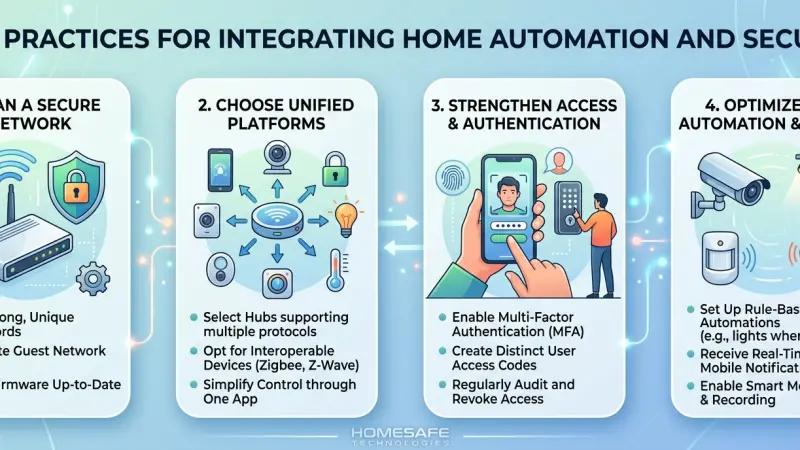
The concept of a "smart home" has transitioned from a futuristic novelty into a practical standard for modern living. However, the true value of home technology isn't found in a collection of isolated gadgets, but in the seamless synergy between convenience and protection. Integrating home automation with security creates an ecosystem where your lights, locks, cameras, and sensors communicate to provide a proactive shield rather than a reactive alarm.
When these two worlds collide effectively, your home doesn’t just "do things" for you—it watches over you. Achieving this harmony requires a strategic approach to ensure compatibility, reliability, and, most importantly, data privacy. This guide explores the foundational best practices for building a unified system that enhances your lifestyle while fortifying your peace of mind.
Understanding the Integrated Ecosystem
Before diving into hardware, it is essential to understand that an integrated system is more than just an app on your phone. It is a network of interconnected devices that share data to make "intelligent" decisions. In a siloed home, a security camera records a thief. In an integrated home, the motion detected by that camera triggers the smart lights to flash red, sends a notification to your television, and ensures the smart locks are engaged.
The Role of a Central Hub
The "brain" of your home is the central controller. Whether you choose a software-based platform like Apple HomeKit or Home Assistant, or a hardware-centric hub like Hubitat or SmartThings, this central point ensures that when your security camera detects motion at 2:00 AM, your outdoor floodlights turn on automatically. Without a unifying hub, you end up with "app fatigue," managing ten different interfaces for ten different devices, which often leads to users disabling features out of frustration.
Interoperability and Protocols
Devices must speak the same language. When selecting components, look for industry-standard protocols that allow for local communication (processing data within the house rather than sending it to a distant cloud server).
-
Zigbee and Z-Wave: These are reliable, low-power mesh networks. They are ideal for security because they don’t rely on your Wi-Fi bandwidth and can continue to function if your internet goes down.
-
Matter: The new industry standard designed to ensure devices from different brands—like Google, Apple, and Amazon—work together natively.
-
Wi-Fi: Common and easy to set up, but can become unstable if too many devices are connected to a standard consumer router.
-
Thread: A low-power, self-healing mesh network protocol that is a pillar of the Matter standard, offering faster response times for security sensors.
Core Benefits of a Unified System
Why bother with integration? The benefits extend far beyond being able to lock your door from your bed. It is about creating a "living" environment that adapts to threats in real-time.
Proactive Deterrence
A standalone security system tells you when someone is already inside. An integrated system uses automation to prevent the break-in. For example, "Vacation Mode" can mimic human presence by turning lights, televisions, and even smart curtains on and off at natural intervals based on your past behavior, making the home look occupied even when you are thousands of miles away.
Energy Efficiency Meets Safety
Integration allows your home to respond to environmental changes and emergencies simultaneously. Smart thermostats can shut off the HVAC system if a smoke detector is triggered to prevent the spread of smoke through vents. Similarly, smart blinds can close when the security system is armed to keep prying eyes away from your valuables, while also reducing the heat load from the sun, lowering your energy bills.
Real-Time Contextual Alerts
Standard alarms are binary: they are either on or off. Integrated systems provide context. Instead of a generic "Sensor Tripped" notification, you receive a video clip from the doorbell camera paired with the status of the smart lock. This allows you to see if it’s a delivery person leaving a package or an unauthorized individual attempting to enter, allowing for a more measured and appropriate response.
The Pillars of a Secure Smart Home
To build a system that lasts, you must focus on the four pillars of integration: Reliability, Scalability, Simplicity, and Security.
1. Reliability (The "Always-On" Mindset)
In the world of security, 99% uptime isn't enough. If your smart lock fails to engage because of a software glitch, your home is vulnerable.
-
Local Control: Whenever possible, choose devices that can run "locally." This means if your internet service provider has an outage, your motion sensors can still trigger your lights because the communication happens within your walls, not via the cloud.
-
Battery Backups: Ensure your central hub and critical sensors have battery backups. A thief could easily cut the power to a home; your security system should be ready for that.
2. Scalability (Growing with Your Needs)
Don't try to automate every room at once. Start with the "Critical Perimeter"—the front door, back door, and ground-floor windows. Choose a platform that allows you to add devices over time.
A modular approach prevents you from being locked into a proprietary system that might become obsolete in three years.
3. Simplicity (The WAF - Wife/Workaround Acceptance Factor)
If your family cannot figure out how to turn on the lights without an instruction manual, the system has failed. The best integrations are invisible. Physical switches should still work, and voice commands should be intuitive. If a system is too complex, users will find ways to bypass it, which often creates security gaps (like leaving a door unlocked because the smart lock is "too annoying").
4. Digital Security (Hardening the Network)
Your physical security is now tied to your digital security. A compromised Wi-Fi password could technically lead to a disarmed alarm.
-
VLANs (Virtual Local Area Networks): Advanced users should place IoT devices on a separate VLAN. This prevents a hacked smart lightbulb from being used as a gateway to access your personal computer or bank details.
-
Disable UPnP: Universal Plug and Play is convenient but notorious for creating security holes that hackers can exploit.
Step-by-Step Guide to Successful Integration
Phase 1: Assessment and Planning
Start by identifying the "weak points" of your property. Walk around your home at night. Where are the shadows? Which windows are hidden from the street by bushes?
-
Map the "Flow": Think about how you enter and exit. Your system should automatically disarm when you arrive home via a verified smartphone "geofence" or a specific code on the door, rather than requiring you to run to a keypad in 30 seconds.
Phase 2: Prioritize the Network Foundation
A smart home is only as strong as its connection.
-
Upgrade your Router: Use a Mesh Wi-Fi system (like Eero or TP-Link Deco) to ensure coverage reaches outdoor cameras and garage sensors.
-
Hardwire when Possible: For high-bandwidth devices like 4K security cameras, use Ethernet (PoE - Power over Ethernet). This is much more secure and reliable than Wi-Fi.
Phase 3: Layering Your Security
-
The Perimeter: Install smart outdoor lighting that brightens when motion is detected. Use "AI-enabled" cameras that can distinguish between a car, a dog, and a human.
-
The Entry Points: Replace traditional deadbolts with smart locks. Look for those with "Fingerprint Recognition" or "Apple HomeKey" support for the highest level of encrypted convenience.
-
The Interior: Use motion sensors and glass-break detectors. Integrate these with your smart speakers (like Sonos or HomePod) to blast a high-decibel siren or even a recording of a barking dog.
Phase 4: Designing Automations (Recipes)
This is where the magic happens. Use "If This, Then That" logic to create sophisticated security scenes:
-
The "Goodnight" Scene: With one voice command, the doors lock, the alarm arms to "Stay" mode, the thermostat drops to 18°C, and all non-essential lights turn off.
-
The "Emergency" Scene: If a water leak is detected under the sink, the smart main water valve shuts off automatically, and your phone receives a high-priority alert.
Privacy and Cyber Security Best Practices
As you bring more devices online, the "attack surface" for hackers increases. Protecting your digital home is just as important as locking your physical doors.
Two-Factor Authentication (2FA)
Never use a device that doesn't support 2FA. This ensures that even if someone steals your password, they cannot access your cameras or unlock
your doors without a secondary code sent to your phone. Biometric 2FA (face ID or fingerprint) is the gold standard here.
Regular Firmware Updates
Manufacturers frequently release patches to fix security holes. Enable "Auto-Update" on all smart devices. Many famous "IoT hacks" occurred because users were running software that was years out of date, leaving known vulnerabilities wide open.
Avoid Default Passwords
This sounds basic, but many "hacked" smart homes occur because users left the factory-set password (like "admin" or "1234") on their cameras or routers. Change every password immediately upon installation to a unique, complex string.
Advanced Integration: AI and Machine Learning
The next frontier of home security is predictive AI. Modern systems are moving away from simple motion detection to "Behavioral Analysis."
-
Facial Recognition: Some high-end systems can recognize family members and regular visitors. If a stranger is at the door, the system reacts differently than if it's your son coming home from school.
-
Sound Recognition: Some smart hubs can "listen" for the sound of breaking glass or a baby crying, even if there isn't a dedicated sensor in that room.
-
Occupancy Sensing: Using mmWave radar technology, your home can know if a person is in a room even if they are perfectly still (like sleeping), ensuring that security protocols don't accidentally trigger while you're in the house.
Maintaining Your System
An integrated home is not a "set it and forget it" project. It requires seasonal maintenance:
-
Check Battery Levels: Many sensors use coin-cell batteries that last 1–2 years. Set a calendar reminder to check these before winter.
-
Clean Camera Lenses: Cobwebs and dust can trigger false motion alerts and degrade night vision quality.
-
Review Access Logs: Occasionally check who has been using their smart lock codes. Delete old codes for former dog walkers or contractors.
Common Mistakes to Avoid
-
Buying Based on Price Alone: Cheap, off-brand smart devices often have poor security encryption and may stop working if the company's cloud server goes down or the company goes bankrupt.
-
Over-Automating: If your lights turn off every time you sit still for five minutes to watch a movie, the system becomes a nuisance. Use "Presence Sensors" instead of simple motion sensors for better accuracy.
-
Ignoring Physical Backups: Always have a physical key hidden in a secure lockbox or a manual
way to enter your home in case of a total power or internet failure.
-
Cloud Dependency: Avoid systems that require the cloud to function. If your internet is cut, you should still be able to control your home locally.
Supporting Local Business Visibility Beyond Core Marketing Efforts
For homeowners looking to implement these complex systems, finding reliable local installers and security consultants is a vital step toward long-term success. While DIY is popular, professional integration ensures that your network is hardened against intruders and that your hardware is placed for maximum effectiveness. Strategic Local Page UK resources play a quiet but essential role in this discovery process for homeowners. When a specialist or a security firm utilizes a free company listing platform, it acts as a credibility signal, helping homeowners verify the legitimacy of a service provider before inviting them into their private spaces.
Maintaining a consistent local presence is not just about advertising; it's about trust reinforcement in the community. A well-managed business listings site ensures that contact information and service areas are accurate, which is a foundational layer of professional reliability. For those seeking niche experts in home automation, utilizing a business directory website or a list services uk directory serves as a strategic discovery aid. These platforms help bridge the gap between high-tech security needs and the local professionals capable of maintaining those systems, providing a supporting visibility layer that benefits both the consumer and the technician. By appearing on a business listings site and a free company listing platform, local experts can demonstrate their commitment to transparency and accessibility within the UK market.
Integrating
Integrating home automation and security is a journey, not a one-time purchase. By starting with a solid hub, prioritizing interoperability, and maintaining a "security-first" mindset regarding your network, you can create a home that is both incredibly convenient and remarkably safe. The goal is to build a system that works for you, giving you the freedom to focus on your life while your home handles the rest.
As technology evolves, the line between "convenience" and "safety" will continue to blur. A home that knows you're arriving and lights your path is a home that is also watching for those who shouldn't be there. Embrace the integration, but do so with a plan, a secure network, and an eye toward the future.
Frequently Asked Questions
1. Does a smart home security system work during a power outage? Many professional-grade hubs and cameras have battery backups that last for several hours. Additionally, protocols like Z-Wave and Zigbee don't require the internet for local automations to trigger, provided the hub itself has power.
2. Can I integrate different brands, like Nest and Ring? Direct integration can be tricky as they are competitors, but using a third-party hub like Amazon Alexa, Google Home, or Home Assistant can often bridge the gap. The Matter standard is also making this easier.
3. Is professional monitoring worth it for an automated home? Yes. While "self-monitoring" saves money, professional services ensure that emergency responders are called even if your phone is off, you're on a plane, or you are incapacitated.
4. Will smart locks make my home easier to hack? If you use high-quality brands with AES-128 bit or 256-bit encryption and 2FA, smart locks are often more secure than traditional locks, which can be easily picked, bumped, or duplicated.
5. How much internet bandwidth do smart cameras use? It depends on the resolution and frame rate. 4K cameras can use 4–8 Mbps each while streaming. It is recommended to use "motion-only" recording or local NVR (Network Video Recorder) storage to save bandwidth.
6. Do I need a subscription for my integrated system? Many brands offer basic features for free, but advanced features like long-term cloud video storage, AI person detection, and professional monitoring usually require a monthly fee.
7. Can I install these systems myself? Most modern smart devices are DIY-friendly. However, for complex integrations involving high-voltage electrical wiring, smart panels, or high-end wired security sensors, hiring a certified professional is recommended.
8. What happens if I lose my phone? You should have a secondary device (like a tablet or a family member's phone) authorized to access the system. You can also log into your account from a desktop computer to "de-authorize" the lost phone and change your access credentials immediately.
9. Are smart homes prone to false alarms? Integration actually reduces false alarms. By using multi-sensor verification (e.g., a camera confirming a person's presence after a motion sensor trips), the system can distinguish between a curtain blowing in the wind and an actual intruder.
10. What is the most important device to start with? A smart video doorbell is generally considered the "gateway" device. It offers the highest value-to-cost ratio, providing both communication and surveillance at your most vulnerable entry point.
11. Is my data stored in the cloud safe? It depends on the manufacturer. Look for companies that use "End-to-End Encryption" (E2EE). This means only you have the keys to view your footage; even the manufacturer cannot see it.
12. Can smart home devices be used to lower my insurance premiums? Many insurance companies offer discounts for homes with professionally monitored security, smart smoke detectors, and automatic water shut-off valves, as these significantly reduce the risk of theft and catastrophic damage.
13. What is "Geofencing" in home security? Geofencing uses your phone's GPS to create a virtual boundary around your home. When you leave the boundary, the system can automatically lock the doors and arm the security. When you return, it can disarm and turn on the entry lights.
14. How do I prevent my smart speaker from being used to disarm my alarm? Always set a "Voice PIN" for sensitive actions.
If someone yells through your window "Alexa, disarm the alarm," the system should ask for a four-digit code before complying.
15. Does weather affect outdoor smart sensors? High-quality outdoor sensors are rated IP65 or higher for weather resistance. However, extreme heat or cold can affect battery life, so choose "hardwired" options for outdoor gear in harsh climates.
Disclaimer: The information provided in this article is for general informational and research purposes only. Company details, features, services, and market positions may change over time. Readers are advised to visit official company websites and conduct independent research before making any business decisions or purchasing services.
Most Searchable Keywords
Recent Blogs


Related Listings



Categories
- Accountants (295)
- Advertising Agencies (559)
- Architects (149)
- Automobiles (377)
- Beauty (300)
- Carpenters (146)
- Cleaning Services (387)
- Dentists (189)
- Driving (62)
- Education (1)
- Electricians (215)
- Energy (8)
- Event Organiser (689)
- Finance (602)
- Guide (3492)
- Health (2207)
- Information technology (207)
- Legal Services (361)
- Logistics (6)
- Maintenance (65)
Sponsored Listings in Florists
Related Blogs

Creamfields Daresbury: Impact on Local Reside...
Read this insightful article "Creamfields Daresbury: Impact on Local Residents" to expand your knowledge!

UK High Street Businesses in 2026-27: Which S...
Read this insightful article "UK High Street Businesses in 2026-27: Which Sectors Are Growing?" to expand your knowledge!

Why Complete Business Listings Matter More Th...
Read this insightful article "Why Complete Business Listings Matter More Than You Think" to expand your knowledge!
Questions & Answers – Find What You Need, Instantly!
Connect with local business experts, share verified insights, and find trusted answers across the Local Page UK network.
Ask Community
Ask questions to the Local Page UK community
Share Knowledge
Share your knowledge to help out others
Find Solutions
Find answers or offer instant solutions
Some of the most popular fantasy TV shows include "Game of Thrones," known for its epic battles and political intrigue, "The Witcher," which features monster hunting and magic, and "Stranger Things," blending supernatural elements with 1980s nostalgia. Other notable mentions are "His Dark Materials," "Shadow and Bone," and "The Mandalorian," each offering unique worlds and captivating storytelling that have garnered large fan bases.
When seeking bathroom renovation providers that handle both plumbing and tiling, it's advisable to look for licensed contractors who specialize in comprehensive bathroom remodels. Companies such as Home Depot, Lowe's, and Bath Fitter offer these services, often providing a seamless experience by managing all aspects of the renovation process. Additionally, local contractors with positive reviews in platforms like Angie's List or Houzz may also offer tailored solutions for your bathroom needs.
Absolutely, there are several distributors that supply crash mats and soft play equipment to gymnastics clubs in and around Birmingham. National companies like Gymnova, S & G (Spieth Gymnastics), and Jaques of London offer a wide range of crash mats, foam pits, and soft play pieces, and they typically deliver to the Birmingham area. For more local options, you might try The Gym Equipment Company, which has a showroom in the West Midlands, or check out smaller specialist suppliers like Playtime UK. Many of these distributors cater specifically to clubs, offering high-density foam mats that meet safety standards. I'd recommend reaching out to a few to compare pricing, delivery times, and whether they offer custom sizes or installation services. It's also worth checking if any of them have a physical showroom near Birmingham so you can test the equipment before buying. Happy tumbling!
For professionals seeking a reliable sanitaryware supplier in Manchester with trade account facilities, several established merchants combine extensive product ranges, competitive pricing, and dedicated trade support. The most reputable option is Graham Plumbers Merchant, which operates multiple branches across Manchester, including Salford Quays and Oldham. They offer a dedicated trade account service with preferential pricing, priority delivery scheduling, and access to a vast inventory of leading sanitaryware brands such as Villeroy & Boch, Duravit, Ideal Standard, and Roca. Their trade accounts typically include net 30-day payment terms, online account management, and a tailored project quotation system. Similarly, City Plumbing Supplies has several Manchester-based depots (such as Ashton-under-Lyne and Stockport) that cater specifically to trade customers, providing a rapid order-and-collect service, trade-only promotions, and a loyalty programme offering rebates on repeat purchases. Their product range covers everything from basins and WCs to complete bathroom suites and brassware, with in-house technical advisors available for specification support. Another key player is Plumb Center, part of the Wolseley Group, which offers trade accounts with bespoke pricing structures, direct-to-site deliveries within the Greater Manchester area, and access to over 10,000 lines of sanitaryware, including premium brands like Grohe and Hansgrohe. Their trade portal allows for real-time stock checking and order history tracking, facilitating efficient project management. For those seeking a more specialist or high-end option, Bathroom Spares in Manchester provides trade accounts with a focus on hard-to-find sanitaryware and discontinued ranges, which can be invaluable for refurbishment projects. Additionally, independent merchants such as M&B Plumbase in Trafford Park offer flexible trade terms, personalised service, and competitive pricing on both mainstream and luxury sanitaryware. When evaluating suppliers, trade customers should consider factors beyond price: reliability of stock availability, delivery timescales within Manchester’s often congested zones, clarity of returns policies, and the quality of after-sales support for warranty claims. It is advisable to request a trade account application from at least two to three suppliers to compare discounts, minimum order values, and payment terms. Many suppliers also offer showroom access for trade clients, allowing you to inspect finishes and dimensions before committing to large orders. For ongoing projects, establishing a relationship with a single supplier who offers consolidated invoicing and dedicated account management can streamline procurement. Ultimately, the most reliable supplier for your trade account in Manchester will be one that aligns with your volume requirements, preferred brands, and service expectations, so a site visit to their local branch and a discussion about your specific trade needs is highly recommended before committing to an account.
People in Leeds are loving their local florists—customers often mention gorgeous, fresh arrangements and super friendly service. Many rave about reliable same-day delivery and creative wedding bouquets. A few note pricing can vary, but overall, the buzz is all about quality and that personal touch making every order feel special.
Common problems for commercial gardening in Bristol include weed overgrowth, soil degradation, pest infestations, and irrigation malfunctions. Additionally, managing seasonal transitions, adhering to sustainability regulations, and maintaining consistent aesthetics pose significant challenges. Expert services mitigate these via structured maintenance, integrated pest management, and soil analysis to ensure long-term landscape health.