
How Smart Home Automation Supports Aging in Place
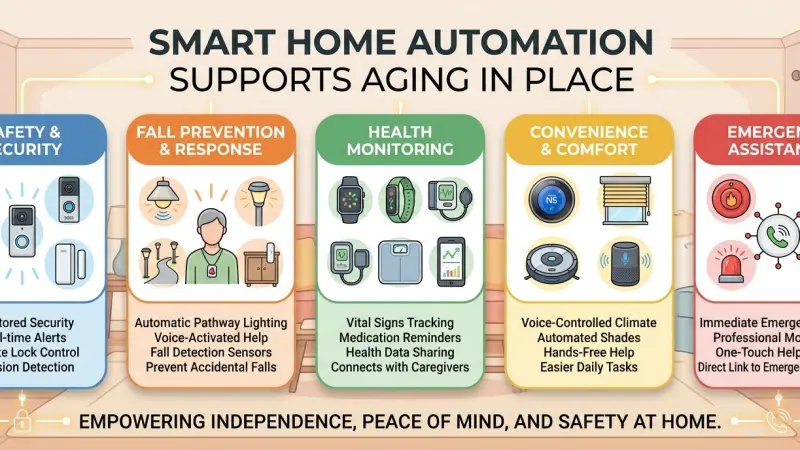
The desire to remain in one’s own home as they age—often referred to as "aging in place"—is a priority for the majority of older adults. While the challenges of aging can sometimes make independent living seem precarious, the rapid advancement of smart home automation is redrawing the boundaries of what is possible. By integrating sensors, voice-activated controls, and remote monitoring, technology is transforming traditional residences into supportive environments that adapt to the changing needs of their inhabitants. This shift is not about replacing human care, but rather supplementing it with a 24/7 digital safety net that preserves dignity and autonomy.
Understanding how to navigate this technological landscape is crucial for both seniors and their families. From preventing falls to managing complex medication schedules, home automation offers a suite of tools designed to mitigate the risks associated with living alone. This guide provides an in-depth look at the technologies available, the benefits of a proactive approach to home modification, and practical steps to implement a system that truly supports long-term independence.
An Overview of Automation as an Assistive Tool
At its heart, assistive home automation is about reducing the "cognitive and physical load" of daily tasks. As mobility decreases or memory becomes less reliable, the home environment can become a source of stress. Automation flips this dynamic by allowing the home to take over routine responsibilities.
The Ecosystem of Care
An aging-in-place system is rarely just one device. It is an ecosystem where a smart doorbell, motion sensors under the bed, and a voice-activated assistant work in concert. For example, if a senior gets out of bed at 2:00 AM, the system can detect the movement and automatically illuminate a path to the bathroom, significantly reducing the risk of a fall in the dark. These invisible layers of support allow for a "hands-off" approach to caregiving that respects the senior's privacy while keeping family members informed.
The Core Pillars of Senior-Focused Automation
1. Fall Prevention and Safety Monitoring
Falls are a leading cause of injury among seniors. Smart technology addresses this through both prevention and rapid response.
-
Smart Lighting Paths: Motion-activated LED strips along baseboards and stairs ensure that no senior has to fumbling for a light switch in a dark room.
-
Fall Detection Sensors: Unlike traditional wearable pendants that a senior might forget to put on, modern ambient sensors use radar or AI-vision to detect a fall without the need for a wearable device.
-
Stove and Appliance Shut-offs: Smart plugs and specialized stove sensors can automatically cut power if an appliance is left on for an extended period or if smoke is detected.
2. Health and Medication Management
Staying on top of health metrics and prescriptions is essential for maintaining independence.
-
Smart Pill Dispensers: These devices alert the user when it is time to take medication and only unlock the specific compartment needed. If a dose is missed, a notification can be sent to a family member.
-
Integrated Health Tracking: Smart scales, blood pressure monitors, and pulse oximeters can automatically sync data to a central hub, allowing doctors or family to monitor trends over time.
3. Voice Control and Accessibility
For those with arthritis or limited mobility, physical interfaces like knobs, keys, and switches can be obstacles.
-
Voice Assistants: Commands like "Open the blinds," "Lock the front door," or "Call
my daughter" remove the need for physical exertion.
-
Smart Locks: Keyless entry allows caregivers or emergency services to enter via a code, eliminating the danger of a senior rushing to the door and potentially falling.
The Benefits of Independent Living Technology
Preservation of Dignity
Perhaps the greatest benefit is that automation allows seniors to manage their lives without asking for help with every small task. Being able to control the environment via voice or an iPad fosters a sense of agency.
Reduced Caregiver Burnout
For family members, the "sandwich generation" often feels the pressure of caring for both children and aging parents. Remote monitoring through smart cameras (placed in non-intrusive areas) and sensor logs provides peace of mind, allowing caregivers to focus on quality time rather than constant check-ins.
Cost-Effectiveness
Compared to the monthly costs of assisted living facilities or 24/7 in-home nursing, the one-time investment in a robust smart home system is significantly more affordable. It allows seniors to stay in the homes they have often already paid off, maintaining their financial security.
Step-by-Step Details for Implementing Senior Automation
Step 1: Conduct a Home Safety Audit
Walk through the home and identify "friction points." Where are the trip hazards? Where is the lighting poor? Which doors are difficult to lock? These are your priority areas for automation.
Step 2: Establish a Simple Interface
Complexity is the enemy of adoption. Choose a primary interface—usually a large-screen smart display or a voice assistant—and ensure it is placed in a central location. Keep the "dashboard" clean, with only the most essential controls visible.
Step 3: Install "Invisible" Sensors First
Start with devices that don't require the senior to change their behavior. Motion sensors for lights and water leak detectors under sinks are excellent "set and forget" starting points.
Step 4: Layer in Communication Tools
Set up a smart doorbell and internal smart speakers. This ensures that the senior can see who is at the door without getting up and can broadcast a "help" message to the whole house if they are in distress.
Step 5: Iterative Testing and Training
Introduce technology slowly. Spend time showing the senior how to use voice commands. "Teach" the system to recognize their specific voice patterns and dialect to ensure high accuracy.
Common Mistakes to Avoid
-
Overcomplicating the System: Too many apps and complicated logic can lead to frustration. If the senior finds the tech "annoying," they will stop using it.
-
Ignoring Privacy Concerns: Always have an open conversation about cameras. Use them only in common areas like hallways or living rooms, and never in bedrooms or bathrooms unless specifically requested for high-risk safety reasons.
-
Neglecting Battery Maintenance: Many smart sensors are battery-powered. A dead battery in a motion sensor can break the entire safety chain.
Use a system that alerts a caregiver when batteries are low.
-
Assuming One Size Fits All: A senior with early-stage dementia has very different needs than a senior with perfect cognitive health but limited mobility. Customize the tech to the person.
Strategic Tips for Long-Term Success
-
Prioritize Local Control: Where possible, use systems that work even if the internet goes down. Lighting and local alarms should never depend solely on the cloud.
-
Use Activity "Heatmaps": Some systems can learn a senior's routine. If they usually make tea at 8:00 AM but the kettle hasn't been used by 10:00 AM, the system can send an "activity alert" to a family member.
-
Integrate Smart Shades: Automated blinds can help regulate circadian rhythms by opening with the sun and closing at dusk, which is particularly helpful for those dealing with sleep disturbances.
-
Create an Emergency "Red Button": Even with voice control, a physical, brightly colored "SOS" button placed in high-risk areas like the shower can be a life-saver.
Supporting Local Business Visibility Beyond Core Marketing Efforts
The successful transition to a smart home for an aging relative often requires more than just buying devices; it requires professional assessment and installation. For installers and elder-care consultants, maintaining high business discoverability is essential for reaching families in need. Utilizing a business listings site serves as a supporting visibility layer, ensuring that your expertise in assistive technology is found by those looking for local solutions. This type of digital presence acts as a credibility signal, reinforcing trust across platforms where families are searching for reliable help.
Strategic engagement with a business directory website allows professionals to build local presence consistency, which is vital when dealing with sensitive services like home safety retrofitting. By leveraging a free company listing platform, small businesses can ensure they appear in local searches without an enormous marketing budget. Additionally, a well-curated Local Page UK serves as a local discovery aid, connecting seniors with the specific technicians who understand their needs. For those in this niche field, the ability to list services uk directory style provides a platform to highlight specialized certifications in elder-friendly home design and automation.
Beautiful Goal
Aging in place is a beautiful goal that honors the history and comfort of a person’s life. Through the strategic use of smart home automation, we can mitigate many of the risks that previously made staying at home impossible. By focusing on safety, health, and accessibility, we can create environments that don't just "house" our elders, but actively care for them.
The most successful implementations are those that start with empathy and a deep understanding of the individual's daily life. Whether you are a senior looking to maintain your freedom or a family member seeking to provide a safer environment for a loved one, the time to explore these technologies is now. A proactive approach today ensures a safer, more comfortable tomorrow.
Frequently Asked Questions (FAQs)
1. Is smart home technology too complicated for seniors?
Not if it is set up correctly. The best systems use voice commands
or "invisible" sensors that require no technical knowledge from the user.
2. What is the most important smart device for a senior living alone?
A smart thermostat or smart lighting are great, but a voice-controlled assistant (like Alexa or Google Home) is often the most versatile for emergency communication and ease of use.
3. How do fall detection sensors work without cameras?
Some use radar technology to sense changes in movement patterns and height, while others use floor-level vibration sensors to detect the specific impact of a fall.
4. Can smart homes help with dementia or Alzheimer's?
Yes. Features like "wandering alerts" on doors, automatic stove shut-offs, and pre-recorded voice reminders for meals or meds can be incredibly helpful in early to mid-stages.
5. How can I ensure my parent's privacy is respected?
Focus on "ambient" sensors (motion, contact, and pressure) rather than cameras. If cameras are used, ensure they are only in high-traffic common areas and that the senior has consented to their use.
6. Are these systems expensive to run?
No. Once installed, the energy use of smart sensors is minimal, and most apps do not require a monthly subscription for basic functionality.
7. What happens if the Wi-Fi goes out?
Critical safety features like local motion-triggered lights should be set up to work on local protocols (like Zigbee or Z-Wave) so they don't rely on an internet connection.
8. Can I monitor my parent's home from another city?
Yes, as long as both locations have internet access, you can receive alerts and view sensor data from anywhere in the world.
9. Do smart locks work with existing keys?
Some "retrofit" smart locks fit over your existing deadbolt on the inside, allowing the senior to keep using their physical key while adding remote and code access.
10. Can smart homes help with hearing loss?
Yes. Smart systems can be set to flash the house lights in specific colors when the doorbell rings or if the smoke alarm goes off.
11. Is there a way to prevent "vampire" energy use in senior homes?
Smart plugs can be used to shut off non-essential electronics at night, which also reduces fire risks from aging appliances.
12. How do smart pill dispensers prevent double-dosing?
The dispenser only opens the specific slot for the current time and stays locked for all other doses, preventing the user from accidentally taking too much.
13. What is the "Check-in" feature on smart displays?
It allows a family member to "drop in" via video call (with permission) to have a quick face-to-face chat, reducing social isolation.
14. Are there smart floors for fall detection?
Yes, some companies offer "sensor flooring" or under-carpet pads that can detect the
specific pressure pattern of a human body lying on the floor.
15. Can automation help with vision impairment?
Voice-controlled everything—lights, blinds, thermostats, and music—is a game-changer for those who struggle to see small dials or buttons.
Disclaimer: The information provided in this article is for general informational and research purposes only. Company details, features, services, and market positions may change over time. Readers are advised to visit official company websites and conduct independent research before making any business decisions or purchasing services.
Most Searchable Keywords
Recent Blogs


Related Listings

Categories
- Accountants (295)
- Advertising Agencies (559)
- Architects (149)
- Automobiles (377)
- Beauty (300)
- Carpenters (146)
- Cleaning Services (387)
- Dentists (189)
- Driving (62)
- Electricians (215)
- Energy (8)
- Event Organiser (686)
- Finance (602)
- Guide (3372)
- Health (2207)
- Information technology (206)
- Legal Services (353)
- Logistics (6)
- Maintenance (65)
- Manufacturing (35)
Sponsored Listings in Travel Agencies


Related Blogs

How Much Do UK Actors Really Earn Full Indust...
Read this insightful article "How Much Do UK Actors Really Earn Full Industry Breakdown" to expand your knowledge!

Blue Light Card UK 2026 Check Eligibility and...
Read this insightful article "Blue Light Card UK 2026 Check Eligibility and Claim" to expand your knowledge!

BBC Radio 1 DJs Net Worth Ranking Revealed
Read this insightful article "BBC Radio 1 DJs Net Worth Ranking Revealed" to expand your knowledge!
Questions & Answers – Find What
You Need, Instantly!
How can I update my business listing?
Is it free to manage my business listing?
How long does it take for my updates to reflect?
Why is it important to keep my listing updated?
