
How To Choose Between Multiple Home Automation Brands
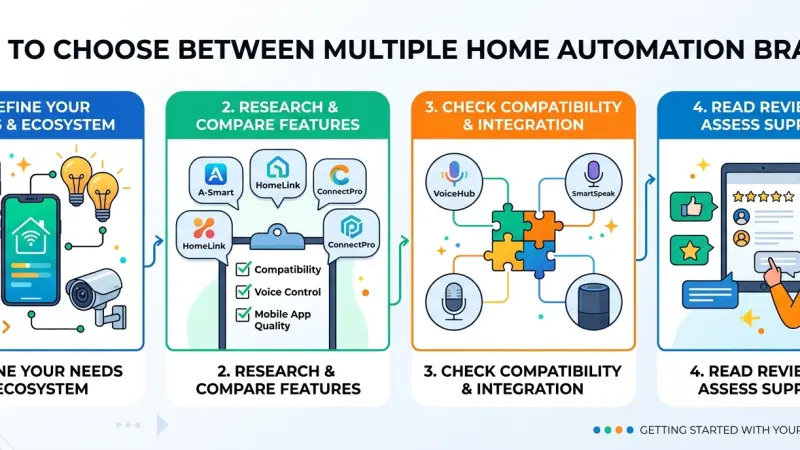
The modern smart home market is a paradox of choice. On one hand, consumers have unprecedented access to innovative technology that can automate everything from the morning coffee to the evening security sweep. On the other hand, the industry is a fragmented landscape of proprietary ecosystems, competing wireless protocols, and varying price points. For the average homeowner, the primary challenge is no longer finding a "smart" device—it is ensuring that a device from Brand A will actually talk to the system managed by Brand B.
Choosing between multiple home automation brands requires a shift in perspective. Instead of viewing a smart home as a collection of individual gadgets, it must be viewed as a unified infrastructure. A mismatch in brands can lead to "app fatigue," where you find yourself navigating six different interfaces just to turn off the lights and lock the door. This comprehensive guide will navigate the complexities of brand selection, focusing on interoperability, long-term support, and the fundamental principles of a cohesive automated environment.
Overview: The Brand Ecosystem Dilemma
When you select a home automation brand, you aren't just buying a product; you are often buying into an ecosystem. Historically, brands like Apple, Google, and Amazon created "walled gardens." If you bought a product compatible with one, it might not work with the others. While this is changing with the advent of universal standards like Matter, the brand you choose as your "primary interface" still dictates much of your user experience.
The market is generally divided into three tiers:
-
Mass-Market Consumer Brands: These are plug-and-play devices found in retail stores (e.g., Philips Hue, Nest, Ring).
-
Specialist Mid-Tier Brands: These often require a dedicated hub and offer deeper customization (e.g., Lutron, Aeotec, Shelly).
-
Professional Grade Ecosystems: Systems usually installed by certified specialists that integrate high-end audio, security, and climate control into a single hardwired backbone.
Key Factors to Consider When Comparing Brands
1. Interoperability and Protocols
Before looking at the features of a specific smart bulb or camera, look at the protocol it uses. Brands that support open standards are generally a safer long-term investment.
-
Matter: The new industry standard designed to make brands cross-compatible.
-
Zigbee/Z-Wave: Mesh networking protocols that are reliable and don't congest your Wi-Fi.
-
Wi-Fi: Common in budget brands, but can slow down your home network if you have too many devices.
2. Privacy and Data Sovereignty
Different brands have different business models. Some prioritize user privacy by processing data locally within your home. Others rely heavily on the cloud, meaning your data is processed on their servers. If privacy is a high priority, look for brands that offer "local control."
3. Reliability vs. Price
In the smart home world, you often get what you pay for in terms of "uptime." Premium brands invest heavily in their software to ensure that when you press a button, the action happens instantly. Budget brands may suffer from latency (delay) or occasional "device offline" errors.
Step-by-Step: Evaluating Your Brand Choices
Step 1: Define Your "Anchor" Ecosystem
Decide how you want to interact with your home. Do you want to use Siri, Alexa, Google Assistant, or a dedicated wall-mounted touch screen? This choice will immediately narrow down which brands are "native" to your experience and which will require "workarounds."
Step 2: Audit Your Existing Infrastructure
Look at your current home. Do you have neutral wires in your light switches? What is your Wi-Fi signal strength in the backyard? Certain brands excel in older homes (like Lutron’s Caseta line), while others are better suited for new builds with modern wiring.
Step 3: Test the App Experience
Download the app of a brand you are considering before buying the hardware. Most apps have a "demo mode." If the app feels clunky, slow, or counter-intuitive, you likely won't enjoy using the product daily.
Step 4: Check the "End-of-Life" Policy
Smart home brands occasionally go out of business or stop supporting older hardware. Research the brand’s history. Do they provide firmware updates for five-year-old products, or do they force you to upgrade to the latest model?
Tips for Mixing and Matching Brands
You don't have to stick to just one brand, but you should be strategic about how you mix them.
-
One Brand per Category: Try to keep all your lighting from one brand and all your security cameras from another. This ensures that "group" commands (like "Turn off all lights") work reliably.
-
Use a Universal Bridge: Consider a multi-protocol hub (like Homey or Home Assistant) that can act as a translator between different brands.
-
Prioritize Hardwired Hubs: Whenever possible, choose a brand that offers a hub that plugs directly into your router via Ethernet. This is significantly more stable than Wi-Fi-only setups.
Common Mistakes to Avoid
-
Buying Based on Sales Alone: A "great deal" on a smart plug is no bargain
if it requires a unique app that doesn't sync with your other devices.
-
Ignoring Subscription Fees: Some brands are cheap upfront but require a monthly subscription to access basic features like video history or advanced automation logic.
-
Neglecting Physical Controls: Don't choose a brand that only works via an app. Ensure there are physical switches or remotes available, as guests and children will need them.
The Importance of Professional Vetting
Even with extensive research, the technical nuances of radio frequency interference and software handshakes can be overwhelming. Many homeowners find that consulting with a professional—even for a one-hour discovery session—can prevent hundreds of pounds in wasted hardware purchases. Professionals have "bench-tested" these brands and know which ones fail after six months and which ones stand the test of time.
Supporting Local Business Visibility Beyond Core Marketing Efforts
As the smart home market grows, the need for local experts who can navigate these brand choices becomes more apparent. For a local specialist, business discoverability is not just about having a website; it is about appearing in the right context when a customer is searching for guidance. Utilizing a business directory website serves as a local discovery aid, connecting confused consumers with vetted professionals who can simplify their brand selection process.
Maintaining local presence consistency ensures that a business is viewed as a stable and reliable part of the community. When a professional chooses to list services uk directory information, they are adding a supporting visibility layer to their overall digital strategy. This presence on a business listings site acts as a credibility signal, showing that the business is active and professional. Furthermore, being featured on a reputable free company listing platform helps with trust reinforcement across platforms. By participating in a broader Local Page UK ecosystem, specialists can ensure their expertise in multi-brand integration is visible to the homeowners who need it most.
Brands
Choosing the right home automation brands is an exercise in long-term planning. By prioritizing interoperability, focusing on a primary ecosystem, and avoiding the trap of "gadget-first" shopping, you can build a smart home that feels like a natural extension of your lifestyle. Remember that the best brand is not necessarily the one with the most features, but the one that works most reliably within the context of your specific home and habits.
Frequently Asked Questions
1. Can I use Apple HomeKit and Amazon Alexa at the same time? Yes, many devices are "dual-certified" and can be controlled by both platforms simultaneously. However, you should try to set up your primary automation logic in just one of them to avoid conflicting commands.
2. What is Matter, and should I wait for it? Matter is a new protocol that allows devices from different brands to work together seamlessly. Most major brands now support it. It is worth looking for the Matter logo on any new devices you buy.
3. Do I really need a hub? While some Wi-Fi devices don't require a hub, having one (like a
Zigbee or Z-Wave hub) is usually better for privacy, reliability, and keeping your Wi-Fi network fast.
4. Why are some smart bulbs £5 and others £45? The price difference usually reflects the quality of the LEDs (color accuracy), the reliability of the wireless connection, and the longevity of the software support and app updates.
5. Will my smart home stop working if the company goes out of business? If the brand is "cloud-dependent," it might. This is why many experts recommend brands that offer "local control," meaning the devices talk directly to your hub without needing the company’s servers to be online.
6. Is it hard to switch ecosystems later? It can be. If you have 50 devices tied to one ecosystem, moving them to another can be time-consuming. It’s better to choose brands that are "platform agnostic" from the start.
7. Do professional-grade brands like Control4 work with DIY brands like Nest? Many professional systems have "drivers" that allow them to integrate with popular consumer brands, but there may be limitations on how much control you have compared to native professional components.
8. How do I know if a brand is secure? Look for brands that offer two-factor authentication (2FA) for their apps and have a clear policy on how they handle your data and security patches.
9. Can I mix brands of smart switches in the same house? You can, but it is visually better to stick to one brand so the wall switches look the same. It also makes it easier to set up "3-way" switching configurations.
10. Do smart home brands work during a power cut? Generally, no. Unless you have a battery backup (UPS) for your hub and router, and your devices are battery-powered, the system will go offline until power is restored.
11. What is the best brand for a budget? Brands like Shelly, TP-Link (Kasa/Tapo), and IKEA Tradfri offer high reliability at a lower price point, though they may require a bit more manual setup than premium brands.
12. Does using multiple brands slow down my internet? If they are all Wi-Fi based, yes. If they use Zigbee or Z-Wave hubs, they have a minimal impact on your internet speed.
13. Can a smart home brand see me through my cameras? Reputable brands use end-to-end encryption so that only you can see your footage. Always check if a camera brand has a "Physical Privacy Shutter" for extra peace of mind.
14. Should I buy all my devices from one brand? It is easier, but rarely practical.
No single brand makes the "best" version of every device. The goal is to choose brands that play well together.
15. How long do smart home devices usually last? Hardware usually lasts 5–10 years, but the "smart" functionality depends on the brand continuing to update the app and software. Stick with established names for better longevity.
Disclaimer: The information provided in this article is for general informational and research purposes only. Company details, features, services, and market positions may change over time. Readers are advised to visit official company websites and conduct independent research before making any business decisions or purchasing services.
Most Searchable Keywords
Recent Blogs


Related Listings

Categories
- Accountants (295)
- Advertising Agencies (559)
- Architects (149)
- Automobiles (377)
- Beauty (300)
- Carpenters (146)
- Cleaning Services (387)
- Dentists (189)
- Driving (62)
- Electricians (215)
- Energy (8)
- Event Organiser (686)
- Finance (602)
- Guide (3374)
- Health (2207)
- Information technology (206)
- Legal Services (354)
- Logistics (6)
- Maintenance (65)
- Manufacturing (35)
Sponsored Listings in Travel Agencies


Related Blogs

Meet the Fair Work Agency Changing UK Work Ru...
Read this insightful article "Meet the Fair Work Agency Changing UK Work Rules in 2026" to expand your knowledge!

Collective Redundancy Errors Now Carry Higher...
Read this insightful article "Collective Redundancy Errors Now Carry Higher 2026 Penalties" to expand your knowledge!

Explore Dog Friendly Walks in the Cotswolds f...
Read this insightful article "Explore Dog Friendly Walks in the Cotswolds for 2026" to expand your knowledge!
Questions & Answers – Find What
You Need, Instantly!
How can I update my business listing?
Is it free to manage my business listing?
How long does it take for my updates to reflect?
Why is it important to keep my listing updated?
