
How to Remove Google Reviews Manage Your Business Reputation
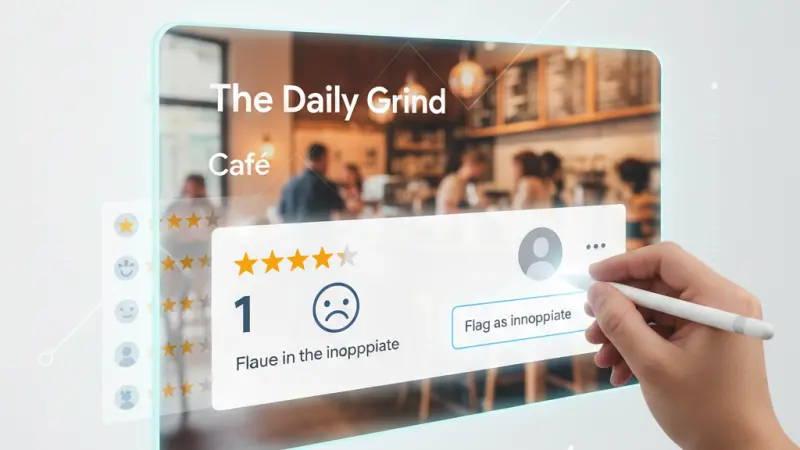
In the digital age, your online reputation is your most valuable currency. For small business owners and large corporations alike, a Google Business Profile acts as the modern "front window" of a shop. However, that window can sometimes be smashed by a single unfair or malicious review.

If you’ve ever seen a one-star rating pop up and felt that sinking feeling in your stomach, this guide is for you. We will explore exactly how to manage your reputation, the technical steps to flag inappropriate content, and the strategic maneuvers to take when Google refuses to budge. Understanding the Power of the Google Review
Before we dive into the "how-to," we must understand the "what." A Google review is a user-generated testimonial integrated directly into Google Search and Google Maps. Because Google dominates over 90% of the search market, these reviews are often the first thing a potential customer sees.
Why Reviews Matter More Than Ever
Your brand trust is built on social proof. Research suggests that a significant majority of consumers read online reviews before visiting a local business. A high rating can boost your SEO (Search Engine Optimization), while a string of negative reviews can push you down the search results, directly impacting your bottom line.
Can You Actually Delete a Google Review?
The short answer is no. Google does not provide a "Delete" button next to reviews for business owners. If they did, every business would have a perfect 5-star rating, and the system would lose all credibility.
There are only two ways a review disappears:
The Reviewer deletes it: The customer chooses to remove their own feedback.
Google removes it: Google’s moderation team deletes the review because it violates their Prohibited and Restricted Content policies.
Step-by-Step Guide to Flagging a Review
If you believe a review is fake, malicious, or violates policy, you can "Flag" it. This asks Google to take a human or algorithmic look at the content.
Method 1: Via Google Maps
Open Google Maps on your computer or mobile device.
Search for your Business Profile.
Find the specific review you wish to dispute.
Click the three vertical dots (More) next to the review.
Select Flag as inappropriate.
Method 2: Via Google Search
Search for your business name on Google.
Click on your Reviews total.
Locate the offending review.
Click More > Report review.
Choose the type of violation (e.g., Spam, Conflict of Interest).
Method 3: Via Your Business Profile Manager
If you manage multiple locations, this is the most efficient way:
Sign in to your Google Business Profile account.
Select the business location.
Click Reviews in the left-hand menu.
Find the review and click Flag as inappropriate.
When Does Google Actually Remove a Review?
Google won't remove a review just because it’s "mean" or you disagree with the customer’s version of events. You must prove it violates one of these specific categories:
1. Spam and Fake Content
This is the most common reason for removal. If a competitor is "review bombing" you or someone is posting nonsensical gibberish, Google will likely remove it.
2. Conflict of Interest
Reviews must be unbiased. You cannot review your own business, and your employees cannot leave reviews. Conversely, a competitor is not allowed to leave a negative review for your business to boost their own ranking.
3. Prohibited Content
Google has a zero-tolerance policy for:
Harassment: Content that threatens or targets specific individuals.
Hate Speech: Content that promotes violence or incites hatred.
Offensive Language: Profanity or obscene gestures.
4. Irrelevant Content
If a customer leaves a review for a dry cleaner on a plumber's profile, it is "off-topic." Google wants reviews to reflect the actual customer experience at that specific location.
Professional Strategies for Managing Negative Reviews
What happens if Google refuses to remove the review? This is where true reputation management begins.
1. The Art of the Public Response
Responding to a negative review is not about winning an argument with the reviewer; it’s about showing future customers that you care.
Be Professional: Never get defensive.
Be Brief: Don't write a novel.
Take it Offline: Provide an email or phone number to discuss the matter privately.
2. Fix the Root Problem
If five different people complain about the "slow service on Saturdays," you don't have a review problem—you have a staffing problem. Use negative feedback as a free consultancy service to improve your business.
3. The "Delete" Request
If you resolve a customer's issue privately (perhaps by offering a refund or a redo of the service), it is perfectly acceptable to ask: "We’re so glad we could make this right. Would you be open to updating or removing your initial review to reflect our resolution?"
Identifying Deceptive or Fake Reviews
How do you spot a "fake"? Look for these red flags:
The Reviewer's History: Do they have a profile picture? Have they reviewed
other businesses, or is this a "burner" account?
Vague Details: Fake reviews often say things like "Bad service, stay away!" without mentioning what they bought or who they spoke to.
Timing: A sudden influx of ten 1-star reviews in two hours is a clear sign of a coordinated attack.
Elevate Your Online Presence with Local Page UK
While managing Google reviews is vital, it is only one piece of the digital marketing puzzle. To truly dominate the local market, your business needs to be visible across multiple high-authority platforms. This is where Local Page UK becomes your greatest ally.
By joining our uk online business directory, you diversify your online footprint, making your brand less vulnerable to a single bad review on one platform. We provide a robust uk business directory that helps customers find verified, high-quality services. As a premier uk local business directory, we empower entrepreneurs to find local businesses uk with ease.
Whether you are looking for a local businesses list uk or want to feature in a dedicated uk small business directory, we offer the tools you need. Our platform serves as a comprehensive uk b2b business directory and uk b2c business directory, ensuring that no matter your industry, you are seen by the right audience. Our business directory uk online is designed for maximum SEO impact, acting as a trusted uk service providers directory and a hub for uk business listings online.
Ready to get started? Explore the local page uk business directory or check our comprehensive uk business directory website to see how we help businesses grow.
Claim Your Free Spot Today
Budget shouldn't be a barrier to visibility. We offer a business listing uk to help you get started. Our business listing uk is the perfect place for a business listing uk. When you join our business listing uk, you benefit from a business listing uk that boosts your local search authority.
From a business listing uk to a specialized business listing uk, we are the top choice for an business listing uk. We even offer targeted options like a business listing uk and a business listing uk.
Browse Our Premium Listings
For those seeking the best of the best, our local business listings uk and uk service listings feature uk verified business listings that customers trust. Browse uk top rated local businesses or find help through our uk home services directory. From uk professional services listings to uk trade services listings, we are the uk local trades directory of choice. Check out our local page uk listings today and simplify your uk local business search.
Service-Related Questions & Answers
1. How long does Google take to remove a flagged review?
It typically takes 3 to 7 business days for a human moderator to review your request, though it can take longer during peak periods.
2. Can I sue someone for a fake Google review?
In the UK, defamation laws apply online. However, legal action is expensive and time-consuming. It is usually better to try flagging the review or responding professionally first.
3. Does replying to a review make it harder to remove?
No. In fact, responding professionally shows Google that you are an active, legitimate business owner.
4. Can I turn off Google reviews for my business?
No. As long as your business is listed on Google Maps, users have the right to leave feedback.
5. Why did Google remove a positive review from my profile?
Google’s spam filters sometimes catch "false positives." This often happens if multiple reviews come from the same IP address or if the reviewer has a history of suspicious activity.
6. Can I offer a discount in exchange for a 5-star review?
No. This is a direct violation of Google’s terms of service and can lead to your entire Business Profile being suspended.
7. Does the number of reviews affect my SEO?
Yes. Both the quantity and the "freshness" of reviews are significant ranking factors for local SEO.
8. What if a former employee leaves a negative review?
This is a "Conflict of Interest." Flag it immediately and provide evidence to Google if possible.
9. Can I delete a Google Business Profile to get rid of bad reviews?
You can, but the reviews may reappear if a new profile is created for the same location. It is better to manage the reviews than to delete your digital history.
10. How do I contact Google Support about a review?
You can use the "Review Management Tool" within the Google Business Profile help section to track the status of your reports.
11. Does Google remove reviews that are 5 years old?
No, reviews stay indefinitely unless they are flagged and found to violate current policies.
12. What is a "Review Bomber"?
This is when a person or group leaves a high volume of 1-star reviews in a short period to intentionally damage a business. Google is usually very good at catching and removing these.
13. Are third-party hotel reviews removable?
No, you must contact the source (like Booking.com or TripAdvisor) to have those addressed.
14. Can I see who flagged my review?
No, the flagging process is anonymous.
15. Is it worth paying a company to remove reviews?
Be very careful. No company has a "secret back door" to Google. Any company promising "guaranteed removal" is often using the same flagging tools you have access to.

Disclaimer: The information provided in this article is for general informational and research purposes only. Company details, features, services, and market positions may change over time. Readers are advised to visit official company websites and conduct independent research before making any business decisions or purchasing services.
Most Searchable Keywords
Recent Blogs
-

Explore Supermarkets in Chepstow and the Surrounding Wye Valley
-
Elite Guide to Taxi and Private Hire Services in Hereford
-
Explore Fuel and Roadside Convenience Across Beckington Today
-
Explore Abergavenny Tyre Services with Expert Local Fitters
-
Claim Your HMRC UK Tax Refund Before Application Deadlines

Categories
- Accountants (295)
- Advertising Agencies (559)
- Architects (149)
- Automobiles (376)
- Beauty (300)
- Carpenters (146)
- Cleaning Services (386)
- Dentists (189)
- Driving (61)
- Electricians (215)
- Energy (7)
- Event Organiser (683)
- Finance (597)
- Guide (3358)
- Health (2205)
- Information technology (206)
- Legal Services (352)
- Logistics (6)
- Maintenance (65)
- Manufacturing (35)
Sponsored Listings in Property Maintenance


Related Blogs

Explore Supermarkets in Chepstow and the Surr...
Read this insightful article "Explore Supermarkets in Chepstow and the Surrounding Wye Valley" to expand your knowledge!

Elite Guide to Taxi and Private Hire Services...
Read this insightful article "Elite Guide to Taxi and Private Hire Services in Hereford" to expand your knowledge!

Explore Fuel and Roadside Convenience Across...
Read this insightful article "Explore Fuel and Roadside Convenience Across Beckington Today" to expand your knowledge!
Questions & Answers – Find What
You Need, Instantly!
How can I update my business listing?
Is it free to manage my business listing?
How long does it take for my updates to reflect?
Why is it important to keep my listing updated?
