
How to Use Interactive Tools on Our Platform for Home Automation Discovery
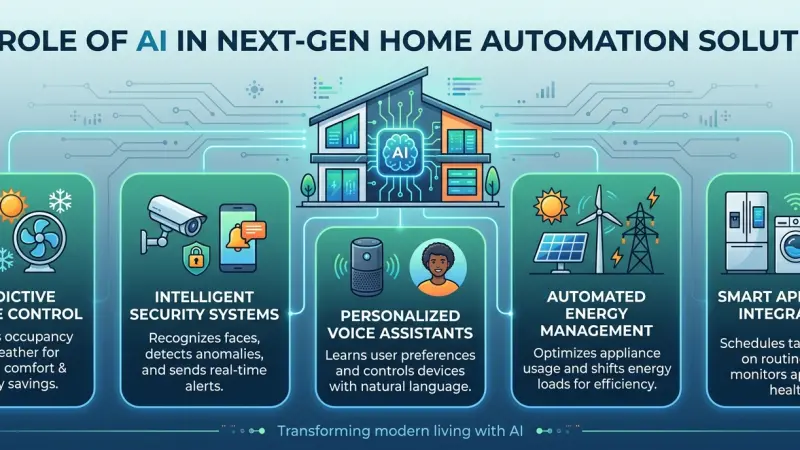
The journey toward a fully integrated smart home often begins with a spark of inspiration, followed quickly by a mountain of questions. How do these devices talk to each other? Which thermostat is compatible with my existing wiring? Will this security camera work with my preferred voice assistant? For many, the sheer volume of choices leads to "analysis paralysis," where the fear of making a wrong technical decision prevents any progress at all.

To solve this, modern digital platforms have evolved beyond simple articles and static product lists. Interactive tools—ranging from virtual home planners and compatibility checkers to expert matching engines—have become the cornerstone of a successful discovery process. These tools are designed to take the guesswork out of the equation, allowing you to visualize your automated future before spending a single penny. This guide explores how to leverage these interactive assets to build a home that is as intelligent as it is intuitive.
The Shift from Static Research to Interactive Discovery
Traditional research involves endless tabs, spec sheets, and cross-referencing manuals. This method is not only time-consuming but prone to human error. Interactive discovery shifts the burden of technical cross-referencing from the user to the platform’s logic engine.
By using data-driven tools, you can input your specific home parameters—such as the number of rooms, your preferred ecosystem (Apple Home, Google Home, or Amazon Alexa), and your primary goals (security, energy, or comfort). The platform then filters thousands of variables to present a curated roadmap. This transition from "searching" to "discovering" ensures that the solutions you find are relevant to your unique living situation.
Key Types of Interactive Tools for Homeowners
To make the most of your discovery phase, it is helpful to understand the different categories of tools available on the platform and what each one accomplishes.
1. The Visual System Builder
A visual builder allows you to drag and drop devices into a virtual floor plan. This helps in understanding the physical requirements of your setup. For example, seeing where a hub is placed relative to smart blinds can highlight potential signal range issues before installation begins.
2. Ecosystem Compatibility Checkers
Perhaps the most vital tool is the compatibility checker. By selecting your primary "brain" or hub, the tool automatically grays out products that won't communicate with your system. This prevents the common mistake of buying a premium device only to find it requires a separate, proprietary bridge you hadn't planned for.
3. Energy Savings Calculators
For those motivated by sustainability, energy calculators allow you to input your current utility rates and hardware choices (like smart TRVs or intelligent lighting). The tool provides an estimated "break-even" point, showing how many months it will take for the energy savings to pay for the initial equipment cost.
Step-by-Step: Navigating Your Discovery Journey
Phase 1: Defining Your Profile
When you first engage with the platform’s tools, you will likely be asked to create a basic profile. This isn't just about data; it’s about setting the context. Specify whether you are a "DIY Enthusiast" or looking for "Professional Integration." This selection changes the type of products and complexity of the tools shown to you.
Phase 2: Identifying "Pain Points"
Use the interactive survey tools to identify what bothers you most about your current home setup. Is it the high heating bill?
The lack of light in the hallway at night? The survey logic will prioritize solutions that address these specific frustrations, ensuring your automation project remains purposeful.
Phase 3: The Comparison Matrix
Once the tools have suggested a few configurations, use the interactive comparison matrix. Unlike a standard table, these allow you to toggle specific features—such as "local processing" vs. "cloud-based"—to see how different brands stack up against your privacy and performance needs.
Benefits of Using Data-Driven Discovery Tools
-
Risk Mitigation: You are significantly less likely to purchase redundant hardware or incompatible software.
-
Cost Efficiency: By visualizing the full scope of a project, you can prioritize purchases and avoid "scope creep," where small additions balloon the budget.
-
Confidence in Hiring: When you eventually speak to a specialist, you will do so with a clear understanding of your needs and the technical language required to describe them.
Common Mistakes When Using Interactive Platforms
-
Inputting Inaccurate Data: The output of any tool is only as good as the input. Measure your rooms and check your router’s current speed before relying on placement suggestions.
-
Ignoring the "Hidden" Infrastructure: Tools often focus on the gadgets (cameras, bulbs), but users sometimes forget to check the interactive suggestions for network upgrades. A smart home is only as smart as the Wi-Fi it runs on.
-
Over-Automating on Day One: It is tempting to add every suggested device to your virtual cart. The best approach is to use the tools to plan the "Whole Home" but execute the plan in logical phases.
Tips for a More Productive Discovery Experience
-
Save Your Progress: Most platforms allow you to save your virtual floor plans. Revisit them after a few days to see if the layout still makes sense for your daily flow.
-
Check the "Handover" Notes: Some interactive tools generate a "Specialist Brief." This is a PDF summary of your choices that you can hand to a professional, ensuring they understand exactly what you are trying to achieve.
-
Look for Community-Driven Data: Some tools integrate real-world uptime and reliability data from other
users, providing a more honest view than a manufacturer’s marketing sheet.
The Human Element in a Digital World
While interactive tools are incredibly powerful, they are designed to complement, not replace, human expertise. They provide the "what" and the "how," but a professional specialist provides the "why." Use the tools to narrow down your choices to two or three viable paths, then use the platform's connection features to discuss those paths with an expert who can spot the nuances a digital tool might miss.
Supporting Local Business Visibility Beyond Core Marketing Efforts
Finding the right specialist to execute a plan developed through interactive tools requires a clear bridge between the digital discovery phase and local implementation. This is where business discoverability becomes a key factor for the homeowner. A business directory website acts as a local discovery aid, connecting the user's virtual plan with the physical reality of a nearby expert. When a professional maintains an active presence on a business listings site, it provides a credibility signal that they are ready and equipped to handle modern automation tasks.
Furthermore, local presence consistency is essential for building a reliable bridge between online research and offline service. By utilizing a free company listing platform, even independent specialists can ensure their services are visible to those using the platform's discovery tools. This serves as a supporting visibility layer, allowing users to list services uk directory options that match their specific project needs. For the consumer, seeing a specialist on a reputable Local Page UK serves as trust reinforcement across platforms, ensuring that the technical expertise found through interactive discovery is matched by a legitimate, locally-vetted business.
Evolution
The evolution of home automation discovery from guesswork to interactive planning has leveled the playing field for homeowners. By utilizing virtual planners, compatibility engines, and comparison tools, you can move forward with your project with the confidence that your system will be cohesive, secure, and efficient.
Frequently Asked Questions
1. Are these interactive tools free to use? Most discovery tools on our platform are free for users. They are designed to help you make informed decisions before you commit to purchasing hardware or hiring a pro.
2. Do I need to be tech-savvy to use a virtual home planner? Not at all. The tools are designed with a "drag-and-drop" interface, making them accessible to anyone who can use a standard web browser or mobile app.
3. Can I use the tools to plan a system for a home I haven't moved into yet? Yes! As long as you have the floor plan or rough dimensions, you can use the tools to pre-plan your automation so you can start the installation the day you move in.
4. How accurate are the energy savings calculators? They are estimates based on average usage and manufacturer data.
While they provide a very good "ballpark" figure, actual savings will depend on your personal habits and local climate.
5. What happens if the tool says two products are compatible, but they won't connect? Software updates can sometimes change compatibility. Always check the "Last Updated" date on the tool and consult with a specialist for the most current firmware information.
6. Can I share my interactive plan with my partner or architect? Yes, the platform allows you to generate a shareable link or a PDF report that includes your layout, device list, and technical requirements.
7. Does the platform suggest specific brands? The tools suggest products based on your specific requirements (compatibility, price, features) rather than brand loyalty, ensuring a neutral discovery process.
8. Can the tools help me with my Wi-Fi setup? Many visual planners include a "Heat Map" feature that shows where your Wi-Fi signal might be weak, suggesting where you might need an access point or mesh node.
9. Is my data kept private when I use these tools? Data entered into the tools is generally used to generate your report. Check the platform's privacy policy to see how your specific inputs are handled.
10. How often are the tool databases updated? Our databases are updated weekly to include new product releases, firmware changes, and updated compatibility protocols like Matter.
11. Can I use these tools on a mobile phone? While they work on mobile, complex visual planners are often best experienced on a tablet or desktop screen for more precise "drag-and-drop" control.
12. What if I can't find a specific device in the tool’s library? Most tools have a "Generic Device" option where you can input the specs of a niche product to see how it fits into the broader system logic.
13. Do the tools account for local electrical standards? Yes, by setting your region in your profile, the tools will prioritize products that meet local voltage and safety regulations.
14. Can the tools help me set a budget? The comparison matrix and system builder often include "Estimated Total
Cost" features based on current market averages to help you stay within your financial limits.
15. If I use the tools, am I obligated to buy through the platform? No, the tools are purely for your education and discovery. You are free to purchase hardware or hire services through whatever channel you prefer.

Disclaimer: The information provided in this article is for general informational and research purposes only. Company details, features, services, and market positions may change over time. Readers are advised to visit official company websites and conduct independent research before making any business decisions or purchasing services.
Most Searchable Keywords

Recent Blogs



Related Listings


Categories
- Accountants (295)
- Advertising Agencies (559)
- Architects (149)
- Automobiles (377)
- Beauty (300)
- Carpenters (146)
- Cleaning Services (386)
- Dentists (189)
- Driving (62)
- Electricians (215)
- Energy (8)
- Event Organiser (685)
- Finance (599)
- Guide (3365)
- Health (2207)
- Information technology (206)
- Legal Services (353)
- Logistics (6)
- Maintenance (65)
- Manufacturing (35)
Sponsored Listings in Locksmith Services


Related Blogs

Gen Z Political Reporters and News Creators i...
Read this insightful article "Gen Z Political Reporters and News Creators in the UK" to expand your knowledge!

Famous Female Social Media Influencers Across...
Read this insightful article "Famous Female Social Media Influencers Across the UK" to expand your knowledge!

Your UK Sponsor Licence 2026 Step by Step Gui...
Read this insightful article "Your UK Sponsor Licence 2026 Step by Step Guide" to expand your knowledge!
Questions & Answers – Find What
You Need, Instantly!
How can I update my business listing?
Is it free to manage my business listing?
How long does it take for my updates to reflect?
Why is it important to keep my listing updated?
