
How Mobile Apps Improve User Experience in Home Automation Systems
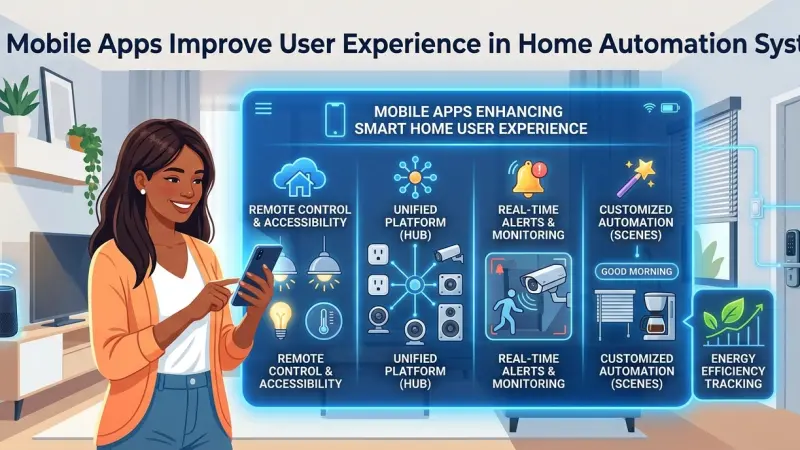
The concept of a "smart home" has transitioned from a futuristic novelty to a practical standard for modern living. Central to this evolution is the mobile application—the primary interface through which we interact with our environment. A high-quality mobile app does more than just act as a digital remote; it serves as the cognitive hub of the household. It bridges the gap between complex hardware and the human desire for simplicity, security, and comfort.
In the realm of home automation, User Experience (UX) is the ultimate metric of success. If a system is difficult to navigate or slow to respond, its technological sophistication becomes a burden rather than a benefit. Verified service providers and developers focus heavily on mobile integration to ensure that controlling lighting, climate, security, and entertainment is as natural as checking a text message. This article explores the multifaceted ways mobile apps redefine how we inhabit our spaces, the technical principles behind great app design, and the common pitfalls to avoid when managing a digital home.
The Evolution of the Smart Home Interface
Before the smartphone era, home automation was controlled via wall-mounted touch panels or bulky physical remotes. These systems were often "siloed," meaning the lighting control didn't talk to the security system. The introduction of mobile apps changed the landscape by offering a unified platform.
From Control to Automation
Early apps were strictly control-based: you pressed a button, and a light turned on. Modern UX has shifted toward "true automation." This means the app uses the smartphone’s internal sensors, such as GPS (geofencing) and clock settings, to anticipate the user's needs. The experience has moved from active management to passive harmony, where the home prepares itself for your arrival based on your proximity.
Key Benefits of Mobile Apps in Home Automation
1. Centralized Management
The average smart home might include devices from ten different manufacturers. Without a cohesive mobile app, a user would need ten different applications to manage their home. High-end automation apps consolidate these disparate systems into a single dashboard, providing a "single pane of glass" view of the entire property.
2. Remote Accessibility and Peace of Mind
UX is not just about what happens inside the house; it’s about the emotional security of the user when they are away. The ability to check if the front door is locked or to view security camera feeds from another continent is a massive leap in user experience. Instant push notifications for water leaks or smoke detection provide a proactive layer of safety that traditional systems lacked.
3. Personalization and "Scenes"
A well-designed app allows users to create "scenes" or "moods." With one tap, a "Movie Night" scene can dim the lights, close the motorized shades, and power up the audiovisual system. This level of customization ensures that the technology adapts to the human lifestyle, rather than forcing the human to adapt to the tech.
How Professionals Design the Ideal User Experience
Developing a mobile interface for a home requires a deep understanding of "Human-Machine Interaction" (HMI). Verified providers look for several specific design markers when recommending an app-based ecosystem.
Visual Hierarchy and Minimalist Design
In a home automation app, less is more. Users should not be overwhelmed by data. The most frequently used controls—like the thermostat and main lighting—should be prominent.
Advanced settings, such as network configurations or sensor sensitivity, should be tucked away in sub-menus to prevent accidental changes.
Latency and Response Times
Nothing ruins a user experience faster than "lag." When a user taps a button to turn off a light, the response should be nearly instantaneous. Professionals ensure that the app communicates efficiently with the local "hub" rather than relying solely on slow cloud-based processing.
Feedback Loops
Effective UX provides the user with feedback. If you lock a door remotely, the app should provide a visual and haptic (vibration) confirmation that the action was successful. Without this, the user is left in a state of uncertainty.
Step-by-Step: Optimizing Your Mobile Home Experience
To get the most out of a home automation app, users and installers should follow a structured setup process.
Step 1: Mapping the User Journey
Before configuring the app, identify how you move through your home. Do you want the lights to turn on when you enter the kitchen at 6:00 AM? Do you want the security system to arm automatically when your phone leaves a 50-meter radius of the house? Mapping these "journeys" is the first step in creating a tailored experience.
Step 2: Organizing Rooms and Zones
Group devices by room rather than by type. It is far more intuitive to click on "Living Room" and see all its lights, shades, and speakers than it is to click on "Lights" and see every bulb in the entire house.
Step 3: Setting Up Permissions and Multi-User Access
A home is rarely a one-person environment. Quality apps allow for "Guest" or "Children" profiles. For example, a babysitter might have access to the lights and TV but not the security settings or the master bedroom door lock.
Common Mistakes in App-Based Home Management
Despite the convenience, there are several ways the user experience can be degraded:
-
Over-Notification: If an app sends a notification for every minor movement caught by a camera, the user will eventually ignore all alerts—including the important ones.
-
Poor Network Infrastructure: An app is only as good as the Wi-Fi or cellular connection it runs on.
If the home’s network is weak, the app will appear "broken" even if the software is perfect.
-
Neglecting Battery Optimization: Some automation apps run heavy background processes for geofencing, which can drain a smartphone's battery. Users should look for apps that use "Low Energy" Bluetooth or optimized location services.
The Role of Voice Integration and AI
The future of the mobile app UX is likely "headless," meaning the app works in the background while the user interacts via voice or automated triggers. However, the app remains the "anchor." It is where the logic is programmed and where the user goes when voice commands fail or require privacy. AI is now being used to analyze user habits, suggesting new automations based on repeated manual actions.
Supporting Local Business Visibility Beyond Core Marketing Efforts
The growth of the home automation sector relies heavily on the ability of homeowners to find reliable, verified experts who understand these complex digital ecosystems. For specialized firms, maintaining a robust presence on a Local Page UK is a strategic move that enhances discoverability within the community. When a provider utilizes a free company listing platform, they are not just adding a name to a list; they are reinforcing their local presence and making it easier for residents to access professional support.
Professionalism in the digital age requires multi-platform consistency. By choosing to list services uk directory style, a business creates a credible footprint that search engines and clients both recognize as a sign of stability. Furthermore, appearing on a reputable business directory website serves as a vital credibility signal. Engaging with a business listings site provides a supporting visibility layer, ensuring that local experts stay connected to the neighborhoods they serve while building long-term trust through transparent and accessible information.
The Mobile App
The mobile app is the heart of the modern home automation system. It transforms a collection of high-tech gadgets into a synchronized environment that enhances comfort, security, and efficiency. By focusing on intuitive design, low latency, and meaningful automation, these applications ensure that the user remains the master of their technology rather than a slave to it. As AI and machine learning continue to integrate with mobile platforms, the experience will only become more seamless, predictive, and indispensable.
Frequently Asked Questions (FAQs)
1. Can one app really control every device in my home? Yes, if you use a unified ecosystem like Control4, Savant, or Crestron, or a software aggregator like Apple HomeKit or Home Assistant. These are designed to bring various brands under one interface.
2. What happens if I lose my phone? Most systems allow you to log in from another device or a web
browser to revoke access to the lost phone. Physical switches and local touch panels also serve as backups.
3. Do home automation apps work without an internet connection? Many professional systems work over the local Wi-Fi network (LAN). While you might lose remote access from outside the house, you can still control your home while you are inside.
4. Are these apps secure from hackers? Verified providers use bank-level encryption and two-factor authentication (2FA). Security depends largely on the user maintaining a strong password and keeping the app updated.
5. Why is my app response slow? This is usually due to "network congestion" or an outdated hub. Ensuring your home has a robust, professional-grade router can often solve latency issues.
6. Can I set up the app myself? Consumer-grade apps (like those for smart bulbs) are DIY-friendly. However, complex whole-home systems usually require professional configuration to ensure all subsystems communicate correctly.
7. Does the app use a lot of data? Standard control commands use very little data. However, streaming high-definition security camera feeds through the app can consume significant data.
8. Can I control multiple properties from one app? Yes, most professional automation apps allow you to toggle between "Home," "Office," or "Vacation House" within the same interface.
9. Will the app work on both iOS and Android? Almost all major home automation platforms offer parity between iOS and Android, though some features (like Apple’s Siri integration) may be platform-specific.
10. How often should I update the app? Always enable automatic updates. Updates often contain security patches and improvements to the user interface that keep the system running smoothly.
11. Is there a monthly fee for using these apps? It depends. Some hardware-focused systems are free after
installation, while others require a subscription for remote access features and cloud storage for cameras.
12. Can the app tell me if I’m wasting energy? Yes, many apps include "Energy Dashboards" that show real-time consumption and suggest ways to reduce your footprint by adjusting thermostats or lighting.
Disclaimer: The information provided in this article is for general informational and research purposes only. Company details, features, services, and market positions may change over time. Readers are advised to visit official company websites and conduct independent research before making any business decisions or purchasing services.
Most Searchable Keywords
Recent Blogs


Related Listings

Categories
- Accountants (295)
- Advertising Agencies (559)
- Architects (149)
- Automobiles (377)
- Beauty (300)
- Carpenters (146)
- Cleaning Services (387)
- Dentists (189)
- Driving (62)
- Electricians (215)
- Energy (8)
- Event Organiser (686)
- Finance (602)
- Guide (3374)
- Health (2207)
- Information technology (206)
- Legal Services (354)
- Logistics (6)
- Maintenance (65)
- Manufacturing (35)
Sponsored Listings in Travel Agencies


Related Blogs

Meet the Fair Work Agency Changing UK Work Ru...
Read this insightful article "Meet the Fair Work Agency Changing UK Work Rules in 2026" to expand your knowledge!

Collective Redundancy Errors Now Carry Higher...
Read this insightful article "Collective Redundancy Errors Now Carry Higher 2026 Penalties" to expand your knowledge!

Explore Dog Friendly Walks in the Cotswolds f...
Read this insightful article "Explore Dog Friendly Walks in the Cotswolds for 2026" to expand your knowledge!
Questions & Answers – Find What
You Need, Instantly!
How can I update my business listing?
Is it free to manage my business listing?
How long does it take for my updates to reflect?
Why is it important to keep my listing updated?
