
Mastering the Create Mod in Minecraft A Beginners Guide to Automation
- 👤 Alex
- 👁️ 268 Views
- Last Updated: April 27, 2026
- 🏷️ Information technology
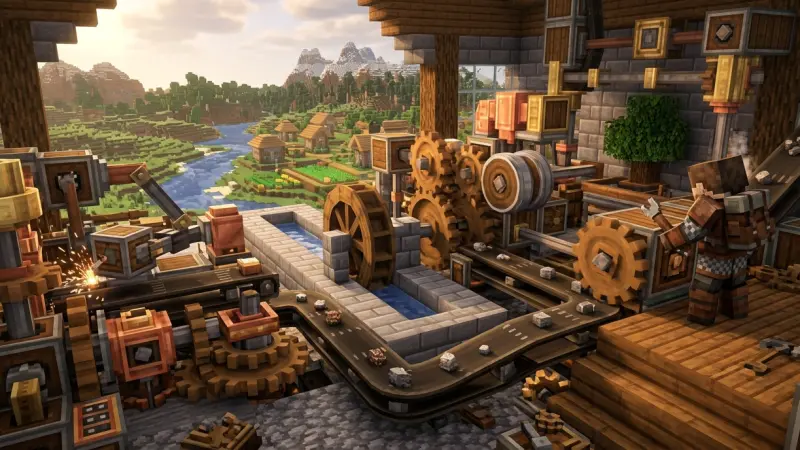
The world of Minecraft has always been about blocks and imagination, but the Create Mod transforms the game into a living, breathing industrial playground. Imagine walking into your base and seeing a colossal clockwork machine whirring with brass gears, belts transporting raw ore to mechanical crushers, and automated arms precisely assembling complex items. In 2026, the Create Mod has solidified its place as the gold standard for "low-tech, high-complexity" engineering, offering players a tactile alternative to the magic-block machines of yesteryear.

This guide is designed to take you from a confused tinkerer with a handful of andesite to a master of rotational force. Whether you are playing on the latest Minecraft 1.22+ versions or exploring a curated 2026 modpack, this article satisfies the search intent for a comprehensive, actionable, and technically accurate foundation in mechanical automation.
The Core Pillars of Kinetic Engineering
To master Create, you must first speak its language: Rotational Force. Unlike Redstone, which is binary (on or off), Create is analog and physical.
Technical Breakdown: Speed vs. Stress
At the heart of every contraption are two fundamental metrics: RPM (Revolutions Per Minute) and SU (Stress Units).
-
RPM: This dictates how fast your machines move. Higher speeds mean faster processing but require more energy.
-
Stress Units: Think of this as your "power budget." Every generator (Water Wheels, Windmills, Steam Engines) produces a set amount of SU. Every consumer (Mechanical Presses, Mixers, Drills) consumes SU based on its speed.
Current 2026 Trends: The Steam Revolution
In 2026, the meta has shifted toward large-scale Modular Steam Engines. While Water Wheels are great for early-game ore processing, the modern "Create 0.6+" ecosystem emphasizes multi-block boilers powered by Blaze Burners.
-
Data Insight: A max-level Steam Engine can produce upwards of 16,384 SU per engine, allowing for massive, lag-efficient factory floors that were impossible in earlier versions.
Strategic Advice: The "Ponder" System
The best "How-To" advice for any beginner is to use the Ponder System. By hovering over a Create block in your inventory and holding [W], the game generates a 3D animated tutorial.
It is the most advanced in-game documentation in Minecraft history—use it religiously to understand complex gear ratios.
Transmission and Transformation: Moving Power
Generating power is only half the battle; you must transport it across your factory without the system becoming "Overstressed."
Shafts, Belts, and Gearboxes
-
Shafts: The simplest way to move rotation in a straight line.
-
Mechanical Belts: Essential for moving items and power over long distances. They can also move power at an angle.
-
Gearboxes: Used to rotate your power axis by 90 degrees. In 2026, players often use Vertical Gearboxes to keep factory designs compact and sleek.
Actionable Strategy: Speed Scaling
To increase speed, connect a Large Cogwheel to a Small Cogwheel.This doubles the RPM but also doubles the stress impact.
-
Beginner Tip: Always place a Stressometer and Speedometer at the start of your main power line. It prevents the dreaded "System Overstressed" shutdown by giving you real-time feedback on your overhead.
Advanced Insights: The Secret to High-Efficiency Farms
Generic guides will tell you to use a Mechanical Drill. Experts tell you to use Contraption Actors.
Pro-Tip: "Contraptions are the 'God Mode' of Create. When you attach a Drill or Saw to a Mechanical Bearing or Cart Assembler, it stops being a block and becomes an 'Entity.' This allows it to pass through blocks, harvest entire forests in one rotation, and store thousands of items in attached chests without dropping a single entity on the ground."
The 2026 "Train" Meta
With the expansion of the Steam and Rails mechanics in 2026, automated trains aren't just for transport.
High-level players now build "Mobile Factories" on trains that process ore while traveling between waypoints, maximizing efficiency during transit.
Comparative Analysis: Create vs. Immersive Engineering
In the 2026 modding scene, these two are often compared. Here is how they stack up for a beginner:
| Feature | Create Mod | Immersive Engineering |
| Logic Type | Kinetic/Rotational Force | Electrical/RF Power |
| Visual Style | Steampunk/Brass (Tactile) | Industrial/Diesel (Static) |
| Automation | Highly Customizable (User-built) | Preset Multi-block Structures |
| Difficulty | High (Physics-based logic) | Medium (Wiring-based) |
| Performance | Optimized for 2026 hardware | Heavy on entity rendering |
FAQs
-
What is the best early-game power source? The Large Water Wheel. It’s cheap (logs and planks) and provides consistent SU for a basic press.
-
How do I stop my machines from breaking? Ensure your network isn't "Overstressed" by adding more power sources or slowing down your consumers with gear ratios.
-
What does "Overstressed" mean? It means your machines are trying to use more SU than your generators are producing. Everything will stop until you fix the balance.
-
How do I change the direction of rotation? Use a Gearshift with a Redstone signal, or simply use a Gearbox.
-
Can I automate Andesite Alloy? Yes! Use a Mechanical Mixer over a basin to combine Andesite and Iron/Zinc nuggets.
-
How do I use Engineer's Goggles? Wear them in your helmet slot
to see detailed Stress and Speed overlays on every block.
-
What is the "Blaze Burner"? A heat source for Basins and Steam Boilers. Feed it coal for heat, or Blaze Cakes for "Superheating."
-
How do I make Brass? Mix Copper and Zinc in a heated Basin (requires a Blaze Burner).
-
Can Create Mod move blocks? Yes, using Mechanical Pistons, Rope Pulleys, or Bearings glued to blocks using Super Glue.
-
Is the Create Mod compatible with Optifine? In 2026, Oculus and Rubidium are recommended over Optifine for better compatibility and performance.
-
How do I filter items on a belt? Use a Brass Tunnel or an Attribute Filter to precisely sort items.
-
What is a "Schematicannon"? A machine that automatically builds structures for you using a ".nbt" file and a chest of blocks.
-
Does speed affect processing? Yes. A Mechanical Press works significantly faster at 128 RPM than at 32 RPM.
-
How do I make a Steam Engine? You need a Boiler (fluid tanks), a heat source (Blaze Burners), and water (Mechanical Pumps), then attach a Steam Engine block to the side.
-
How do I glue blocks together? Hold Super Glue in your off-hand and click the corners
of the area you want to turn into a single moving contraption.
The Horizon of Automation The Create Mod isn't just a tool for automation; it’s a tool for expression. In 2026, as Minecraft continues to evolve, the ability to build custom, moving machinery remains the peak of technical gameplay. Start small with a simple bread farm, and before you know it, you’ll be commanding a sprawling industrial empire.

Disclaimer: The information provided in this article is for general informational and research purposes only. Company details, features, services, and market positions may change over time. Readers are advised to visit official company websites and conduct independent research before making any business decisions or purchasing services.
Most Searchable Keywords

Recent Blogs



Related Listings
-
Undo Capital
-

Top Mobile App Developers in UK | Downtown Applications
-

Polar DC
-

Chronicle Online
-

Imobisoft

Categories
- Accountants (295)
- Advertising Agencies (559)
- Architects (149)
- Automobiles (377)
- Beauty (300)
- Carpenters (146)
- Cleaning Services (386)
- Dentists (189)
- Driving (62)
- Electricians (215)
- Energy (8)
- Event Organiser (685)
- Finance (599)
- Guide (3365)
- Health (2207)
- Information technology (206)
- Legal Services (353)
- Logistics (6)
- Maintenance (65)
- Manufacturing (35)

Sponsored Listings in Information Technology
Related Blogs

Gen Z Political Reporters and News Creators i...
Read this insightful article "Gen Z Political Reporters and News Creators in the UK" to expand your knowledge!

Famous Female Social Media Influencers Across...
Read this insightful article "Famous Female Social Media Influencers Across the UK" to expand your knowledge!

Your UK Sponsor Licence 2026 Step by Step Gui...
Read this insightful article "Your UK Sponsor Licence 2026 Step by Step Guide" to expand your knowledge!
Questions & Answers – Find What
You Need, Instantly!
How can I update my business listing?
Is it free to manage my business listing?
How long does it take for my updates to reflect?
Why is it important to keep my listing updated?
