
Naviance Your Complete Guide to College Career Success
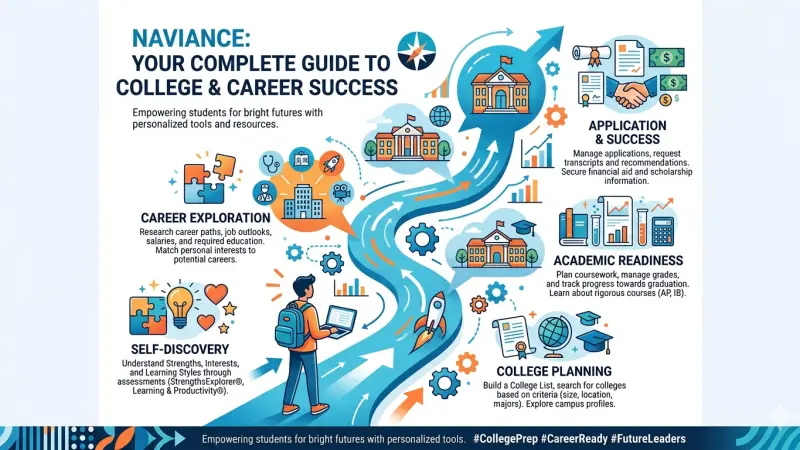
As of April 17, 2026, Naviance remains a primary platform for college, career, and life readiness (CCLR) in secondary education across the United States. Owned by PowerSchool, the software is designed to bridge the gap between high school academics and post-secondary goals. It serves as a centralized hub where students, parents, counselors, and teachers collaborate on the transition to higher education or the workforce.

The platform's utility is built on data-driven insights. By integrating a student's academic profile with historical admission data from their specific high school, Naviance provides a localized perspective on college admissions that national databases often lack. In 2026, the platform continues to evolve, incorporating more intuitive search interfaces and streamlined document delivery systems to manage the increasing volume of digital college applications.
Naviance is not a social network or a general search engine; it is a restricted-access tool typically provided by school districts. It functions as a record-keeping system, a research database, and a communication bridge. For students in the Class of 2026 and beyond, understanding the mechanics of this tool is essential for managing deadlines, requesting recommendations, and identifying "best-fit" institutions.
Key Features of the Naviance Platform
Naviance is structured into several core modules that address different stages of the student journey. Each module contains specific tools designed for factual reporting and objective planning.
SuperMatch College Search
SuperMatch is the primary search engine within the platform. It allows students to filter thousands of institutions based on:
-
Location and Campus Setting (Urban, suburban, rural)
-
Academic Programs (Specific majors and degrees)
-
Admissions Difficulty (Based on GPA and standardized test scores)
-
Cost and Financial Aid (Sticker price vs. average net price)
-
Student Life (Clubs, athletics, and diversity metrics)
Scattergrams
The Scattergram is perhaps the most distinctive feature of Naviance. It is a visual representation of historical data from a student's specific high school.
-
X-Axis: Represents SAT or ACT scores.
-
Y-Axis: Represents cumulative GPA.
-
Symbols: Icons indicate whether previous applicants from that school were accepted, denied, or waitlisted at a specific college.
-
Utility: This tool helps students understand their statistical standing relative to past applicants from their own environment, rather than national averages.
Scholarship Database
Naviance maintains a dual-layered scholarship tool:
-
National Database: A searchable list of thousands of broad scholarship opportunities.
-
Local Database: A curated list maintained by high school counselors featuring local awards from community organizations, which often have higher success rates due to a smaller applicant pool.
The College Application Process in Naviance
For the 2026 application cycle, Naviance acts as the logistical backbone for submitting materials to higher education institutions.
It integrates directly with the Common Application and other electronic delivery systems.
Document Management and eDocs
The eDocs system allows for the electronic transmission of critical documents. The workflow generally follows this sequence:
-
Transcript Requests: Students request official transcripts through the "Colleges I'm Applying To" list.
-
Teacher Recommendations: Students select teachers within the interface to request letters. These teachers then upload their letters directly to the student’s file.
-
Counselor Forms: Counselors upload the School Profile, Secondary School Report (SSR), and their own recommendation letters.
Common App Account Matching
A critical step for students is the Common App Account Match.
-
Requirement: Students must create a Common App account and sign the FERPA Release Authorization.
-
Synchronization: Once the accounts are linked in Naviance using the student's email address, all data regarding application status and document delivery is synchronized between the two platforms.
Tracking Deadlines
The platform automatically organizes colleges into a list with their respective application deadlines (Early Decision, Early Action, Regular Decision). This ensures that students and counselors are aware of upcoming cut-off dates for November 1st, January 1st, and other key milestones.
Career Exploration and Self-Discovery Tools
Naviance provides several validated assessments to help students identify potential career paths before they select a college major.
Assessment Types
-
Self-Discovery: Tools like the Gallup CliftonStrengthsExplorer® identify a student's top talent themes.
-
Career Interest Profiler: A vocational interest assessment based on Holland’s Interest Codes (Realistic, Investigative, Artistic, Social, Enterprising, Conventional).
-
Career Cluster Finder: Helps students identify broad industry areas (e.g., Health Science, Information Technology) that align with their activities and interests.
Roadtrip Nation
Naviance features an integration with Roadtrip Nation, a video library containing thousands of interviews with professionals across various fields. This provides qualitative insight into daily work life and career trajectories that quantitative data cannot capture.
Administrative and Counselor Tools (eDocs)
Counselors use a specific interface to manage the progress of an entire graduating class.
| Feature | Function for Staff |
| Transcript Manager | Batch processing and tracking of official student transcripts. |
| Teacher Desk | Allows teachers to view all pending recommendation requests in one dashboard. |
| Reporting Tools | Enables administrators to track college application rates, acceptance rates, and scholarship totals for the district. |
| Communication | Facilitates mass emailing to specific groups (e.g., all seniors or all students interested in STEM). |
Naviance Student and Parent Portal Access
Access to Naviance is typically managed through school-specific URLs or Single Sign-On (SSO) portals like Clever or ClassLink.
-
Student Access: Students have full functional access to take assessments, build college lists, and request documents.
-
Parent Access: Parent accounts are generally "view-only." Parents can see their child's progress, view the scholarship list, and research colleges, but they cannot usually request transcripts or recommendations on the student's behalf.
-
Alumni Access: Many schools provide continued access for a limited time after graduation, though students often need to update their login credentials to a personal email address before the school-issued email is deactivated.
Data Privacy and the 2026 Settlement Overview
In early 2026, Naviance and its parent company, PowerSchool, were involved in a notable legal settlement regarding data handling.
Direct Answer: As of April 3, 2026, a $17.25 million class-action settlement was reached involving Naviance. The case addressed allegations concerning the protection of student data and privacy practices between 2021 and early 2026.
Key Details of the Settlement:
-
Eligibility: Students who logged into Naviance between August 18, 2021, and January 23, 2026, may be eligible for financial relief.
-
Impact: The settlement has prompted stricter data governance policies and clearer transparency regarding how student information is shared with third-party institutions and service providers.
-
Current Status: The platform remains operational, with updated privacy terms to meet new regulatory standards and the requirements of the settlement agreement.
Frequently Asked Questions (FAQs)
1. How do I log into Naviance?
Most students log in through their school’s portal using Clever or a direct link provided by their counseling office.
2. Can I use Naviance if my school doesn't pay for it?
No. Naviance is a B2B (business-to-business) product sold to schools and districts. Individual students cannot purchase personal subscriptions.
3. What is the difference between Naviance and the Common App?
The Common App is the platform used to actually fill out and submit the application. Naviance is the tool used by your school to send your supporting documents (transcripts, recommendations) to those colleges.
4. Are the Scattergram data points 100% accurate?
They are based on historical data reported by your school. While accurate for past results, they do not guarantee future admission, as colleges change their criteria annually.
5. How do I request a teacher recommendation?
In the Colleges tab, go to Letters of Recommendation and select Add Request. You must ask the teacher in person before making the request in Naviance.
6. Is Naviance available in languages other than English?
Yes, the student portal offers several language options, including Spanish, to assist families with the college research process.
7. Can I track my scholarship applications in Naviance?
Yes, there is a section to track the status of scholarships you have applied for and any awards you have received.
8. What should I do if my Common App and Naviance accounts won't match?
Ensure the email address is the same on both platforms and that you have completed the FERPA waiver on the Common App website.
9. Can I see my class rank on Naviance?
This depends on your school's settings. If your school tracks and reports class rank, it will typically appear in the Profile or About Me section.
10. How does the SuperMatch "Fit Score" work?
The score is a percentage based on how many of your selected "Must Have" and "Nice to Have" criteria a college meets.
11. Does Naviance work for international college applications?
Naviance supports document delivery to many international universities, particularly those that accept the Common App or use the Parchment network.
12. What is "Roadtrip Nation" in Naviance?
It is a video series featuring interviews with leaders and professionals to help students explore different career paths.
13. How long do I keep access to Naviance after graduation?
This varies by school, but most access expires within 6 to 12 months post-graduation unless you convert your account to an alumni profile.
14. Who can see my Naviance profile?
Your school counselors, designated administrators, and your parents (if they have an account) can see your activity and data.
15. Is there a Naviance mobile app?
Naviance is optimized for mobile web browsers, though the full desktop version
is recommended for complex tasks like managing eDocs.
Naviance
Naviance serves as a comprehensive infrastructure for secondary schools to manage the complexities of college and career planning. By integrating historical admission data with modern document delivery systems, it provides a structured environment for students to navigate their post-secondary options. Despite the administrative and legal shifts seen in early 2026, the platform continues to be a standard tool for streamlining the communication between high schools and higher education institutions globally. Its success relies on the active collaboration between students, who must maintain their profiles, and counselors, who ensure the accuracy of the institutional data provided.

Disclaimer: The information provided in this article is for general informational and research purposes only. Company details, features, services, and market positions may change over time. Readers are advised to visit official company websites and conduct independent research before making any business decisions or purchasing services.
Most Searchable Keywords
Recent Blogs



Related Listings

Categories
- Accountants (295)
- Advertising Agencies (559)
- Architects (149)
- Automobiles (377)
- Beauty (300)
- Carpenters (146)
- Cleaning Services (386)
- Dentists (189)
- Driving (62)
- Electricians (215)
- Energy (8)
- Event Organiser (685)
- Finance (599)
- Guide (3365)
- Health (2207)
- Information technology (206)
- Legal Services (353)
- Logistics (6)
- Maintenance (65)
- Manufacturing (35)
Sponsored Listings in Locksmith Services


Related Blogs

Gen Z Political Reporters and News Creators i...
Read this insightful article "Gen Z Political Reporters and News Creators in the UK" to expand your knowledge!

Famous Female Social Media Influencers Across...
Read this insightful article "Famous Female Social Media Influencers Across the UK" to expand your knowledge!

Your UK Sponsor Licence 2026 Step by Step Gui...
Read this insightful article "Your UK Sponsor Licence 2026 Step by Step Guide" to expand your knowledge!
Questions & Answers – Find What
You Need, Instantly!
How can I update my business listing?
Is it free to manage my business listing?
How long does it take for my updates to reflect?
Why is it important to keep my listing updated?
