
NHS login: Instantly Order Repeat Prescriptions and View GP Records
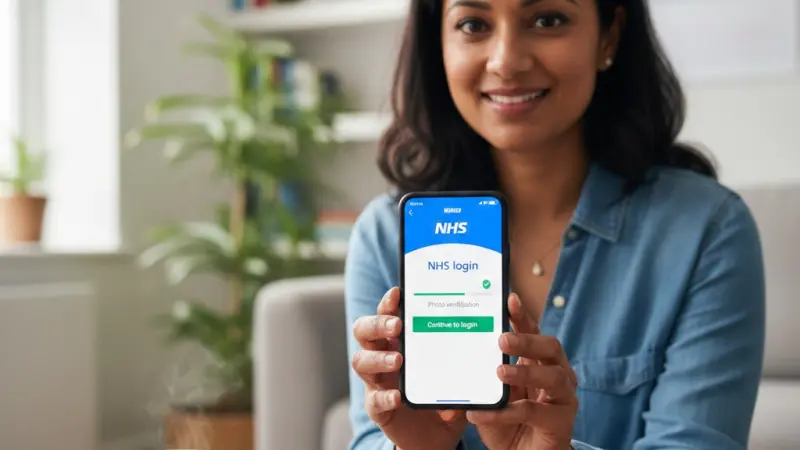
NHS login is the secure, universal digital gateway that allows residents in England and Wales to access a wide range of health and social care services through a single set of credentials. By verifying your identity to a high level of security, the system ensures that your sensitive medical records remain private while remaining easily accessible to you via the NHS App, website, and various third-party health platforms. To get started, you simply need an email address, a mobile phone number, and a form of photo identification. Once registered, you can book appointments, order repeat prescriptions, and view your GP health record without needing to contact your surgery directly. This digital transformation streamlines the patient experience, reducing the administrative burden on primary care providers while empowering individuals to take proactive control of their well-being from any compatible device.

The evolution of digital patient access
The transition toward a centralised digital identity for healthcare represents a significant milestone in the modernisation of the health service. Previously, patients were often required to manage multiple login details for different local surgery portals or specialist secondary care apps, leading to confusion and fragmented data. The introduction of a unified entry point has solved this by creating a consistent user experience across the entire digital ecosystem. This move aligns with broader government objectives to digitise the frontline, making services more efficient and ensuring that data follows the patient rather than being locked in siloes.
Standardising the user journey
By implementing a standardised journey, the system provides a familiar interface regardless of which specific service is being accessed. This consistency is vital for accessibility, ensuring that those who may not be naturally tech-savvy can navigate their health requirements with confidence. The interface is designed to meet rigorous accessibility standards, supporting screen readers and high-contrast modes to ensure no one is left behind in the digital shift.
Universal credential management
Users no longer need to remember dozens of passwords. A single, encrypted set of login details now grants access to everything from mental health support apps to local hospital waiting list trackers, simplifying the digital landscape for every UK citizen.
Verification levels and security protocols
Security is the cornerstone of the platform, as it handles some of the most sensitive personal data imaginable. To protect your information, the system employs various levels of verification depending on the depth of information you need to see. For basic services, a simple email and phone check might suffice. However, to view full clinical notes or blood test results, a "proven identity" is required. This involves a rigorous check of government-issued photo ID against a live video or photo of the user, processed through advanced biometric software to prevent identity theft.
Protecting sensitive medical records
Encryption and multi-factor authentication are mandatory components of the security architecture. Every time a user attempts to access their data, a unique security code is sent to their registered mobile device. This secondary layer ensures that even if a password is compromised, an unauthorised individual cannot gain entry to a patient's private medical history or personal contact details.
Encryption at rest and transit
Data is protected using industry-leading encryption protocols both while it is being stored and while it is being transmitted between your device and the central servers, ensuring that your health journey remains entirely confidential and tamper-proof.
Step by step guide to setup
Creating your account is a straightforward process that can be completed in a matter of minutes if you have your documents ready. First, download the NHS App or visit the official website and enter your email address. You will be prompted to create a secure password and verify your mobile number via a text message code. Following this, you will need to prove who you are. The most efficient method is using the "Fast Track" option with a UK driving licence or passport. You will take a photo of the ID and then perform a short face scan to confirm a match.
Navigating the identity check
If you do not have a photo ID, you can still gain access by using details provided by your GP surgery. You can request an ODS code, an account ID, and a linkage key from your practice receptionist.
Entering these details manually into the system bypasses the need for biometric scanning, although it does require a physical visit to your surgery or a phone call to obtain the necessary credentials.
Document capture tips
Ensure you are in a well-lit room and avoid glare on your ID card. Keeping your camera steady and ensuring the entire document is within the frame will significantly increase the chances of an instant automated approval.
Managing repeat prescriptions efficiently
One of the most popular features of the system is the ability to manage medications without calling the pharmacy or the GP. Once logged in, you can see a list of your current repeat prescriptions and their dosages. With a few taps, you can request a refill, which is then sent electronically to your nominated pharmacy for collection or delivery. This eliminates the need for paper prescriptions and significantly reduces the time spent waiting for processing at the local clinic.
Choosing a nominated pharmacy
You have the freedom to change your nominated pharmacy at any time through the interface. Whether you prefer a high-street chemist near your workplace or an online pharmacy that delivers directly to your door, the system updates your preference instantly across the national electronic prescription service, ensuring your medicine always goes to the right place.
Tracking medication requests
The interface provides a status update for each request, showing when it has been approved by the GP and when it has been sent to the pharmacy, allowing for better personal planning and peace of mind.
Viewing your health records online
Transparency in healthcare is a major benefit of this digital platform. Users can view their coded records, which include details of immunisations, allergies, and test results. Having this information at your fingertips is invaluable during consultations with private specialists or when travelling abroad. It allows for more informed discussions with healthcare professionals and ensures that you are always aware of the information being held about your clinical history and ongoing treatments.
Interpreting test results
While the system allows you to see blood tests and imaging reports, it is important to wait for a GP's comments before drawing conclusions. Most results will include a brief note from the clinician, such as "satisfactory" or "no further action required," which helps provide context to the raw data displayed in the app or web portal.
Immunisation and vaccine history
A full history of your vaccinations, including seasonal flu jabs and travel immunisations, is clearly displayed. This serves as a digital yellow book, providing proof of protection whenever it might be required for work or international transit.
Common mistakes to avoid during registration
Many users encounter frustration during the registration phase due to simple, avoidable errors. A frequent issue is using a shared email address; the system requires a unique email for every adult to ensure data privacy. Another mistake is trying to verify identity using an expired passport. The software will automatically reject any document that is past its valid date, so always check your documents before starting the process to save time and prevent unnecessary delays.
Issues with mobile signal and codes
Ensure you have a stable mobile signal when registering, as the security codes sent via SMS are time-sensitive. If you enter a code too late, it will expire, and you will have to restart that segment of the journey.
If you find yourself in a dead zone, wait until you have a strong connection before requesting the secondary authentication factor.
Mismatched personal details
If the details held by your GP (such as a previous surname or an old address) do not match the details on your ID, the automated check may fail. It is often wise to ensure your surgery has your most current information on file.
The future of integrated care
Looking ahead, the role of this unified login will expand even further. We are moving toward a future where social care, secondary hospital care, and primary GP care are all managed through this single interface. This will likely include the integration of wearable technology data, allowing users to upload heart rate or glucose levels directly into their medical records for remote monitoring by specialists, potentially preventing hospital admissions through early intervention and better data-driven insights.
Artificial intelligence and diagnostics
As AI becomes more prevalent in the UK health landscape, the portal may offer personalised health advice based on your record. By analysing trends in your health data, the system could suggest lifestyle changes or flag the need for a check-up before symptoms even become apparent, shifting the focus from reactive treatment to proactive wellness.
Expanding third party integration
More private health and wellness apps are seeking integration with the central system. This will allow for a holistic view of your health, combining NHS clinical data with your personal fitness and nutrition tracking for a complete 360-degree wellness profile.
Practical guidance for troubleshooting
If you find yourself locked out or unable to verify, the first step is to clear your browser cache or try a different device. Most technical hitches are local rather than systemic. If your identity check is repeatedly rejected, the manual review team can often help; you may be asked to provide additional documents or a different video clip. Remember that the support team cannot see your medical data; they are only there to help with the technical aspects of the login process itself.
Updating your contact information
If you change your mobile number, it is critical to update it within the settings before you lose access to the old one. If you have already lost access to your old number, you may need to delete your existing account and start the registration process again to re-verify your identity with the new contact details.
Technical support channels
The official help website offers a comprehensive knowledge base that covers the vast majority of user queries.
For more complex issues, an online contact form is available, which connects you to a dedicated helpdesk capable of resolving account-specific discrepancies and technical bugs.
Frequently Asked Questions
How do I get an NHS login?
To get started, download the NHS App or visit the NHS website and enter your email address. You will be guided through creating a password and verifying your mobile number. To access full medical records, you will need to provide a photo of your ID, such as a passport or driving licence, and record a short video or perform a face scan to prove your identity securely.
What if I do not have a photo ID?
If you lack a passport or driving licence, you can still register by using registration details provided by your GP surgery. Ask your practice for your "linkage key," "ODS code," and "account ID." You can enter these details manually during the setup process to verify your identity without the need for biometric scanning or government-issued photo documents, ensuring accessibility for all patients.
Is the system secure and private?
Yes, the system is designed to meet the highest security standards. It uses multi-factor authentication, requiring both a password and a unique code sent to your mobile phone for every login. Your data is encrypted during transit and at rest. Furthermore, the platform only shares the specific data necessary for each service, ensuring your full medical history is never exposed to unauthorised third parties.
Can I use one login for my family?
Every adult must have their own unique account and a separate email address to maintain privacy and data integrity. However, parents or guardians can often apply for "proxy access" to manage the health needs of children or dependants. This is usually set up through your GP surgery, allowing you to switch between profiles within your own account once the relationship is verified by a clinician.
What services can I access with it?
Once verified, you can use the NHS App, book GP appointments, order repeat prescriptions, and view your medical records. You can also access various health services such as 111 online, COVID-19 vaccination records, and specialist apps for mental health, maternity care, and musculoskeletal conditions. The list of integrated services continues to grow, providing a single point of access for all your UK health and social care needs.

Disclaimer: The information provided in this article is for general informational and research purposes only. Company details, features, services, and market positions may change over time. Readers are advised to visit official company websites and conduct independent research before making any business decisions or purchasing services.
Most Searchable Keywords
Recent Blogs


Related Listings

Categories
- Accountants (295)
- Advertising Agencies (559)
- Architects (149)
- Automobiles (377)
- Beauty (300)
- Carpenters (146)
- Cleaning Services (386)
- Dentists (189)
- Driving (62)
- Electricians (215)
- Energy (8)
- Event Organiser (685)
- Finance (599)
- Guide (3365)
- Health (2207)
- Information technology (206)
- Legal Services (353)
- Logistics (6)
- Maintenance (65)
- Manufacturing (35)

Sponsored Listings in Locksmith Services


Related Blogs

Your UK Sponsor Licence 2026 Step by Step Gui...
Read this insightful article "Your UK Sponsor Licence 2026 Step by Step Guide" to expand your knowledge!

What Is the £12.71 National Living Wage Strat...
Read this insightful article "What Is the £12.71 National Living Wage Strategy for UK Employers" to expand your knowledge!

Where to Find the Best Summer Festivals in Br...
Read this insightful article "Where to Find the Best Summer Festivals in Bristol" to expand your knowledge!
Questions & Answers – Find What
You Need, Instantly!
How can I update my business listing?
Is it free to manage my business listing?
How long does it take for my updates to reflect?
Why is it important to keep my listing updated?
