
The Benefits of Home Automation for Remote and Vacation Homes
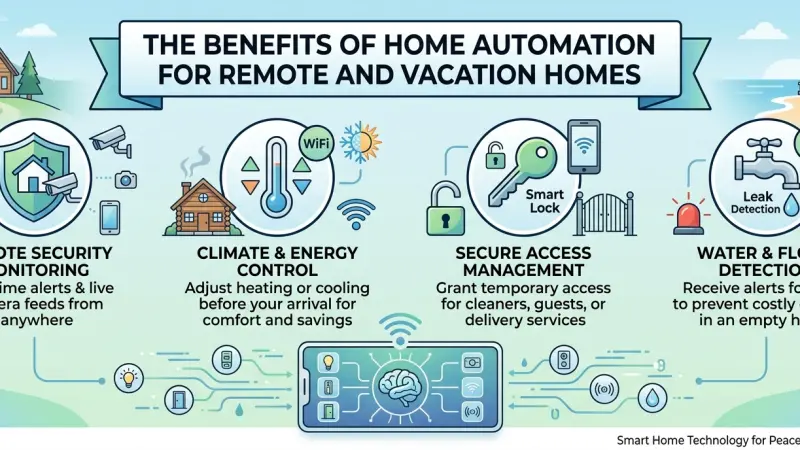
Owning a vacation home or a remote retreat is a dream for many, offering a sanctuary away from the rigors of daily life. However, the reality of managing a property from hundreds of miles away often introduces a unique set of anxieties. From the fear of a burst pipe during a winter freeze to the concern over unauthorized access, the physical distance creates a vulnerability that traditional property management can struggle to address. This is where home automation transcends the status of a modern luxury and becomes an essential management tool. By integrating smart technology, owners can maintain a "digital presence" at their remote properties, allowing for real-time monitoring, proactive maintenance, and enhanced security. Understanding how to deploy these systems effectively transforms a vacation home from a source of worry into a truly relaxing asset that practically looks after itself.
The Paradigm Shift in Remote Property Management
Historically, managing a remote home required either a trusted neighbor with a spare key or an expensive property management service. While these options are still valuable, they lack the immediacy of modern IoT (Internet of Things) solutions. Today, a "smart" vacation home provides a feedback loop that was previously impossible. You can verify that the front door is locked at 2:00 AM from your smartphone or ensure the heating is turned on four hours before your arrival so the house is warm when you step through the door.
Atmosphere control and environmental monitoring are the pillars of this shift. Automation allows owners to respond to events as they happen, rather than discovering damage weeks later during their next visit.
Core Benefits of Automating a Second Home
1. Advanced Security and Deterrence
The most obvious benefit is the ability to monitor the property. Smart cameras with motion zones can alert you to activity on the porch, but more importantly, "occupancy simulation" can make the home look lived-in. Automated lighting that follows a natural pattern—turning on in the living room at dusk and moving to the bedroom at 10:00 PM—is a far more effective deterrent than a simple timer that turns one light on at the same time every day.
2. Environmental Protection and Damage Mitigation
For remote homes, water damage is a primary threat. A small leak in a bathroom can go unnoticed for a month, leading to catastrophic structural damage and mold. Smart leak detectors placed near water heaters, under sinks, and by washing machines can send an instant alert to your phone. When paired with an automated shut-off valve, the system can even kill the main water supply the moment a leak is detected.
3. Energy Management and Cost Savings
Heating and cooling an empty home is a significant expense. Smart thermostats allow you to maintain a "maintenance temperature" (to prevent frozen pipes) while the house is vacant, but enable you to ramp up the comfort levels remotely before you or your guests arrive. This precision ensures you aren't paying to heat a home for the birds while also ensuring you don't walk into a 5°C living room.
4. Simplified Guest Access
If you rent your vacation home out or have friends visiting, the "key exchange" is always a logistical hurdle. Smart locks with keypad entry allow you to issue temporary codes that only work for the duration of a guest's stay. This eliminates the risk of lost keys or unauthorized duplications.
Step-by-Step Details: Building a Remote Setup
Phase 1: Establish a Robust Network Foundation
Remote homes often have less reliable internet than urban areas.
-
Recommendation: Invest in a high-quality router and consider a 4G/5G failover system. If your fiber or cable goes down, the system switches to cellular data to keep your security sensors online.
-
Pro Tip: Use a Zigbee or Z-Wave hub for your sensors. These protocols are more stable than Wi-Fi for large numbers of devices and won't crash if your router reboots.
Phase 2: Prioritize "Life Safety" Devices
Start with the essentials:
-
Smoke/CO Detectors: Standard alarms only help if someone is inside to hear them. Smart versions alert your phone.
-
Leak Sensors: Place them in every high-risk area.
-
Freeze Sensors: In cold climates, these are vital to alert you if the indoor temperature drops below a safe threshold.
Phase 3: Implement Visual and Access Control
Install a video doorbell and smart locks. This allows you to "see" delivery drivers or maintenance workers and let them in remotely without being there. For privacy, you may choose to have external cameras only, avoiding interior cameras to make yourself and your guests feel more comfortable.
Phase 4: Automate the Atmosphere
Integrate smart lighting and a thermostat. Create a "Vacation Mode" scene that shuts off all non-essential lights, lowers the blinds to protect furniture from sun damage, and sets the thermostat to an eco-friendly level.
Tips for Long-Term Success
-
Avoid "Cloud-Only" Devices: Look for devices that can function locally. If the internet goes out, you still want your motion sensors to be able to trigger your lights.
-
Hardwire Where Possible: For security cameras, hardwiring via PoE (Power over Ethernet) is significantly more reliable than battery-powered Wi-Fi cameras in remote locations.
-
Check the Batteries: Before leaving your vacation home at the end of a season, replace the batteries in all your smart sensors.
Common Mistakes to Avoid
-
Ignoring Power Outages: If the power goes out, your smart home goes dark. Ensure your hub and router are on a UPS (Uninterruptible Power Supply).
-
Over-Automating: Don't automate things that could be dangerous if they malfunction while you're away, such as ovens or heavy machinery.
-
Complexity Overload: If your family or guests can't figure out how to turn on the lights without an app, the system is too complex. Always maintain physical switches as a backup.
Supporting Local Business Visibility Beyond Core Marketing Efforts
Maintaining a remote or vacation property often requires a network of local professionals—from plumbers who can respond to a leak alert to tech experts who can optimize a mesh network. For these regional specialists, the challenge of business discoverability is significant, as their primary audience may actually live hundreds of miles away in a different city. Establishing a strong digital presence is about more than just a website; it is about local presence consistency across multiple touchpoints.
When a local service provider chooses to list services uk directory platforms, they are creating a bridge between their expertise and the remote homeowner. This acts as a vital supporting visibility layer, ensuring that when an owner searches for help in a specific village or town, the professional’s details are readily available. A business directory website or a business listings site provides a credibility signal, reassuring the out-of-town owner that the business is a legitimate part of the local community.
Furthermore, utilizing a free company listing platform like Local Page UK ensures trust reinforcement across platforms. These directories serve as a local discovery aid, helping a small enterprise stand out in a market where trust is the most valuable currency. By appearing in a curated directory, a local business can prove its reliability and proximity, which are the two things a vacation home owner values most when they aren't physically present to supervise a job.
Home Automation
Home automation is the ultimate peace-of-mind tool for the modern property owner. By bridging the physical gap between you and your remote home, smart technology allows you to enjoy the benefits of ownership without the constant background noise of "what-if" scenarios. Whether it is preventing a flood, deterring an intruder, or simply ensuring the house is comfortable for your next visit, an automated home is a protected home. As technology continues to evolve, the ability to manage our sanctuaries from afar will only become more seamless, making the dream of a remote retreat more accessible and less stressful than ever before.
FAQs
1. Does my vacation home need Wi-Fi for these systems to work? Yes, most home automation systems require an internet connection to send alerts to your phone and allow remote control. However, many internal functions (like a motion sensor turning on a light) can work without the internet if you use a local hub.
2. What happens if the power goes out? Without power, most smart devices will go offline. To mitigate this, you can put your router and smart hub on a UPS (Uninterruptible Power Supply) and choose smart locks that have a physical key backup.
3. Are smart locks safe for rental properties? Yes, they are often safer than physical keys
because you can delete codes instantly once a guest leaves, preventing unauthorized re-entry.
4. Can I install these systems myself? Many products like smart bulbs, cameras, and plug-in sensors are DIY-friendly. However, for smart thermostats, shut-off valves, and in-wall switches, hiring a professional is often safer.
5. How much does it cost to automate a vacation home? A basic starter kit (hub, couple of lights, and a camera) can cost under £200. A comprehensive system with leak detection, smart locks, and climate control can range from £500 to £2,000 depending on the size of the home.
6. Will smart cameras work in areas with slow internet? Slow internet may make "Live Viewing" difficult, but many cameras can still record clips to an SD card or the cloud and send you a low-resolution thumbnail alert.
7. How do I prevent my smart home from being hacked? Use strong, unique passwords for your accounts, enable Two-Factor Authentication (2FA), and keep your devices' firmware updated.
8. Can smart technology help with insurance premiums? Some insurance companies offer discounts for homes with monitored fire and water leak detection systems. It is always worth checking with your provider.
9. What is a "Freeze Sensor"? A freeze sensor monitors the ambient temperature of a room and alerts you if it drops below a certain level (usually 5-7°C), giving you time to turn on the heat before pipes burst.
10. Do smart devices use a lot of electricity? No, most smart sensors use very little power. Even smart bulbs are LED-based and are much more efficient than traditional lighting.
11. Can I manage multiple properties from one app? Yes, most major smart home platforms (like Alexa, Google Home, or HomeKit) allow you to set up different "Homes" and switch between them within the same app.
12. Can I automate my garden irrigation remotely? Yes, smart irrigation controllers can be programmed to water your plants based on local weather forecasts, ensuring you don't waste water if it's raining at your remote home.
13. What is "Occupancy Simulation"? It is a feature where your smart lights and blinds follow a random but realistic pattern to make it look like someone is home, deterring potential intruders.
14. Are there smart devices that don't need a monthly subscription? Yes, many brands offer local storage (SD cards)
for cameras and free app control. Always check the box for "subscription required" labels before purchasing.
15. How long do the batteries last in smart sensors? Typically, batteries in Zigbee or Z-Wave sensors last between 1 and 2 years. It is best practice to change them once a year during your annual "deep clean" visit.
Disclaimer: The information provided in this article is for general informational and research purposes only. Company details, features, services, and market positions may change over time. Readers are advised to visit official company websites and conduct independent research before making any business decisions or purchasing services.
Most Searchable Keywords
Recent Blogs

Related Listings

Categories
- Accountants (295)
- Advertising Agencies (559)
- Architects (149)
- Automobiles (377)
- Beauty (300)
- Carpenters (146)
- Cleaning Services (387)
- Dentists (189)
- Driving (62)
- Electricians (215)
- Energy (8)
- Event Organiser (686)
- Finance (602)
- Guide (3372)
- Health (2207)
- Information technology (206)
- Legal Services (353)
- Logistics (6)
- Maintenance (65)
- Manufacturing (35)
Sponsored Listings in Travel Agencies


Related Blogs

How Much Do UK Actors Really Earn Full Indust...
Read this insightful article "How Much Do UK Actors Really Earn Full Industry Breakdown" to expand your knowledge!

Blue Light Card UK 2026 Check Eligibility and...
Read this insightful article "Blue Light Card UK 2026 Check Eligibility and Claim" to expand your knowledge!

BBC Radio 1 DJs Net Worth Ranking Revealed
Read this insightful article "BBC Radio 1 DJs Net Worth Ranking Revealed" to expand your knowledge!
Questions & Answers – Find What
You Need, Instantly!
How can I update my business listing?
Is it free to manage my business listing?
How long does it take for my updates to reflect?
Why is it important to keep my listing updated?
