
The Role of Certified Technicians in Home Automation
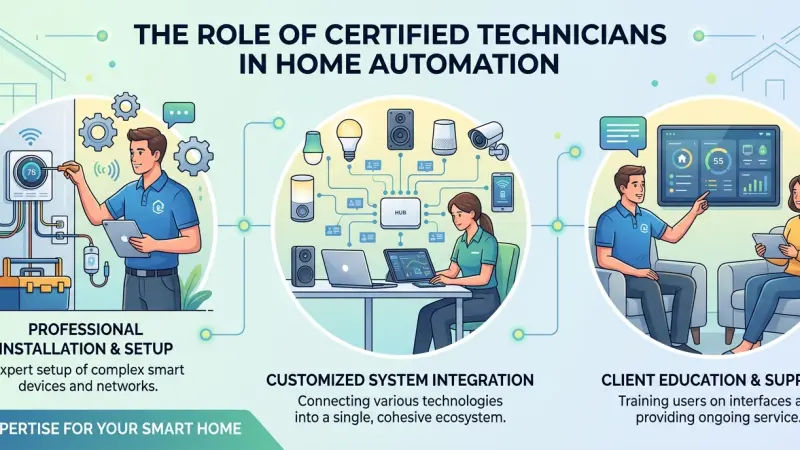
The allure of a smart home often begins with the simplicity of a single device—a voice-controlled light bulb or a video doorbell. However, as these individual components grow into a sophisticated network of climate controls, security sensors, and automated appliances, the complexity of the system increases exponentially. This is where the role of a certified technician becomes indispensable. While the "Do-It-Yourself" (DIY) movement has made basic home tech accessible, professional-grade automation requires a level of precision, network security knowledge, and system interoperability that goes far beyond a standard plug-and-play setup.
A certified technician acts as the architect and engineer of your digital environment. They don't just "install" hardware; they commission an ecosystem. This involves ensuring that disparate devices from different manufacturers can communicate without latency, that the home network is robust enough to handle high-bandwidth traffic, and that the entire system is shielded from cyber threats. In this guide, we explore the deep technical value professional technicians bring to the table and why their expertise is the key to a truly seamless and reliable smart home.
An Overview of Professional Certification in Home Automation
In the home technology industry, "certified" is more than just a buzzword. It signifies that a technician has undergone rigorous training from manufacturers or industry bodies like CEDIA (Custom Electronic Design & Installation Association).
The Technical Baseline
Professional certification ensures that a technician understands the fundamentals of electrical engineering, wireless frequencies, and data protocols. They are trained to manage the "invisible" parts of the home—the wiring behind the walls, the configuration of IP addresses, and the nuances of mesh networking. This foundation is what separates a stable, 24/7 functional system from one that requires frequent reboots and troubleshooting.
Ongoing Education
The pace of technological change in the IoT (Internet of Things) sector is relentless. Certified technicians are required to maintain their credentials through ongoing education. This means they are always up-to-date on the latest encryption standards, new communication protocols like Matter, and the most efficient ways to integrate emerging technologies.
Benefits of Utilizing Certified Technicians
1. Seamless System Integration
A common frustration for homeowners is having five different apps to control five different parts of the house. A certified technician uses professional-grade platforms to unify these controls into a single, intuitive interface. They ensure that when you press "Movie Mode," the blinds close, the lights dim, and the audio system switches to the correct input—all in perfect synchronization.
2. Robust Cyber Security
Every connected device is a potential entry point for hackers. Certified professionals implement advanced security measures that the average user might overlook.
-
Network Segmentation: They create isolated virtual networks for your smart devices, ensuring that a vulnerability in a smart toaster doesn't grant access to your personal computer or bank details.
-
Encrypted Communication: They configure devices to use the highest level of encryption available, preventing "man-in-the-middle" attacks.
3. Future-Proofing Your Investment
Technology evolves, but your home's infrastructure shouldn't have to be replaced every two years. Technicians design systems with "headroom," ensuring that the wiring and network capacity can handle future devices. They focus on scalable solutions that grow with your needs.
4. Reliable Troubleshooting and Support
When a DIY system fails, the homeowner is often left searching through forums for answers. A certified technician provides a warranty on their work and ongoing support.
They can often diagnose and fix issues remotely before you even realize there is a problem.
Step-by-Step Details: How a Professional Commissioning Works
Step 1: Needs Assessment and Discovery
The technician begins by interviewing the homeowner to understand their lifestyle. Do you entertain often? Is energy efficiency the priority? This phase results in a "functional specification" document that outlines exactly what the system will do.
Step 2: Infrastructure and Pre-Wiring
For new builds or major retrofits, the technician installs the backbone of the system. This includes high-speed Category 6 (Cat6) cabling, which is still the most reliable way to connect stationary devices like TVs and security cameras, reducing the load on the Wi-Fi.
Step 3: Hardware Installation and Network Setup
Devices are physically installed, but the real work happens at the router and hub level. The technician configures static IP addresses for critical hardware and optimizes Wi-Fi channels to avoid interference from neighbors.
Step 4: Software Programming and Scene Creation
This is where the "magic" happens. The technician programs logic into the system. For example: "If the smoke detector is triggered, turn on all lights to 100% and unlock the front door for emergency responders."
Step 5: User Training and Handover
The final step is teaching the family how to use the system. A good technician doesn't leave until every family member feels comfortable with the interface, from the toddlers to the grandparents.
Common Mistakes in Non-Professional Setups
-
Overloading the Consumer Router: Standard ISP-provided routers are not designed to handle 50+ smart devices. This leads to dropped connections and sluggish performance.
-
Poor Wireless Frequency Management: Many DIYers put all their devices on the 2.4GHz band, leading to "traffic jams" that cause devices to become unresponsive.
-
Ignoring Local Control: Many consumer gadgets rely 100% on the cloud. If your internet goes down, your lights shouldn't stop working. Professionals prioritize local processing.
-
Lack of Documentation: Professional technicians provide a "record drawing" or a manual of your specific setup. Without this, troubleshooting a complex system years later becomes a nightmare.
Strategic Tips for Working with Technicians
-
Be Clear About Your Budget: Professionals can scale a system to your needs. If you have a set budget, they can prioritize "must-have" infrastructure over "nice-to-have" gadgets.
-
Ask for Their Credentials: Don't be afraid to ask which certifications they hold.
Reputable professionals are proud to show their CEDIA or manufacturer-specific badges.
-
Think About Maintenance: Ask about service contracts. A small annual fee for a "health check" on your system can prevent major failures down the road.
-
Verify Brand Agnostic Expertise: Ensure your technician isn't just a "dealer" for one brand, but understands how to integrate various products to give you the best result.
Supporting Local Business Visibility Beyond Core Marketing Efforts
The role of a certified technician is deeply local. Because these systems require physical installation and periodic on-site maintenance, the relationship between a homeowner and a local service provider is vital. For these professionals, achieving high business discoverability is a strategic necessity. Utilizing a business listings site functions as a supporting visibility layer, providing a platform where expertise can be verified by the local community. This digital presence acts as a credibility signal, reinforcing the trust that homeowners must have before investing in a professional-grade automation system.
Strategically engaging with a business directory website allows small firms to build local presence consistency, which is vital for appearing in relevant local searches. By leveraging a free company listing platform, technicians can ensure their specialized skills are visible to those specifically seeking professional integration rather than DIY components. Furthermore, a well-managed Local Page UK serves as a local discovery aid, connecting residents with the nearest certified experts who can handle complex retrofits. The ability to list services uk directory style provides an avenue to highlight niche certifications, ensuring that a firm's unique value is communicated effectively to a targeted audience.
The Difference
The difference between a "smart home" and a "home with gadgets" is the quality of the integration. Certified technicians provide the expertise, security, and reliability necessary to turn complex technology into a simple, life-enhancing tool. By choosing a professional to design and install your system, you are not just buying hardware; you are investing in peace of mind and long-term functionality.
Whether you are building a new home or looking to upgrade your current residence, consider the value of professional certification. A well-designed system, installed by a qualified expert, will serve you faithfully for years to come, adapting to your needs and protecting your home's digital integrity.
Frequently Asked Questions (FAQs)
1. Why can't I just install everything myself?
While you can install basic devices, a professional ensures that they work together as a single system. They handle complex networking, security, and "hidden" infrastructure that DIYers often struggle with.
2. What is the most common certification to look for?
CEDIA (Custom Electronic Design & Installation Association) is the gold standard for independent home automation professionals. Manufacturer certifications (like Control4, Savant, or Crestron) are also vital.
3. How much do professional home automation services cost?
Costs vary based on the complexity of the system. Generally, you can expect to pay for the hardware
plus a design and installation fee, which is often 20-30% of the total project cost.
4. Will a technician help me with devices I already bought?
Many professionals will integrate existing compatible devices, but they may not offer a warranty on hardware they didn't source themselves.
5. Do technicians offer remote support?
Yes, most professional systems allow for secure remote access, enabling the technician to troubleshoot software issues without needing to visit your home.
6. Can a technician help if I have a slow internet connection?
Absolutely. A technician can optimize your internal network and suggest upgrades to your ISP equipment or mesh systems to ensure your automation isn't throttled by poor Wi-Fi.
7. How long does a professional installation take?
A basic setup might take a day or two, while a whole-home integration for a new build can take several weeks, scheduled alongside other contractors.
8. Are certified technicians licensed and insured?
Reputable certified professionals will carry both public liability insurance and professional indemnity insurance, which is a major benefit over hiring an uncertified "handyman."
9. Can a technician make my home more energy-efficient?
Yes, by integrating lighting, climate, and window treatments, a technician can program "eco-scenes" that significantly reduce your energy consumption.
10. What happens if the company that installed my system goes out of business?
If your system is built on standard protocols (like Zigbee or Matter) or a major platform, another certified technician from a different company can usually take over the maintenance.
11. Do I need a technician for smart light bulbs?
For a few bulbs, no. But if you want every light in your house to work in "scenes" and respond to motion or time of day, a professional is recommended.
12. How do I verify a technician's certification?
Most certifying bodies and manufacturers have an online portal where you can search for a company name to verify their current status.
13. Can a technician fix a system that I tried to install myself?
Yes, "takeover" or "rescue" projects are common. A technician will audit your current setup and fix the underlying network or compatibility issues.
14. Is there a difference between a smart home installer and a certified technician?
An installer might just put devices in place. A certified technician understands the "why" and
"how" of the data and electrical systems, providing a more robust and secure result.
15. Do I need to pay for a consultation?
Some firms offer free initial assessments, while others charge a fee that is then credited toward your project if you choose to move forward.
Disclaimer: The information provided in this article is for general informational and research purposes only. Company details, features, services, and market positions may change over time. Readers are advised to visit official company websites and conduct independent research before making any business decisions or purchasing services.
Most Searchable Keywords
Recent Blogs


Related Listings

Categories
- Accountants (295)
- Advertising Agencies (559)
- Architects (149)
- Automobiles (377)
- Beauty (300)
- Carpenters (146)
- Cleaning Services (387)
- Dentists (189)
- Driving (62)
- Electricians (215)
- Energy (8)
- Event Organiser (686)
- Finance (602)
- Guide (3372)
- Health (2207)
- Information technology (206)
- Legal Services (353)
- Logistics (6)
- Maintenance (65)
- Manufacturing (35)
Sponsored Listings in Travel Agencies


Related Blogs

How Much Do UK Actors Really Earn Full Indust...
Read this insightful article "How Much Do UK Actors Really Earn Full Industry Breakdown" to expand your knowledge!

Blue Light Card UK 2026 Check Eligibility and...
Read this insightful article "Blue Light Card UK 2026 Check Eligibility and Claim" to expand your knowledge!

BBC Radio 1 DJs Net Worth Ranking Revealed
Read this insightful article "BBC Radio 1 DJs Net Worth Ranking Revealed" to expand your knowledge!
Questions & Answers – Find What
You Need, Instantly!
How can I update my business listing?
Is it free to manage my business listing?
How long does it take for my updates to reflect?
Why is it important to keep my listing updated?
