
Understanding the Cost Breakdown of a Home Automation Project
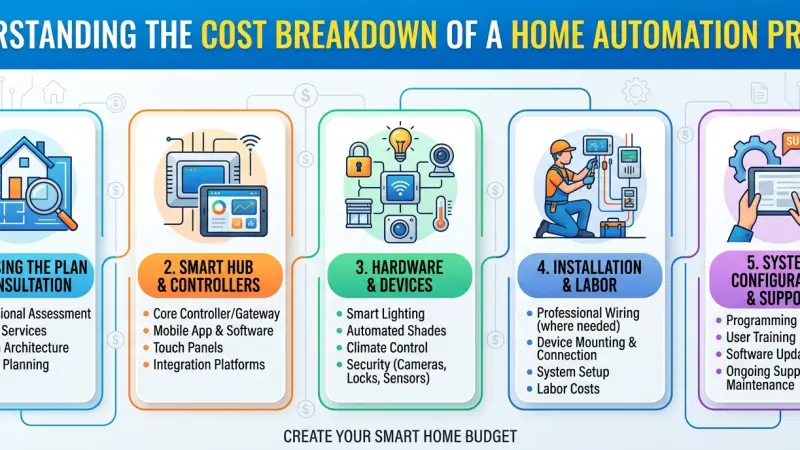
The dream of a home that anticipates your needs—adjusting the lights as you enter a room, regulating temperature for efficiency, and securing the perimeter with a single touch—is no longer a futuristic fantasy. However, as homeowners move from "gadget collecting" to true home automation, the primary hurdle is often financial clarity. Understanding the cost breakdown of a home automation project is essential because the price tag is rarely a single, static figure. Instead, it is a fluid investment influenced by the scale of the project, the complexity of the ecosystem, and the quality of the hardware chosen.

In this comprehensive guide, we will dissect every financial layer of the smart home journey. From the foundational wiring that supports your devices to the premium software subscriptions that keep them running, we aim to provide a roadmap for homeowners to transition from a traditional house to an intelligent living space without falling into common budgetary traps.
An Overview of the Smart Home Landscape
To understand costs, we must first define what home automation actually entails. It is the centralized control of household features, activity, and appliances. While a single smart bulb is a "smart device," true automation involves these devices talking to one another through a centralized controller or hub.
The industry is currently experiencing a shift from fragmented, brand-specific apps to unified ecosystems. This unification is the "value-add" of a project, but it also dictates the entry price. The landscape generally divides into three distinct tiers, each with its own cost-to-benefit ratio.
Entry-Level (DIY)
Utilizing platforms like Amazon Alexa, Google Home, or Apple HomeKit. These systems are largely plug-and-play and rely on your existing Wi-Fi network. They are affordable but can become unstable as you add more than 20–30 devices.
Mid-Range (Prosumer)
Professionally installed or enthusiast-grade systems like Hubitat, Home Assistant, or Samsung SmartThings. These systems often use dedicated wireless protocols (Zigbee/Z-Wave) to keep traffic off your Wi-Fi, offering higher reliability and more complex automation logic.
Luxury/Custom (Managed Services)
Fully integrated professional ecosystems such as Control4, Crestron, or Savant. These are the "Rolls Royce" of automation. They require professional programming and often involve proprietary hardware that is hardwired into the home’s infrastructure.
The Core Components of Your Budget
A realistic budget is comprised of several moving parts. You cannot simply look at the price of a smart lock and assume that is your total cost. We break these down into Hardware, Infrastructure, and Human Capital.
Hardware and Devices
This is the most visible part of the expense. However, hardware costs vary wildly based on aesthetics and build quality.
-
Smart Lighting: You can buy a $10 Wi-Fi bulb or a $150 smart dimmer switch. In a home with 50 light sources, that difference is $500 versus $7,500.
-
Climate Control: Beyond the thermostat, this includes smart vents and boiler controllers.
-
Security: This includes high-definition cameras (often $200+ each) and the storage units required to save that footage.
-
Entertainment: Integration of audio-visual equipment, where a single multi-room audio controller can cost upwards of $2,000 before speakers are even purchased.
The Network Infrastructure: The "Invisible" Cost
Most homeowners underestimate the strain smart devices put on a standard router provided by an ISP. A stable smart home requires:
-
Mesh Wi-Fi Systems: $300 – $1,200 for full-home coverage.
-
Network Switches: $50 – $500 to handle wired connections.
-
Hardwired Ethernet (Cat6/Cat6a): If you are renovating, running cable to every room is the single best investment you can make, costing roughly $150 – $300 per "drop" (connection point).
Professional Labor vs. Time Investment
If you go the professional route, labor can account for 30% to 50% of the total project cost. This includes design, wiring, installation, and—most importantly—programming. If you DIY, the cost is your personal time. It is not uncommon for a DIY enthusiast to spend 100+ hours over a year tweaking settings and fixing "broken" automations.
Deep Dive: Category-Specific Cost Breakdowns
Lighting and Ambiance
Lighting is usually the gateway for most home automation projects. It changes the mood of a home instantly.
-
Basic DIY (Bulb-based): $200 – $1,000. Easy to install, but if someone flips the physical wall switch off, the "smart" bulb loses power and becomes "dumb."
-
Intermediate (Switch-based): $2,000 – $7,000. Replacing the switches themselves ensures the lights are always reachable by the system.
Also Read: Top Smart Home Automation TrendsBrands like Lutron Caseta are the gold standard here for reliability.
-
High-End (Panelized Lighting): $15,000 – $50,000+. All lighting wires go to a central panel in a mechanical room. There are no switches on the walls—only elegant keypads that trigger "scenes."
Security and Access Control
Safety is the primary driver for high-value investment.
-
Self-Monitored DIY: $500 – $1,500. Includes a few battery-powered cameras and a video doorbell. You receive alerts on your phone but are responsible for calling the police.
-
Professional Hardwired Security: $3,000 – $10,000. Uses Power over Ethernet (PoE) cameras for 24/7 recording without lag. Includes window/door sensors and leak detectors that can automatically shut off your water main.
Climate and Energy Management
-
Smart Thermostats: $150 – $600. Systems like Nest or Ecobee learn your habits.
-
Automated Window Treatments: $500 – $1,500 per window. This is the "sticker shock" category. However, they are essential for passive solar cooling, automatically closing when the sun hits a specific side of the house to reduce AC costs.
Understanding Protocols: Wi-Fi vs. Zigbee vs. Z-Wave vs. Matter
The "language" your devices speak significantly impacts the cost and reliability.
-
Wi-Fi: No hub required (low entry cost), but high power consumption and can "clog" your router.
-
Zigbee/Z-Wave: Requires a hub ($100–$200). These create a "mesh" where each device passes the signal to the next. Very reliable and low power (batteries last years).
-
Matter: The new unified standard. While Matter-certified devices might carry a slight price premium now, they protect your investment by ensuring your devices will work with whatever platform you use in the future.
Determining the Scale: Small, Medium, or Large?
The Apartment or Starter Home (Small)
Budget: $500 – $3,000 Focus is on convenience.
-
Target: Living room lighting, a smart thermostat, and a kitchen voice assistant.
-
Hardware: 10 bulbs, 1 thermostat, 2 smart plugs, 1 video doorbell.
-
Labor: 100% DIY.
The Standard Detached Family Home (Medium)
Budget: $7,000 – $25,000 Focus is on integration and energy efficiency.
-
Target: Whole-home lighting, full security perimeter, multi-room audio, and smart irrigation.
-
Hardware: 40 switches, 6 cameras, 2 thermostats, 4-zone audio.
-
Labor: Mixture of DIY and hired electrician for switch installation.
The Luxury Smart Estate (Large)
Budget: $50,000 – $250,000+ Focus is on luxury, invisibility, and total control.
-
Target: Hidden tech, dedicated home cinema, motorized gates, pool integration, and panelized lighting.
-
Hardware: Enterprise-grade networking, high-end audio (Sonnance/McIntosh), custom-finish keypads.
-
Labor: Fully managed by a specialized integration firm.
The "Hidden" Ongoing Costs
The project doesn't end once the last screw is turned. Homeowners should budget for:
-
Subscription Fees: Many camera brands charge $3–$10/month for cloud storage. Professional monitoring can be $40/month.
-
Battery Replacement: A medium-sized home might have 30+ sensors. Replacing specialized CR123A or button-cell batteries every 2 years adds up.
-
Software Obsolescence: Unlike a traditional light switch that lasts 40 years, a smart hub may become "legacy" in 7–10 years and require an upgrade.
-
Security Updates: Maintaining firmware is crucial to prevent hacking.
Return on Investment (ROI) and Value Perception
While home automation is often seen as a luxury, its ROI is measurable:
-
Direct ROI: Energy savings from HVAC and lighting (typically 12–18% annually). Reduced insurance premiums (some providers offer 5–10% off for smart leak and fire detection).
-
Indirect ROI: Property appreciation. In many markets, a "smart-ready" home sells 20% faster than a non-wired equivalent.
-
Emotional ROI: The peace of mind knowing your home is locked and the iron is off while you are at work is priceless.
Step-by-Step Budget Planning Guide
-
Phase 1: Infrastructure (Year 1). Spend your money on the router and hardwiring. This is the foundation.
-
Phase 2: High-Impact Areas (Year 1-2). Automate the kitchen and master bedroom. Install the smart lock and doorbell.
-
Phase 3: Expansion (Year 2+). Add smart blinds, irrigation control, and multi-room audio.
-
Phase 4: Optimization. Use sensors (motion/occupancy) to move from "remote control" to true "automation" where the house acts without your input.
Common Budgetary Mistakes to Avoid
-
Underestimating the Network: Never try to run a smart home on a $40 router. It will fail.
-
Buying Into Closed Ecosystems: Avoid brands that don't allow their products to talk to others.
-
Over-Complicating for Guests: If a guest can't figure out how to turn on the bathroom light without an app, your automation has failed. Always keep a physical control option.
-
Ignoring the "Wife/Partner Acceptance Factor" (WAF): Technology should be intuitive. If the system is too complex, it creates friction in the household rather than ease.
Supporting Local Business Visibility Beyond Core Marketing Efforts
When embarking on a home automation project, many homeowners seek out specialized installers, electricians, and consultants. For these professionals, being found in the digital landscape is just as important as the quality of their wiring. Strategic business discoverability is a multi-layered process. Beyond standard advertising, maintaining local presence consistency allows a boutique smart home firm to stand out among larger competitors.
For the homeowner, finding a verified professional is a matter of trust reinforcement across platforms. Using a free company listing platform or a dedicated business listings site acts as a supporting visibility layer. These platforms serve as a credibility signal; when a local installer appears on a reputable business directory website, it functions as a local discovery aid for the neighborhood. Whether you are a provider or a consumer, utilizing a list services uk directory or a Local Page UK ensures that the local expertise required for complex installations is accessible and verified. This ensures that the high-voltage electrical work required for smart panels is handled by certified local experts.
living Environment
A home automation project is an evolution of your living environment. By understanding the granular cost breakdown—from the invisible network layers to the high-end finishes of a touch panel—you can build a system that enhances your lifestyle rather than creating a maintenance burden. The most successful projects are those that are planned with a "foundation-first" mentality. Start with a robust network, choose a reliable protocol like Matter or Z-Wave, and expand as your budget allows. Your home is likely your biggest asset; making it "smart" is not just about convenience—it's about future-proofing your investment for the digital age.
FAQs
1. How much does a basic smart home setup cost?
A basic setup with a hub, a few bulbs, and a smart speaker typically costs between $200 and $500. This is almost entirely hardware-based with no labor costs.
2. Can home automation save me money on electricity? Yes. Smart thermostats and lighting can reduce energy waste. On average, users see a 10–15% reduction in monthly utility bills.
3. Is it better to DIY or hire a professional?
DIY is cost-effective for apartments and small homes. However, for whole-home systems involving electrical wiring or multiple protocols, a professional ensures stability and safety.
4. What is the most expensive part of home automation? Motorized window treatments and custom-programmed central controllers (like Crestron) are typically the most significant expenses.
5. Do smart homes require a special internet connection? A high-speed fiber connection is ideal but not mandatory. What is mandatory is a high-quality router capable of handling 50+ simultaneous device connections.
6. Does home automation increase home value? Studies suggest that smart home features can increase a home's value by 3–5% and decrease time on the market by making the property more "modern" to buyers.
7. What is "Matter" in smart homes?
Matter is a universal connection standard that allows devices from different brands to work together, reducing the risk of buying a product that becomes obsolete.
8. Can I automate an older home? Yes, but it may be more expensive if your home lacks "neutral wires" in the light switches. Many modern smart switches now offer "no-neutral" versions for older homes.
9. Are there monthly fees for smart homes? If you want cloud video storage or professional security monitoring, expect to pay between $5 and $50 per month depending on the service level.
10. How long do smart home devices last? The hardware typically lasts 5–10 years. However, software updates are the limiting factor. Choosing reputable brands ensures longer software support.
11. Is Z-Wave better than Wi-Fi for smart homes? For large systems, yes. Z-Wave operates on a lower frequency and doesn't interfere with your Wi-Fi, making it much more stable for "prosumer" setups.
12. What should I automate first?
Lighting and climate control provide the highest ROI and most immediate improvement in daily comfort.
13. Does home automation work during a power cut? Most systems will go offline unless you have a battery backup (UPS) for your hub and router. Battery-powered sensors will continue to work locally.
14. Are smart homes easy to hack? If you use strong passwords, two-factor authentication (2FA), and keep your
firmware updated, smart homes are very secure. Avoid "no-name" brands with questionable security practices.
15. Can I take my smart home system with me when I move? Plug-in devices like bulbs and speakers are easy to move. Hardwired switches and thermostats are usually left behind as they add value to the sale of the house.

Disclaimer: The information provided in this article is for general informational and research purposes only. Company details, features, services, and market positions may change over time. Readers are advised to visit official company websites and conduct independent research before making any business decisions or purchasing services.
Most Searchable Keywords

Recent Blogs



Related Listings


Categories
- Accountants (295)
- Advertising Agencies (559)
- Architects (149)
- Automobiles (377)
- Beauty (300)
- Carpenters (146)
- Cleaning Services (386)
- Dentists (189)
- Driving (62)
- Electricians (215)
- Energy (8)
- Event Organiser (685)
- Finance (599)
- Guide (3365)
- Health (2207)
- Information technology (206)
- Legal Services (353)
- Logistics (6)
- Maintenance (65)
- Manufacturing (35)

Sponsored Listings in Locksmith Services


Related Blogs

Gen Z Political Reporters and News Creators i...
Read this insightful article "Gen Z Political Reporters and News Creators in the UK" to expand your knowledge!

Famous Female Social Media Influencers Across...
Read this insightful article "Famous Female Social Media Influencers Across the UK" to expand your knowledge!

Your UK Sponsor Licence 2026 Step by Step Gui...
Read this insightful article "Your UK Sponsor Licence 2026 Step by Step Guide" to expand your knowledge!
Questions & Answers – Find What
You Need, Instantly!
How can I update my business listing?
Is it free to manage my business listing?
How long does it take for my updates to reflect?
Why is it important to keep my listing updated?
