
What to Expect During a Home Automation Service Call
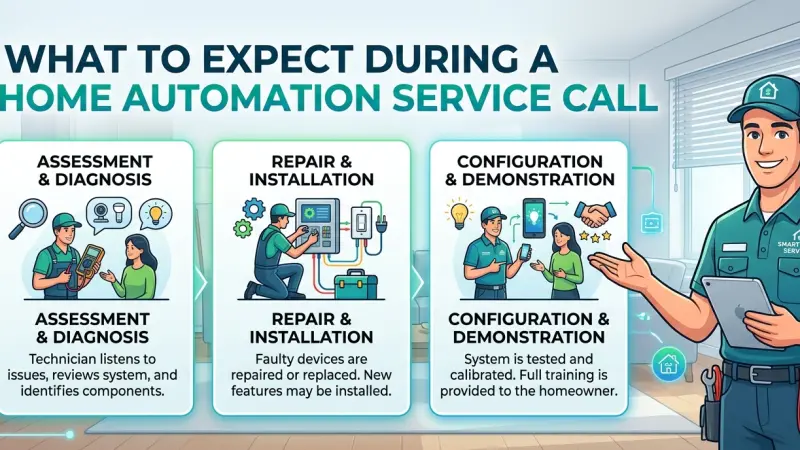
Investing in a smart home is an investment in a lifestyle of convenience, safety, and modern efficiency. However, when the invisible technology that powers your daily routines experiences a glitch—whether it’s a non-responsive central hub, a flickering lighting scene that disrupts your evening, or a security camera that refuses to sync with your cloud storage—it can be a source of significant frustration. Unlike traditional appliances, smart home systems are interconnected ecosystems; a failure in one area can often ripple through the entire house, turning a dream of convenience into a technical puzzle.

While many minor issues can be resolved with a simple power cycle, a router reboot, or a basic firmware update via an app, more complex systemic failures require the specialized expertise of a professional. Scheduling a home automation service call is the first step toward restoring your home’s functionality and peace of mind. But for many homeowners, inviting a technician into their digital sanctuary can feel daunting. What exactly happens during these visits? How should you prepare your physical and digital space? This guide provides a detailed, step-by-step walkthrough of the professional service experience. We will explore the typical stages of a service call, the sophisticated diagnostic tools professionals use, and how to ensure you extract the most value out of your technical appointment.
Pre-Visit Preparation: Setting the Stage for Success
A successful and cost-effective service call begins long before the technician even knocks on your door. Because most professionals bill by the hour, effective communication and physical preparation can significantly reduce the time spent on-site, saving you money and accelerating the resolution.
Documenting the Specific Symptomsand Patterns
"It’s just not working" is an incredibly difficult starting point for a technician. Modern smart homes have hundreds of variables. Before the technician arrives, take diligent notes on when the issue occurs. Does the smart lock only fail to engage at night? Does the kitchen lighting scene flicker only when the microwave or dishwasher is running? These environmental clues often point toward electrical interference or signal congestion. If possible, take screenshots of specific error messages in your smart home app or record a short video of the malfunction as it happens. This empirical evidence is invaluable for rapid diagnosis and prevents the "technician's paradox," where a device miraculously starts working perfectly the moment a professional is watching.
Consolidating Physicaland Digital Access
Ensure the technician has clear, unobstructed access to the "bones" of your system. This includes the main networking rack, the primary router, any central automation bridges (like Hue, SmartThings, or Lutron), and the main electrical panel. If your automation hub is tucked behind a heavy entertainment center or in a locked closet, have those areas opened and cleared.
Digitally, the preparation is just as critical. Have your primary smart home management app (Control4, Savant, Crestron, or Home Assistant) open on your tablet or phone. Ensure you have the administrator passwords for your Wi-Fi network and your core automation accounts ready. A technician cannot effectively troubleshoot a system they cannot log into, and hunting for a lost password on a sticky note can eat up thirty minutes of billable time.
The Initial Consultation and Diagnostic Phase
When the professional arrives, the visit typically begins with a briefing. This is a collaborative phase where your documented observations meet their technical expertise.
The Physical Walkthrough and Environmental Scan
The technician will likely want to see the problem in person first. During this walkthrough, they are looking for more than just software errors; they are inspecting for physical interference. They might check if a metal cabinet was recently moved in front of a wireless sensor or if moisture is accumulating near an outdoor camera. They will also inspect wiring integrity, looking for signs of heat discoloration or oxidation on terminals, which are common causes of intermittent "offline" errors.
Network Stress Testing and RF Analysis
Since the vast majority of smart home issues are rooted in network instability or Radio Frequency (RF) interference, the technician will often start by testing your Wi-Fi or mesh signal strength throughout the house. They use specialized tools—often called Spectrum Analyzers—to identify "dead zones" or channel interference from neighboring signals. In a crowded neighborhood, a neighbor’s new high-powered router might be broadcasting on the same channel as your Zigbee mesh, causing your smart lights to drop off the network. The technician's goal here is to ensure the "invisible highway" your data travels on is clear and fast.
Systematic Troubleshooting and Resolution
Once the root cause is identified, the technician moves into the repair and resolution phase. This is rarely a linear process and may involve several iterative steps to ensure the fix is stable.
Firmware and Software Synchronization
Many service calls are the result of "version mismatch." In a complex ecosystem, if your central hub received an automatic cloud update but your individual switches or sensors did not, the "handshake" protocol between them may fail. The technician will perform a system-wide audit to ensure every node in your network is running the latest, most compatible firmware. This often involves pushing updates to dozens of devices simultaneously, a process that requires a stable connection and professional oversight.
Hardware Recalibration and Mechanical Tuning
For motorized systems—such as automated window treatments, motorized gates, or smart deadbolts—the technician will check the mechanical alignment. Over time, houses settle, doors can sag, and window frames can shift. These physical changes put immense strain on small motors. The technician will recalibrate the "end-limits" of these motors to ensure they aren't pushing against a hard stop, which prevents premature motor burnout and extends the life of your expensive window treatments.
Wiring Integrityand Signal Boosting
If the issue is rooted in connectivity, the technician may physically move your hubs or install signal repeaters to strengthen the mesh network. In high-end hardwired systems, they might use a cable certifier to check ethernet runs, re-terminating cables or tightening connections in the wall plates to ensure a stable, high-speed data flow.
They may also suggest replacing older "Category 5" cabling with "Category 6a" to support higher bandwidth for 4K security cameras.
System Optimization and "Health Check"
A high-quality service call goes beyond just fixing the immediate problem; it aims to optimize the entire system to prevent future failures.
Reviewing and StreamliningAutomation Logic
Sometimes the "error" isn't a hardware failure at all, but a conflict in your programming logic. For example, two different automated routines might be trying to control the same hallway light at the same time, leading to a "strobing" effect. The technician will review your scenes, triggers, and schedules to ensure they are streamlined, logical, and free of redundant commands that can bog down the processor.
Security and Privacy Audit
Privacy is a paramount concern in a smart home. During the visit, the technician should check your system for security vulnerabilities. This includes:
-
Ensuring your hub's built-in firewall is active and configured correctly.
-
Verifying that "Guest" Wi-Fi networks are properly partitioned so visitors cannot access your security cameras.
-
Checking the logs to ensure no unauthorized devices or IP addresses have gained access to your smart home network.
-
Updating passwords if they suspect a breach or if the previous settings were too weak.
The Handover: Education and Testing
Before the technician leaves, there is a critical "handover" phase. This is your opportunity to ensure the system works for your specific lifestyle.
User Verification Testing
The technician should ask you to perform the actions that were previously failing. You should test the system from your own devices (phone, tablet, wall touchscreens) to ensure the fix isn't just working on the technician's specialized laptop. This is the time to verify that the "Movie Night" scene dims the lights to exactly the right level and that the front door lock responds as expected.
Knowledge Transfer
A good professional will take five to ten minutes to explain what went wrong and how they fixed it. They might show you how to perform a "soft reboot" of your hub or explain what the different colors on your router’s status LED mean. This education empowers you to handle minor glitches in the future without needing a paid service call.
Common Mistakes Homeowners Make During Service Calls
-
Hiding the Full Extent of the Problem: If multiple things are acting up, tell the technician immediately. Fixing a lighting issue might inadvertently affect a security routine if the technician doesn't see the whole interconnected picture.
-
Attempting a "Hard Reset" Right Before the Visit: While well-intentioned, factory resetting your hub right before a technician arrives deletes the internal error logs and history they need
to see to diagnose the original fault. It's like a patient taking painkillers right before seeing a doctor—it hides the symptoms.
-
Not Asking for a Service Report: Always request a digital or paper report detailing exactly what was changed, which firmware versions were updated, and what the final network signal strengths were. This becomes a vital "medical record" for your home if you ever have issues in the future.
Supporting Local Business Visibility Beyond Core Marketing Efforts
While many smart home components can be purchased online, the integration and maintenance of these systems are deeply local services. Finding a reliable technician for a complex home automation service call often begins with a localized digital search. For homeowners, the ability to find vetted, local experts is a matter of both convenience and safety. This is where business discoverability plays a pivotal role in the professional service industry. For the professionals themselves, maintaining local presence consistency is the primary key to becoming a trusted name in the regional community.
Strategic growth for these technical firms often involve leveraging a business directory website to reach clients at the exact moment they experience a system failure. By ensuring they are listed on a free company listing platform, small and medium-sized technology firms can provide a much-needed credibility signal to wary homeowners who are letting strangers into their homes. Furthermore, appearing on a business listings site acts as a critical local discovery aid, helping to facilitate trust reinforcement across platforms. For those looking to be discovered in a crowded regional market, using a list services uk directory like Local Page UK creates an invaluable supporting visibility layer, ensuring that when a homeowner's automation fails, the most qualified local expert is found immediately.
Home Automation
A home automation service call is an essential part of the lifecycle of a modern smart home. By understanding the professional process—from the initial diagnostic walkthrough and network stress testing to the final security audit and knowledge transfer—you can transform a stressful system failure into a positive and educational experience. Professional technicians bring a level of specialized insight that goes far beyond basic troubleshooting, offering optimization strategies that can significantly extend the life of your hardware and improve your daily user experience. When you are prepared and know exactly what to expect, you ensure that your smart home remains a reliable, efficient, and secure asset for your family for years to come.
Frequently Asked Questions (FAQs)
1. How long does a typical home automation service call take?
Most calls are resolved within 1 to 3 hours. However, if the issue involves tracing faulty wiring behind walls or re-programming a complex whole-home controller, it can take a full day.
2. Should I be home for the entire visit?
Yes. You are the "end user," and you will need to provide passwords, demonstrate the issues, and ultimately verify that the "fix" works according to your personal preferences and daily routines.
3. Why is a service call more expensive than a standard electrician's visit?
Smart home technicians are dual-specialists; they must understand high-voltage electrical codes as well as complex low-voltage IP networking, software logic, and RF signal propagation. Their specialized diagnostic software and constant training command a higher professional rate.
4. Can a technician fix devices from different brands in one visit? Generally, yes. Most modern professionals are trained in "interoperability" and can manage systems that use a mix of brands (like Philips Hue, Nest, and Sonos), provided they follow standard protocols like Zigbee, Z-Wave, or the new Matter standard.
5. Will the technician need my Wi-Fi password?
Yes. To test connectivity, update firmware, and ensure your devices are communicating properly, they will need access to the network. For your peace of mind, you can always change your password after the visit is complete.
6. What happens if the technician can't find the problem during the visit?
Intermittent issues are the hardest to diagnose. If the problem doesn't occur during the visit, the technician will usually analyze system logs or install a temporary monitoring tool to "catch" the error when it happens next, allowing for a remote fix later.
7. Do I get a warranty on the repair work?
Most reputable companies offer a 30 to 90-day warranty on the labor and the specific resolution they implemented. Note that this doesn't usually cover new, unrelated issues that may arise.
8. Is it worth paying for an annual maintenance plan? For homeowners with large, complex systems (100+ devices), a maintenance plan is highly recommended. It often includes bi-annual "tune-ups," remote monitoring, and priority scheduling for emergency calls.
9. Can they fix my slow internet speeds during the service call? While their primary focus is automation, they can identify if your router is underpowered, if your ISP is underperforming, or if your network topology is inefficient, which benefits the entire household.
10. How can I lower the final cost of a service call?
Prepare a detailed list of issues in advance, ensure all equipment racks and hubs are easily accessible, and have all your passwords ready to minimize the technician's billable "exploration" time.
11. What specialized tools do technicians bring? Expect them to carry Wi-Fi Spectrum Analyzers, network cable certifiers, digital
multi-meters, and specialized laptops pre-loaded with proprietary diagnostic software for brands like Lutron or Control4.
12. Do they need to enter every room in the house? Typically, no. They only need access to the rooms where devices are failing or the rooms containing the central networking and hub equipment. However, they may need to do a "signal sweep" in various rooms to map your Wi-Fi coverage.

Disclaimer: The information provided in this article is for general informational and research purposes only. Company details, features, services, and market positions may change over time. Readers are advised to visit official company websites and conduct independent research before making any business decisions or purchasing services.
Most Searchable Keywords

Recent Blogs



Related Listings


Categories
- Accountants (295)
- Advertising Agencies (559)
- Architects (149)
- Automobiles (377)
- Beauty (300)
- Carpenters (146)
- Cleaning Services (386)
- Dentists (189)
- Driving (62)
- Electricians (215)
- Energy (8)
- Event Organiser (685)
- Finance (599)
- Guide (3365)
- Health (2207)
- Information technology (206)
- Legal Services (353)
- Logistics (6)
- Maintenance (65)
- Manufacturing (35)

Sponsored Listings in Locksmith Services


Related Blogs

Gen Z Political Reporters and News Creators i...
Read this insightful article "Gen Z Political Reporters and News Creators in the UK" to expand your knowledge!

Famous Female Social Media Influencers Across...
Read this insightful article "Famous Female Social Media Influencers Across the UK" to expand your knowledge!

Your UK Sponsor Licence 2026 Step by Step Gui...
Read this insightful article "Your UK Sponsor Licence 2026 Step by Step Guide" to expand your knowledge!
Questions & Answers – Find What
You Need, Instantly!
How can I update my business listing?
Is it free to manage my business listing?
How long does it take for my updates to reflect?
Why is it important to keep my listing updated?
