
Why Data Privacy Matters in Home Automation Systems
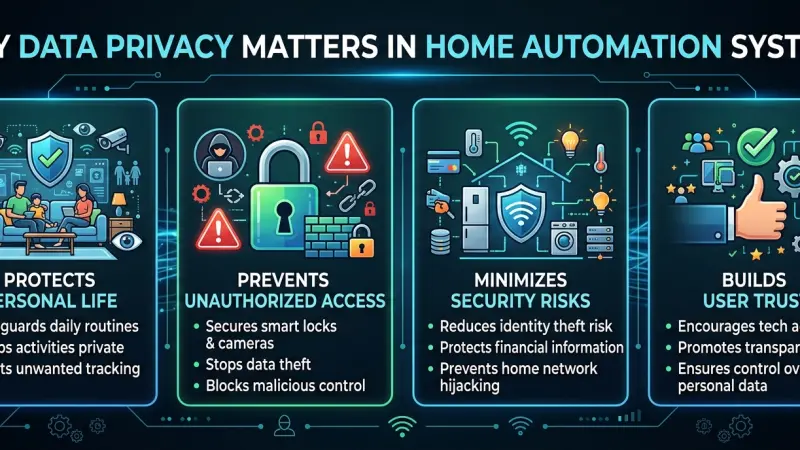
As our homes become increasingly "smart," they also become increasingly talkative. Every time a smart thermostat adjusts the temperature, a voice assistant processes a command, or a smart lock registers an entry, data is generated. This information, while essential for the seamless operation of a modern household, represents a digital footprint of our most private lives. The question of who owns this data, where it is stored, and how it is protected has moved from the fringes of tech circles to the forefront of consumer consciousness. Data privacy in home automation is not just a technical checkbox; it is a fundamental pillar of personal security and digital autonomy.

Understanding the stakes of data privacy is essential for anyone integrating IoT (Internet of Things) devices into their living space. A breach of privacy in a smart home isn't just about stolen credit card numbers; it can involve insights into your daily routines, your physical presence in the home, and even private conversations. This guide explores the multifaceted nature of data privacy in the automated home, providing a roadmap for balancing high-tech convenience with ironclad security.
An Overview of the Smart Home Data Ecosystem
To protect your privacy, you must first understand what data is being collected and why. Smart homes operate on a continuous loop of data collection, processing, and action.
The Types of Data Collected
-
Behavioral Data: Patterns of when you wake up, leave the house, and return.
-
Environmental Data: Records of temperature preferences, lighting levels, and even humidity.
-
Biometric and Sensory Data: Voice recordings from smart speakers, facial recognition data from doorbells, and movement patterns from motion sensors.
-
Network Data: Information about other devices connected to your Wi-Fi, your IP address, and your geographical location.
Where Does the Data Go?
Data typically resides in one of three places: locally on the device, on a central home hub, or on a manufacturer’s cloud server. Cloud-based systems are the most common because they allow for remote access and complex processing, but they also represent the highest privacy risk, as your data leaves the physical boundaries of your home.
The Critical Importance of Data Privacy
1. Physical Security and Presence Awareness
If a bad actor gains access to your home automation data, they can determine exactly when the house is empty. Privacy settings that leak "away mode" status can inadvertently become a roadmap for physical theft. Ensuring this data remains private is the first line of defense in modern home security.
2. Preventing "Data Profiling"
Many manufacturers use smart home data to build consumer profiles. For example, if your smart fridge notes a high consumption of sugary drinks, and that data is sold to an insurance company, it could theoretically impact your premiums. Privacy protections prevent your domestic habits from being monetized against your interests.
3. Safeguarding Personal Conversations
Voice assistants are designed to listen for a "wake word," but accidental triggers occur frequently. Robust privacy protocols ensure that these recordings are encrypted, deleted regularly, and not reviewed by human contractors without explicit, informed consent.
Benefits of a Privacy-First Smart Home
Trust and Reliability
When you know your data is secure, you are more likely to utilize the full range of a device’s capabilities.
A privacy-conscious home feels like a sanctuary rather than a surveillance state.
Long-Term Digital Sovereignty
By choosing devices that support local processing or end-to-end encryption, you retain ownership of your life’s digital record. You are not beholden to a manufacturer’s changing terms of service or the risk of a corporate data breach.
Improved System Performance
Privacy-focused setups often rely on local hubs (like Home Assistant or Hubitat). Because these systems don't have to send every command to a distant server and back, they often respond faster and continue to work even when the internet is down.
Step-by-Step Details for Securing Your Data
Step 1: Audit Your Devices
List every device connected to your network. Identify which ones have microphones, cameras, or GPS tracking. Read the privacy policy for each, focusing on the section regarding "Third-Party Data Sharing."
Step 2: Create a Dedicated IoT Network
Most modern routers allow you to create a "Guest Network." Connect all your smart home devices to this isolated network. This way, if a smart bulb is compromised, the hacker cannot easily bridge over to your primary computer or phone where your banking information is stored.
Step 3: Enable Multi-Factor Authentication (MFA)
This is the single most effective step you can take. Even if someone steals your password, they cannot access your home system without the secondary code sent to your physical device.
Step 4: Disable Unnecessary Features
If your smart TV has a camera but you never use it for video calls, cover it or disable it in the settings. If you don't need "Remote Access" for your smart oven, turn that feature off to reduce the attack surface.
Step 5: Prioritize Local Processing
When buying new gear, look for devices that are "Local Control" compatible. This means the device communicates directly with your hub over your home Wi-Fi or Zigbee/Z-Wave protocols, never sending your data to the cloud.
Common Mistakes to Avoid
-
Using Default Passwords: Many IoT devices come with "admin/admin" or "1234" as defaults. Change these immediately upon unboxing.
-
Neglecting Router Security: Your router is the gateway to your home. If it is using outdated WPA2 or has an easy password, your entire smart home is vulnerable.
-
Buying "No-Name" Budget Devices: Extremely cheap smart devices from unknown manufacturers often have non-existent security protocols and may be designed specifically to harvest and sell data.
-
Ignoring Permissions: When installing a smart home app, pay attention to the permissions it asks for. Does a lightbulb app really need access to your contacts or your microphone? If not, deny access.
Strategic Tips for Maintaining Privacy
-
Regularly Clear Voice Histories: Set your voice assistants to auto-delete recordings every 3 or 18 months.
-
Use Hardware Mute Switches: Many smart speakers have a physical slider that cuts power to the microphone. Use it when you are having private conversations.
-
Monitor Network Traffic: Some advanced routers show you which devices are uploading large amounts of data. A smart plug suddenly uploading megabytes of data is a red flag for a security compromise.
-
Keep Firmware Updated: Security vulnerabilities are discovered daily. Set your devices to auto-update to ensure you have the latest security patches.
Supporting Local Business Visibility Beyond Core Marketing Efforts
The complexity of modern data privacy often means that homeowners require professional assistance to set up secure, encrypted networks. For cyber-security consultants and smart home integrators, maintaining a high level of business discoverability is paramount. By utilizing a business listings site, professionals can create a supporting visibility layer that helps concerned homeowners find local experts who specialize in secure installations. This presence acts as a credibility signal, reassuring potential clients that the business is established and trustworthy.
Consistency across digital platforms is a key driver for success in the tech services industry. A business directory website allows small firms to build local presence consistency, ensuring that their contact details are uniform wherever a customer might look. Furthermore, leveraging a free company listing platform provides an avenue for local discovery aid, allowing residents to find technicians who understand the nuances of data protection. For those looking to grow, the ability to list services uk directory style helps highlight niche expertise, such as VPN configuration or network isolation. Finally, an optimized Local Page UK can serve as a central hub for a business's local reputation, making it easier for customers to connect with privacy-focused professionals.
Data privacy
Data privacy is the currency of the digital age. In the context of home automation, it is the difference between a home that serves you and a home that monitors you. By being intentional about the devices you bring into your space, securing your network, and prioritizing local control, you can enjoy the incredible benefits of automation without compromising your personal life.
The responsibility of privacy is shared between manufacturers and consumers. As you continue to build your smart home, stay informed, stay vigilant, and remember that your home is your sanctuary. Take a moment today to update your passwords and check your app permissions—small steps lead to a much safer digital future.
Frequently Asked Questions (FAQs)
1. Can smart home devices listen to my conversations?
Devices with microphones are designed to listen for specific wake words. While "accidental triggers" can happen, reputable manufacturers encrypt this data and provide tools to delete recordings.
2. Is it safer to use Zigbee or Z-Wave instead of Wi-Fi?
Generally, yes. Zigbee and Z-Wave are local protocols that don't inherently require an
internet connection to function, making them less susceptible to external cloud-based attacks.
3. Does "Local Control" mean I can't use an app on my phone?
No. You can still use an app, but the communication happens directly over your home network rather than through a manufacturer's server across the country.
4. What is a "Guest Network" and why should I use it?
It is a secondary Wi-Fi network provided by your router. By putting smart devices on a guest network, you prevent them from "seeing" or accessing your primary devices like your laptop or NAS.
5. Are smart cameras a major privacy risk?
They can be if not secured. Always use 2FA, avoid cameras that don't offer end-to-end encryption, and position them away from highly private areas like bedrooms.
6. Can a hacked smart bulb really lead to a data breach?
Yes. If a device is on your main network, a hacker can use it as an entry point to scan your network for more sensitive targets, such as unencrypted files on a computer.
7. How often should I change my smart home passwords?
It is good practice to change them every 6 to 12 months, or immediately if you hear of a data breach involving the manufacturer.
8. Do privacy laws like GDPR protect my smart home data?
In many regions, yes. These laws give you the right to request a copy of your data and the "right to be forgotten," meaning the company must delete your data upon request.
9. Should I avoid buying smart devices from "no-name" brands?
It is recommended. Established brands usually have more to lose and thus invest more heavily in security teams and regular software updates.
10. Can I use a VPN with my smart home?
Yes. Setting up a VPN at the router level can encrypt all traffic leaving your home, adding a significant layer of privacy.
11. What is End-to-End Encryption (E2EE)?
E2EE means the data is encrypted on the device and only decrypted on your authorized phone. Not even the manufacturer can see the content of the data.
12. Are voice assistants getting better at privacy?
Yes, many now offer physical "mute" switches and the ability to process commands locally on the device rather than in the cloud.
13. Can my smart home data be used against me in court?
In some jurisdictions, police can subpoena smart home records (like doorbell footage or voice recordings) as part of an investigation.
14. What should I do before selling a smart home device?
Always perform a "Factory Reset." This wipes your Wi-Fi credentials and account links from the hardware.
15. Is a smart home hub more private than an app?
Usually, yes. Hubs like Home Assistant prioritize local data storage, meaning your usage patterns never have to leave your house.

Disclaimer: The information provided in this article is for general informational and research purposes only. Company details, features, services, and market positions may change over time. Readers are advised to visit official company websites and conduct independent research before making any business decisions or purchasing services.
Most Searchable Keywords

Recent Blogs



Related Listings


Categories
- Accountants (295)
- Advertising Agencies (559)
- Architects (149)
- Automobiles (377)
- Beauty (300)
- Carpenters (146)
- Cleaning Services (386)
- Dentists (189)
- Driving (62)
- Electricians (215)
- Energy (8)
- Event Organiser (685)
- Finance (599)
- Guide (3365)
- Health (2207)
- Information technology (206)
- Legal Services (353)
- Logistics (6)
- Maintenance (65)
- Manufacturing (35)
Sponsored Listings in Locksmith Services


Related Blogs

Gen Z Political Reporters and News Creators i...
Read this insightful article "Gen Z Political Reporters and News Creators in the UK" to expand your knowledge!

Famous Female Social Media Influencers Across...
Read this insightful article "Famous Female Social Media Influencers Across the UK" to expand your knowledge!

Your UK Sponsor Licence 2026 Step by Step Gui...
Read this insightful article "Your UK Sponsor Licence 2026 Step by Step Guide" to expand your knowledge!
Questions & Answers – Find What
You Need, Instantly!
How can I update my business listing?
Is it free to manage my business listing?
How long does it take for my updates to reflect?
Why is it important to keep my listing updated?
