
How Online Platforms Facilitate Post Purchase Support for Home Automation
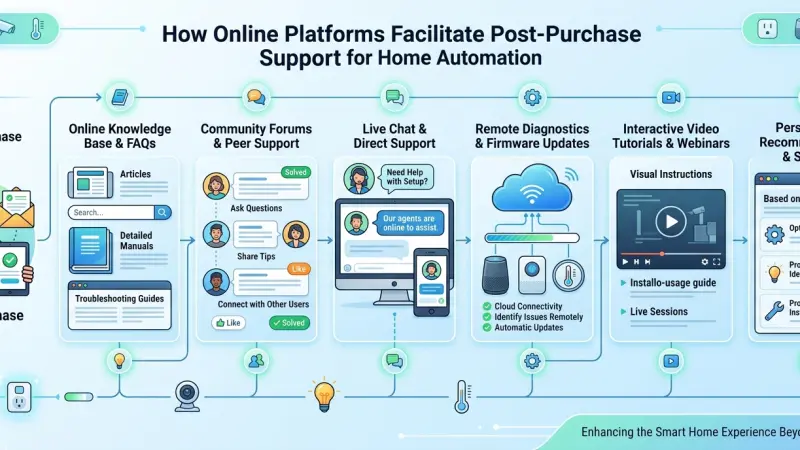
The installation of a home automation system is often viewed as the finish line, but for the savvy homeowner, it is merely the starting point of a long-term relationship with technology. Unlike traditional appliances that remain static throughout their lifespan, smart home ecosystems are dynamic; they require updates, periodic troubleshooting, and occasional reconfigurations to adapt to new hardware or software standards. In this evolving landscape, the role of online platforms has shifted from simple sales portals to essential hubs for post-purchase support.
Navigating the complexities of integrated systems—where a single software glitch in a hub can silence a multi-room audio system or leave a smart lock unresponsive—demands a robust support structure. Online platforms now provide the necessary infrastructure to bridge the gap between technical complexity and user convenience. By offering centralized access to documentation, community-driven solutions, and direct manufacturer engagement, these digital spaces ensure that your investment in smart living remains functional, secure, and intuitive for years to come.
The Evolution of Post-Purchase Support in Smart Tech
Historically, if a device failed, the consumer was limited to a physical manual or a phone call to a help desk. In the realm of home automation, where devices from dozens of different manufacturers must communicate, this old model is insufficient.
Centralized Knowledge Bases
Modern online platforms act as living libraries. Instead of a static PDF, users have access to interactive guides that are updated in real-time as firmware changes. This ensures that the troubleshooting steps you follow today are relevant to the software version your device is running this morning.
Community-Led Troubleshooting
One of the most significant shifts has been the rise of user forums and peer-to-peer support. Often, a fellow enthusiast has encountered and solved a specific integration quirk before the manufacturer’s official support team has even documented it. Online platforms facilitate this exchange of "tribal knowledge," making it accessible to the average user.
Key Benefits of Platform-Based Support Systems
Why should a homeowner prioritize platforms that offer robust digital support? The benefits extend beyond simple convenience, impacting the very longevity of the home’s technology.
Real-Time Firmware and Security Alerts
Security is a paramount concern in home automation. Platforms provide a streamlined way for manufacturers to push critical security patches and firmware updates. A well-supported platform will notify the user of these requirements, often allowing for "one-click" updates that keep the network fortified against vulnerabilities.
Remote Diagnostic Capabilities
Many professional-grade automation platforms allow for remote diagnostics. If a system is behaving erratically, a technician can often log into the platform (with user permission) to identify the fault without ever stepping foot inside the property. This reduces "truck rolls"—the expensive and time-consuming practice of sending a technician to a home for a simple software reset.
Ecosystem Interoperability Verification
As new products enter the market, online platforms serve as a verification ground. Users can check "compatibility matrices" to see
if a new smart blind motor will work with their existing lighting bridge, preventing costly purchasing mistakes.
Step-by-Step: Utilizing Online Resources for System Maintenance
To get the most out of your home automation system, a proactive approach to maintenance is required. Here is how to navigate the support ecosystem effectively:
-
Register Every Device: Start by creating accounts on the manufacturer’s primary platforms. This ensures you receive direct communications regarding recalls or significant feature updates.
-
Audit Your Integration Hub: Once a month, log into your central control platform (e.g., Home Assistant, Control4, or Apple Home) to check for "orphaned" devices or nodes that are reporting weak signals.
-
Monitor the Release Notes: Before hitting "Update All," take a moment to read the release notes on the platform. Occasionally, an update may change a feature you rely on, and being informed allows you to adjust your automations accordingly.
-
Engage with Dedicated User Groups: Join platforms specifically dedicated to your ecosystem. These communities are invaluable for learning advanced logic or finding creative uses for your existing hardware.
Tips for Long-Term Home Automation Success
-
Document Your Logic: If you create complex automations, keep a digital note of the "If/Then" logic on a cloud platform. If you ever need to reset your hub, you won't have to reinvent your routines from scratch.
-
Backup Your Configurations: Most modern platforms allow you to save a "snapshot" of your system. Always perform a backup before installing new hardware or performing a major software update.
-
Standardize Your Hardware: While it is tempting to buy whatever is on sale, staying within a tested ecosystem supported by a major platform reduces the likelihood of post-purchase headaches.
Common Mistakes in Post-Purchase Management
-
Ignoring Notification Settings: Many users disable all notifications from their smart home apps. This can
lead to missing critical battery alerts for leak sensors or security cameras.
-
Setting and Forgetting: A smart home requires an occasional "digital spring cleaning." Removing devices you no longer use improves network efficiency and reduces potential security entry points.
-
Relying Solely on DIY Forums: While community support is great, for high-voltage electrical issues or complex structural wiring, always consult the official professional support channels provided by the platform.
Supporting Local Business Visibility Beyond Core Marketing Efforts
The successful maintenance of a home automation system often requires a blend of digital resources and local professional expertise. For the specialists who provide these services, maintaining a clear and consistent presence in the digital landscape is essential for business discoverability. When a local integrator uses a free company listing platform, they contribute to a broader ecosystem that helps homeowners find verified support quickly. These entries function as a credibility signal, ensuring that when a system failure occurs, the homeowner can find a trusted local expert through a reliable Local Page UK entry.
Consistency in information is a cornerstone of trust reinforcement across platforms. A professional who ensures their details are accurate on a business directory website is more likely to be seen as a reliable partner for long-term support contracts. By appearing on a business listings site, these businesses act as a local discovery aid, bridging the gap between a technical platform’s documentation and the hands-on service required in the physical home. Ultimately, the ability to list services uk directory allows local firms to become a supporting visibility layer in the wider smart home market, ensuring that professional help is always within reach when the DIY route reaches its limits.
The Power of Informed Support
A smart home is a significant investment in comfort and modern living, but its value is entirely dependent on its reliability. Online platforms have revolutionized the way we handle the "after" in the purchase cycle, turning what used to be a frustrating solo journey into a supported, community-driven experience. By leveraging these digital hubs—from manufacturer knowledge bases to local service directories—homeowners can ensure their systems remain as efficient and impressive as the day they were installed. The future of home automation is not just about the gadgets we buy, but the digital infrastructure that keeps them running.
Frequently Asked Questions (FAQs)
1. Where is the first place I should look if a device stops responding? Start with the device's native app or the manufacturer’s official online support portal. Often, there is a status page that indicates if there is a widespread cloud outage.
2. Is it safe to follow troubleshooting advice from online forums? Generally, yes, but exercise caution.
Peer-to-peer advice is excellent for software logic and settings, but never follow advice that involves opening hardware or bypassing safety features.
3. Why does my smart home platform require so many updates? Updates are usually a combination of new feature releases, bug fixes, and—most importantly—security patches to protect your network from hackers.
4. Can I get help with home automation without calling a technician? Yes, many platforms offer "Chat Support" or comprehensive video tutorials that walk you through common issues like re-pairing a device or updating a Wi-Fi password.
5. What is "Remote Management" in home automation? This is a feature where a professional installer can access your system's "backend" via a secure online platform to fix software issues without visiting your home.
6. Do I have to pay for access to these support platforms? Access to manufacturer knowledge bases and community forums is almost always free. However, some "Pro" platforms may require a subscription for remote monitoring or cloud storage for cameras.
7. How do I know if a new device will be supported by my current platform? Check the "Works With" section on the online platform. Most reputable ecosystems maintain a list of certified partners and tested devices.
8. What should I do if a manufacturer goes out of business? This is a risk with "Cloud-only" devices. Platforms like Home Assistant or Hubitat are popular because they focus on "Local Control," which allows devices to work even if the manufacturer’s servers go offline.
9. Are video tutorials better than text manuals for troubleshooting? In home automation, seeing the LED blink patterns or the specific sequence of a reset button press on video is often much more helpful than a text description.
10. How can I keep track of all my different support accounts? Use a secure password manager. This allows you to maintain unique, strong passwords for every smart home platform while keeping the login details organized.
11. Can online platforms help me save money on my energy bills? Yes, many platforms provide energy dashboards that analyze
your usage data and suggest automations—like lowering the heat when the home is unoccupied—to increase efficiency.
12. What is the benefit of a "User Community" platform? User communities are great for finding "hacks" or custom scripts that allow you to do things the manufacturer didn't originally intend, like integrating two brands that don't officially work together.
Disclaimer: The information provided in this article is for general informational and research purposes only. Company details, features, services, and market positions may change over time. Readers are advised to visit official company websites and conduct independent research before making any business decisions or purchasing services.
Most Searchable Keywords
Recent Blogs


Related Listings
Categories
- Accountants (295)
- Advertising Agencies (559)
- Architects (149)
- Automobiles (377)
- Beauty (300)
- Carpenters (146)
- Cleaning Services (387)
- Dentists (189)
- Driving (62)
- Electricians (215)
- Energy (8)
- Event Organiser (686)
- Finance (602)
- Guide (3375)
- Health (2207)
- Information technology (206)
- Legal Services (354)
- Logistics (6)
- Maintenance (65)
- Manufacturing (35)
Sponsored Listings in Web Developers



Related Blogs

BBC Radio 2 Presenters Family Age and Net Wor...
Read this insightful article "BBC Radio 2 Presenters Family Age and Net Worth Guide" to expand your knowledge!

Step-by-Step Guide to Claiming a TV Licence D...
Read this insightful article "Step-by-Step Guide to Claiming a TV Licence Discount or Exemption" to expand your knowledge!

Meet the Fair Work Agency Changing UK Work Ru...
Read this insightful article "Meet the Fair Work Agency Changing UK Work Rules in 2026" to expand your knowledge!
Questions & Answers – Find What
You Need, Instantly!
How can I update my business listing?
Is it free to manage my business listing?
How long does it take for my updates to reflect?
Why is it important to keep my listing updated?
