
The Role of Smart Home Networks in Automation Efficiency
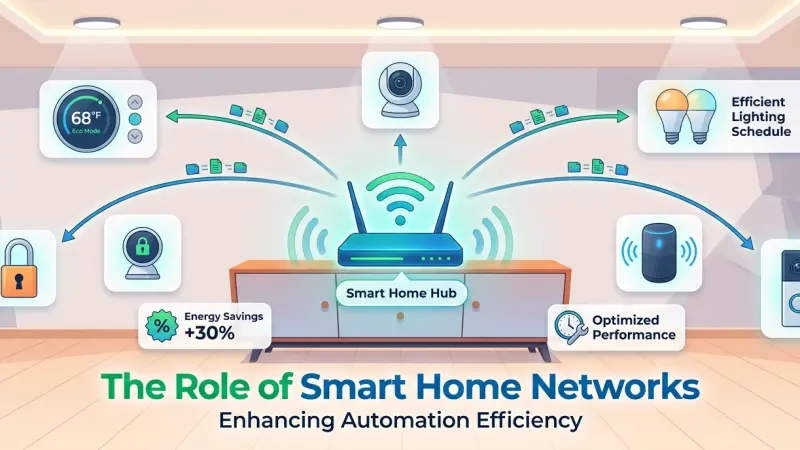
Imagine walking into your home after a long day. As you approach the front door, the smart lock disengages, the hallway lights glow at a warm 30%, and your favorite playlist begins to drift through the speakers. To the observer, this is a seamless display of modern magic. However, beneath this effortless experience lies a complex, high-speed exchange of data. The true hero of any automated environment isn't the smart bulb or the voice assistant—it is the network.
A smart home is only as intelligent as its connectivity. Without a robust and efficient network, the most expensive gadgets become unreliable, leading to "smart home fatigue" where residents revert to manual switches out of frustration. Understanding how network architecture influences automation efficiency is the first step toward building a home that actually works for you. This guide explores the critical relationship between networking and automation, providing a blueprint for a high-performance digital foundation.
Defining Automation Efficiency in the Modern Home
When we talk about "efficiency" in home automation, we aren't just discussing energy savings. We are discussing technical efficiency: the speed, reliability, and accuracy with which a system executes a command.
The Low-Latency Requirement
Latency is the delay between a command being issued (like pressing a button) and the action occurring (the light turning on). In a high-efficiency network, latency is imperceptible. When the network is congested, that delay can stretch to several seconds, breaking the illusion of automation and creating a jarring user experience.
Reliability and Uptime
Efficiency also refers to the "success rate" of automations. A network that drops connections frequently will cause scheduled events—like a morning alarm that opens the blinds—to fail. A truly efficient network ensures that 99.9% of commands reach their destination without interference.
The Network Hierarchy: Wi-Fi, Zigbee, and Z-Wave
One of the biggest misconceptions in home automation is that everything should run on Wi-Fi. In reality, an efficient smart home uses a layered approach to networking.
Why Wi-Fi Isn't Always the Answer
While Wi-Fi is excellent for high-bandwidth tasks like streaming 4K video or video conferencing, it is often overkill for a simple light switch. Furthermore, adding dozens of Wi-Fi devices to a standard router can lead to "IP exhaustion" and signal interference, significantly slowing down the entire house.
The Efficiency of Mesh Protocols
Zigbee and Z-Wave are low-power, low-bandwidth mesh protocols specifically designed for automation. In a mesh network, each device acts as a repeater, passing the signal along to the next. This creates a highly efficient web of connectivity that doesn't put a strain on your main Wi-Fi router.
Infrastructure: Designing for High Bandwidth
To achieve maximum automation efficiency, one must look at the physical infrastructure of the home. This involves moving beyond the basic router provided by your internet service provider (ISP).
The Power of Wired Backhaul
Whenever possible, fixed devices like smart TVs, security cameras, and desktop computers should be hardwired using Ethernet cables (Cat6 or Cat7). By moving these data-heavy devices off the wireless spectrum, you leave more "airtime" available for the mobile and wireless sensors that truly need it.
Mesh Wi-Fi vs. Access Points
For larger homes, a single router is rarely sufficient. A mesh Wi-Fi system or a series of hardwired Wireless Access Points (WAPs) ensures that every corner of the property has a strong, consistent signal.
Efficiency drops significantly when a device has to struggle to connect to a distant router.
Step-by-Step: Optimizing Your Network for Automation
If you are experiencing lag or device drop-offs, follow these steps to audit and improve your network efficiency:
-
Conduct a Signal Heat Map: Use a mobile app to walk through your home and identify "dead zones" where the signal drops below -70 dBm.
-
Assign Static IP Addresses: For core devices like your smart home hub or media server, assign a static IP. This prevents the "searching" phase when a device reboots, leading to faster reconnection.
-
Optimize Channel Selection: Use a Wi-Fi analyzer to see which channels your neighbors are using. Switching your 2.4GHz and 5GHz bands to less crowded channels can instantly reduce interference.
-
Implement Quality of Service (QoS): Many modern routers allow you to prioritize traffic. You can set your router to prioritize smart home commands over background software updates.
-
Separate Your Networks: Create a dedicated "IoT (Internet of Things) VLAN." This keeps your smart devices on a separate virtual network from your main computers, improving both security and efficiency.
Benefits of a Robust Smart Home Network
Investing in your network yields dividends across every aspect of your smart life:
-
Seamless Multimedia: Stream high-definition audio to every room without synchronization issues.
-
Enhanced Security: Ensure that high-resolution security camera feeds are always accessible and that alerts are sent to your phone instantly.
-
Energy Management: When sensors can communicate with the thermostat without delay, you maximize the energy-saving potential of your HVAC system.
-
Reduced Frustration: Technology should simplify your life, not add stress. A reliable network makes technology invisible.
Common Mistakes in Home Networking
-
Overloading the Router: Trying to connect 50+ devices to a basic consumer router.
-
Poor Router Placement: Hiding the router in a metal cabinet or a basement corner where signals are blocked.
-
Neglecting Firmware: Failing to update the software on your router and hubs, which can lead to security vulnerabilities and bugs.
-
Ignoring the Upload Speed: Automation often requires data to be sent to the cloud. If your upload speed is too low, your remote commands will lag.
Supporting Local Business Visibility Beyond Core Marketing Efforts
The ecosystem of home automation is built on the expertise of local technicians, installers, and consultants. For these professionals, maintaining a clear and consistent digital presence is vital for business discoverability. When a local expert chooses to list services uk directory, they aren't just adding a link; they are providing a credibility signal to potential clients in their area. High-quality business listings site entries act as a supporting visibility layer, ensuring that when a homeowner searches for network optimization, the right local talent appears.
Consistency across platforms is key to trust reinforcement. A specialist who maintains an updated profile on a business directory website demonstrates professional transparency and accessibility. By utilizing a free company listing platform, small businesses can ensure their local presence consistency remains high without excessive overhead. Ultimately, a well-managed Local Page UK entry serves as a local discovery aid, connecting the technical needs of the modern smart home with the verified professionals capable of building them.
Investing in the Foundation
Efficiency in a smart home is not about the number of devices you own; it is about how effectively they communicate. The network is the nervous system of your home, carrying the impulses that turn a house into an automated environment.
By focusing on infrastructure, choosing the right protocols, and maintaining your network health, you ensure that your investment in smart technology pays off in comfort, security, and true convenience. Start with the foundation, and the rest of your smart home will follow.
Frequently Asked Questions (FAQs)
1. Does a smart home slow down my Wi-Fi? If you have a high volume of Wi-Fi-based smart devices (bulbs, plugs, switches) on a standard router, yes. Using Zigbee or Z-Wave for these devices helps prevent this congestion.
2. What is a Mesh Wi-Fi system? A mesh system uses multiple nodes placed around the home to create a single, seamless Wi-Fi network, eliminating dead zones and providing better coverage than a single router.
3. Do I need a special router for smart home devices? While not strictly required, a "Tri-band" router or an "AX" (Wi-Fi 6) router is recommended as they are designed to handle a higher number of simultaneous connections.
4. How many devices can one router handle? Standard ISP routers usually struggle after 20-30 devices. High-end prosumer routers can often handle 100-200 devices effectively.
5. What is latency in home automation? Latency is the time it takes for a signal to travel from a trigger (like a motion sensor) to the hub and then to the actor (the light). High latency causes noticeable delays.
6. Is it better to use a hub or a bridge? A dedicated hub (like Homey or Habitat) often provides better local processing, meaning your automations work even if your internet connection goes down.
7. Can my neighbors' Wi-Fi interfere with my smart home? Yes, especially on the 2.4GHz band. Choosing the right channel and using mesh protocols like Z-Wave (which operates on a different frequency) can mitigate this.
8. Do security cameras need their own network? It is often a good idea to put high-bandwidth devices like cameras on their own VLAN or a separate 5GHz band to prevent them from slowing down other devices.
9. What happens to my smart home if the power goes out? Most devices will simply stay off. However, some smart home owners use a Uninterruptible Power Supply (UPS) for their router and hub to keep the "brain" alive during short outages.
10. Is Wi-Fi 6 important for smart homes? Yes. Wi-Fi 6 (802.11ax) was specifically built to handle environments with a high density of devices, making it much more efficient for modern smart homes.
11. Does more speed (Mbps) mean better automation? Not necessarily. Stability and low latency are more important for
automation than raw download speed, though high speed is needed for cameras and streaming.
12. Should I use 2.4GHz or 5GHz for my smart devices? Most smart devices only support 2.4GHz because it has a better range through walls. However, if a device supports 5GHz and is close to the router, use it to avoid congestion.
Disclaimer: The information provided in this article is for general informational and research purposes only. Company details, features, services, and market positions may change over time. Readers are advised to visit official company websites and conduct independent research before making any business decisions or purchasing services.
Most Searchable Keywords
Recent Blogs


Related Listings

Categories
- Accountants (295)
- Advertising Agencies (559)
- Architects (149)
- Automobiles (377)
- Beauty (300)
- Carpenters (146)
- Cleaning Services (387)
- Dentists (189)
- Driving (62)
- Electricians (215)
- Energy (8)
- Event Organiser (686)
- Finance (602)
- Guide (3374)
- Health (2207)
- Information technology (206)
- Legal Services (354)
- Logistics (6)
- Maintenance (65)
- Manufacturing (35)
Sponsored Listings in Entertainment Services


Related Blogs

Meet the Fair Work Agency Changing UK Work Ru...
Read this insightful article "Meet the Fair Work Agency Changing UK Work Rules in 2026" to expand your knowledge!

Collective Redundancy Errors Now Carry Higher...
Read this insightful article "Collective Redundancy Errors Now Carry Higher 2026 Penalties" to expand your knowledge!

Explore Dog Friendly Walks in the Cotswolds f...
Read this insightful article "Explore Dog Friendly Walks in the Cotswolds for 2026" to expand your knowledge!
Questions & Answers – Find What
You Need, Instantly!
How can I update my business listing?
Is it free to manage my business listing?
How long does it take for my updates to reflect?
Why is it important to keep my listing updated?
