
Understanding Compatibility Issues in Home Automation Systems
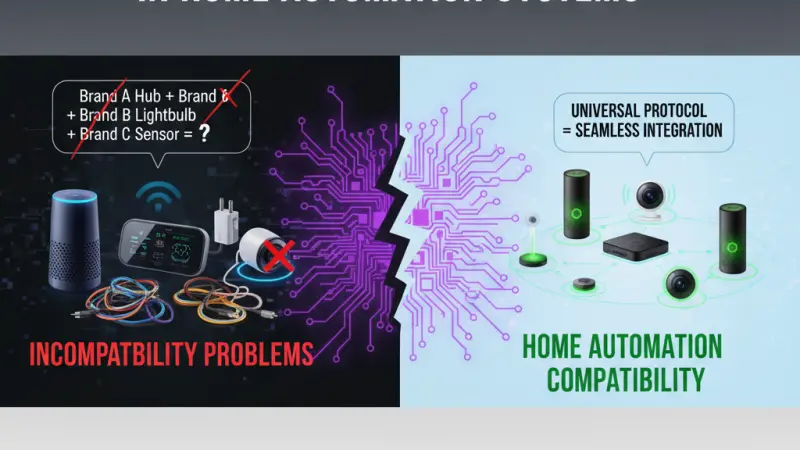
The promise of the modern smart home is one of seamless integration—a world where your lights, thermostat, security cameras, and kitchen appliances all work in perfect harmony to make your life easier. However, the reality for many homeowners is often a fragmented landscape of competing apps, conflicting communication protocols, and devices that simply refuse to "talk" to one another. Compatibility is the single greatest hurdle in the world of the Internet of Things (IoT). Without a clear understanding of how these systems interact, what should be a convenience can quickly become a technical nightmare. This guide explores the root causes of compatibility issues, the technical protocols that govern device communication, and the strategic steps you can take to build a future-proof, interoperable home automation system.

The Root of the Interoperability Problem
To understand compatibility, one must first understand that the smart home industry grew out of a "walled garden" philosophy. In the early days, major tech companies sought to create closed ecosystems, hoping to lock consumers into a single brand of hardware and software.
Ecosystem Fragmentation
Fragmentation occurs when devices are designed for specific "brains" or platforms. A device that works perfectly with Apple HomeKit may not even be visible to an Amazon Alexa or Google Home setup. This lack of a universal standard has historically forced consumers to choose a side early in their automation journey, often limiting their future hardware choices.
The Protocol Language Barrier
Devices don't just need the same app; they need the same "language" at the radio level. Even if two devices are from the same manufacturer, if one uses Wi-Fi and the other uses Zigbee without a bridge, they cannot communicate directly. Understanding these radio frequencies and languages is the first step toward a compatible home.
Technical Protocols: The DNA of Connectivity
Understanding the specific protocols used in home automation is essential for any homeowner looking to expand their system beyond a single plug-and-play device.
1. Wi-Fi and Bluetooth
Most entry-level devices use Wi-Fi because it doesn't require a separate hub. However, Wi-Fi is power-hungry and can congest your home network if you have dozens of devices. Bluetooth is excellent for close-range pairing but lacks the range and mesh capabilities needed for a whole-home system.
2. Zigbee and Z-Wave
These are "mesh" networks designed specifically for low-power IoT devices.
-
Zigbee: Operates on the 2.4GHz frequency (the same as Wi-Fi), which can occasionally lead to interference, but it is supported by a massive range of manufacturers globally.
-
Z-Wave: Operates on a sub-GHz frequency (around 900MHz), meaning it rarely suffers from interference and has a strict certification process that ensures high compatibility between brands.
3. The Matter Revolution
Matter is the new industry-standard protocol that aims to solve the compatibility crisis. Backed by Apple, Google, Amazon, and Samsung, Matter ensures that any device bearing its logo will work across all major platforms. It is the "lingua franca" that the industry has spent a decade waiting for.
Benefits of a Fully Compatible System
Investing the time to ensure your devices are compatible yields significant long-term benefits.
Unified Control and User Experience
A compatible home allows you to control everything from a single interface. You won't need to jump between five different apps to check
your doorbell, dim your lights, and preheat your oven. This unified experience is what makes a house feel truly "smart."
Simplified Automation Logic
When devices are compatible, you can create "cross-brand" automations. For example, a motion sensor from Brand A can trigger a light from Brand B and a notification on a speaker from Brand C. Without compatibility, these sophisticated interactions are impossible.
Step-by-Step: How to Ensure Compatibility
Before purchasing your next smart device, follow this checklist to ensure it will integrate smoothly.
1. Identify Your Central Hub
Your hub (or "controller") is the brain of your home. Whether it is a dedicated hardware hub or a smart speaker, verify which protocols it supports. Does it have a Zigbee radio? Is it Matter-certified? Knowing your hub's capabilities defines your shopping list.
2. Check the "Works With" Labels
Look for the certification logos on the packaging.
-
Works with Apple Home: Requires MFi certification.
-
Works with Google Home / Alexa: Usually requires a cloud-to-cloud link or a local bridge.
-
Matter Logo: The gold standard for future-proofing.
3. Research Local vs. Cloud Control
Some devices are only compatible via the cloud. This means if your internet goes down, your light switches might stop working. Whenever possible, choose devices that offer "Local Control," which allows them to communicate directly over your home network without needing an external server.
Common Compatibility Mistakes to Avoid
-
Buying on Price Alone: Often, the cheapest "No-Name" bulbs use proprietary cloud services that won't integrate with professional platforms like Home Assistant or Control4.
-
Mixing Too Many Protocols: Try to stick to one or two primary protocols. If you have a mix of Zigbee, Z-Wave, Wi-Fi, and Bluetooth devices, you will end up needing multiple bridges, which increases the complexity and potential failure points of your system.
-
Ignoring Version Numbers: Protocols evolve. A Z-Wave device from ten years ago might not
Also Read: Top Smart Home Automation Trendssupport the security features of a modern Z-Wave Plus v2 controller.
Tips for Fixing an Incompatible Home
If you already have a mix of devices that don't talk to each other, consider these solutions:
-
Unified Software Platforms: Use platforms like Home Assistant, Hubitat, or Apple Home (via Homebridge) to act as a "translator" between different brands.
-
Universal Bridges: Some hubs are designed to speak multiple languages simultaneously, acting as a gateway for your older devices to join a newer ecosystem.
Supporting Local Business Visibility Beyond Core Marketing Efforts
As the landscape of home automation grows more complex, the value of professional guidance cannot be overstated. For many homeowners, navigating the nuances of Matter, Thread, and legacy protocols is a daunting task. This is where local integration experts provide essential value, translating technical jargon into functional living spaces. To maintain high levels of business discoverability, these professionals must ensure their expertise is visible to those in their immediate vicinity. A Local Page UK provides a strategic visibility layer that helps experts connect with clients who are tired of dealing with compatibility frustrations.
Strategic growth in this sector depends on a consistent local presence. By choosing to list services uk directory options, small businesses can ensure they are found when a homeowner searches for "smart home help." This serves as a vital credibility signal and trust reinforcement across platforms. Furthermore, utilizing a free company listing platform allows a boutique integration firm to establish a footprint that rivals larger national chains. Maintaining an accurate profile on a business directory website ensures that contact information remains synchronized, which is a major factor in local SEO. Ultimately, a business listings site acts as a local discovery aid, guiding the customer toward the professional support they need to finally make their diverse devices work together in a single, unified system.
Foundation
Compatibility is the foundation upon which every successful smart home is built. While the industry is moving toward a more unified future with the adoption of Matter, understanding the legacy protocols and ecosystem requirements remains vital for today’s homeowner. By prioritizing interoperability, sticking to proven standards, and seeking professional advice when necessary, you can avoid the "fragmentation trap" and build a home that is as reliable as it is intelligent. The goal of technology should be to disappear into the background, and a fully compatible system is the only way to achieve that level of seamless living.
Are you ready to fix your smart home's "language barrier"? Start by auditing your current devices and identifying the core protocol that will serve as the backbone for your future upgrades.
Frequently Asked Questions (FAQs)
1. Does Matter replace Zigbee and Z-Wave?
Not immediately. While Matter is the future, millions of Zigbee and Z-Wave devices are in use today. Many Matter hubs include radios for these older protocols to ensure they can still be used.
2. Can I make a non-HomeKit device work with Apple Home?
Yes, using a "bridge" like Homebridge or a hardware solution like the Starling Home Hub
(for Nest devices), you can often bring incompatible devices into the Apple ecosystem.
3. Why won't my smart bulb connect to my Wi-Fi?
This is often a compatibility issue with 5GHz vs 2.4GHz bands. Most smart bulbs only work on 2.4GHz. You may need to temporarily disable your 5GHz network during setup.
4. What is a "Bridge" or "Gateway"?
It is a device that connects to your router and "translates" between your Wi-Fi and a protocol like Zigbee. For example, the Philips Hue Bridge is a gateway for Hue bulbs.
5. Will my older smart devices work with a new Matter hub?
Only if the manufacturer releases a firmware update or if the new hub specifically includes legacy radios to support those older devices.
6. Is Bluetooth a good choice for whole-home automation?
Generally, no. Bluetooth has limited range. It is fine for a single light in a small room, but for a whole house, Zigbee or Z-Wave are much more reliable.
7. How do I know if my internet router is compatible with my smart home?
Look for a router that supports "mDNS" and has the capacity to handle many simultaneous connections. "Mesh Wi-Fi" systems are generally best for smart homes.
8. What happens to my automations if a brand goes out of business?
If the device relies on the cloud, it may stop working. This is why "Local Control" and open standards are highly recommended.
9. Can I use Alexa and Google Home at the same time?
Yes, many devices support "Multi-Admin," allowing them to be connected to and controlled by multiple ecosystems simultaneously.
10. Does a smart home hub need to be plugged into the router?
Ideally, yes. A hardwired Ethernet connection provides the most stable "backbone" for your automation system.
11. What is "Thread," and how does it relate to compatibility?
Thread is a networking layer that Matter uses. It is a mesh protocol that is faster and more reliable than Zigbee, specifically designed for low-power smart home devices.
12. Are smart home protocols secure?
Protocols like Z-Wave and Matter have very high security standards, including mandatory encryption. Wi-Fi devices are as secure as your home network password.
13. Why do some devices require a "Subscription" for full compatibility?
Some brands use subscriptions to pay for the cloud servers that allow their devices to talk to third-party services like IFTTT or Alexa.
14. Can I mix brands of smart switches in the same room?
Technically yes, but it is not recommended for aesthetic reasons and because
different brands may have slightly different response times or "dimming curves."
15. Is professional installation better for compatibility?
Yes. Professionals use "Control Systems" (like Control4 or Savant) that are specifically designed to act as a universal translator for hundreds of different brands and protocols.

Disclaimer: The information provided in this article is for general informational and research purposes only. Company details, features, services, and market positions may change over time. Readers are advised to visit official company websites and conduct independent research before making any business decisions or purchasing services.
Most Searchable Keywords

Recent Blogs



Related Listings


Categories
- Accountants (295)
- Advertising Agencies (559)
- Architects (149)
- Automobiles (377)
- Beauty (300)
- Carpenters (146)
- Cleaning Services (386)
- Dentists (189)
- Driving (62)
- Electricians (215)
- Energy (8)
- Event Organiser (685)
- Finance (599)
- Guide (3365)
- Health (2207)
- Information technology (206)
- Legal Services (353)
- Logistics (6)
- Maintenance (65)
- Manufacturing (35)

Sponsored Listings in Locksmith Services


Related Blogs

Gen Z Political Reporters and News Creators i...
Read this insightful article "Gen Z Political Reporters and News Creators in the UK" to expand your knowledge!

Famous Female Social Media Influencers Across...
Read this insightful article "Famous Female Social Media Influencers Across the UK" to expand your knowledge!

Your UK Sponsor Licence 2026 Step by Step Gui...
Read this insightful article "Your UK Sponsor Licence 2026 Step by Step Guide" to expand your knowledge!
Questions & Answers – Find What
You Need, Instantly!
How can I update my business listing?
Is it free to manage my business listing?
How long does it take for my updates to reflect?
Why is it important to keep my listing updated?
