
Beyond the Box Set: How to Unlock Everything on BBC iPlayer Today
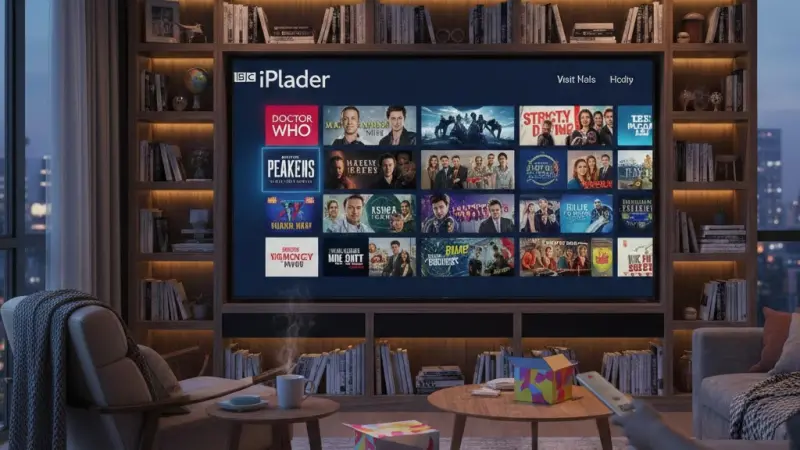
BBC iPlayer is the United Kingdom’s premier video-on-demand service, offering a vast library of live television, radio broadcasts, and an extensive catalogue of past programming. To use the service, viewers simply need a compatible device, a stable internet connection, and a valid TV Licence. You can access content via the official website or the dedicated app available on smart TVs, tablets, and smartphones. Once signed in with a BBC account, users can stream live channels including BBC One, Two, and Three, or delve into thousands of box sets ranging from gripping dramas to insightful documentaries. The service is funded by the licence fee, ensuring an ad-free experience for all domestic users.

What is BBC iPlayer? BBC iPlayer is a free-to-use digital streaming platform provided by the British Broadcasting Corporation. It allows residents in the UK to watch live television and catch up on broadcasted content from the previous several years. It requires a BBC account and a television licence for legal access.
The platform has evolved from a simple seven-day catch-up tool into a sophisticated streaming giant that rivals international competitors. Its primary appeal lies in its high-quality, culturally relevant British content. Whether you are looking for the latest news updates, regional programming, or world-class natural history programmes like Planet Earth, the interface provides a seamless gateway to the best of British media without the interruption of commercial breaks.
Mastering the Streaming Interface
Navigating the digital landscape of the BBC’s flagship streaming service requires an understanding of its intuitive layout. The home screen is curated to highlight trending series, personalized recommendations based on your viewing history, and curated collections for specific genres. For those who prefer a structured approach, the "Channels" tab allows you to jump directly into the live feed of any BBC station. The search functionality is robust, enabling users to find specific episodes or discover hidden gems by searching for actors, directors, or specific niche topics.
Optimising Your Viewing Profile
Creating a personal profile is more than just a formality; it is the key to a tailored entertainment experience. By setting up individual profiles for family members, the algorithm ensures that your "Added" list remains relevant to your tastes. This feature also includes a "Continue Watching" section, which is essential for picking up exactly where you left off across different devices. Furthermore, the parental control settings allow for a restricted "Children" mode, ensuring younger viewers only access age-appropriate animations and educational content.
Managing Personal Data
The BBC takes data privacy seriously, allowing you to manage how your viewing habits are tracked. Within the settings menu, you can clear your history or opt-out of certain personalised features. This level of control ensures that your digital footprint remains minimal while still benefiting from a service that understands your preferences over time.
Accessing Content Across Diverse Devices
One of the strongest advantages of this service is its near-universal compatibility. From the latest OLED smart televisions to older laptop models, the web-based player and the native applications are designed to scale effectively. Most modern games consoles, such as the PlayStation and Xbox, feature dedicated apps that support high-definition streaming. Mobile users can benefit from the ability to download programmes for offline viewing, which is particularly useful for commuters or those travelling to areas with limited connectivity.
Setting Up Your Smart Television
To begin viewing on a large screen, ensure your television is connected to your home Wi-Fi network. Most UK sets come with the application pre-installed via the Freeview Play or YouView platforms. Once launched, you will be prompted to sign in using a code displayed on the screen, which you then enter into your mobile device or computer. This pairing process links your account securely without the need to type complex passwords using a remote control, streamlining the initial setup significantly.
Checking Device Compatibility
While most devices are supported, older hardware may occasionally lose access as security protocols are updated. It is worth checking the official compatibility list if you are using a device manufactured before twenty-twelve. Keeping your software updated to the latest firmware version is the best way to ensure uninterrupted access to the high-bitrate streams provided by the corporation.
Legal Requirements and Licensing Obligations
Understanding the legal framework surrounding British television is vital for every household. In the United Kingdom, the law requires that any individual watching live television or using the iPlayer service must be covered by a valid TV Licence.
This applies regardless of whether you are watching on a television, a computer, or a mobile phone. Currently, the annual cost is one hundred and sixty-nine pounds and fifty pence. This fee directly funds the production of programmes and the maintenance of the digital infrastructure required to deliver them.
Understanding the Catch Up Exception
A common misconception in previous years was that the licence only applied to live broadcasts. However, the regulations were updated to close the "iPlayer loophole." Now, even if you only use the service to watch on-demand box sets or older documentaries, the requirement for a licence remains in place. Failure to comply can result in a significant fine and a criminal record, so it is always advisable to ensure your household is correctly covered before logging into the application.
Verifying Your Status
The sign-in process involves a declaration where you confirm that you possess a valid licence. While the system operates partly on trust, the BBC does perform periodic checks against their database of licensed addresses. If you are a student or living in shared accommodation, it is important to check if your specific room or the whole house requires an individual licence to remain legally compliant.
Common Mistakes to Avoid During Use
Many users encounter frustration due to simple oversights that can be easily rectified. One major mistake is attempting to use the service through a Virtual Private Network (VPN) while abroad. The BBC uses sophisticated geo-blocking technology to ensure that content is only accessible to those within the UK borders. Using a VPN often triggers a "content not available in your location" error, even if you are a paying licence fee holder. It is best to download your desired programmes before leaving the country to avoid this issue.
Neglecting App Updates
Another frequent error is ignoring software update notifications on smart TVs and mobile devices. These updates often contain critical patches for video playback issues and security enhancements. If the application feels sluggish or crashes during peak hours, it is likely that an update is pending. Ensuring that your device has sufficient storage space for these updates is a simple maintenance task that significantly improves the stability of your viewing experience over the long term.
Ignoring Sound Settings
Users often overlook the audio options available within the player. High-end dramas are often broadcast with surround sound capabilities, but the default setting might be set to standard stereo. Checking the audio settings during playback can reveal "Audio Description" for the visually impaired or enhanced dialogue tracks that make speech clearer over background music, which is a common complaint in modern television production.
Step By Step Guide to Playback
Getting started with your first stream is a straightforward process if you follow a logical sequence. First, navigate to the official website or open the application on your chosen device. You will be greeted with a login screen where you must enter your BBC account credentials. If you do not have an account, the registration process takes less than two minutes and requires only basic information such as your postcode and email address. Once logged in, you can browse the "Home" or "Categories" sections to find a programme that interests you.
Finding Live Content Quickly
If your goal is to watch a live broadcast, click on the "Live" button usually located at the top or side of the interface. This opens a digital electronic programme guide showing what is currently airing across all stations. You can choose to "Watch from start" if you have missed the beginning of a show, a revolutionary feature that ensures you never have to wait for the repeat to catch the opening scenes of a live event.
Saving For Later
When you find something you want to watch but don't have the time immediately, use the "Add" button (represented by a plus icon). This saves the programme to your "My Programmes" list. This list acts as a personal library, keeping track of new episodes as they are released and notifying you when content is about to expire from the platform, helping you prioritise your viewing schedule.
Troubleshooting Playback and Connection Issues
Technical glitches can occasionally disrupt your evening entertainment, but most have simple solutions. The most frequent culprit is a fluctuating internet connection. Since high-definition streaming requires a consistent download speed of at least five megabits per second, any drop in bandwidth can lead to buffering.
Restarting your router or switching from a wireless connection to a wired ethernet cable can often resolve these interruptions immediately. If the app itself hangs, clearing the cache in your device settings is a reliable second step.
Resolving Authentication Errors
Sometimes the application may log you out unexpectedly or refuse to accept your credentials. This usually happens after a major system update. The best course of action is to sign out completely, restart your device, and sign back in. If you have forgotten your password, the "Reset Password" link will send a secure email to your registered address. Ensure you check your junk folder if the email does not arrive within a few minutes, as automated system emails are sometimes flagged by filters.
Dealing With Buffering
If buffering persists despite a good connection, check if other devices on your network are performing high-bandwidth tasks like downloading large files or gaming. Limiting the number of active devices can free up the necessary capacity for a smooth stream. Additionally, lowering the video quality settings within the player can help if your internet speed is permanently limited, ensuring the show goes on without constant pausing.
Future Outlook for British Streaming
The landscape of digital broadcasting is shifting rapidly, and the BBC is at the forefront of this evolution. We are likely to see even deeper integration of artificial intelligence to provide hyper-personalised viewing experiences. There are also ongoing discussions regarding the future of the licence fee model, with potential moves toward a subscription-based system or a household levy. Regardless of the funding mechanism, the goal remains the same: providing high-quality, ad-free content that reflects the diversity and creativity of the British public.
Ultra High Definition Expansion
One exciting development is the increasing availability of content in Four-K Ultra High Definition and High Dynamic Range. While currently limited to flagship events like major sporting tournaments and top-tier nature documentaries, the infrastructure is being laid to make this the standard for all major releases. This will provide viewers with unparalleled visual clarity and colour depth, making the home cinema experience more immersive than ever before as technology becomes more accessible to the average household.
Interactive Viewing Experiences
We may also see a rise in interactive storytelling, where viewers can influence the direction of a plot or access real-time data overlays during live sports. This kind of engagement is already being trialled in niche areas and could soon become a mainstream feature of the platform. As the lines between traditional television and digital gaming continue to blur, the iPlayer is expected to adapt by offering more than just passive viewing, turning every show into an active experience.
Maximising Value From Your Subscription
To truly get the most out of the service, one should explore the "Archive" and "Films" categories. Beyond the current weekly hits, there is a massive wealth of classic British cinema and historical documentaries that are often overlooked. The "Sounds" integration also allows you to jump between televised music performances and related radio broadcasts or podcasts, creating a multi-media ecosystem. By taking the time to explore these deeper layers, you ensure that the cost of your licence fee is returned through hundreds of hours of high-quality education and entertainment.
Using the Search Filters
The search tool is more powerful than it looks. You can filter results by "Most Recent," "A to Z," or even by specific categories like "Northern Ireland" or "Scotland" to find regional news and culture.
This is particularly useful for those living away from their home region who wish to stay connected with local events. Utilising these filters helps break through the mainstream "Recommended" lists and uncovers the true breadth of what the corporation produces for all corners of the country.
Participating in Beta Features
For the tech-savvy, the "BBC Taster" website often allows users to try out experimental iPlayer features before they are rolled out to the general public. This can include new interface designs, experimental audio formats, or VR content. Participating in these trials not only gives you a sneak peek at the future of the service but also allows you to provide feedback that shapes the final product for millions of other users across the United Kingdom.
Frequently Asked Questions
Do I need a TV Licence to watch BBC iPlayer?
Yes, it is a legal requirement in the UK to be covered by a valid TV Licence to watch any content on BBC iPlayer. This applies to live broadcasts as well as on-demand catch-up services and box sets. Whether you are using a smartphone, tablet, laptop, or a traditional television set, you must ensure your household is correctly licensed to avoid potential fines and legal action.
Can I watch BBC iPlayer when I am travelling abroad?
Direct streaming of BBC iPlayer is not available outside the United Kingdom due to rights agreements and geo-blocking. However, you can download most programmes to your mobile device or tablet while you are still inside the UK. These downloads remain available for a limited time, allowing you to watch them offline while travelling. Using a VPN to bypass these restrictions is against the terms of service.
Why does my iPlayer app keep buffering or freezing?
Buffering is typically caused by a slow or unstable internet connection. To fix this, ensure your Wi-Fi signal is strong or use an ethernet cable for a more stable link. You should also check if other devices are consuming bandwidth on your network. If the problem persists, try restarting your device, clearing the app cache, or checking for any pending software updates that might improve performance and stability.
Is there a way to watch BBC iPlayer without an account?
No, a BBC account is mandatory to use the iPlayer service. The registration process is free and requires you to provide an email address, date of birth, and a UK postcode. Having an account allows the BBC to offer personalised recommendations, keep track of your "Added" list, and ensure you can resume watching programmes from where you left off across different devices seamlessly and securely.
How long do programmes stay available on the platform?
Most programmes are available for at least twelve months after their initial broadcast, though many popular box sets and flagship series remain on the service for much longer. Each programme page displays an "availability" notice, telling you exactly how many days or months are left before it is removed. It is a good habit to check this date for series you are currently binge-watching to avoid disappointment.

Disclaimer: The information provided in this article is for general informational and research purposes only. Company details, features, services, and market positions may change over time. Readers are advised to visit official company websites and conduct independent research before making any business decisions or purchasing services.
Most Searchable Keywords

Recent Blogs



Related Listings


Categories
- Accountants (295)
- Advertising Agencies (559)
- Architects (149)
- Automobiles (377)
- Beauty (300)
- Carpenters (146)
- Cleaning Services (386)
- Dentists (189)
- Driving (62)
- Electricians (215)
- Energy (8)
- Event Organiser (685)
- Finance (599)
- Guide (3365)
- Health (2207)
- Information technology (206)
- Legal Services (353)
- Logistics (6)
- Maintenance (65)
- Manufacturing (35)
Sponsored Listings in Locksmith Services


Related Blogs

Gen Z Political Reporters and News Creators i...
Read this insightful article "Gen Z Political Reporters and News Creators in the UK" to expand your knowledge!

Famous Female Social Media Influencers Across...
Read this insightful article "Famous Female Social Media Influencers Across the UK" to expand your knowledge!

Your UK Sponsor Licence 2026 Step by Step Gui...
Read this insightful article "Your UK Sponsor Licence 2026 Step by Step Guide" to expand your knowledge!
Questions & Answers – Find What
You Need, Instantly!
How can I update my business listing?
Is it free to manage my business listing?
How long does it take for my updates to reflect?
Why is it important to keep my listing updated?
