
Why Home Automation Businesses Should Invest in Customer Training
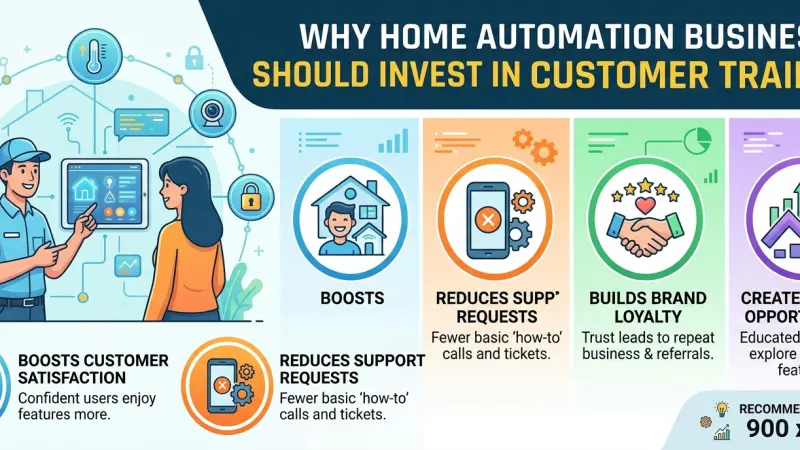
The home automation industry is currently witnessing an unprecedented surge in adoption. As the "Internet of Things" (IoT) moves from a niche hobby for tech enthusiasts into the mainstream residential market, a significant gap has emerged: the complexity of the systems often outpaces the technical literacy of the average homeowner. For a home automation business, the sale and installation of hardware are merely the beginning of the relationship. The true hallmark of success—and the primary driver of profitability—is how effectively the end-user can navigate their new intelligent environment.
Investing in customer training is no longer an optional "add-on" service; it is a strategic necessity. When clients feel empowered to use their systems, support tickets drop, referrals rise, and the perceived value of the installation skyrockets. This guide examines the multi-faceted benefits of client education and provides a blueprint for businesses looking to integrate robust training modules into their service delivery model.
The Current State of the Smart Home Experience
In the early days of home automation, users were typically "prosumers" who enjoyed the troubleshooting process. Today’s market is different. Modern clients want "invisible" technology that works without friction. However, even the most intuitive interfaces require a baseline of understanding.
The Complexity Paradox
As systems become more capable, the backend logic becomes more complex. While a user might only see a "Good Morning" button, that button might be triggering adjustments to the HVAC, window shades, lighting circuits, and security arming states simultaneously. If the user doesn't understand the "why" behind the automation, they may inadvertently interfere with the system, leading to frustration and the belief that the technology is "broken."
The Adoption Gap
Statistics show that many high-end smart home features go unused simply because the homeowner is afraid of "messing something up." This adoption gap represents a failure in service delivery. A feature that is paid for but unused is a feature that provides zero value, which directly impacts the likelihood of that client returning for future upgrades or recommending the service to others.
The Tangible Benefits of Investing in Training
Reduced Post-Installation Support Costs
The "truck roll" is one of the most significant expenses for an integration firm. Sending a technician back to a site because a client couldn't figure out how to reset their smart lock or adjust a lighting schedule eats into the project’s profit margins.
-
Proactive Education: By spending an extra two hours on-site for training during the handover, a business can prevent dozens of "nuisance" phone calls over the following six months.
-
Self-Service Resources: Providing digital manuals or video walkthroughs allows users to troubleshoot basic issues independently.
Increased Customer Satisfaction and Retention
A trained customer is a confident customer. When a homeowner can effortlessly host a dinner party and adjust the "ambiance" with a single tap, they feel the immediate luxury and convenience they paid for. This positive emotional connection to the technology translates into brand loyalty.
Higher Referral Rates
Word-of-mouth remains the most powerful marketing tool in the luxury residential sector. When a client shows off their home to friends and can explain how it works clearly, they are effectively acting as a brand ambassador for the automation business.
Designing an Effective Customer Training Program
A "one-size-fits-all" approach rarely works in tech education. Training must be tailored to the specific hardware installed and the technical comfort level of the user.
Step 1: The Handover Demo
This is the most critical phase. Once the installation is complete, a lead technician or project manager should walk the client through every room.
-
The "Hands-On" Requirement: The client must be the one touching the screen or pressing the buttons. Muscle memory is far more effective than passive observation.
-
Scenario-Based Learning: Instead of explaining what buttons do, explain how to achieve a goal. "Here is how you prepare the house for a weekend away," or "Here is how you check if the kids left the lights on."
Step 2: Custom Documentation
Standard manufacturer manuals are often too technical and dry.
-
Cheat Sheets: Create a laminated one-page guide for common tasks like overriding the thermostat or viewing camera history.
-
Branded Video Tutorials: Short, 60-second clips showing the specific interface the client has
in their home can be sent via a follow-up email.
Step 3: The 30-Day Follow-Up
Learning happens in waves. After the client has lived with the system for a month, they will have new questions. A scheduled follow-up call or visit to "fine-tune" the training can address these advanced queries and ensure the system is being used to its full potential.
Training for Different User Demographics
The Non-Technical Homeowner
For this group, focus on voice commands and physical keypads. Minimize the need for them to open an app. Training should emphasize safety and the "set it and forget it" nature of the automations.
The Power User
Enthusiasts may want to know how to create their own "scenes" or integrate new DIY devices. Providing them with the "advanced" login or a sandbox environment where they can experiment without breaking core logic is key to their satisfaction.
Multi-Generational Households
In homes with children or elderly residents, training needs to cover accessibility. Ensure that everyone in the house knows how to perform basic tasks, especially security-related ones like disarming the alarm or unlocking the front door in an emergency.
Common Training Mistakes to Avoid
-
Drowning the Client in Data: Don't explain the backend programming or the Zigbee signal strength. Focus only on the user interface.
-
Neglecting the "Why": Don't just show them how to dim the lights; explain how the "Cinema Scene" also adjusts the temperature for better comfort.
-
Failing to Record the Session: With the client's permission, recording the training walk-through on a smartphone allows them to refer back to it later.
-
Assuming Intuition: Just because an interface looks like an iPhone doesn't mean the user will instinctively know where to find the "Settings" menu.
Tips for Long-Term Educational Success
-
Iterative Learning: Offer "advanced" training sessions as an annual service check-up.
-
Use Analogies: Explain the smart home hub like a "brain" and the sensors like "nervous system" inputs.
-
Gamify the Experience: Encourage users to try one new automation feature per week.
-
Feedback Loops: Ask clients what part of the system they find most confusing. Use this data to improve your next installation's interface design.
The Business Case: Professionalism and Scalability
Systematizing customer training allows a business to scale. When every client receives the same high standard of education, the service department becomes predictable. It moves the business away from "reactive fire-fighting" and toward "proactive relationship management." Furthermore, offering "certified training" can be a differentiator in a crowded market, positioning the business as a consultant rather than just a contractor.
Supporting Local Business Visibility Beyond Core Marketing Efforts
For home automation businesses, establishing a reputation for excellent customer service is only half the battle; the other half is ensuring that potential clients can find you when they begin their research. Strategic business discoverability is a multi-layered process that relies heavily on how information is disseminated across the web. Beyond standard social media efforts, maintaining local presence consistency ensures that when a homeowner searches for "smart home installers near me," your business appears with accurate contact details and service descriptions.
For the modern integrator, utilizing a free company listing platform is a foundational step in building a digital footprint. These entries act as a credibility signal to both search engines and potential customers. When a company is active on a reputable business listings site, it serves as a powerful local discovery aid, helping to bridge the gap between a digital search and a physical consultation.
Trust is the currency of the home automation industry. Homeowners are effectively inviting technicians into their private sanctuaries, and trust reinforcement across platforms is essential to lower their barrier to entry. Whether a business is just starting out or looking to dominate its region, being featured on a list
services uk directory or a prominent business directory website provides a supporting visibility layer that traditional ads cannot replicate. Ultimately, appearing on Local Page UK ensures that your commitment to customer education and technical excellence is visible to the very community you serve.
Customer training
Customer training is the bridge between a collection of expensive gadgets and a life-enhancing smart home. By investing time and resources into educating the end-user, home automation businesses can significantly reduce their overhead, increase client satisfaction, and build a resilient brand based on trust and empowerment. The goal of any automation project should be to make the technology so seamless that the user forgets it's there—but when they do need to interact with it, they should do so with the confidence that only proper training can provide.
Don't let your hard work be undermined by a confused client. Make education a core pillar of your business model and watch as your support calls turn into five-star reviews.
FAQs
1. How long should a typical customer training session last?
For a standard family home, 90 minutes to two hours is usually the "sweet spot" before information fatigue sets in.
2. Should we charge extra for training?
Many successful firms include a "standard training package" in the initial quote and offer "advanced" or "refresher" sessions as a paid service later on.
3. What is the most common thing users forget after training?
Users frequently forget how to override automated schedules, such as changing the heating times during a holiday or a particularly cold week.
4. Is video training as effective as in-person training?
Video is excellent for reference, but in-person training is superior for initial adoption because it allows for immediate Q&A and tactile learning.
5. How do I handle training for older clients who are tech-averse?
Focus on voice control (Alexa/Siri) and traditional-looking physical switches that have been programmed with smart capabilities. Keep the interface as familiar as possible.
6. Should I give the client the "admin" password?
This depends on the system. For DIY-friendly systems like Home Assistant, yes. For managed systems like Control4, it’s usually best to keep core programming restricted to prevent accidental system-wide failures.
7. How often should we offer "refresher" training?
An annual "system health check" is a great time to offer a 30-minute refresher, especially if the software has been updated with new features.
8. What should be included in a "Smart Home Cheat Sheet"?
Include how to: Reset the Wi-Fi, arm/disarm the alarm, override the thermostat, use the "All Off" button, and contact support.
9. Can we use manufacturer videos for training?
Yes, but they should be curated. Sending a link to a 20-minute generic YouTube video is less effective than a 1-minute clip of a specific feature.
10. How does training affect my insurance or liability?
Properly training a client on security features can reduce liability by ensuring they know how to correctly arm the system and recognize legitimate alerts versus false alarms.
11. What if the client refuses training?
Document that training was offered and declined. Provide them with a digital "Quick Start Guide" so they have resources if they change their mind.
12. Does training help with hardware sales?
Absolutely. An educated client understands the value of additional sensors or modules and is more likely to buy upgrades because they aren't intimidated by the technology.
13. How do I train kids on a smart home?
Keep it simple. Show them how to use voice commands for lights or music, and emphasize that the security system is not a toy.
14. Should training include cybersecurity tips?
Yes. Every session should briefly cover the importance of strong passwords and why they shouldn't share their guest Wi-Fi password with everyone.
15. What is the ROI of a training program?
While difficult to measure to the penny, the ROI is seen in the reduction of "free" support hours and the increase in high-value referrals from satisfied, confident clients.
Disclaimer: The information provided in this article is for general informational and research purposes only. Company details, features, services, and market positions may change over time. Readers are advised to visit official company websites and conduct independent research before making any business decisions or purchasing services.
Most Searchable Keywords
Recent Blogs


Related Listings



Categories
- Accountants (295)
- Advertising Agencies (559)
- Architects (149)
- Automobiles (377)
- Beauty (300)
- Carpenters (146)
- Cleaning Services (387)
- Dentists (189)
- Driving (62)
- Education (1)
- Electricians (215)
- Energy (8)
- Event Organiser (689)
- Finance (602)
- Guide (3492)
- Health (2207)
- Information technology (207)
- Legal Services (361)
- Logistics (6)
- Maintenance (65)
Sponsored Listings in Accountants
Related Blogs

Creamfields Daresbury: Impact on Local Reside...
Read this insightful article "Creamfields Daresbury: Impact on Local Residents" to expand your knowledge!

UK High Street Businesses in 2026-27: Which S...
Read this insightful article "UK High Street Businesses in 2026-27: Which Sectors Are Growing?" to expand your knowledge!

Why Complete Business Listings Matter More Th...
Read this insightful article "Why Complete Business Listings Matter More Than You Think" to expand your knowledge!
Questions & Answers – Find What You Need, Instantly!
Connect with local business experts, share verified insights, and find trusted answers across the Local Page UK network.
Ask Community
Ask questions to the Local Page UK community
Share Knowledge
Share your knowledge to help out others
Find Solutions
Find answers or offer instant solutions
Some of the most popular fantasy TV shows include "Game of Thrones," known for its epic battles and political intrigue, "The Witcher," which features monster hunting and magic, and "Stranger Things," blending supernatural elements with 1980s nostalgia. Other notable mentions are "His Dark Materials," "Shadow and Bone," and "The Mandalorian," each offering unique worlds and captivating storytelling that have garnered large fan bases.
When seeking bathroom renovation providers that handle both plumbing and tiling, it's advisable to look for licensed contractors who specialize in comprehensive bathroom remodels. Companies such as Home Depot, Lowe's, and Bath Fitter offer these services, often providing a seamless experience by managing all aspects of the renovation process. Additionally, local contractors with positive reviews in platforms like Angie's List or Houzz may also offer tailored solutions for your bathroom needs.
Absolutely, there are several distributors that supply crash mats and soft play equipment to gymnastics clubs in and around Birmingham. National companies like Gymnova, S & G (Spieth Gymnastics), and Jaques of London offer a wide range of crash mats, foam pits, and soft play pieces, and they typically deliver to the Birmingham area. For more local options, you might try The Gym Equipment Company, which has a showroom in the West Midlands, or check out smaller specialist suppliers like Playtime UK. Many of these distributors cater specifically to clubs, offering high-density foam mats that meet safety standards. I'd recommend reaching out to a few to compare pricing, delivery times, and whether they offer custom sizes or installation services. It's also worth checking if any of them have a physical showroom near Birmingham so you can test the equipment before buying. Happy tumbling!
For professionals seeking a reliable sanitaryware supplier in Manchester with trade account facilities, several established merchants combine extensive product ranges, competitive pricing, and dedicated trade support. The most reputable option is Graham Plumbers Merchant, which operates multiple branches across Manchester, including Salford Quays and Oldham. They offer a dedicated trade account service with preferential pricing, priority delivery scheduling, and access to a vast inventory of leading sanitaryware brands such as Villeroy & Boch, Duravit, Ideal Standard, and Roca. Their trade accounts typically include net 30-day payment terms, online account management, and a tailored project quotation system. Similarly, City Plumbing Supplies has several Manchester-based depots (such as Ashton-under-Lyne and Stockport) that cater specifically to trade customers, providing a rapid order-and-collect service, trade-only promotions, and a loyalty programme offering rebates on repeat purchases. Their product range covers everything from basins and WCs to complete bathroom suites and brassware, with in-house technical advisors available for specification support. Another key player is Plumb Center, part of the Wolseley Group, which offers trade accounts with bespoke pricing structures, direct-to-site deliveries within the Greater Manchester area, and access to over 10,000 lines of sanitaryware, including premium brands like Grohe and Hansgrohe. Their trade portal allows for real-time stock checking and order history tracking, facilitating efficient project management. For those seeking a more specialist or high-end option, Bathroom Spares in Manchester provides trade accounts with a focus on hard-to-find sanitaryware and discontinued ranges, which can be invaluable for refurbishment projects. Additionally, independent merchants such as M&B Plumbase in Trafford Park offer flexible trade terms, personalised service, and competitive pricing on both mainstream and luxury sanitaryware. When evaluating suppliers, trade customers should consider factors beyond price: reliability of stock availability, delivery timescales within Manchester’s often congested zones, clarity of returns policies, and the quality of after-sales support for warranty claims. It is advisable to request a trade account application from at least two to three suppliers to compare discounts, minimum order values, and payment terms. Many suppliers also offer showroom access for trade clients, allowing you to inspect finishes and dimensions before committing to large orders. For ongoing projects, establishing a relationship with a single supplier who offers consolidated invoicing and dedicated account management can streamline procurement. Ultimately, the most reliable supplier for your trade account in Manchester will be one that aligns with your volume requirements, preferred brands, and service expectations, so a site visit to their local branch and a discussion about your specific trade needs is highly recommended before committing to an account.
People in Leeds are loving their local florists—customers often mention gorgeous, fresh arrangements and super friendly service. Many rave about reliable same-day delivery and creative wedding bouquets. A few note pricing can vary, but overall, the buzz is all about quality and that personal touch making every order feel special.
Common problems for commercial gardening in Bristol include weed overgrowth, soil degradation, pest infestations, and irrigation malfunctions. Additionally, managing seasonal transitions, adhering to sustainability regulations, and maintaining consistent aesthetics pose significant challenges. Expert services mitigate these via structured maintenance, integrated pest management, and soil analysis to ensure long-term landscape health.