
Essential Tips for Cloud Security
The year 2014 remains etched in the collective memory of the digital age as a watershed moment for online privacy. It was the summer when the world realized that the "cloud"—often marketed as a fluffy, ethereal, and invincible vault—was, in reality, a collection of very terrestrial and very vulnerable servers. The sudden, unauthorized circulation of private photos belonging to global icons like Rihanna, Kate Upton, Selena Gomez, and Jennifer Lawrence didn't just fuel tabloid headlines; it shattered the illusion of digital immunity.
Hackers had exploited a "hole" in Apple’s security system—specifically targeting weak passwords and security questions—to gain access to the iCloud service. This wasn't an isolated incident. From Scarlett Johansson’s 2011 bathroom selfies to the subsequent "Celebgate" leaks that affected over sixty individuals, the message was clear: if it’s online, it’s a target.
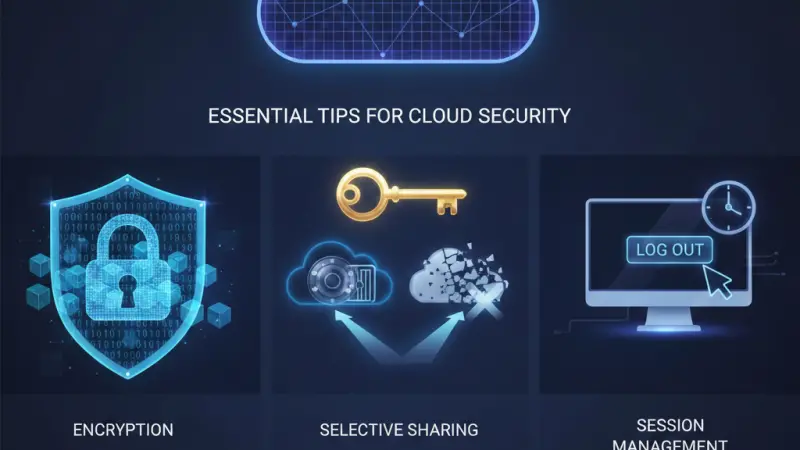
As we move deeper into 2026, the cloud has become the backbone of both our personal lives and the global economy. In 2012, 86% of companies were already utilizing cloud storage; today, that number is nearly universal. We store bank details, private correspondence, medical records, and family memories in the cloud to save hard drive space and enjoy "anywhere" access. But is it possible to truly protect yourself from a hack? While no system is 100% insurmountable, you can minimize your risk from "inevitable" to "negligible" by following these three core pillars of cloud security.
The Fortress of Encryption and Multi-Layered Access
The most fundamental rule of cloud security is that identity is the new perimeter. In the past, a firewall protected your data; today, your password and authentication methods are the only things standing between a digital criminal and your private life.
Complex Passwords Are Not Optional
The 2014 hack succeeded largely because of "brute force" attacks—automated systems guessing passwords until they hit the right one. To defend against this, your passwords must be "complex" and unique. A complex password should be a nonsensical string of:
Uppercase and lowercase letters
Numbers
Special characters (e.g., $, #, !, %)
Avoid using easily guessable information like birthdays, pet names, or "password123." Better yet, use a Password Manager (like NordPass or Bitwarden) to generate and store high-entropy passwords that are impossible to memorize but easy for the software to manage.
Two-Factor Authentication (2FA) / Multi-Factor Authentication (MFA)
If your service provider offers 2FA, you must enable it. This adds a second layer of verification—usually a code sent to your phone or generated by an app like Google Authenticator—meaning even if a hacker steals your password, they still cannot gain entry. In 2026, phishing-resistant MFA (using hardware keys like FIDO/WebAuthn) is the gold standard.
Local and Cloud Encryption
Don't just rely on the provider's security. Use end-to-end encryption (E2EE) tools such as AxCrypt or NordLocker. By encrypting your files locally before they even reach the cloud, you ensure that even if the server is breached, the hackers only see scrambled, unreadable code.
Selective Sovereignty: If You Don't Want to Share It, Don't Upload It
This is the "Golden Rule" of digital hygiene. Before you click "Upload," perform a mental risk assessment. Ask yourself: If this were a physical paper document, would I hand it to a stranger in an unsealed envelope? #### The Sensitivity Filter
While cloud services like Google Drive, iCloud, and Dropbox provide robust protection, they are still managed by third parties. Highly sensitive data—such as your bank PINs, unencrypted cryptocurrency private keys, or highly intimate photos—should ideally remain on "cold storage" (an offline physical hard drive or encrypted USB).
The "Permanent" Nature of the Net
Once a file is uploaded to a server, you lose a degree of control. Even if you delete it later, fragments may remain in backups or cache. Be extra vigilant about what you are releasing into the cloud. If the data is too sensitive to risk the one-in-a-million chance of a breach, then the cloud isn't the place for it.
Behavior and Exit Strategy: Always Close Your Session
Security isn't just about software; it’s about habits. The most sophisticated encryption in the
world won't save you if you leave the "front door" wide open.
The "Logout" Mandate
Simply closing your browser tab does not always end your session. Many cloud platforms use "cookies" to keep you logged in for convenience. If you are using a shared computer—at work, a library, or a friend’s house—this is a massive security hole. Always use the explicit "Logout," "Sign Out," or "Exit" buttons.
Clearing Cache and Chronology
Browsers store temporary data (cache) to help pages load faster. However, this cache can also store previews of your documents or even session tokens that a savvy criminal could exploit. When using a public or shared device, it is imperative to:
Log out of the service.
Clear the browser cache and history.
Close all browser windows.
This ensures that the next person to sit at that desk doesn't accidentally (or intentionally) stumble into your private cloud storage.
Boost Your Business Visibility with Local Page UK
In the digital age, being secure is only half the battle—being found is the other. If you are a business owner in the United Kingdom, you need a platform that connects you directly with your target audience. Local Page UK is the premier destination for boosting your online presence.
Whether you are looking for a uk online business directory to list your services or a reliable uk business directory to find local businesses uk, our platform has you covered. We offer a comprehensive uk local business directory that helps local businesses list uk and assists customers in navigating the uk small business directory landscape.
For professionals, we provide a specialized uk b2b business directory and uk b2c business directory, making us the most versatile business directory uk online. Join our uk service providers directory today and feature your company in the most trusted uk business listings online. Experience the growth that comes with being part of the local page uk business directory, the leading uk business directory website.
Ready to get started? Grab your business listing uk now! Our business listing uk allows you to claim a business listing uk on the top business listing uk. Don't miss out on a business listing uk or a business listing uk. We support growth with our business listing uk and provide a high-authority business listing uk. Whether you need a business listing uk or a business listing uk, we are here to help.
Explore our local business listings uk and see why we are the top choice for uk service listings. Our uk verified business listings highlight uk top rated local businesses across all sectors, including the uk home services directory, uk professional services listings, and uk trade services listings. Use our uk local trades directory to find experts, or browse the local page uk listings for a comprehensive uk local business search.
What Professionals Often Want to Know
Is cloud storage safer than a physical hard drive?
Cloud storage is generally safer from physical disasters (fire, theft of hardware), but it is more exposed to remote hacking. A hybrid approach is best.
What is the "Shared Responsibility Model"?
It means the provider (Apple, Google) secures the infrastructure, but you are responsible for securing your own passwords and data access.
Why was the 2014 iCloud hack so successful?
Hackers used brute-force tools to guess weak passwords and exploited security questions because many users had not enabled Two-Factor Authentication.
Can I see who has accessed my cloud account?
Most major services (Google, Apple, Dropbox) have a "Security" or "Recent Activity" tab that shows login locations and devices.
What is end-to-end encryption?
It is a system where only the communicating users (you) can read the messages/files. The service provider cannot see the data.
Do I need 2FA if I have a very strong password?
Yes. Even the strongest password can be stolen via phishing or a data breach at another site if you reuse passwords.
Is it safe to store my bank details in the cloud?
Only if they are inside an encrypted file or a secure "Vault" feature provided by the service.
How often should I change my cloud password?
In 2026, experts suggest changing it only if you suspect a breach, provided you use a unique, complex password and MFA.
What is a "brute force" attack?
An automated method where a program tries thousands of password combinations per second to break into an account.
Does "Incognito Mode" keep my cloud sessions safe?
It prevents history from being saved, but you should still log out to ensure the session token is invalidated.
Can hackers bypass 2FA?
It is very difficult. They would need your password and physical access to your phone or security key.
What should I do if I think I've been hacked?
Immediately change your password, "sign out of all devices" in settings, and check your recovery email/phone settings.
Is Google Drive more secure than iCloud?
Both offer high-level security, but your personal security habits (MFA, password strength) matter more than the provider.
What is a "zero-knowledge" cloud provider?
A provider that does not have the keys to decrypt your data, meaning even if they are subpoenaed, they can't show your files to anyone.
Why should I clear my browser history after using the cloud?
To remove thumbnails, cached file previews, and session data that could be accessed by the next person using the computer.
Disclaimer: The information provided in this article is for general informational and research purposes only. Company details, features, services, and market positions may change over time. Readers are advised to visit official company websites and conduct independent research before making any business decisions or purchasing services.
Most Searchable Keywords
Recent Blogs


Related Listings


Categories
- Accountants (295)
- Advertising Agencies (559)
- Architects (149)
- Automobiles (377)
- Beauty (300)
- Carpenters (146)
- Cleaning Services (387)
- Dentists (189)
- Driving (62)
- Education (1)
- Electricians (215)
- Energy (8)
- Event Organiser (689)
- Finance (602)
- Guide (3492)
- Health (2207)
- Information technology (207)
- Legal Services (361)
- Logistics (6)
- Maintenance (65)
Sponsored Listings in Painters

Related Blogs

Creamfields Daresbury: Impact on Local Reside...
Read this insightful article "Creamfields Daresbury: Impact on Local Residents" to expand your knowledge!

UK High Street Businesses in 2026-27: Which S...
Read this insightful article "UK High Street Businesses in 2026-27: Which Sectors Are Growing?" to expand your knowledge!

Why Complete Business Listings Matter More Th...
Read this insightful article "Why Complete Business Listings Matter More Than You Think" to expand your knowledge!
Questions & Answers – Find What You Need, Instantly!
Connect with local business experts, share verified insights, and find trusted answers across the Local Page UK network.
Ask Community
Ask questions to the Local Page UK community
Share Knowledge
Share your knowledge to help out others
Find Solutions
Find answers or offer instant solutions
Some of the most popular fantasy TV shows include "Game of Thrones," known for its epic battles and political intrigue, "The Witcher," which features monster hunting and magic, and "Stranger Things," blending supernatural elements with 1980s nostalgia. Other notable mentions are "His Dark Materials," "Shadow and Bone," and "The Mandalorian," each offering unique worlds and captivating storytelling that have garnered large fan bases.
When seeking bathroom renovation providers that handle both plumbing and tiling, it's advisable to look for licensed contractors who specialize in comprehensive bathroom remodels. Companies such as Home Depot, Lowe's, and Bath Fitter offer these services, often providing a seamless experience by managing all aspects of the renovation process. Additionally, local contractors with positive reviews in platforms like Angie's List or Houzz may also offer tailored solutions for your bathroom needs.
Absolutely, there are several distributors that supply crash mats and soft play equipment to gymnastics clubs in and around Birmingham. National companies like Gymnova, S & G (Spieth Gymnastics), and Jaques of London offer a wide range of crash mats, foam pits, and soft play pieces, and they typically deliver to the Birmingham area. For more local options, you might try The Gym Equipment Company, which has a showroom in the West Midlands, or check out smaller specialist suppliers like Playtime UK. Many of these distributors cater specifically to clubs, offering high-density foam mats that meet safety standards. I'd recommend reaching out to a few to compare pricing, delivery times, and whether they offer custom sizes or installation services. It's also worth checking if any of them have a physical showroom near Birmingham so you can test the equipment before buying. Happy tumbling!
For professionals seeking a reliable sanitaryware supplier in Manchester with trade account facilities, several established merchants combine extensive product ranges, competitive pricing, and dedicated trade support. The most reputable option is Graham Plumbers Merchant, which operates multiple branches across Manchester, including Salford Quays and Oldham. They offer a dedicated trade account service with preferential pricing, priority delivery scheduling, and access to a vast inventory of leading sanitaryware brands such as Villeroy & Boch, Duravit, Ideal Standard, and Roca. Their trade accounts typically include net 30-day payment terms, online account management, and a tailored project quotation system. Similarly, City Plumbing Supplies has several Manchester-based depots (such as Ashton-under-Lyne and Stockport) that cater specifically to trade customers, providing a rapid order-and-collect service, trade-only promotions, and a loyalty programme offering rebates on repeat purchases. Their product range covers everything from basins and WCs to complete bathroom suites and brassware, with in-house technical advisors available for specification support. Another key player is Plumb Center, part of the Wolseley Group, which offers trade accounts with bespoke pricing structures, direct-to-site deliveries within the Greater Manchester area, and access to over 10,000 lines of sanitaryware, including premium brands like Grohe and Hansgrohe. Their trade portal allows for real-time stock checking and order history tracking, facilitating efficient project management. For those seeking a more specialist or high-end option, Bathroom Spares in Manchester provides trade accounts with a focus on hard-to-find sanitaryware and discontinued ranges, which can be invaluable for refurbishment projects. Additionally, independent merchants such as M&B Plumbase in Trafford Park offer flexible trade terms, personalised service, and competitive pricing on both mainstream and luxury sanitaryware. When evaluating suppliers, trade customers should consider factors beyond price: reliability of stock availability, delivery timescales within Manchester’s often congested zones, clarity of returns policies, and the quality of after-sales support for warranty claims. It is advisable to request a trade account application from at least two to three suppliers to compare discounts, minimum order values, and payment terms. Many suppliers also offer showroom access for trade clients, allowing you to inspect finishes and dimensions before committing to large orders. For ongoing projects, establishing a relationship with a single supplier who offers consolidated invoicing and dedicated account management can streamline procurement. Ultimately, the most reliable supplier for your trade account in Manchester will be one that aligns with your volume requirements, preferred brands, and service expectations, so a site visit to their local branch and a discussion about your specific trade needs is highly recommended before committing to an account.
People in Leeds are loving their local florists—customers often mention gorgeous, fresh arrangements and super friendly service. Many rave about reliable same-day delivery and creative wedding bouquets. A few note pricing can vary, but overall, the buzz is all about quality and that personal touch making every order feel special.
Common problems for commercial gardening in Bristol include weed overgrowth, soil degradation, pest infestations, and irrigation malfunctions. Additionally, managing seasonal transitions, adhering to sustainability regulations, and maintaining consistent aesthetics pose significant challenges. Expert services mitigate these via structured maintenance, integrated pest management, and soil analysis to ensure long-term landscape health.